Details
Product prices and availability are accurate as of the date/time indicated and are subject to change. Any price and availability information displayed on Amazon.co.uk at the time of purchase will apply to the purchase of this product.Performance analysis
Strange Brigade: what it takes to run it
Measured on 262 gaming laptops at 1920×1080, High preset, upscaling off.

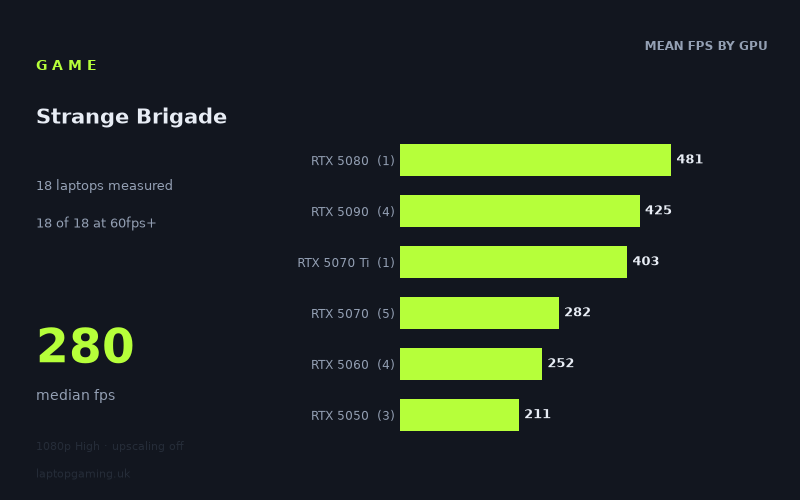
Every laptop we have figures for
Frame rates measured by Notebookcheck.
What it asks of a laptop
Almost nothing. That is the honest summary of Notebookcheck's numbers, and it is worth stating plainly before we get into tiers and prices: every one of the 14 laptops measured cleared 144fps at 1080p on the High preset with upscaling off. Not 60fps. Not 100fps. All fourteen were above 144fps, and the slowest machine in the set — an HP Victus 15 with an RTX 5050 — returned 192fps.
The spread runs from 494fps down to 192fps, with a median of 281fps. In ratio terms that is a 2.6x gap between fastest and slowest, which sounds substantial until you notice that the entire range sits above the refresh ceiling of most gaming panels. The difficulty in this title isn't about whether a GPU can keep up; it's about where the numbers stop being GPU-bound at all.
The tier averages tell that story clearly:
- RTX 5050: 211fps mean across three laptops
- RTX 5060: 252fps mean across three laptops
- RTX 5070: 282fps mean across three laptops
- RTX 5090: 425fps mean across four laptops
- RTX 5080: 481fps from a single laptop
Look at the step sizes. Going from a 5050 to a 5060 buys you roughly 19 per cent. From a 5060 to a 5070, about 12 per cent. Those are small, orderly gains — the sort of scaling you see when a game is light enough that the rest of the system is doing at least as much work as the graphics chip. Then the top two tiers jump away from the mid-range entirely, which is what happens when you throw a vastly more capable GPU at a workload it finishes early.
The most revealing detail is that the single RTX 5080 laptop, the Lenovo Legion Pro 7i 16 Gen 10 at 481fps, beat three of the four RTX 5090 machines and sits within 3 per cent of the fastest result overall. And the four RTX 5090 laptops themselves range from 353fps to 494fps — a 40 per cent gap between machines carrying nominally identical silicon. At these frame rates the GPU has stopped being the limiting factor. What separates a 353fps result from a 494fps one is CPU throughput, memory speed, sustained power delivery and thermal behaviour, not raster performance. Treat any figure above roughly 350fps here as a measurement of the whole platform rather than the graphics card.
What runs it
The tier-by-tier breakdown is unusually short, because every threshold is cleared by everything.
60fps: 14 of 14 laptops. The slowest result in the set is more than three times this target.
100fps: 14 of 14. Again, the 192fps floor is nearly double it.
144fps: 14 of 14. Even the entry-level RTX 5050 machines — the Acer Nitro V 16 AI and Medion Erazer Scout 17 E1 at 220fps each, the HP Victus 15-fa2160ng at 192fps — comfortably saturate a 144Hz panel with headroom to spare.
240Hz panels: this is where a real distinction finally appears. The three RTX 5050 laptops (192–220fps) fall short of feeding a 240Hz screen fully at these settings. Everything from the RTX 5060 upwards clears it: the Lenovo Legion 5 15AHP G10 at 269fps, the Lenovo LOQ at 248fps, the HP Omen 16-ap0091ng at 238fps sitting just under, and the 5070 machines at 260–294fps.
Above 300fps: only the RTX 5080 and RTX 5090 laptops get there. The Razer Blade 16 with a 5090 manages 353fps, the ROG Strix Scar 16 397fps, the Schenker XMG Neo 16 E25 457fps, the Legion Pro 7i 481fps and the ROG Strix Scar 18 494fps. If you own a 360Hz or faster display and genuinely want it fed to capacity in this title, that is the shortlist — and note that it is a shortlist defined by CPU and cooling as much as by GPU badge.
The cheapest laptop that handles it
Of the machines in this data set with a price attached, the ASUS TUF Gaming A18 at £1,489 is the least expensive, and it returned 260fps with an RTX 5070 at 115W. That is 240Hz-capable performance for under £1,500, and it beats two of the RTX 5060 results in the set.
But the more useful conclusion is that price is almost irrelevant here. The unpriced RTX 5050 laptops — the HP Victus 15 at 192fps, the Acer Nitro V 16 AI and Medion Erazer Scout 17 at 220fps apiece — are the cheapest class of machine represented, and they all deliver frame rates that a 144Hz panel cannot fully display. If this title is your benchmark for a purchase, the entry tier is already over-specified.
At the other end, the contrast is instructive. The Razer Blade 16 with Core Ultra 9 and RTX 5090 costs £4,979 and produced 353fps. The Legion Pro 7i 16 Gen 10 costs £3,662 and produced 481fps — 36 per cent more performance for £1,317 less. That gap is a chassis and power-delivery story, not a silicon one, and it is a useful warning about paying for thin-and-light 90-class laptops.
What this means if you're buying
Do not use this title as a purchasing criterion. There is no GPU in this data set that struggles, no tier that needs upscaling, and no meaningful benefit to spending above the mid-range. If your existing laptop has any current-generation discrete GPU, it will run this comfortably at 1080p High.
Two caveats on the data. First, everything here was measured at 1920x1080 on the High preset with upscaling disabled — there are no figures for 1440p, 1600p or higher presets, so we won't put numbers on them. Given a 192fps floor at 1080p, though, the headroom for pushing resolution or settings is obviously enormous across the board. Second, these are averages; they say nothing about frame pacing or 1 per cent lows, and a 480fps average does not guarantee perfect smoothness.
The practical advice: pick your laptop on the strength of whatever else you intend to play, and match your GPU to your panel rather than to this game. An RTX 5050 machine is enough for 144Hz. An RTX 5060 or 5070 comfortably covers 240Hz. Only a well-cooled 5080 or 5090 chassis feeds the fastest displays — and in this data the well-cooled part matters more than the number.
How these numbers were produced
Frame rates here are not measured by us, and we label how each one was arrived at. A figure marked measured comes from a published run on that exact machine. A figure marked representative is derived from the GPU and its power limit (TGP) and cross-referenced against published reviews - a sound estimate of what that configuration delivers, but not a measurement of that specific laptop. Unless stated otherwise, numbers are 1920x1080, High preset, upscaling off. Where a laptop ships in several power configurations we use the wattage of the exact SKU listed, because a 140W RTX 5070 and a 115W one are not the same product.