Review
Lenovo Legion Slim 7 review
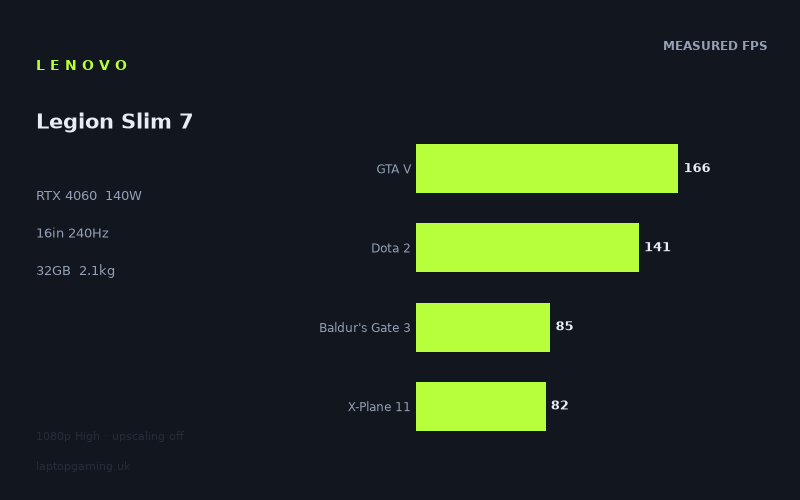
Frame rates
1920×1080, High preset, upscaling off.
Measured on this machine. Source: Notebookcheck, 2023-11-06.
Not scored: incomplete benchmark suite
Every scored laptop on this site is averaged over the same 5 games, and this one is short of Cyberpunk 2077. A mean over 4 games is not comparable to a mean over 5, so we publish the figures we have and leave the score blank rather than rank it against machines tested on a different set. The numbers below are real - the suite is just incomplete.
How these numbers were produced
Frame rates here are not measured by us, and we label how each one was arrived at. A figure marked measured comes from a published run on that exact machine. A figure marked representative is derived from the GPU and its power limit (TGP) and cross-referenced against published reviews - a sound estimate of what that configuration delivers, but not a measurement of that specific laptop. Unless stated otherwise, numbers are 1920x1080, High preset, upscaling off. Where a laptop ships in several power configurations we use the wattage of the exact SKU listed, because a 140W RTX 5070 and a 115W one are not the same product.
In use
The short version
The most important number on the Lenovo Legion Slim 7 16APH8's spec sheet is not the graphics card. It is the 140W that graphics card is allowed to draw. The GPU is an RTX 4060, which sits in the lower half of the RTX 40 mobile range, and 140W is the top of the configurable band for that chip. Manufacturers deploy the same silicon anywhere across a wide power range, and the gap between the bottom and the top of it is not a rounding error.
You do not have to take that on trust, because Lenovo itself supplies the control group. The Legion Slim 5, which appears in the comparison section below, runs the same RTX 4060 at 60W — less than half the power budget, identical three digits on the retail box. Two machines from the same manufacturer, the same product family and the same year, advertising the same graphics card, configured to draw wildly different amounts of power. That is the single most useful thing to understand about buying a gaming laptop in this class, and this review has the data to make the point concretely rather than in the abstract.
Notebookcheck benchmarked fourteen games on this machine at 1920x1080, High preset, with upscaling switched off. The fastest result is 208fps. The slowest is 48fps. That is a spread of more than four to one across a single resolution and a single preset, and the shape of the data tells you more about this laptop than any individual figure in it.
One finding stands out immediately and it is not flattering to the specification as a whole. Not one of the fourteen measured titles reaches the panel's 240Hz refresh rate. The closest is Strange Brigade at 208fps, and Strange Brigade exists in benchmark suites precisely because almost nothing stands in its way. The display is specified beyond what this hardware delivers in any game in the measured set, at a resolution lower than the panel's own. That is a real mismatch and it gets a full section below.
Two caveats belong at the front, because both change how everything else should be read.
The first is price. We have no confirmed UK price for this configuration. A gaming laptop is a price-performance product before it is anything else, and without the price, half the argument is missing. There is no value verdict in this review — not a positive one, not a negative one. Everything below is about what the hardware does, not what it is worth paying.
The second is ranking. Our ranked laptops are averaged across the same five-game scoring suite so that the ordering means something. This machine has four of those five — GTA V at 166fps, Dota 2 at 141fps, Baldur's Gate 3 at 85fps and X-Plane 11 at 82fps, a mean of 118fps across the four — but no figures for Cyberpunk 2077. Averaging a four-game set against a table built on five would quietly flatter or punish the machine depending on which game is missing, so the Legion Slim 7 sits outside the ranked field. That is a gap in the data, stated plainly, not a judgement on the laptop.
The era matters too. The benchmark data is dated 6 November 2023, and this is a 2023 machine judged against 2023 hardware. The generation has moved on since. That does not make a full-power RTX 4060 paired with a Zen 4 eight-core processor, 32GB of memory and a 1TB SSD a bad configuration; it makes it a mature one, whose behaviour is now understood rather than speculative.
Who it suits, in one line: someone who plays at 1080p or intends to run the native panel with upscaling enabled, who wants the fastest implementation of this GPU rather than the cheapest, and who values 2.13kg and 32GB in a 16in machine more than the last few frames per second.
Performance
What 140W actually buys on an RTX 4060
The RTX 4060 laptop GPU is not a single product with a single performance level. It is a chip vendors configure across a power band, and where a given laptop sits in that band matters more to the frame rate than most of the other specifications combined. This machine sits at the ceiling. Nothing about the GPU configuration is being held back to protect a slim profile, a quiet fan curve or a smaller power adapter.
The evidence for that is not in any one measurement but in the shape of the whole set. A power-starved implementation tends to produce compressed results: the card hits its limit early and stays pinned there, so the light games come in slower than they ought to and the heavy games are slower still, and the whole table bunches up. The measured figures here show the opposite. From 208fps at the top to 48fps at the bottom, the results fan out enormously. That fan is the signature of a graphics card being allowed to run as fast as the game in front of it permits, so the differences between titles express the games rather than the cooling system.
Where the 140W figure is genuinely striking is in the context of the chassis. This is a 2.13kg machine. Pushing that much power through a graphics card, alongside an eight-core mobile processor, in a chassis of that weight is an aggressive engineering choice rather than a conservative one. Lenovo's Slim line is not, on this evidence, a euphemism for a throttled line.
What the power limit does not tell you is what it costs elsewhere. We have no measured temperature figures, no fan-noise figures and no measured battery runtime for this machine. A 140W GPU in a 2.13kg chassis has to move a substantial amount of heat through a small volume, and how gracefully any individual design does that varies enormously between machines that look similar on paper. This review will not guess at it. If acoustics under load or keyboard-deck temperature matter to you — and in a thin, high-power design they reasonably should — those are questions to resolve elsewhere before buying, and they are fair questions to insist on.
The Ryzen 7 7840HS, and where it shows up in the results
The processor is a Ryzen 7 7840HS: a Zen 4 part with eight cores, the current architecture at the time this machine was measured rather than a rebadged older one. That distinction matters, because AMD's mobile naming in this era mixed generations under similar numbers, and plenty of laptops sold in 2023 with 7000-series badges carried the previous architecture. This one does not.
In genuinely GPU-bound games the processor is close to invisible, because it is not setting the pace. In CPU-bound games it is exactly what sets the pace, and the measured set contains several of those.
- GTA V — 166fps. An old engine with well-documented CPU sensitivity. A result like this says more about single-thread throughput and how the engine threads its work than about the graphics card, which is nowhere near troubled by a decade-old renderer at 1080p.
- Dota 2 — 141fps. Not a graphically demanding game in any sense that matters to an RTX 4060. The frame time is being set by the game's own simulation and draw-call pattern and by the processor servicing it. This is the clearest CPU-limit signal in the set.
- X-Plane 11 — 82fps. A flight simulator with an older-generation renderer that issues an enormous number of individual draw calls per frame, every one of which the CPU must prepare before the GPU sees anything. Classic draw-call-bound behaviour: a faster graphics card buys very little here, faster single-thread performance buys a great deal.
- Total War Pharaoh — 128fps and Company of Heroes 3 — 122fps. Strategy engines with large unit counts and heavy simulation work. Both comfortably fast, both in the band where the processor is doing meaningful work rather than idling.
These are strong CPU-side numbers for the generation, and they matter to the argument later on. When a machine's comparisons come out flat against rivals with more graphics card, the obvious question is whether the processor is holding it back. Here the evidence points the other way: the CPU-leaning titles are among the healthier results in the table.
Nothing clears the panel: the top of the table
Three titles sit clearly above the rest, and none of them reaches the display's refresh ceiling.
- Strange Brigade — 208fps. The fastest game in almost every laptop benchmark set, included for that reason: a low-overhead, well-behaved renderer that functions as a ceiling test rather than a difficulty test. 208fps tells you what this hardware does when very little is in its way. It is a good result. It is still short of 240Hz.
- GTA V — 166fps. Fast, and limited more by the engine and the processor than by the RTX 4060.
- EA Sports FC 24 — 155fps. Sports engines are typically well behaved: constrained scenes, tight frame budgets, and a genre where frame consistency is a selling point. This is a title people genuinely want high refresh rates in, and 155fps is strong in absolute terms while still leaving the panel's headroom unused.
The honest conclusion from the top of the table is that this is a display the GPU cannot fill at High settings, in any measured game, at a resolution below the panel's own. That is not the same as saying the frame rates are poor — 208, 166 and 155 are all fast. It is saying that the relationship between this GPU and this panel is not the one the specification sheet implies.
The middle band, where most of the library lives
The bulk of the measured set falls between roughly the high seventies and the low one-forties, and this is where the laptop's everyday character sits.
- Dota 2 — 141fps. A CPU-limited result, not a GPU-limited one.
- Total War Pharaoh — 128fps. A 2023 strategy release running comfortably fast at High. Total War benchmarks are typically battle scenes with large unit counts, the most demanding thing those engines do.
- Company of Heroes 3 — 122fps. Same story, same comfort.
- Armored Core 6 — 103fps. FromSoftware's renderer is not especially expensive by 2023 standards, and this lands where a mid-weight modern action title should on this hardware.
- Baldur's Gate 3 — 85fps. One of the four scoring-suite games available here, and more interesting than it first appears. Baldur's Gate 3 is known for becoming CPU-heavy in dense scenes with many active entities, and a benchmark run captures a specific slice of that. 85fps at High is a good result for a game that punishes hardware in a way that has little to do with pixel count.
- Atomic Heart — 83fps. A visually elaborate Unreal title with expensive post-processing. Firmly in the GPU-limited group.
- X-Plane 11 — 82fps. Draw-call bound, as above.
- Sons of the Forest — 80fps. Dense foliage, volumetric lighting and a lot of overdraw. Another genuinely GPU-limited result.
- Assassin's Creed Mirage — 76fps. Ubisoft's Anvil engine in a dense, heavily populated city — a workload that leans on the processor and the graphics card at once, which is why open-world Ubisoft titles are consistently useful benchmarks.
Read this band by cause rather than by position in the list. Dota 2 at 141fps and Sons of the Forest at 80fps are separated by a large margin, but they are constrained by entirely different things and respond to entirely different remedies. Turning down settings in Sons of the Forest will buy frames, because the graphics card is the bottleneck. Turning down settings in Dota 2 will buy comparatively little, because it never was. That distinction is the difference between buying the right laptop and buying an expensive graphics card your library cannot use.
The bottom of the set: Alan Wake 2 and Lords of the Fallen
Two results sit well below everything else, and they are the two most instructive numbers in the table.
Alan Wake 2 — 54fps. Remedy's Northlight engine is one of the most expensive renderers of its generation even with ray tracing left alone. It leans on modern GPU features aggressively and it was widely understood at launch to be a title designed around upscaling rather than one treating upscaling as a bonus. 54fps at 1920x1080 on High with upscaling switched off is, in that context, a reasonable showing rather than a failure — but it is roughly a quarter of what Strange Brigade manages on the same machine, and it is the point at which a 140W RTX 4060 is genuinely working.
Lords of the Fallen — 48fps. The slowest result in the set. An Unreal Engine 5 title using the engine's software lighting and reflection systems, which are expensive by design and which were, at release, comfortably ahead of what mid-range hardware could deliver at native resolution. 48fps at 1080p High with no upscaling is the honest floor of what this machine does when a game asks it for everything the era had to offer.
These two matter more than the rest for three reasons.
First, they establish the worst case at a resolution well below the panel's own. Every other frame rate in the table has room to give away. These do not.
Second, they are the games where the 140W power limit earns its keep. In Strange Brigade at 208fps, the difference between a full-power RTX 4060 and a starved one is largely academic, because neither is the constraint. In Lords of the Fallen at 48fps the graphics card is saturated, and a lower-power implementation of the same chip would show a real deficit. If you want a single-sentence justification for choosing the 140W configuration over a cheaper one, it lives at the bottom of this table, not the top.
Third, they are the shape of things to come. Both are 2023 releases, and both were early examples of the direction the industry took: renderers that assume upscaling is on, and lighting systems whose cost does not fall gracefully when you reduce the preset. A machine producing 48fps and 54fps in the two most forward-looking titles it was measured in is saying something about its useful life in that category of game, and it is not a comfortable message. It is also not a criticism of this specific configuration — nothing at this GPU tier in 2023 was going to sail through those two at native resolution.
Where the spread actually comes from
208fps at the top, 48fps at the bottom, across fourteen games at an identical resolution and preset. More than four to one. The causes are not the same at both ends, and they are worth separating.
Engine cost. The single biggest factor. Strange Brigade's renderer and Lords of the Fallen's renderer are not asking for comparable work per frame; they are barely in the same discipline. A decade of graphics development separates the approaches, and the frame rates reflect that far more than they reflect anything about the laptop.
Modern lighting techniques. Even where full ray tracing is not switched on, the newest titles here use software-traced lighting and reflection systems whose cost is structural rather than optional. That is why the two 2023 releases at the bottom sit so far below two 2023 releases in the middle — Total War Pharaoh and Company of Heroes 3 are the same vintage and run at more than twice the rate.
CPU-bound versus GPU-bound. A substantial slice of this list is not limited by the graphics card at all. X-Plane 11, Dota 2 and GTA V are limited by draw-call preparation and single-thread throughput. This matters enormously for the rival comparisons below, because a benchmark set full of CPU-bound titles cannot say much about differences in graphics cards.
Memory pressure. The RTX 4060 carries the smallest frame buffer of any GPU in this review's comparison set, on a narrower memory bus than the tiers above it. At 1920x1080 that is rarely a problem, which is one reason the results here look healthy. At the panel's native resolution, with high-resolution texture settings and the modern lighting systems the bottom titles bring with them, memory capacity and bandwidth become part of the constraint rather than a footnote. That is a property of the chip rather than a measurement of this laptop, and it is stated as such.
Upscaling switched off. Every figure quoted here is native rendering with no assistance. That is the correct way to benchmark, because it isolates the hardware and makes cross-machine comparison valid. It also means these figures are a floor rather than a ceiling for real-world use in supported titles, and the gap between floor and ceiling is widest in precisely the games at the bottom.
What the spread does not mean is that the machine is inconsistent. All fourteen results were produced under the same conditions. The variation is a property of the games. Two further conditions are worth stating: the preset is High rather than the maximum in most of these titles, so anyone who habitually runs everything maxed should subtract — by how much is not something the data supports quantifying — and these are averages, with no 1% low or frame-time consistency data anywhere in the set. That last point matters most for Alan Wake 2 and Lords of the Fallen, where an average in the fifties can conceal a rough experience or a perfectly smooth one, and the average alone will not tell you which.
It also means a single headline frame rate for this machine would be close to useless. The four-game scoring-suite mean of 118fps sits tidily in the middle of the range and describes no game in the list. There is a further wrinkle worth noting: all four scoring-suite games available for this laptop are comparatively CPU-leaning — an old open-world title, a MOBA, a simulator with an ageing renderer, and an isometric RPG that becomes processor-heavy in busy scenes. That mean is therefore a fair number for comparing like with like, but a poor summary of what a 140W graphics card contributes. The games where this GPU configuration earns its money sit outside the suite.
A note on the source. These figures were measured by Notebookcheck on 6 November 2023. Games get patched, drivers mature, and a result from a specific date is a snapshot rather than a permanent property of the hardware. The relative picture — which titles are fast, which are slow, where the constraints sit — is durable. The precise digits are less so, and by 2026 several of these games have been through substantial updates.
The screen
240Hz, and what actually reaches it
The panel is a 16in IPS display at 2560x1600 and 240Hz. On paper that is a genuinely high-end specification for a 2023 machine — a high-resolution 16:10 panel with an esports-class refresh rate, which was not a common combination at the time and is still not a cheap one.
Relative to the graphics card behind it, it is also the least well-matched thing about this laptop. Of the fourteen games measured, at a resolution with roughly half the pixels of the panel's native mode, at a preset below maximum, with upscaling switched off, none reaches the refresh ceiling. The fastest, Strange Brigade at 208fps, is a benchmark chosen for being fast, and it falls short. The title people most plausibly buy a high-refresh panel to play competitively — Dota 2 at 141fps — falls a long way short.
Two things follow, and they pull in opposite directions.
The unflattering reading is that the refresh rate is largely aspirational at High settings. If your mental model of a 240Hz laptop is one that delivers 240 frames every second, nothing in the measured data supports that model for this machine, and at the panel's own resolution the shortfall would only grow. Buying this laptop specifically to fill a 240Hz panel would be buying a specification you cannot use in any of the fourteen games there is data for.
The more generous — and more accurate — reading is that a high-refresh panel is not an on/off proposition. A display capable of 240Hz is not wasted at 141fps or 103fps; it runs at whatever the graphics card delivers, without the fixed-cadence penalty a low-refresh display imposes. Every one of the fourteen results is above the point at which a conventional low-refresh panel would start discarding frames, so the display never becomes the bottleneck and never throws away work the GPU has already done. High refresh also reduces the time each frame waits to be shown, and that latency benefit accrues at any frame rate, not only at the ceiling. One caveat on that argument: whether this panel supports variable refresh is not confirmed in our data, and the smoothness case depends substantially on it being present.
The one genuine route to the refresh ceiling is the one the benchmark set does not cover: competitive titles at low presets. Dota 2 at 141fps was measured at High, and turning settings down in a MOBA is cheap in visual terms and can be expensive in frame-rate terms — so there is real headroom there these figures do not capture. If your play is dominated by esports titles at low settings, the 240Hz panel may well earn itself. What this data set can say is that at High settings, across a broad fourteen-game library, it does not.
2560x1600 is the panel; 1920x1080 is the data
Every frame rate in this review was measured at 1920x1080. The display runs at 2560x1600. That gap needs stating without hedging: we have no measured performance data for this laptop at its own native resolution.
The pixel arithmetic is not in dispute. 2560x1600 is 4,096,000 pixels against 1920x1080's 2,073,600 — just under twice as many. What that doubling does to a frame rate is emphatically not a simple division, and anyone presenting it as one is guessing. Scaling with resolution depends on how much of a game's frame time goes on pixel work as opposed to geometry, simulation, draw-call preparation and everything else that does not care how many pixels there are.
That produces a clear, if unquantified, shape. The CPU-bound titles — X-Plane 11, Dota 2, GTA V — will lose relatively little at the higher resolution, because the bottleneck is not in the pixel pipeline. The GPU-bound titles at the bottom will lose a great deal, because that is precisely where their time is going. Alan Wake 2 at 54fps and Lords of the Fallen at 48fps have the least to give and will feel the change most severely, and they are also where the frame buffer and bandwidth constraints of this GPU tier are most likely to compound the pixel cost.
That is a shape, not a set of numbers, and it should not be converted into one. What can be said is a practical consequence rather than a measurement: at 2560x1600 in the heaviest titles here, upscaling stops being an optional quality setting and becomes the mechanism by which the game runs at all. That is not unusual for this GPU tier in 2023, and both of those games shipped expecting it. But it means the honest description of this machine is a 1080p-native laptop with a 1600p panel it drives through upscaling in demanding titles — not a native 1600p gaming machine.
None of which makes the panel a bad choice. High resolution is worth having outside games, on a display that will be looked at for thousands of hours, and 16:10 at this pixel count is a good desktop. It simply is not a resolution the graphics card can serve natively across the board, and the specification implies otherwise.
IPS, and the panel figures we do not have
The panel type is IPS: wide, stable viewing angles and generally sensible colour behaviour compared with the TN panels that used to dominate high-refresh gaming laptops, at the cost of the contrast an OLED delivers. For a machine that will be used for work as well as games, which the 32GB memory configuration rather suggests, IPS is the sensible default.
Beyond panel type, resolution and refresh rate, we have no measured figures for this display. No brightness, no colour-gamut coverage, no contrast ratio, no response-time measurement and no confirmation of variable refresh support. Panel quality varies substantially between configurations of the same model, and the display is one of the components most easily and least visibly compromised. Response time deserves a specific flag: a high-refresh display whose pixels cannot keep up delivers the latency benefit but not the clarity benefit, and on an IPS panel at this refresh rate that is a more consequential unknown than it would be at a lower one. If colour work matters to you, or you need a screen that holds up in a bright room, treat these as open questions rather than assumptions.
Build, size and portability
2.13kg for a 16in laptop with a 140W graphics card is the specification that most clearly separates this machine from its obvious rivals, and it deserves more attention than the frame rates get in most buying decisions.
Gaming laptops in this class routinely sit well above that weight, and the ones pushing a graphics card to the top of its power band are usually the heaviest of all, because sustained power draw demands cooling volume and cooling volume demands mass. This machine is doing the high-power thing in a chassis substantially lighter than the norm for it. That is the entire proposition of the Slim line, and on the evidence of the measured frame rates it has been achieved without the usual compromise of quietly turning the GPU down.
What 2.13kg means in practice is a machine you can genuinely take with you. Not an ultraportable — nothing at 16in with this hardware is — but a laptop that goes in a bag for a commute or a term without the weight dominating the decision every time you pick it up. Combined with a 16in 16:10 display, 32GB of memory and a 1TB SSD, this reads as a machine intended to be someone's only computer rather than a games console that happens to fold.
The 32GB memory configuration is worth dwelling on, because it is unusual at this GPU tier. 16GB has been the mainstream figure for years and remains adequate for games specifically. 32GB is a productivity and longevity specification: the difference between a machine comfortable running development tools, virtual machines, large project files or an overgrown browser session alongside a game, and one that is not. It is also the specification most likely to determine how long the laptop stays useful. Whether the memory is socketed or soldered is not something we have confirmed, and on thin designs it frequently is not — worth checking if future upgrades matter, though at 32GB the question is less pressing than it would be at half that. 1TB of storage is the sensible modern minimum given current install sizes, and good to see as standard rather than a paid extra.
Two portability caveats the specification does not cover. We have no battery capacity figure and no measured battery runtime for this machine, in gaming or in light use, so how long it lasts away from a socket is not something this review can tell you. And the travelling weight is higher than 2.13kg, because a machine configured to draw 140W through its graphics card alongside an eight-core processor needs an adapter sized to match, and that adapter is not small. The figure for it is not in our data either.
What can be stated as a general truth about the hardware class rather than a measurement of this machine: a 140W GPU cannot be fed from a laptop battery. No gaming laptop of this power class runs at full performance unplugged, because the battery cannot supply the current and the firmware will not attempt it. Gaming away from mains power means a reduced power budget and correspondingly reduced frame rates. The portability here is real, but it is portability for work, study and travel rather than portability for gaming on a train.
The 16:10 aspect ratio deserves a line. The extra vertical space over a 16:9 display of similar width is genuinely useful in anything with a user interface — strategy games, simulators, spreadsheets, code — and costs essentially nothing in games that do not care about aspect ratio.
How it compares
Four machines from the same GPU generation share enough measured games with the Legion Slim 7 for a like-for-like comparison: the two nearest results, the machine this one beats by the widest margin, and the machine that beats it by the widest margin. All four comparisons are drawn only from games both machines hold, with the scoring suite preferred — which, as established above, means the shared sets are weighted towards CPU-leaning titles. That weighting explains a great deal of what follows.
None of the four has a confirmed UK price in our data either, so every comparison below is about capability, not value. The value question cannot be answered here for any of these machines.
MSI Thin GF63 — RTX 4050, and a gap that means something
Across four shared games the Legion Slim 7 averages 37fps ahead of the MSI Thin GF63, which runs an RTX 4050. This is the widest margin in the comparison set and the only one where the result maps cleanly onto what the spec sheets imply.
It is more interesting than a simple tier gap, though, because of which games are involved. The comparison method prefers the scoring suite, and the scoring-suite games available for this machine are the CPU-leaning ones. A 37fps advantage that survives a shared set weighted towards titles where the graphics card is often not the constraint is not purely a GPU-tier story. If it were only about the graphics card, the CPU-bound games would have compressed it towards nothing — which is exactly what happens in the next two comparisons.
The likelier explanation is that the difference is platform-wide rather than GPU-specific. The GF63 is a budget-oriented thin machine, and machines built to that brief tend to economise on the processor, the memory configuration and the cooling as well as on the graphics card. A gap that persists through CPU-bound titles points at the whole platform being slower, not just the card in it.
The practical reading: this is the one comparison in this review where the more expensive machine is doing demonstrably more work in the games both were measured in. Without prices, whether it does enough more to justify a price difference is not a question this review can settle — but unlike the comparisons below, the performance difference is real, substantial and does not evaporate under examination.
Asus ROG Zephyrus G16 2024 — an RTX 4070 that does not pull ahead
Across three shared games, the Legion Slim 7 and the Asus ROG Zephyrus G16 2024 average within a frame per second of each other. The Zephyrus has the higher-tier graphics card — an RTX 4070 against this machine's RTX 4060 — and does not convert that into an advantage on the games they share.
This is not a fluke and not a data error. Two mechanisms are at work and they compound.
The first is power. The Zephyrus G16 in its 2024 form is a thin premium machine built around portability, and thin premium machines do not run their graphics cards at the top of the configurable band. We do not have a recorded power limit for the G16's GPU, so this is reasoning from the chassis class rather than from a measurement, and it is labelled as such — but a starved RTX 4070 against a maximum-power RTX 4060 is precisely the pairing that produces this result. The tier on the box is not the performance. The power the chassis permits is a substantial part of the performance, and this machine's 140W is why a nominally lesser GPU keeps up.
The second is the shared games themselves. Three shared titles is a small sample, and a small sample of CPU-leaning titles is smaller still in any meaningful sense. When a game's frame rate is set by draw-call preparation or single-thread throughput, swapping in a faster graphics card changes very little, and the average across such a set shows it. A three-game average is also fragile: one unusual result moves it noticeably, in a way a fourteen-game average would not.
Both mechanisms point the same way, so the honest conclusion is not "these machines are equal". It is that on three titles which mostly do not stress a graphics card, two very different implementations of graphics cards produced the same answer. Where the Zephyrus should pull ahead is in the heavy, GPU-bound titles — the Alan Wake 2 and Lords of the Fallen end of the table — and at higher resolutions. Whether it actually does is not something the shared data reaches, and this review will not assert it.
Lenovo Legion Slim 5 — the same GPU at 60W, and the most useful comparison here
Across three shared games, the Legion Slim 7 averages fractionally behind the Lenovo Legion Slim 5. The Slim 5 runs the same RTX 4060 at 60W — less than half this machine's power budget — and on the games the two share, the difference is smaller than a frame per second.
That result deserves to be sat with rather than explained away, because it appears to contradict everything the performance section argued about the value of a high power limit. It does not, but understanding why requires being precise about what the comparison measures.
Three shared games, drawn preferentially from a scoring suite whose available members are an old open-world title, a MOBA, a simulator with an ageing renderer and an isometric RPG. In those games this laptop's frame rate is set largely by the processor and the engine. The Legion Slim 5 comes from the same manufacturer, the same product family and the same generation, so its processor and platform are broadly comparable. Two machines with comparable processors, running games limited by the processor, produce comparable frame rates. The difference in graphics-card power is invisible because nothing in those three games is asking for it.
The correct conclusion is not that the 140W configuration is pointless. It is that the 140W configuration is pointless in these three games, and by extension across the substantial portion of any real library that behaves like them. That is genuinely useful buying information and it cuts directly against how gaming laptops are marketed. If your play is competitive titles, strategy, simulators and older engines, a cheaper machine with the same graphics card at a fraction of the power will very likely serve you identically, and the money saved is real.
Where the two should separate is exactly where the shared data does not reach: the GPU-bound titles at the bottom of this laptop's fourteen-game table, and the panel's native resolution. Lords of the Fallen at 48fps and Alan Wake 2 at 54fps are the games where a card running at 140W has something a card running at 60W does not, because there the card is genuinely saturated rather than idling between CPU-imposed limits. The shared-game method cannot show that, because those titles are not in the overlap. So it remains a well-founded expectation rather than a finding, and it is presented that way.
There is a second dimension with nothing to do with frame rates. The 60W configuration exists because it allows a cheaper cooling system, a smaller adapter and often a lower price. Whether you want to pay for the 140W version depends entirely on whether your library contains the games that can use it. This review can tell you which games those are. It cannot tell you what either machine costs.
Asus ROG Strix Scar 17 — the machine that pulls away
Across three shared games, the Legion Slim 7 averages 69fps behind the Asus ROG Strix Scar 17. This is the widest deficit in the comparison set and by some distance the most interesting result in it.
The Strix Scar 17 carries an RTX 4090 — the top of the mobile range, two full tiers above this machine — so a significant deficit is unsurprising in itself. What is surprising is the size of it given the composition of the shared set.
Recall the pattern the previous two comparisons established: on CPU-leaning shared games, GPU differences compress towards nothing. A higher-tier RTX 4070 could not separate itself. The same RTX 4060 at less than half the power could not be separated either. Yet the Strix Scar averages 69fps clear across a shared set drawn from the same pool. If graphics-card capability were being suppressed by CPU limits in those titles, that gap should have compressed too.
The most plausible explanation is that a large part of the 69fps is not a graphics-card story at all. The Strix Scar 17 is a flagship desktop-replacement design, and machines in that category are built around the fastest mobile processors of their generation, with cooling and power delivery to match. In a shared set weighted towards CPU-leaning titles, a much faster processor produces exactly this: a large, consistent lead a faster graphics card alone would not have generated.
One detail in the data reinforces the point rather than undermining it. The power limit recorded against the Strix Scar's graphics card is 25W, which cannot be a correct description of an RTX 4090 producing results of this order in a flagship chassis, and should be treated as an artefact of the record rather than a specification. But taken at face value it would only strengthen the argument: a graphics card supposedly running at a fraction of this machine's power budget, opening a 69fps lead on games that mostly do not stress graphics cards, is not a result attributable to the GPU.
The buying implication is not "buy a Strix Scar". Flagship machines of that type carry weight, heat, noise and price penalties this laptop does not, and none of the four is priced in our data. The implication is narrower and more useful: if your library is dominated by the CPU-leaning titles that make up the shared set — simulators, strategy, MOBAs, older open-world engines — the processor is where your money makes a difference, and this comparison demonstrates that more clearly than any amount of GPU tier-chasing.
What the four comparisons say taken together
Four rivals from the same GPU generation. One a tier below and comprehensively beaten. Two — one a tier above, one identical but at less than half the power — that cannot be separated from this machine at all. One two tiers above that pulls away decisively.
Line those up and a single coherent finding emerges, and it is not about the Legion Slim 7 specifically. At 1920x1080 on a High preset, across the kind of library that populates a standard benchmark suite, the graphics card frequently stops being what sets the frame rate. Once a GPU is fast enough to render 1080p High comfortably — and a 140W RTX 4060 comfortably is — the pace is set by how quickly the processor can prepare frames and by the engine's own limits. Adding graphics card produces very little, which is what the Zephyrus and Slim 5 comparisons show. Adding processor produces a lot, which is what the Strix Scar comparison shows. Removing platform capability across the board produces a large deficit, which is what the GF63 comparison shows.
Two practical conclusions follow. First, 1080p is not the resolution at which this machine's specification makes sense. The measurements are at 1080p because that is what makes cross-machine comparison possible, and it is the right methodological choice — but a 140W RTX 4060 attached to a 2560x1600 240Hz panel is not a 1080p product, and the flat comparisons are the evidence. Its advantage over lower-power implementations of the same chip lives at higher resolutions and in heavier titles, which is exactly the territory the shared data does not cover.
Second, buying on GPU tier alone is a mistake at this end of the market. A tier-above RTX 4070 in a thin chassis matched this machine. The same RTX 4060 at 60W matched it. Those are two independent demonstrations that the number on the box is a poor predictor of the number on the screen — and equally, that the power limit only pays when a game asks for it. In Strange Brigade at 208fps it does not. In Lords of the Fallen at 48fps it emphatically does, and that title appears in none of the shared sets.
What we cannot tell you
An honest review is partly a list of the questions it cannot answer, and there are several here.
No price, so no value verdict — favourable or otherwise. That is not a hedge; it is the absence of the single most important input to a buying decision, and it applies to all four rivals above, so none of those comparisons can be resolved on cost either.
No ranked position, because the scoring suite is one game short. Averaging four games against a table built on five would produce a figure that looks comparable and is not.
No native-resolution data. Every figure here is 1920x1080; the panel is 2560x1600. No frame rate at the native resolution appears anywhere in this review because none exists in the data, and none will be estimated.
No thermals, acoustics, battery capacity or runtime. For a 140W graphics card in a 2.13kg chassis, thermals and noise are not trivia — they are among the most likely determinants of whether you enjoy owning the machine, and the specific areas where a thin, high-power design is most exposed.
No panel measurements and no frame-time data. Brightness, colour coverage, contrast, response time and variable refresh support are unconfirmed; the frame rates are averages only, with nothing about 1% lows or stutter.
Who it's for
The 1080p player who wants the full-power version of this GPU. Across fourteen measured games at High with upscaling off, twelve produce results at 76fps or above and the slowest is 48fps. At this resolution the machine is comfortable across a broad mainstream library, and the 140W configuration means it is the fastest version of this graphics card available rather than a compromised one.
The player who intends to use upscaling at the native panel resolution. This is the realistic use pattern for the machine and a perfectly good one. Run 2560x1600 with upscaling in the demanding titles and native in the lighter ones, and a 140W RTX 4060 is appropriate hardware for that plan. The measured figures with upscaling off establish a floor that makes it a reasonable expectation — though the native-resolution numbers themselves are not in the data and this review will not manufacture them.
Anyone who needs one machine for both work and games. This is where the configuration is genuinely distinctive. 32GB of memory is well above the norm at this GPU tier, 1TB is ample, the 16in 16:10 2560x1600 IPS panel is a good desktop, and 2.13kg is light enough to actually carry. Most laptops with this graphics card are built purely as games machines. This one reads as a computer that also plays games well, and that is a meaningfully different product.
The buyer who understands the difference between a GPU model and a GPU implementation. The Legion Slim 5 comparison is the clearest possible illustration of why 140W is worth caring about — and equally, of when it is not. If you have been comparing RTX 4060 laptops and wondering why prices vary so widely, the power limit is a substantial part of the answer, and this machine is at the top of that range.
The player of mid-weight modern titles. Armored Core 6 at 103fps, Baldur's Gate 3 at 85fps, Atomic Heart at 83fps, Sons of the Forest at 80fps and Assassin's Creed Mirage at 76fps describe the mainstream 2023 library, and every one is a comfortable result at High with no assistance.
Who should buy something else
Anyone who needs a value judgement today. With no confirmed UK price, there is no way to say whether this represents sensible spending, and no way to compare it on cost against any of the four rivals above.
Anyone buying primarily for the 240Hz panel. Not one of the fourteen measured games reaches the refresh ceiling at 1080p High — not the fastest benchmark in the set, not the MOBA, not the sports title. At the panel's own resolution the shortfall would be larger. If filling a 240Hz display is the point of the purchase, the data does not support this machine as the way to do it at High settings.
Anyone whose library is CPU-bound. Look hard at the Legion Slim 5 comparison: the same graphics card at 60W could not be separated from this one across three shared games. If you mostly play competitive titles, MOBAs, simulators, strategy games or older open-world engines, the 140W configuration is spending money on capability those games will not use. The Strix Scar comparison points at where the money should go instead — the processor.
Anyone who insists on native 2560x1600 at maximum settings with no upscaling in the heaviest games. The data does not exist to say what this machine delivers there, and it will not be invented. What can be said is that the two most demanding titles measured produced 54fps and 48fps at roughly half the pixel count and a preset below maximum, with no assistance. If native-maximum-no-upscaling is a hard requirement rather than a preference, this is not the GPU tier for it.
Anyone for whom noise and heat are deciding factors. 140W through a graphics card in a 2.13kg chassis is an aggressive combination and there are no acoustic or thermal measurements in our data for it. Thin high-power designs are exactly the category where this goes wrong most often, and the physics are less forgiving than in a heavier chassis with more cooling volume.
Anyone who needs a ranked position against our measured field. The incomplete scoring suite means this machine cannot be placed against the fully measured laptops.
Anyone buying in 2026 who expects current-generation behaviour. This is a 2023 machine measured in 2023. Judged against its own generation it is a strong configuration of a mid-range GPU. Judged against what has arrived since, the graphics card generation has moved on, and the two most forward-looking titles in its own benchmark set — the ones built around modern lighting and designed around upscaling — are already the ones it handles least comfortably. That is not a reason to dismiss it. It is a reason to be clear-eyed about which end of the game library it will age into rather than out of.
The bottom line
Stripped to what the data supports: the Lenovo Legion Slim 7 16APH8 pairs an RTX 4060 running at 140W — the top of the configurable band for that chip — with a Zen 4 Ryzen 7 7840HS, 32GB of memory, a 1TB SSD and a 16in 2560x1600 IPS panel at 240Hz, in a 2.13kg chassis.
Across fourteen games measured by Notebookcheck at 1920x1080 and High with upscaling off, the results run from 208fps in Strange Brigade down to 48fps in Lords of the Fallen, with a four-game scoring-suite mean of 118fps. Nothing in that list reaches the panel's refresh rate. Twelve of the fourteen sit at 76fps or above, and the two that do not are the newest and most technically ambitious titles in the set.
Against four rivals from its own generation the picture is instructive rather than tidy. It averages 37fps clear of an RTX 4050 machine, cannot be separated from a thin-chassis RTX 4070, cannot be separated from the same GPU at 60W in Lenovo's own cheaper model, and trails an RTX 4090 flagship by 69fps. Those four results together say less about this laptop than about the benchmark conditions: at 1080p High, on the games these suites have in common, the graphics card frequently is not what sets the frame rate.
The strongest case for this machine lives in the two places the shared data does not reach — the heavy modern titles where 140W pulls away from 60W, and the 2560x1600 resolution its own panel runs at. Those are reasonable expectations given the hardware. They are not measurements, and they are not presented as such.
What is measured, and what is unusual, is the surrounding package: full GPU power, a Zen 4 processor that holds up in the CPU-bound titles, 32GB of memory, and 2.13kg. That is a coherent single-machine specification rather than a games-only one, and it is the most persuasive argument in its favour.
Whether any of it is worth paying for stays an open question, because there is no confirmed UK price to answer it with.