Performance analysis
The Witcher 3 (2015): what it takes to run it
Measured on 199 gaming laptops at 1920×1080, High preset, upscaling off.

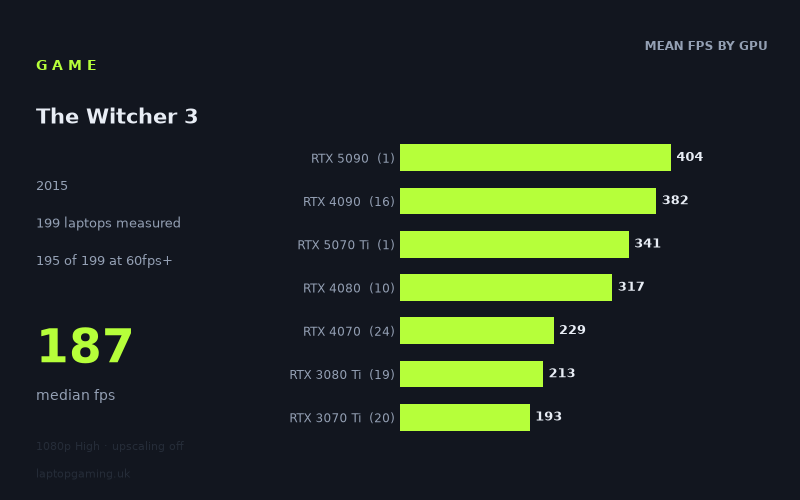
Every laptop we have figures for
Frame rates measured by Notebookcheck.
What it asks of a laptop
At 1,920 x 1,080 on the High preset with upscaling off, The Witcher 3 is broadly forgiving for gaming laptops in this Notebookcheck dataset. The median result is 187fps, 195 of the 199 measured laptops reach 60fps, 187 reach 100fps and 156 reach 144fps.
That does not mean every laptop with a dedicated GPU performs alike. Results span from 442fps on the Alienware m18 R1 with an RTX 4090 to 30fps on the MSI Prestige 15 with an RTX 3050 Ti. The spread is exceptionally wide, so the GPU tier and, in several cases, the specific laptop implementation matter substantially.
The tier averages show a clear performance ladder. RTX 4090 laptops average 382fps across 16 machines, RTX 4080 models average 317fps across 10, and RTX 4070 laptops average 229fps across 24. Older high-end GPUs remain very capable: RTX 3080 Ti machines average 213fps, RTX 3070 Ti models 193fps and RTX 3080 laptops 189fps.
The more interesting result for a buyer on a sensible budget is lower down the chart. RTX 4060 laptops average 182fps across 12 systems, RTX 3060 models average 146fps across 21, and RTX 4050 machines average 142fps across 12. Even the RTX 2060 average is 100fps, albeit from only three laptops. The measured figures therefore suggest that the game is not especially difficult to run at these settings on a properly equipped gaming laptop, but lower-powered and thin-and-light designs can fall well behind the class average.
The bottom end deserves caution. RTX 3050 Ti laptops average 88fps across eight machines and RTX 3050 systems average 83fps across three. The two RTX 2050 laptops manage 59fps and 58fps. There is also a major outlier: the MSI Prestige 15 with RTX 3050 Ti records 30fps, despite other RTX 3050 Ti laptops in the list reaching between 73fps and 106fps. Do not buy based on the GPU name alone where the laptop is a slim creator-style model or uses a lower-power graphics implementation.
What runs it
For 60fps: the measured figures are very reassuring. Only four of 199 laptops sit below 60fps: the Acer Aspire 5 with RTX 2050 at 59fps, HP Envy 17-cr0079ng with RTX 2050 at 58fps, Lenovo Yoga Slim 7 Pro X 14IAH7 with RTX 3050 at 54fps, and MSI Prestige 15 with RTX 3050 Ti at 30fps. Every listed RTX 3060, RTX 3070, RTX 4060 and above clears 60fps in this sample.
For 100fps: 187 of 199 systems get there. The RTX 3060 group averages 146fps, with measured results ranging from 125fps on the Lenovo Legion 5 to 181fps on the Lenovo Legion 5 15IAH7H. RTX 4050 machines average 142fps; results include 121fps for the Samsung Galaxy Book4 Ultra, 151fps for the Medion Erazer Scout E20 and 177fps for the Lenovo Legion Pro 5 16ARX8. These are useful figures for high-refresh 1080p play, though they are measured results from particular laptops rather than a guarantee for every configuration carrying those GPUs.
For 144fps: 156 of 199 laptops meet that mark. RTX 4060 is a particularly strong measured tier, averaging 182fps. Examples range from 110fps on the Dell G16 and 112fps on the Schenker XMG Pro 15 (E23) to 229fps on the Lenovo Legion 5 16IRX G9, illustrating why individual laptop results remain important. RTX 4070 averages 229fps and is consistently well beyond 144fps in the listed results, from 195fps on the Dell XPS 16 to 257fps on the Lenovo Legion Pro 5.
For far higher refresh-rate panels, there is ample headroom in the upper tiers. RTX 4080 machines average 317fps and RTX 4090 machines 382fps. The fastest measured result is 442fps from the Alienware m18 R1 with RTX 4090. These figures are far above what is necessary for a 144Hz display at the tested settings; buying this class of hardware for this game alone would be difficult to justify from the performance data.
The cheapest laptop that handles it
Prices are supplied for only some entries, so there is no complete price comparison across all 199 laptops. Among the machines with a stated UK price, the least expensive listed option is the Razer Blade 14 Ryzen 9 with RTX 3070 at £860. It records 164fps. Another Razer Blade 14 Ryzen 9 with RTX 3070 Ti is also listed at £860 and records 188fps.
Both of those measured systems comfortably exceed 60fps, 100fps and 144fps at the tested settings. However, they are two specific laptops with supplied prices, not evidence that every £860 RTX 3070- or RTX 3070 Ti-equipped laptop will deliver the same result.
Other priced reference points include the Asus ROG Strix G17 with RTX 3050 Ti at £1,256 and 104fps, the MSI GF65 Thin with RTX 3060 at £1,667 and 134fps, and the Lenovo Legion 5 Pro 16ARH7H with RTX 3070 Ti at £1,700 and 226fps. Of those, the Legion is the strongest high-refresh result, while the lower-priced Razer entries are the best stated-value examples in this fact sheet.
What this means if you’re buying
If The Witcher 3 at 1080p High without upscaling is a main concern, prioritise the measured laptop result over chasing the newest flagship GPU. The data says an RTX 3060, RTX 4050 or RTX 4060 laptop can be enough for very high frame rates, while RTX 4070 and above provide considerably more headroom than the game requires at these settings.
For a 60Hz screen, avoid the weakest RTX 2050 and RTX 3050 implementations if you want a comfortable margin. For a 120Hz or 144Hz screen, the measured RTX 3060, RTX 4050 and RTX 4060 results are more relevant starting points, but check the exact laptop rather than assuming the GPU label settles the matter. For 144Hz and beyond, RTX 4070-class results are consistently stronger in this dataset, while RTX 4080 and RTX 4090 laptops are excessive purely for this workload.
How these numbers were produced
Frame rates here are not measured by us, and we label how each one was arrived at. A figure marked measured comes from a published run on that exact machine. A figure marked representative is derived from the GPU and its power limit (TGP) and cross-referenced against published reviews - a sound estimate of what that configuration delivers, but not a measurement of that specific laptop. Unless stated otherwise, numbers are 1920x1080, High preset, upscaling off. Where a laptop ships in several power configurations we use the wattage of the exact SKU listed, because a 140W RTX 5070 and a 115W one are not the same product.