Review
HP Omen 15-en0375ng review
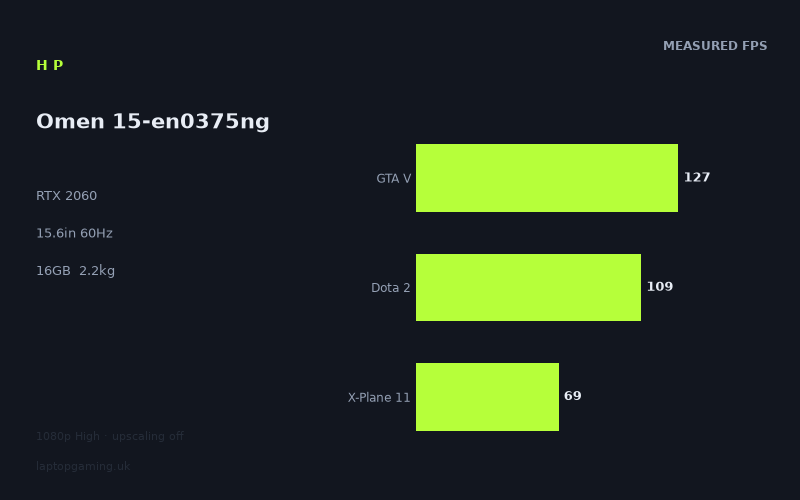
Frame rates
1920×1080, High preset, upscaling off.
Measured on this machine. Source: Notebookcheck, 2021-01-04.
Not scored: incomplete benchmark suite
Every scored laptop on this site is averaged over the same 5 games, and this one is short of Cyberpunk 2077, Baldur's Gate 3. A mean over 3 games is not comparable to a mean over 5, so we publish the figures we have and leave the score blank rather than rank it against machines tested on a different set. The numbers below are real - the suite is just incomplete.
How these numbers were produced
Frame rates here are not measured by us, and we label how each one was arrived at. A figure marked measured comes from a published run on that exact machine. A figure marked representative is derived from the GPU and its power limit (TGP) and cross-referenced against published reviews - a sound estimate of what that configuration delivers, but not a measurement of that specific laptop. Unless stated otherwise, numbers are 1920x1080, High preset, upscaling off. Where a laptop ships in several power configurations we use the wattage of the exact SKU listed, because a 140W RTX 5070 and a 115W one are not the same product.
In use
The short version
The HP Omen 15-en0375ng is a 15.6in gaming laptop built around an RTX 2060, a Ryzen 7 4800H, 16GB of memory and a 512GB SSD. Its published game results show a machine that remains capable at 1920x1080 using High settings with upscaling off, but its 60Hz IPS display sets a clear ceiling on how much benefit the very highest frame rates can deliver on the built-in panel.
Notebookcheck’s measured figures are encouraging in lighter and older games. Valorant reaches 177fps, FIFA 21 reaches 163fps, GTA V reaches 127fps, Dota 2 reaches 109fps, The Witcher 3 reaches 107fps and Battlefield V reaches 102fps. Those are substantially beyond the display’s 60Hz refresh rate. In those games, the laptop has performance in reserve for demanding settings choices, frame-rate caps, or use with an external display with a higher refresh rate. The internal screen itself cannot show more than 60 refreshes per second, so the headline figures in Valorant and FIFA 21 matter more as evidence of available performance than as a reason to expect the built-in panel to display every rendered frame.
The more demanding end of the list is where this Omen’s position is clearer. Shadow of the Tomb Raider runs at 83fps, Yakuza Like a Dragon at 72fps, X-Plane 11 at 69fps and Watch Dogs Legion at 66fps. These are still ahead of the screen’s refresh rate, although there is less spare performance. Borderlands 3 and Call of Duty Black Ops Cold War each record 62fps, which is effectively on the edge of fully feeding a 60Hz panel under the stated test conditions. Dirt 5 reaches 59fps, while Immortals Fenyx Rising, Assassin’s Creed Valhalla and Crysis Remastered each reach figures in the low-to-mid 50s. Cyberpunk 2077 1.0 is the outlier at 45fps.
That makes this a sensible option for someone whose priority is conventional 1080p gaming rather than chasing very high refresh performance in every game. The benchmark data supports a straightforward conclusion: it has enough performance for a broad range of games at High settings, but not enough consistency to treat 60fps as guaranteed in the heaviest titles under the supplied test conditions. It is particularly well aligned with games such as Valorant, FIFA 21, GTA V, Dota 2, The Witcher 3 and Battlefield V, where its measured output comfortably exceeds what the integrated screen can refresh.
There is an important caveat around value. A UK price is not confirmed for this configuration, so there is no responsible way to call it good value, poor value, cheap or expensive. The performance figures tell us what the hardware can do, but they cannot tell a prospective buyer whether this exact listing is competitively priced. That distinction matters especially for an older GPU generation: a strong specification on paper is not automatically a good purchase if the asking price is out of line with the performance available elsewhere.
The machine also cannot be given a comparable position against the site’s fully assessed gaming-laptop list from the available scoring-suite data. Notebookcheck’s figures provide GTA V at 127fps, Dota 2 at 109fps and X-Plane 11 at 69fps, producing a mean of 102fps across those measured scoring-suite games. However, figures are not available here for Final Fantasy XV or Strange Brigade. Since comparable gaming assessments require the same complete set of games, a partial suite should not be presented as a direct ranking against machines with complete results. That is not a fault in the measured numbers; it is simply an honest limit on what can be concluded from them.
Buy this Omen if the specification and eventual UK price make sense for you, if a 15.6in 1080p 60Hz IPS display is acceptable, and if your gaming is weighted towards the titles in which it is clearly above 60fps. Be more cautious if you want a laptop that can make full practical use of very high frame rates on its own screen, if you mainly play the heaviest games at High settings, or if portability is your first concern. At 2.16kg, it is portable in the literal sense, but it is not a lightweight machine.
Performance
What Notebookcheck’s figures show
The measured results were recorded by Notebookcheck at 1920x1080 using the High preset with upscaling off. Those conditions are useful because they match the Omen’s native 1920x1080 display resolution and avoid treating an upscaled result as direct native-resolution performance. The figures therefore give a practical view of what the RTX 2060 and Ryzen 7 4800H can produce at the screen’s intended resolution without relying on an image-reconstruction mode.
The performance spread is wide, from 177fps in Valorant to 45fps in Cyberpunk 2077 1.0. That does not mean the results are inconsistent or unreliable. It means that the games make very different demands under the same broad resolution and preset conditions. A laptop GPU is not assigned one universal frame rate. It produces a different result according to the game being rendered, the balance between processor and graphics workload, and how demanding that title is at High settings. Looking only at an average would hide the part that matters most to buyers: whether the games they actually play sit above, around or below the display’s 60Hz limit.
At the top of the list, Valorant at 177fps and FIFA 21 at 163fps are far beyond the screen refresh rate. GTA V at 127fps, Dota 2 at 109fps, The Witcher 3 at 107fps and Battlefield V at 102fps also leave a substantial margin above 60Hz. These are not marginal passes. They show that the Omen has enough measured performance to run a sizeable group of games well above the throughput its own panel can display.
There is a practical difference between a game measuring just above 60fps and one measuring well beyond it. Borderlands 3 at 62fps and Call of Duty Black Ops Cold War at 62fps are technically above the panel refresh, but only narrowly. Their results say that the laptop can broadly match the internal display in the tested scenario, not that it has a large cushion for more demanding scenes or different game updates. By contrast, the figures in Valorant, FIFA 21, GTA V, Dota 2, The Witcher 3 and Battlefield V indicate much more performance headroom under the stated settings.
The middle of the list is also important because it includes games that are still comfortably playable by ordinary 60Hz-screen standards without being extravagantly overpowered for the panel. Shadow of the Tomb Raider reaches 83fps. Yakuza Like a Dragon reaches 72fps. X-Plane 11 reaches 69fps. Watch Dogs Legion reaches 66fps. These results put the Omen on the favourable side of its display’s refresh rate, but the margin steadily tightens as the games become more demanding.
Dirt 5 at 59fps is the first result that lands just under the display’s nominal 60Hz target. This is a useful example of why it is misleading to reduce the laptop to a simple statement that it is either “a 60fps machine” or it is not. A result of 59fps is extremely close to the panel’s refresh rate, but it remains below it in the recorded measurement. Buyers who want the cleanest possible 60fps target in every title should not ignore that distinction. Equally, it would be unreasonable to portray 59fps as a fundamentally poor outcome. It is evidence that the Omen is close to the display’s limit in Dirt 5 at 1920x1080 High with upscaling off.
Immortals Fenyx Rising at 54fps, Assassin’s Creed Valhalla at 53fps and Crysis Remastered at 53fps show a more definite gap below 60fps. Here, the measured data suggests that High settings at native resolution ask more of the laptop than it can consistently deliver at the internal panel’s full refresh rate. The distinction is not academic. Someone buying primarily for these heavier games should expect to make choices: accept the measured performance level, lower settings, or look for a faster machine if maintaining a higher frame rate is the priority. The fact sheet does not provide alternative-quality results, so it would be wrong to promise what setting reduction would achieve. The safe conclusion is simply that the supplied High-preset figures are below 60fps in these titles.
Cyberpunk 2077 1.0 at 45fps is the clearest warning against assuming that RTX 2060 branding alone guarantees 60fps at High settings in every demanding game. At the supplied 1920x1080 High preset with upscaling off, the result is below the 60Hz panel’s refresh rate by a meaningful margin. That does not make the laptop unsuitable for Cyberpunk 2077 1.0, but it does make it unsuitable for a buyer who regards 60fps at these exact settings as non-negotiable. The published measurement is the relevant evidence, and it is more useful than a vague claim that the GPU is “good for 1080p”.
The scoring-suite results, and their limits
The available scoring-suite figures are GTA V at 127fps, Dota 2 at 109fps and X-Plane 11 at 69fps. Their mean is 102fps. That is a healthy result within this partial selection, but it must be read in context. GTA V and Dota 2 are substantially above the screen’s 60Hz refresh rate, while X-Plane 11 is closer to it. The mean is therefore pulled upwards by games where the Omen is producing far more frames than the integrated display can show.
This is precisely why the individual figures matter more than a single summary number. A buyer mainly interested in GTA V and Dota 2 should see a very capable result. A buyer mainly interested in X-Plane 11 should see a laptop that is above the panel’s refresh rate, but with much less headroom. Neither view is contradicted by the 102fps mean; they are different readings of the same data.
The partial suite cannot support a direct place against laptops assessed across a complete common set. Final Fantasy XV and Strange Brigade are not available for this Omen in the supplied data. Without those measurements, it would be misleading to take the available mean and place it beside a figure built from five games. A complete comparison needs the same games for every laptop, otherwise the game mix itself can distort the result. This Omen may look stronger or weaker depending on which missing games are added, and there is no basis for pretending otherwise.
GPU power limit: what can and cannot be said
The RTX 2060 is identified in the specification, but no GPU power limit is supplied for the HP Omen 15-en0375ng. That means there is no supported basis for claiming a particular wattage, calling it a low-power implementation, or comparing its power configuration directly with another RTX 2060 laptop. Laptop GPU names alone do not provide enough information to make that claim, and the missing power-limit figure should not be filled in with assumptions.
What can be said is that the measured game results are the outcomes buyers should use. This particular Omen produces 177fps in Valorant, 163fps in FIFA 21, 127fps in GTA V and 102fps in Battlefield V under Notebookcheck’s stated conditions. It produces 53fps in Assassin’s Creed Valhalla and Crysis Remastered, and 45fps in Cyberpunk 2077 1.0. Those numbers describe the actual performance position more usefully than unsupported speculation about how aggressively the RTX 2060 may be configured.
The comparison against the MSI Stealth 15M is particularly revealing in this respect. Both machines use an RTX 2060, yet this Omen averages 3fps behind the MSI across three shared games. That is a small difference, not evidence that the two laptops are identical in every workload. Still, it demonstrates why model name and GPU label should not be treated as the whole story. Platform configuration, game behaviour and the shared-game mix matter. The available comparison is close enough that buyers should not expect the Omen’s RTX 2060 label alone to decide between it and another RTX 2060 system.
At 1920x1080, lighter games in the shared comparison set can become CPU-bound, compressing genuine GPU differences. That helps explain why a near-zero gap against another RTX 2060 laptop should not be inflated into a decisive win or loss. It also explains why the narrow advantage over the Acer Aspire 16, which has an RTX 2050, does not establish that the two machines will remain close in every heavier game. The supplied comparisons are valid for the shared games; they should not be stretched beyond them.
What performance class this represents
In practical terms, the Omen’s benchmark pattern is that of a laptop able to handle a wide mix of 1080p gaming, with excellent results in less demanding titles and much tighter results in the most demanding games in the list. It is not a laptop where every result is clustered around one frame rate. It ranges from well over the internal display’s limit to clearly below it. That makes it more important than usual to shop by the games you play rather than by a broad claim about the GPU tier.
For competitive or lightweight games represented by Valorant, FIFA 21 and Dota 2, the available performance is more than the 60Hz panel can exploit. For established large-scale games represented by GTA V, The Witcher 3 and Battlefield V, it is also comfortably beyond the display ceiling. For games such as Shadow of the Tomb Raider, Yakuza Like a Dragon, X-Plane 11 and Watch Dogs Legion, it remains on the right side of 60fps, though without the same surplus.
For Borderlands 3, Call of Duty Black Ops Cold War and Dirt 5, this is essentially a laptop operating around the display target rather than clearly above it. For Immortals Fenyx Rising, Assassin’s Creed Valhalla, Crysis Remastered and Cyberpunk 2077 1.0, the evidence points to a different expectation: High settings at native resolution with upscaling off are too demanding for a consistent 60fps outcome in the supplied results.
That is a balanced and useful performance profile, but it is not an unlimited one. Buyers upgrading from a less capable laptop may find the results in Valorant, FIFA 21, GTA V and Battlefield V particularly attractive. Buyers coming from a machine already capable of driving a high-refresh external display may be more concerned by the slower results in the heavier games and by the Omen’s 60Hz integrated panel.
The screen
The HP Omen 15-en0375ng has a 15.6in IPS display with a 1920x1080 resolution and a 60Hz refresh rate. This is a conventional gaming-laptop resolution and a sensible fit for the benchmark conditions, which are also 1920x1080. There is no need to infer how the GPU might behave at a different native resolution because the available game data already matches the panel’s stated pixel count.
The 60Hz refresh rate is the defining limitation of the display specification. The laptop can render 177fps in Valorant and 163fps in FIFA 21, but the built-in panel refreshes at 60Hz. It follows that the screen cannot present those very high rendered frame rates as distinct refreshes in the same way a higher-refresh panel could. The high figures are not wasted in every possible sense, because they reveal performance headroom, but they are not fully expressed by this particular internal display.
GTA V at 127fps, Dota 2 at 109fps, The Witcher 3 at 107fps and Battlefield V at 102fps tell a similar story. The Omen has measured output well beyond 60fps in these games, so the screen rather than the GPU becomes the practical limiter for visible refresh on the laptop itself. If your usual games are concentrated in this group, the hardware is capable of more than the panel specification asks of it.
The display and GPU are more closely matched in Shadow of the Tomb Raider at 83fps, Yakuza Like a Dragon at 72fps, X-Plane 11 at 69fps and Watch Dogs Legion at 66fps. These games still measure beyond 60fps, but the margin is modest compared with Valorant or FIFA 21. Here, the 60Hz panel is still a ceiling, but it is a ceiling the laptop approaches rather than dramatically exceeds.
Borderlands 3 and Call of Duty Black Ops Cold War, both at 62fps, are the closest examples of the GPU and screen operating in balance under the test conditions. Their measured output is just above the panel refresh rate. Dirt 5 at 59fps sits just below it. In these games, a 60Hz panel is not obviously underspecified in the way it is for Valorant; the measured GPU performance is already near the screen’s limit.
For Immortals Fenyx Rising at 54fps, Assassin’s Creed Valhalla at 53fps, Crysis Remastered at 53fps and Cyberpunk 2077 1.0 at 45fps, a higher-refresh screen would not solve the performance shortfall at the tested High preset. The issue is not that the panel lacks refresh capability; it is that the measured frame rate is below 60fps. That is an important distinction for buyers deciding whether a 60Hz screen is their main concern. In the most demanding games listed, moving to a higher-refresh display would not make the published frame rate higher.
The IPS panel type is part of the specification, but no measured information is supplied on brightness, colour coverage, contrast, response behaviour, screen uniformity or outdoor visibility. Those are all important display qualities, and none should be guessed from the IPS label alone. IPS tells us the panel classification; it does not provide a measured verdict on this specific panel’s image quality. A buyer for whom photo work, colour-critical design, outdoor use or particularly fast pixel response matters should seek tested panel data before treating the screen as a deciding factor.
For gaming alone, the screen is best described as functional rather than ambitious. Its 1920x1080 resolution matches the Omen’s measured performance well. Its 60Hz refresh rate is adequate for the demanding games where the laptop runs around or below 60fps, but it restrains the visible benefit of the strongest results in lighter titles. That does not make it a bad pairing; it makes it a pairing aimed at standard 1080p gaming rather than high-refresh gaming on the integrated display.
Build, size and portability
The available physical specification gives the Omen a weight of 2.16kg and a 15.6in screen. That places it firmly in the category of a laptop that can be transported, but should not be mistaken for a lightly carried everyday machine. A 2.16kg laptop is realistic to move between rooms, take to a workplace, carry to university or pack for travel, but it remains a substantial item before considering whatever accessories a gaming setup may require.
The 15.6in screen size also points towards a conventional laptop footprint rather than an ultra-compact design. However, dimensions are not supplied, so it would be wrong to claim a specific width, depth, thickness, bag fit or desk footprint. Weight and display size give a useful indication of intended use, but they do not provide a complete physical picture. Buyers with a strict bag-size requirement should confirm the actual dimensions from the seller or manufacturer before purchasing.
For a buyer using the Omen mainly at a desk and occasionally moving it, 2.16kg should be manageable. For a buyer carrying a laptop throughout the day, it deserves more scrutiny. The difference between “portable” and “comfortable to carry constantly” is significant, and the supplied weight places this closer to the former than the latter. This is especially relevant because the gaming performance suggests the machine is most attractive when used as a dedicated gaming system, not merely as a general-purpose laptop that happens to run games.
There are no supplied measurements for battery life, charging hardware, noise, external temperatures, keyboard quality, trackpad quality, ports, webcam, speakers, chassis materials, upgrade access or internal layout. Those omissions matter. A gaming laptop can be strong in benchmark data and still be a poor fit for a particular buyer if its battery endurance, port selection or acoustic behaviour does not suit their routine. Since no evidence is provided here, those areas should remain unknown rather than being turned into confident claims.
The sensible interpretation is therefore narrow. The Omen has a 15.6in display, weighs 2.16kg and is more naturally suited to a desk-first routine with some travel than to constant one-bag commuting. It may be perfectly practical for regular transport, but the figures do not support calling it especially slim, compact or travel-focused. Nor do they support the opposite claim that it is cumbersome: weight alone is not enough to settle every buyer’s carrying experience.
How it compares
The rival comparisons are useful because they place the Omen against a spread of laptops from the same GPU generation rather than pretending that one adjacent model tells the whole story. They are based only on games both machines hold, with preference given to the scoring suite. That makes them controlled comparisons of the available shared data, but not broad claims about every game each laptop may run.
Against the Acer Aspire 17 with RTX 2050 at 35W
Against the Acer Aspire 17 with an RTX 2050 at 35W, the HP Omen averages 13fps ahead across three shared games. This is the Omen’s largest advantage among the supplied rival comparisons. It supports the view that the Omen has a meaningful performance edge over that lower-positioned Aspire configuration in the games where both have measured figures.
The 13fps margin should be read as a real advantage, not a decorative statistic. At 1080p, frame-rate differences matter most where they move a game from below a display target to above it, or where they create more room for demanding scenes. The exact shared titles are not listed here, so it would be wrong to claim where that advantage appears game by game. But across the three-game comparison, the Omen is clearly the faster machine.
Price is not confirmed for either model in the supplied information. That prevents a complete buying verdict. If the Omen were available at a sensible premium, its measured advantage could be persuasive for someone prioritising gaming performance. If the premium were large, the value calculation would change. The data tells us that the Omen is faster in this comparison, but not whether the difference is worth paying for.
Against the Acer Aspire 16 with RTX 2050
Against the Acer Aspire 16 with an RTX 2050, the Omen averages 4fps ahead across three shared games. This is a much tighter result than the comparison with the Acer Aspire 17. It would be easy to see RTX 2060 versus RTX 2050 in the specification list and expect a large universal gulf. The shared benchmark data does not support that simplified conclusion in this particular comparison.
A 4fps lead is still a lead, but it is not enough on its own to define a purchase. At 1920x1080, lighter titles in the shared set can be CPU-bound and compress genuine GPU differences. This means the narrow result may say more about the games used for comparison than about every possible workload. It should not be used to argue that the two GPUs are interchangeable in all titles, especially when the Omen’s own wider game list shows a substantial spread from 177fps to 45fps depending on the game.
For a buyer choosing between these two specific laptops, the Omen’s advantage exists but is modest in the shared results. With no confirmed UK price for either machine, the right conclusion is conditional: the Omen needs a competitive price or another clearly preferred specification feature to make a compelling case solely from this narrow performance lead. If the two were similarly priced, the Omen’s measured edge is a valid reason to lean towards it. If the Omen cost substantially more, the available data does not establish a large enough gaming advantage to dismiss the Aspire automatically.
Against the MSI Stealth 15M with RTX 2060
The MSI Stealth 15M is one of the closest comparisons because it also uses an RTX 2060. Across three shared games, the HP Omen averages 3fps behind it. That is a near-zero difference in practical comparative terms, especially given that the games are shared titles rather than a complete universal test set.
The useful conclusion is not that the Omen is clearly slower. It is that these two RTX 2060 laptops are extremely close in the available shared-game data. A 3fps average deficit should not outweigh major differences a buyer might find in price, screen specification, weight, keyboard preference, ports or other factors, although those other factors are not provided here and therefore cannot be judged in this review.
At 1080p, lighter titles can become CPU-bound and compress genuine GPU gaps. That is directly relevant to this result. The narrow difference may reflect the shared games reaching a point where graphics performance is not the only limiting factor. It would be overconfident to turn the 3fps deficit into a general statement that the MSI is always faster, just as it would be wrong to dismiss it entirely. The correct reading is that the two machines are close in the measured overlap.
The Omen’s own figures reinforce that point. Its performance is high enough in Valorant, FIFA 21, GTA V, Dota 2, The Witcher 3 and Battlefield V that a small comparative difference may have little effect on a 60Hz internal screen. Where a game is already above 60fps, an additional few frames do not change the fact that the built-in panel refreshes at 60Hz. In the heavier games where the Omen is below 60fps, the supplied MSI comparison does not tell us how the two laptops differ because no game-by-game overlap is provided.
Against the Alienware m17 R3 with RTX 2080
The Alienware m17 R3 with an RTX 2080 is the machine that beats the Omen by the largest supplied margin. The HP averages 43fps behind it across three shared games. This is not a near-zero result, and it should not be explained away as a rounding issue or a minor configuration quirk. In the available shared benchmark data, the Alienware has a substantial performance advantage.
That comparison gives useful context to the Omen’s position. The Omen is capable at 1080p, especially in the games where it is above the 60Hz panel’s refresh rate. But it is not at the top of the generation represented here. The Alienware’s lead is large enough to matter for buyers who want more performance headroom in demanding games, want a better chance of staying above 60fps at high settings, or intend to use a display where very high rendered frame rates can be more fully utilised.
Again, price is not confirmed for either laptop. The Alienware’s performance advantage does not automatically make it the better purchase. A much faster machine can still be a poor choice if its cost is disproportionate, while a slower laptop can be sensible if it is priced accordingly. What the benchmark data establishes is performance hierarchy, not value hierarchy. The Omen is well behind this RTX 2080 rival in the shared games; whether that matters enough depends on the eventual UK prices and on the games a buyer plays.
What the rival spread means
Across the supplied comparisons, the Omen sits in a useful middle position. It is clearly ahead of the Acer Aspire 17 with RTX 2050 at 35W, narrowly ahead of the Acer Aspire 16 with RTX 2050, narrowly behind the RTX 2060 MSI Stealth 15M, and substantially behind the RTX 2080 Alienware m17 R3. That is a more informative picture than calling it simply an RTX 2060 laptop and assuming all similarly named machines behave alike.
The narrow results against the Acer Aspire 16 and MSI Stealth 15M also underline why buyers should treat close shared-game averages carefully. The fact sheet specifically notes that lighter titles at 1080p can be CPU-bound and compress genuine GPU gaps. In other words, a small frame-rate difference is a real result, but it may not represent the full potential separation in more graphics-heavy games. Conversely, the 43fps gap to the Alienware is sufficiently large that it remains meaningful even with that caution.
There is no confirmed UK price for the Omen or any of these rivals. That removes the most important final step in a buying comparison. Performance tells us where the Omen stands; it does not establish whether it is the smarter purchase. Any retailer listing should therefore be checked against the available alternatives at the time of purchase rather than relying on an old assumption about what an RTX 2060 laptop ought to cost.
Who it’s for
Buy it if your games match its strengths
The Omen 15-en0375ng makes the strongest case for buyers whose regular games resemble the favourable half of the published list. Valorant at 177fps, FIFA 21 at 163fps, GTA V at 127fps, Dota 2 at 109fps, The Witcher 3 at 107fps and Battlefield V at 102fps all show performance well beyond the 60Hz screen’s refresh rate. If these are close to your usual library, the laptop has ample measured performance at 1920x1080 High with upscaling off.
It also suits buyers who want a straightforward native-resolution gaming setup. The display resolution is 1920x1080 and the benchmark data is recorded at 1920x1080, so the results do not rely on lowering resolution to make the hardware look stronger. Shadow of the Tomb Raider at 83fps, Yakuza Like a Dragon at 72fps, X-Plane 11 at 69fps and Watch Dogs Legion at 66fps make the case that the machine can still run many more demanding games around or above the screen’s refresh rate.
The Omen is also sensible for someone who sees 60Hz as sufficient. A buyer who does not need a high-refresh integrated display may reasonably prefer the machine’s measured gaming capability over chasing a specification that the games they play would not consistently exploit. The 60Hz panel is a limitation in Valorant and FIFA 21, but it is a closer match for Borderlands 3, Call of Duty Black Ops Cold War, Dirt 5, Immortals Fenyx Rising, Assassin’s Creed Valhalla, Crysis Remastered and Cyberpunk 2077 1.0.
Finally, it suits a desk-first owner who still needs a laptop rather than a desktop. At 2.16kg, it is transportable for occasional travel, moving between home and work, or taking to different rooms. The available information does not support stronger claims about portability, but it does support the basic conclusion that this is not a fixed desktop replacement in the strictest sense.
Buy something else if you need a faster internal display
Do not choose this Omen primarily for high-refresh gaming on the built-in screen. Its 60Hz panel cannot fully display the 177fps measured in Valorant or the 163fps measured in FIFA 21. The same applies, to varying degrees, to GTA V, Dota 2, The Witcher 3 and Battlefield V. If you play competitive games and specifically want the laptop screen itself to reflect very high frame rates, the display specification is the reason to look elsewhere.
This is not an argument that the Omen lacks performance in those games. The measured data says the opposite. It is an argument that the panel and the strongest benchmark results are mismatched. A higher-refresh display would be more appropriate for a buyer who places the greatest value on the high frame rates this hardware can render in lighter titles.
Buy something else if 60fps at High settings is essential in the heaviest games
Buyers focused on Cyberpunk 2077 1.0, Assassin’s Creed Valhalla, Crysis Remastered or Immortals Fenyx Rising should be realistic about the results. Cyberpunk 2077 1.0 records 45fps. Assassin’s Creed Valhalla and Crysis Remastered each record 53fps. Immortals Fenyx Rising records 54fps. These results are below the 60Hz panel’s refresh rate at 1920x1080 High with upscaling off.
If your requirement is a consistent 60fps at those exact settings, the supplied figures say this is not the right fit. A faster alternative, such as one that performs closer to the Alienware m17 R3’s position in the shared comparison, may be more appropriate if price and other specifications make sense. The Alienware’s 43fps shared-game advantage shows that more performance was available in this generation, though no price information is available to judge the cost of moving up.
Equally, do not buy purely on the assumption that settings changes will solve every issue in a predictable way. The fact sheet does not include lower-preset results, alternative resolutions or upscaled figures. It is reasonable to recognise that the High-preset test is not the only way to configure a game, but it is not reasonable to invent the frame rate that another setting would produce.
Buy something else if you need a particularly light daily-carry machine
At 2.16kg, the Omen is not the obvious choice for someone who wants the lightest possible laptop for daily carrying. It can travel, but its stated weight makes it better suited to someone willing to accept a more substantial machine in exchange for gaming hardware. A buyer moving between fixed locations will likely view that compromise differently from someone carrying it all day.
Because dimensions are not supplied, a buyer with strict travel requirements should not rely on the 15.6in screen size and weight alone. Confirm the physical measurements, charger arrangement and other practical details before deciding it will fit a particular bag or routine. The benchmark data is strong enough to make the Omen worth considering for gaming, but the available information is not complete enough to certify it as a travel-focused laptop.
The final buying judgement
The HP Omen 15-en0375ng is best understood as a capable 1080p gaming laptop with a standard-refresh display. Its RTX 2060 and Ryzen 7 4800H combination delivers strong measured results in a substantial part of the game list, including 177fps in Valorant, 163fps in FIFA 21, 127fps in GTA V and 102fps in Battlefield V. It stays above 60fps in Shadow of the Tomb Raider, Yakuza Like a Dragon, X-Plane 11 and Watch Dogs Legion, while operating around that line in Borderlands 3, Call of Duty Black Ops Cold War and Dirt 5.
The caveats are equally clear. The 60Hz display cannot make full use of the highest measured frame rates. The heaviest games in the supplied data fall below 60fps at High settings with upscaling off. The 2.16kg weight means this is portable rather than especially light. No GPU power limit is supplied, so configuration claims should be based on the measured results rather than assumed wattage. No UK price is confirmed, so no verdict on value should be made before checking an actual listing.
If it appears at a sensible UK price and your priorities are conventional 1920x1080 gaming, an IPS panel, 16GB of memory and strong results in the games where it is well above 60fps, it is a credible choice. If your priorities are a high-refresh built-in display, maximum performance in the heaviest titles, or the lightest possible machine to carry every day, the published specification and benchmark spread point towards looking elsewhere.