Review
Lenovo Legion Y740-17IRHg-81UJ001VGE review
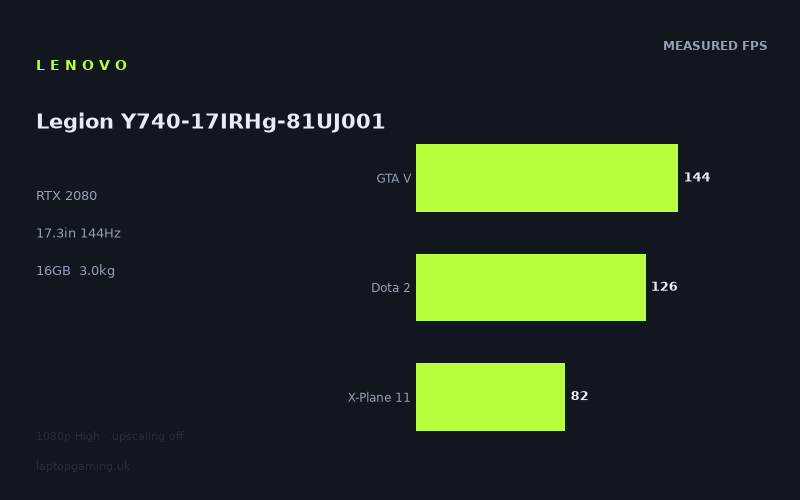
Frame rates
1920×1080, High preset, upscaling off.
Measured on this machine. Source: Notebookcheck, 2020-03-27.
Not scored: incomplete benchmark suite
Every scored laptop on this site is averaged over the same 5 games, and this one is short of Cyberpunk 2077, Baldur's Gate 3. A mean over 3 games is not comparable to a mean over 5, so we publish the figures we have and leave the score blank rather than rank it against machines tested on a different set. The numbers below are real - the suite is just incomplete.
How these numbers were produced
Frame rates here are not measured by us, and we label how each one was arrived at. A figure marked measured comes from a published run on that exact machine. A figure marked representative is derived from the GPU and its power limit (TGP) and cross-referenced against published reviews - a sound estimate of what that configuration delivers, but not a measurement of that specific laptop. Unless stated otherwise, numbers are 1920x1080, High preset, upscaling off. Where a laptop ships in several power configurations we use the wattage of the exact SKU listed, because a 140W RTX 5070 and a 115W one are not the same product.
In use
The short version
The Lenovo Legion Y740-17IRHg-81UJ001VGE is a large-format gaming laptop built around an RTX 2080, a Core i7-9750H, 16GB of memory and a 17.3in 144Hz IPS display. The available benchmark data shows that it remains a capable 1080p machine in the measured games, but its appeal depends heavily on what a buyer can actually find it for. There is no confirmed UK price in the supplied information, so it is not possible to make a responsible value judgement.
Its strongest result is not simply that it has an RTX 2080 badge. The useful part is that Notebookcheck’s published figures show strong performance across a varied game selection: 145fps in The Witcher 3, 144fps in GTA V, 139fps in Rise of the Tomb Raider, 126fps in Dota 2, 82fps in X-Plane 11 and 75fps in Metro Exodus. That is a broad spread, but it is the sort of spread expected from a gaming laptop: easier or more CPU-limited titles can approach the panel’s 144Hz refresh rate, while more demanding games remain well below it.
The Legion is therefore best understood as a machine for someone who wants a large 1080p gaming display and is happy to tune expectations on a game-by-game basis. In lighter games, and in some older high-end games, the screen’s 144Hz capability is properly useful. In the more demanding measured titles, especially Metro Exodus and X-Plane 11, the GPU and system are delivering a good experience by normal gaming standards, but not enough frames to keep the display refreshed at its maximum rate continuously.
The key caveat is that the RTX 2080 name alone does not settle where this Legion sits in the wider RTX 2080 market. Notebookcheck’s comparable figures place it almost level with the Acer Predator Triton 500, which also uses an RTX 2080, but substantially behind the MSI GT76 Titan DT with the same nominal GPU. That matters. Buyers should not assume that every RTX 2080 laptop behaves alike, or that this Legion automatically performs like the biggest and least compromise-led machines carrying the same graphics label.
There is no confirmed GPU power limit in the fact sheet. That is important enough to say plainly. A laptop GPU’s configured power limit can have a major effect on sustained performance, but no wattage figure is supplied here, so it would be wrong to invent one or to describe this Legion as a particular power class. The benchmark results are the evidence available: this configuration performs roughly alongside the Triton 500 in the shared results, is very close to the RTX 2070 Asus ROG Strix G15 in the same comparison set, and sits well behind the GT76 Titan DT.
The Legion Y740 is not a portable-all-day machine in the normal sense. At 3.01kg, before considering a charger or any other travel gear, it is a substantial 17.3in laptop. It makes more sense as a system that moves between a desk, a living-room setup, a student room, a workplace and occasional travel, rather than something to carry casually every day. Its 76Wh battery is a respectable specification to list, but there is no battery-life measurement in the supplied data. It would be misleading to translate that capacity into a claimed number of hours.
Buy this model only if its price reflects its age, size and the fact that the available benchmark suite is incomplete. The frame-rate evidence is good enough to establish that it can still game effectively at its native 1920x1080 resolution. It is not good enough to rank the Legion against the site’s scored laptops, because the scoring suite is incomplete. There are no supplied figures for Final Fantasy XV or Strange Brigade, and scored laptops are averaged over the same five games. A partial result should not be presented as directly comparable to a complete one.
Performance
The measured results
The available figures were measured by Notebookcheck at 1920x1080 using the High preset with upscaling disabled. That is the right context for every conclusion in this review. These are not maximum-settings results, ray-tracing results, battery-mode results or figures produced with an upscaling mode enabled. They are High-preset native-resolution results from a defined test setup, published on 2020-03-27.
- The Witcher 3: 145fps
- GTA V: 144fps
- Rise of the Tomb Raider: 139fps
- Dota 2: 126fps
- X-Plane 11: 82fps
- Metro Exodus: 75fps
Across the three scoring-suite games available for this machine, the mean is 117fps. That is a useful summary, but it should not be mistaken for a promise of 117fps in every game or even a reliable prediction for every game from the same era. The individual figures are more informative. The Legion moves from 145fps in The Witcher 3 to 75fps in Metro Exodus. That difference says much more about its practical use than a single average ever could.
The Witcher 3 result is the cleanest demonstration of the Legion matching the intentions of its 144Hz screen. Notebookcheck’s figure is 145fps, which places the measured performance at the panel’s rated refresh rate. That does not mean every location, every scene or every future game will hold that figure. It does mean that, in this benchmark, the laptop has the performance required to make a 144Hz display more than a decorative specification. The screen can receive frames at a rate that uses its maximum refresh capability.
GTA V is similarly well suited to the display. The measured figure is 144fps, exactly matching the listed refresh rate. Again, the sensible interpretation is not that the Legion somehow turns every demanding game into a 144fps experience. GTA V is one measured workload, at one defined setting, and it happens to align with the panel particularly well. For a buyer who plays GTA V regularly, that is genuinely useful information. For a buyer whose main interest is Metro Exodus or simulation games, it is less representative.
Rise of the Tomb Raider comes close at 139fps. That is still a strong result for a laptop operating at 1920x1080 on High settings without upscaling. It is below the display’s 144Hz rating, but the practical point is that it remains in the same broad high-refresh territory as The Witcher 3 and GTA V. A 144Hz panel is not wasted here. It has more refresh capacity than the benchmark result reaches, yet the system is still producing frames quickly enough that a conventional lower-refresh display would leave less headroom.
Dota 2 at 126fps is another case where the Legion is clearly benefiting from the high-refresh panel without fully reaching its stated maximum refresh rate in the measured run. That is not a failure. A 126fps result is still well above the figures from the more graphically intensive or simulation-heavy titles in the list. It also shows why buyers should avoid reducing a gaming laptop to a crude statement such as “it can do 144Hz” or “it cannot do 144Hz”. The right answer depends on the game, settings, scene complexity and system balance.
X-Plane 11 produces 82fps. This is the result that most clearly demonstrates why a large number printed on a GPU badge should not be treated as a universal frame-rate guarantee. Flight simulation workloads can behave differently from conventional action games, and the measured number sits far below the panel’s 144Hz capability. It is still a substantial result in isolation, but a buyer choosing this Legion primarily for X-Plane 11 should not buy on the assumption that the 144Hz screen will be saturated by the benchmark performance.
Metro Exodus is the lowest supplied result at 75fps. It is also one of the most useful figures because it establishes the lower end of the Legion’s measured gaming range. The machine is not struggling into unusably low performance; 75fps remains a credible result for a demanding game at 1920x1080 on the High preset with upscaling off. But it is a long way from the 144fps delivered in GTA V and The Witcher 3. This is exactly why a high-refresh gaming laptop should be judged on a spread of titles rather than on one favourable result.
What the spread across games means
The Legion’s figures show a familiar gaming-laptop pattern: performance is high where the game and settings allow the system to run quickly, then falls sharply where the workload becomes more demanding. There is no contradiction in a machine delivering 145fps in one title and 75fps in another. Those results are not interchangeable measures of the same task. They are evidence that the laptop’s 1080p performance varies materially according to the game.
The lighter or less GPU-constrained parts of a benchmark set can compress differences between laptops. This is especially relevant when comparing machines with different graphics chips but similar results. At 1920x1080, some shared titles can become limited by factors beyond raw GPU capability, including the processor and the rest of the platform. That means a faster graphics chip does not always produce a proportionally faster published frame rate in every game. The near-zero result against the Asus ROG Strix G15 and Acer Predator Triton 500 should therefore not be read as proof that the underlying hardware configurations are identical. It shows that, in the shared-game data, the measured outcomes are very close.
It also means that buyers should treat the 117fps mean with care. It is useful for describing the available scoring-suite data, but it conceals how different the three contributing games can be in practice. GTA V reaches 144fps, Dota 2 reaches 126fps and X-Plane 11 reaches 82fps. Someone who spends most of their time in GTA V will have a markedly different experience of the panel’s 144Hz capability from someone who spends most of their time in X-Plane 11.
There is a further limitation: the available scoring-suite data contains only three of the five games used for scored laptop comparisons. The supplied list has no result for Final Fantasy XV and no result for Strange Brigade. Since scored laptops are averaged over the same five games, a mean calculated from only GTA V, Dota 2 and X-Plane 11 cannot honestly be placed beside a completed five-game mean. It would make the Legion appear more directly comparable than the data allows.
That incomplete suite does not make the published figures useless. Far from it. The six available games provide a better real-world picture than a single synthetic summary would. The limitation is specifically about ranking and scoring. It is possible to say that the Legion handles the measured games well at its native resolution and High settings. It is not possible to claim a complete scored standing against every laptop with a full five-game result.
RTX 2080 performance without a confirmed power figure
The Legion’s RTX 2080 is the headline component, but it needs to be interpreted in the context of laptop design rather than treated as a direct equivalent of every other RTX 2080 system. The rival data supplied for this review makes that point clearly. The Legion is almost level with the Acer Predator Triton 500, also equipped with an RTX 2080, but trails the MSI GT76 Titan DT by a large shared-game margin. Same GPU family, very different outcome.
No GPU power-limit figure is provided for the Legion. There is therefore no basis for saying that it uses a particular wattage configuration, nor for attributing the gap to the GT76 Titan DT to one single technical setting. Cooling, firmware choices, processor behaviour, memory configuration and the wider laptop design can all affect benchmark results. The responsible conclusion is narrower: the Legion’s measured performance is not at the top of the RTX 2080 spread represented by these rivals.
That is not necessarily a reason to dismiss the machine. A 17.3in laptop at 3.01kg is already a substantial device, yet it is still not the same proposition as every very large performance-focused gaming system. The GT76 Titan DT’s advantage in the shared-game comparison shows that buyers chasing the highest possible performance from this generation should look beyond the GPU label and compare actual results. Conversely, buyers who find the Legion at an appropriate price do not need the absolute fastest RTX 2080 implementation to enjoy strong 1080p performance in the titles measured here.
The processor is a Core i7-9750H and the laptop has 16GB of memory. Those specifications are sufficient context for identifying the configuration, but no separate processor or productivity benchmarks are supplied. It would be wrong to convert game figures into claims about video editing, compiling, rendering, streaming or other work. The measured gaming data does show that the platform can support high frame rates in several games, but it does not establish a complete picture of CPU-led workloads.
Likewise, the 512GB SSD is a clear and useful storage specification, but there is no supplied storage-speed measurement. It is fair to say that 512GB is the installed capacity. It is not fair to claim a particular boot time, game-loading result or file-transfer performance. Buyers with large game libraries should consider the listed capacity carefully, especially because modern gaming use can fill storage quickly, but no precise claim about how many games will fit can be made from the supplied information.
The screen
The Legion has a 17.3in IPS panel with a 1920x1080 resolution and a 144Hz refresh rate. This is a sensible display specification for the measured performance. The GPU is being asked to drive a native 1080p panel rather than a higher-resolution screen, and the benchmark data shows why that matters. The system can reach or closely approach the display’s refresh rate in several measured games, while demanding titles remain playable without requiring upscaling in the published High-preset results.
A 144Hz panel is valuable only when the system can supply frames quickly enough for the extra refresh capacity to matter. In this Legion, the answer varies by game. The Witcher 3 reaches 145fps, placing the measured result at the screen’s rated refresh level. GTA V reaches 144fps, also aligning directly with the display specification. Rise of the Tomb Raider reaches 139fps, which is just below the panel’s rating but remains clearly in high-refresh territory.
Dota 2 at 126fps also makes a 144Hz display worthwhile. The laptop does not need to hit the refresh-rate figure exactly in every title for the panel to be useful. The important point is that the measured performance is high enough to benefit from a display designed for fast motion and rapid updates. The available data supports that conclusion for Dota 2, GTA V, Rise of the Tomb Raider and The Witcher 3.
The picture changes with X-Plane 11 and Metro Exodus. At 82fps and 75fps respectively, both are well below 144Hz. That does not turn the display into a poor choice; it simply means the screen has performance headroom that those games do not fill at the tested settings. A buyer whose main interest is these heavier workloads should think of the 144Hz panel as a quality feature and an opportunity for lighter games, rather than as a target this Legion will always reach.
There is a practical advantage to this balance. A 1920x1080 panel keeps the GPU’s task manageable. The benchmark data was measured at the display’s native resolution, so there is no need to infer how the laptop might cope if asked to run at a different resolution. The supplied results already show what matters: the Legion can drive its own panel effectively in a range of games, and it does so without upscaling in the stated test conditions.
Buyers should not over-read the 144Hz specification into claims that are not supported by the data. There are no supplied measurements for response times, brightness, contrast, colour coverage, colour accuracy, flicker, backlight behaviour or outdoor visibility. The panel type is IPS, and the refresh rate is 144Hz, but those facts alone do not prove professional colour suitability or establish a full image-quality verdict. The data supports a gaming-focused conclusion: it is a large, high-refresh, 1080p IPS display that the hardware can use well in some games and cannot fully saturate in others.
The 17.3in size also changes the experience relative to a smaller gaming laptop. A screen of this size is naturally more suited to a desk, a larger room or a fixed gaming position than a machine intended for brief casual use. It gives the Legion the feel of a self-contained gaming setup rather than a compact travel computer. That does not automatically make it better than a smaller model, but it does make the target buyer clearer.
The right buyer for this panel is someone who values 1080p high-refresh gaming more than a higher-resolution display. The supplied benchmark data supports that preference. Moving to a more demanding display resolution would alter the performance equation, but no results at another resolution are given here. The Legion should therefore be judged on what it demonstrably does: native 1920x1080 High-preset gaming with frame rates ranging from 75fps to 145fps in the published selection.
Build, size and portability
The most concrete physical fact available is the Legion’s 3.01kg weight. That is enough to make a straightforward recommendation: this is not a laptop for buyers who need a genuinely light machine. It can be transported, but its size class and weight point towards a more deliberate style of ownership. It is better suited to being carried when necessary than carried constantly.
The 17.3in screen reinforces that conclusion. A laptop built around a display of this size is usually chosen because the larger screen matters more than compactness. The Legion is likely to be most comfortable in a fixed setup, whether that is a home desk, a bedroom, a study space or a location where it can remain in place for extended periods. It is also the sort of system that can replace the need for an external monitor for some buyers, because its own display is both large by laptop standards and equipped with a 144Hz refresh rate.
No dimensions are provided in the fact sheet. That means there is no basis for a claim about its footprint, thickness, bag compatibility or desk depth. The 3.01kg figure tells a buyer that the machine has mass; it does not tell them exactly how much space it occupies. Anyone for whom travel and bag fit are deciding factors should seek the model’s full physical dimensions before buying.
The same restraint applies to chassis materials, keyboard quality, trackpad behaviour, speaker quality, port selection, webcam performance and upgrade access. None of those details are supplied. It would be easy to fill a gaming-laptop review with assumptions about a Legion-branded chassis, but that would not be useful or trustworthy. The available evidence supports a focused assessment: this is a heavy 17.3in gaming machine with the internal specification and display hardware expected of a desktop-oriented laptop from its generation.
The 76Wh battery deserves similar care. Battery capacity is not battery life. The fact sheet confirms a 76Wh battery, but it provides no Notebookcheck battery-runtime result and no gaming battery result. It is therefore not possible to say how long the Legion lasts away from mains power, nor to say whether it is particularly strong or weak compared with alternatives. A buyer planning to game unplugged should not make a purchase decision based on an assumed runtime.
For gaming use, the weight is arguably less problematic than it would be for general mobile work. A buyer who moves the laptop only occasionally may find a 3.01kg system entirely acceptable, especially if the goal is a larger screen and strong native-1080p gaming results. A buyer who travels regularly, changes location several times in a day or wants a laptop that can be comfortably used as an everyday carry device should be much more cautious. The Legion is likely to feel like a commitment in a way that a smaller machine does not.
The distinction matters because gaming laptops are often bought for an imagined mix of desk gaming and portable use. This Legion looks strongest when judged primarily as a transportable gaming station. The available performance data supports that role: it can produce high frame rates at its native resolution, and its large high-refresh display can show those results effectively. The physical specifications make less sense for someone whose priority is mobility above all else.
How it compares
The rival data is deliberately a spread rather than a narrow list of almost identical machines. That is useful because it shows where the Legion sits against lower-powered graphics, nearby performance rivals and a substantially faster RTX 2080 system. The comparisons are based only on games both machines hold, with preference given to the scoring suite. They should be read as shared-game performance comparisons, not as complete overall-product verdicts.
Against the Acer Aspire 17 with RTX 2050 at 35W
The Acer Aspire 17 uses an RTX 2050 at 35W and is listed at GBP 1,199. Across three shared games, the Legion averages 29fps ahead. This is the clearest performance advantage in the supplied comparison set. The Legion’s RTX 2080 configuration is delivering a materially higher shared-game result than this lower-powered RTX 2050 laptop.
The comparison does not automatically settle which machine is the better purchase, because the Legion has no confirmed UK price. A 29fps shared-game advantage is meaningful, but performance is only one part of a buying decision. The Aspire’s listed price is known and the Legion’s is not. It would be irresponsible to declare the Legion better value without knowing what it costs in the UK.
What can be said confidently is that buyers looking specifically for stronger gaming performance should prefer the Legion’s measured results if the price is sensible. The 17.3in Legion combines that performance lead with a 144Hz IPS display, while the supplied information for the Aspire comparison is limited to its RTX 2050 at 35W and price. Buyers must avoid filling in missing specification details for either system.
The difference also illustrates why GPU generation labels need context. An RTX 2050 at 35W is not simply a weaker name on paper; in the shared benchmark set, the Legion is substantially ahead. This is the sort of gap that should matter to a buyer who expects to play demanding games at 1920x1080 rather than merely launch them.
Against the Asus ROG Strix G15 with RTX 2070
The Asus ROG Strix G15 uses an RTX 2070 and has no confirmed UK price in the supplied data. Across three shared games, the Legion averages only 1fps ahead. That is effectively a near-zero difference in the comparison data, and it deserves interpretation rather than repetition.
The Legion has the nominally higher RTX 2080 GPU, but the shared-game result does not show a meaningful performance separation. At 1920x1080, lighter titles in a shared set can become CPU-bound and compress genuine GPU gaps. In that situation, a faster GPU may not translate into a much faster average frame rate because other parts of the system or the game workload are limiting performance first.
This does not prove that the RTX 2080 and RTX 2070 are interchangeable in every game. It proves only that the Legion and the Strix G15 are extremely close in the three shared games used for this comparison. Buyers should not pay a major premium for the Legion solely on the assumption that RTX 2080 branding guarantees a clearly higher result than the RTX 2070 machine. The available numbers do not support that claim.
Conversely, the close result should not be used to dismiss the Legion’s performance. It remains a strong 1080p machine in its own right, with 145fps in The Witcher 3, 144fps in GTA V and 139fps in Rise of the Tomb Raider. The point is about comparative buying: if both laptops are available at different prices, the decision should consider the exact display, size, condition, storage and portability requirements, because the shared benchmark data alone does not give the Legion a decisive lead.
Against the Acer Predator Triton 500 with RTX 2080
The Acer Predator Triton 500 also uses an RTX 2080 and has no confirmed UK price in the supplied information. Across three shared games, the Legion averages 1fps behind. This is another near-zero result, and it is a useful reminder that RTX 2080 laptops can be broadly similar in published gaming figures without being identical products.
A 1fps shared-game gap does not support a strong claim that the Triton 500 is meaningfully faster in normal use. It says that the two machines are effectively neck and neck in the available comparison. That is particularly relevant for a buyer who may be choosing between two machines based on the same GPU label. The evidence here does not justify treating one as a clear performance winner.
Instead, a buyer should concentrate on the specifications that are known. The Legion has a 17.3in 1920x1080 144Hz IPS screen, weighs 3.01kg, includes a 76Wh battery, has 16GB of memory and a 512GB SSD. The supplied fact sheet does not provide equivalent display, size, battery or storage details for the Triton 500, so it is not possible to present a complete feature-by-feature judgement. The benchmark data says performance is closely matched in the shared games; it does not settle every other question.
This comparison also supports a cautious view of the Legion’s RTX 2080 implementation. It is evidently capable of competing closely with another RTX 2080 laptop in the available measurements. At the same time, the GT76 Titan DT comparison shows that it is not the fastest RTX 2080 result in this group. The Legion sits in the middle of a broad performance reality rather than at either extreme.
Against the MSI GT76 Titan DT with RTX 2080
The MSI GT76 Titan DT uses an RTX 2080 and has no confirmed UK price in the supplied data. Across three shared games, the Legion averages 27fps behind. This is the largest deficit among the listed comparisons and the most important warning for buyers who assume that one RTX 2080 laptop should automatically match another.
The difference is large enough that it should influence a performance-first purchase. If the buyer’s only priority is extracting the highest available frame rates from this GPU generation, the GT76 Titan DT’s shared-game advantage is substantial. The Legion is not the right machine to present as the ultimate RTX 2080 option on the basis of these figures.
There is no confirmed power limit for the Legion and no such figure supplied for the GT76 Titan DT in this fact sheet, so it would be speculation to identify a single cause for the gap. It is enough to recognise the result. Larger, more performance-led gaming systems can differ significantly from other laptops with the same GPU name, and the GT76 Titan DT demonstrates that point directly.
The Legion’s case is not destroyed by this comparison. Its own results remain strong at 1920x1080 High settings without upscaling, and it still makes effective use of a 144Hz panel in several games. But a buyer comparing it directly with the GT76 Titan DT should not be persuaded by the shared RTX 2080 label. The benchmark data shows a clear performance separation.
Who it’s for
The Legion Y740-17IRHg-81UJ001VGE is for the buyer who wants a large-screen gaming laptop rather than a lightweight general-purpose notebook. Its 17.3in 1920x1080 IPS display, 144Hz refresh rate and 3.01kg weight describe a machine aimed at desk use with the option to move it when needed. The performance figures support that role. This is not a low-frame-rate compromise at native resolution: Notebookcheck’s measurements range from 75fps in Metro Exodus to 145fps in The Witcher 3 under the stated High-preset conditions.
It is particularly suitable for someone playing games similar to GTA V, The Witcher 3, Rise of the Tomb Raider and Dota 2, where the measured figures reach 144fps, 145fps, 139fps and 126fps. In those titles, the 144Hz screen is not merely a specification for the box. The hardware can produce the kind of frame rates that make high refresh relevant.
It also suits the buyer who understands that gaming performance is variable. Metro Exodus at 75fps and X-Plane 11 at 82fps show that demanding games will not necessarily reach the screen’s maximum refresh rate. A sensible owner will treat the 144Hz display as headroom for suitable games, not as a guaranteed outcome for every release or workload.
The Legion is a reasonable candidate for someone replacing an older desktop-style gaming setup with one machine that includes its own large display. The 17.3in panel, 512GB SSD, 16GB of memory, Core i7-9750H and RTX 2080 provide a coherent gaming specification. The supplied benchmark data indicates that the system remains capable at its native resolution. A buyer who mostly plays while plugged in at a desk, but still needs the option of moving the computer, is the clearest match.
It may also appeal to buyers considering lower-powered RTX laptops. Against the Acer Aspire 17 with an RTX 2050 at 35W, the Legion’s 29fps shared-game advantage is substantial. If gaming performance is the priority and the Legion is available at a sensible price, that lead matters more than a simple comparison of product names.
However, there are several buyers who should look elsewhere. Anyone who needs a light laptop for regular commuting, frequent travel or everyday carrying should avoid treating 3.01kg as a minor detail. The Legion is transportable, but it is not a natural fit for a mobility-first lifestyle. The 17.3in screen is part of the attraction, yet it also places the machine firmly in the large-laptop category.
Buyers who require a known battery-life result should also look elsewhere unless they can find a reliable measurement outside this fact sheet. The 76Wh battery capacity is known, but runtime is not. It is not enough to know the size of the battery if the buying decision depends on how long the laptop lasts away from mains power.
Anyone who wants the fastest possible RTX 2080 laptop performance should not choose this Legion solely from the GPU name. The MSI GT76 Titan DT averages 27fps ahead across the three shared games. That is decisive evidence that the Legion is not the top performance implementation in this comparison group. The Legion can still be the better fit for other reasons, but raw shared-game speed is not its strongest comparative argument against the GT76 Titan DT.
Buyers deciding between the Legion and the Asus ROG Strix G15 should be especially price-sensitive. The Legion averages only 1fps ahead across three shared games. That is too close to justify a large premium based on performance alone. The same applies in reverse against the Acer Predator Triton 500, where the Legion averages only 1fps behind. In both cases, the shared benchmark data is effectively a draw, so the eventual purchase should turn on price and the specific non-performance features that matter to the buyer.
Finally, buyers who want a complete site ranking should not use this model as though it has a full scoring-suite result. The supplied data lacks Final Fantasy XV and Strange Brigade. Because scored laptops are averaged over the same five games, the Legion’s partial three-game mean cannot be ranked directly against complete five-game averages. That is not a weakness in the games that have been measured; it is a limitation of the comparison data, and it should be treated honestly.
The sensible conclusion is straightforward. The Legion Y740-17IRHg-81UJ001VGE remains a credible large-screen 1080p gaming laptop on the evidence available. Its strongest measured titles make excellent use of the 144Hz IPS panel, its more demanding results remain solid without upscaling, and its RTX 2080 performance is competitive with some similarly equipped rivals. It is heavy, its battery life is unknown, its power limit is unconfirmed, its complete scoring-suite position cannot be established, and its UK price is not confirmed. Those caveats do not make it a poor choice. They define the conditions under which it is worth buying: a buyer should want a substantial 17.3in gaming machine, should value its measured 1080p performance more than maximum portability, and should only commit once the actual asking price makes sense.