Review
Schenker XMG Apex 15 review
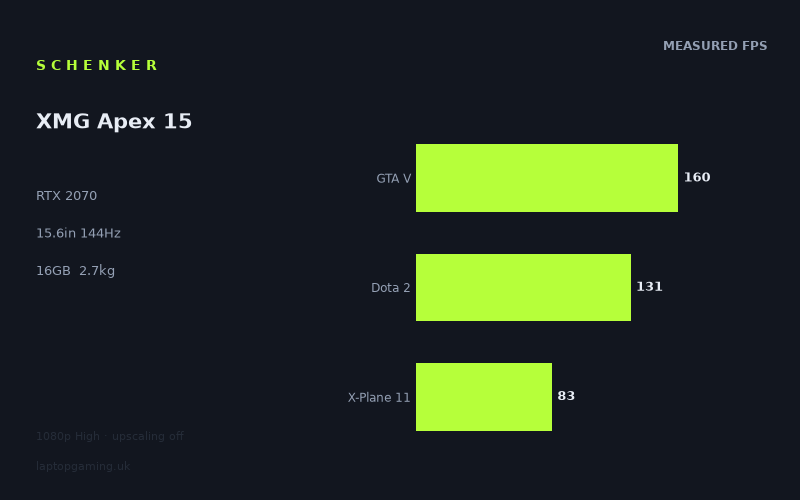
Frame rates
1920×1080, High preset, upscaling off.
Measured on this machine. Source: Notebookcheck, 2020-05-07.
Not scored: incomplete benchmark suite
Every scored laptop on this site is averaged over the same 5 games, and this one is short of Cyberpunk 2077, Baldur's Gate 3. A mean over 3 games is not comparable to a mean over 5, so we publish the figures we have and leave the score blank rather than rank it against machines tested on a different set. The numbers below are real - the suite is just incomplete.
How these numbers were produced
Frame rates here are not measured by us, and we label how each one was arrived at. A figure marked measured comes from a published run on that exact machine. A figure marked representative is derived from the GPU and its power limit (TGP) and cross-referenced against published reviews - a sound estimate of what that configuration delivers, but not a measurement of that specific laptop. Unless stated otherwise, numbers are 1920x1080, High preset, upscaling off. Where a laptop ships in several power configurations we use the wattage of the exact SKU listed, because a 140W RTX 5070 and a 115W one are not the same product.
In use
The short version
The Schenker XMG Apex 15 is a straightforward performance-led gaming laptop built around an RTX 2070, a Ryzen 9 3900, 16GB of memory and a 15.6in 144Hz IPS display. The published Notebookcheck benchmark data shows that it remains very capable at its native 1920x1080 resolution with the High preset selected and upscaling disabled. It is particularly convincing in Doom Eternal and GTA V, where the measured figures exceed the screen’s 144Hz refresh rate, and it remains close to that level in The Witcher 3 and Battlefield V.
The important qualification is that the RTX 2070 name alone does not tell the whole story. Laptop GPU performance depends heavily on the implementation: power limit, cooling capacity, firmware behaviour and the balance between processor and graphics load all matter. The available fact sheet does not confirm the GPU power limit for this XMG Apex 15, so there is no basis for claiming that it runs at a particular wattage or for attributing its results to a specific power configuration. What can be said is that the measured frame rates place it firmly in the class of machines that can make sensible use of a 144Hz 1080p panel in a substantial range of games, rather than merely displaying a high refresh-rate badge that the hardware cannot approach.
Notebookcheck recorded 161fps in Doom Eternal, 160fps in GTA V, 142fps in The Witcher 3, 136fps in Battlefield V and 131fps in Dota 2. Those are strong results for the screen fitted here. They show that the Apex 15 is not limited to esports-style games when chasing high refresh: demanding mainstream titles are also running well above 100fps in the published figures. The machine does not maintain that kind of result in every game, however. Shadow of the Tomb Raider is measured at 107fps, Hunt Showdown at 101fps, X-Plane 11 at 83fps and Borderlands 3 at 81fps. That spread is the real story of this laptop. It is quick, but it is not a universal 144fps-at-High machine.
That distinction matters more than a headline GPU label. A buyer interested in fast competitive games, Doom Eternal, GTA V, Dota 2 or titles with similar performance demands has good reason to look at the XMG Apex 15. A buyer whose priority is making every graphically heavy release sit at or above the panel’s full refresh rate will need to accept settings adjustments, game-specific compromises or a more powerful machine. The measured figures show the panel can be fully exploited in some games, nearly fully exploited in others, and only partly exploited in the tougher titles.
There is no confirmed UK price in the fact sheet. That prevents a complete value judgement. The hardware and benchmark results indicate that this is potentially an appealing high-performance 1080p system, but potential value is not actual value without a UK asking price. It would be wrong to call it a bargain, poor value or fairly priced when the key piece of that judgement is missing. Price matters especially here because the rival set includes machines with RTX 2070 and RTX 2080 graphics that can be very close in shared-game performance despite apparently different GPU classes.
The Apex 15 also needs to be approached as a fairly substantial portable rather than a casual carry-everywhere laptop. Its 2.668kg weight is a meaningful consideration for a 15.6in system. The specification includes a 62Wh battery, but there is no published battery-life result in the supplied information, so no claim can be made about how long it lasts away from mains power. Likewise, dimensions, chassis materials, keyboard quality, port selection, cooling noise and surface temperatures are not confirmed here. The sensible conclusion is not to fill those gaps with assumptions. This is a laptop to assess first as a desk-oriented gaming machine that can be moved when needed, not as an ultralight travel computer.
For the right buyer, the attraction is clear: a 144Hz IPS screen paired with benchmark data that regularly reaches or approaches that refresh rate at 1080p High, plus a Ryzen 9 3900 and 1TB SSD. The reservations are equally clear: no confirmed UK price, no confirmed GPU power limit, no battery-runtime result and a weight that makes portability a compromise. The performance is real and attributable because the frame-rate figures come from Notebookcheck. The wider ownership picture is less complete because the fact sheet does not provide the measurements needed to make stronger claims.
Performance
What the published benchmark data says
All frame rates discussed here are Notebookcheck measurements taken at 1920x1080 using the High preset with upscaling disabled, dated 2020-05-07. That is an important baseline. The results are not a promise of what every game will do, and they should not be treated as numbers produced by Laptop Gaming. They are a consistent set of published measurements for this configuration and these settings.
The strongest figure is Doom Eternal at 161fps. That is above the 144Hz refresh rate of the fitted display, meaning the GPU performance shown in this benchmark is sufficient to feed the panel at its maximum refresh and beyond. There is a practical limit to how much benefit a 144Hz screen can visibly show once frame rate exceeds its refresh rate, but the result remains useful. It gives the machine performance headroom rather than merely scraping the panel’s limit. A game running at 161fps under the stated conditions is not asking the RTX 2070 to compromise simply to reach the display’s defining feature.
GTA V follows very closely at 160fps. Again, the measured result is above the screen refresh rate. GTA V is one of the scoring-suite games, and it contributes to the published mean of 125fps across the available scoring-suite results. More importantly for a prospective owner, it demonstrates that the Apex 15 can provide a high-refresh experience in a major open-world game at the selected 1080p High configuration. It is not just a case of a lightweight multiplayer title delivering a large number. The measured data shows a broadly demanding game reaching the same territory as Doom Eternal.
The Witcher 3 lands at 142fps. This is only just below the 144Hz panel refresh rate, and it is an excellent match for the display in practical terms. The important point is not to round it up and claim full-refresh operation where the number does not say that. The measured figure is 142fps, not 144fps. But it is also not a result that makes the 144Hz screen feel irrelevant. It is close enough to demonstrate that this game, at the stated settings, is one of the titles for which the display choice makes sense.
Battlefield V is measured at 136fps. That remains a very high result and is close to the panel limit, but it also begins to show why the Apex 15 should be described as a strong 1080p High machine rather than an effortless 144fps machine in every demanding game. The difference between 136fps and 144fps is not enormous, yet it is evidence that the display refresh rate is a ceiling the system approaches rather than universally reaches. Buyers who want a consistently very high frame-rate experience in Battlefield V have a good foundation here. Buyers who regard any result below 144fps as a reason to lower settings should expect to make that choice in some games.
Dota 2 is measured at 131fps. This is also a scoring-suite result and reinforces the general picture: the Apex 15 performs well into high-refresh territory, but it is not automatically at the display maximum in every title. A 131fps result is still substantially above conventional lower-refresh gaming targets, and it provides a credible reason for fitting a 144Hz screen. At the same time, it underlines an important buying point. The screen’s refresh rate is an upper limit, not a result the laptop guarantees. The game, the selected quality settings, the processor demand and the graphics workload determine whether the hardware reaches it.
Across GTA V, Dota 2 and X-Plane 11, the available scoring-suite mean is 125fps. That is a useful summary figure, but it must be treated with care. It is not a complete score for the machine, and it cannot be used to rank the XMG Apex 15 against scored laptops because figures are not available for Final Fantasy XV and Strange Brigade. Every scored laptop is averaged over the same set of games, while this machine has only a partial set. Calling its available 125fps mean a direct ranking figure would create a false comparison. The number is valuable as a description of these available results, not as a substitute for a complete cross-laptop score.
The games that sit below the refresh ceiling
Escape from Tarkov is measured at 120fps and Gears Tactics at 119fps. These are still strong frame rates, particularly at 1920x1080 with the High preset and no upscaling. They are below the panel’s 144Hz maximum, but not so far below that the screen becomes mismatched to the hardware. Instead, they represent the kind of result that makes a high-refresh panel worthwhile without necessarily allowing the system to saturate it. The owner is still getting a substantially faster output than a more basic display could present, while retaining room to alter settings if a specific frame-rate target matters more than visual quality.
Shadow of the Tomb Raider at 107fps and Hunt Showdown at 101fps are the next tier down. Both remain above 100fps in the published measurements, which is a good outcome for a laptop at High settings. Yet these are also the figures that should temper expectations around the RTX 2070. A 144Hz panel is not wasted with frame rates around this level, but the system is no longer operating close to the maximum refresh rate. Someone choosing this laptop specifically because they want every visually demanding game to run at the panel limit should pay more attention to Shadow of the Tomb Raider and Hunt Showdown than to Doom Eternal alone.
Borderlands 3 is measured at 81fps, while X-Plane 11 is measured at 83fps. These results remain playable-looking on paper and are not evidence of a weak machine. They are evidence of how widely game engines and workloads vary. The RTX 2070 can produce 161fps in Doom Eternal and 81fps in Borderlands 3 using the stated test conditions. That is not a contradiction. It is precisely why laptop reviews should use a spread of games rather than treating a single benchmark as the whole performance story.
For a buyer, the consequence is simple. The Apex 15 is fast enough to deliver high frame rates across every published result, but the extent to which it uses the 144Hz panel differs sharply by game. Doom Eternal and GTA V are above the screen maximum. The Witcher 3 is almost there. Battlefield V and Dota 2 are close enough to make the high-refresh panel a sensible fit. Escape from Tarkov and Gears Tactics are clearly high frame-rate experiences without reaching the maximum refresh. Shadow of the Tomb Raider and Hunt Showdown sit around the 100fps mark. Borderlands 3 and X-Plane 11 show that some games will require a more accepting attitude towards frame rate, settings or both.
Why the frame-rate spread matters
It is tempting to look at an RTX 2070 laptop and ask whether it is “good for 144Hz”. The data shows why that question needs a more precise answer. It is good for making meaningful use of a 144Hz panel. It is not shown to deliver 144fps in every game. Those statements can both be true.
Different games load a laptop differently. Some place heavier emphasis on graphics processing. Some are more dependent on processor performance. Some combine both heavily. Game engines also vary in their rendering techniques, scene complexity and performance scaling. The Ryzen 9 3900 is part of the package, and its presence matters in games that lean strongly on CPU resources, but the supplied benchmark data does not isolate processor and GPU contribution in each result. It would be speculation to assign a precise share of any frame rate to one component.
The 1080p resolution is also relevant. At 1920x1080, lighter titles in a shared benchmark set can become CPU-bound, meaning that additional graphics capability may not translate neatly into a large frame-rate advantage. This is particularly important when looking at the rival comparisons later in the review. A machine with nominally stronger graphics can be only marginally ahead, or even effectively level, if the games being compared are not exposing the full graphics-performance gap at these settings. A near-zero difference is therefore not meaningless. It can show that the tested workload is constrained elsewhere or that the whole system balance is more important than a GPU badge suggests.
The Apex 15’s own results make the same point internally. Doom Eternal and GTA V are near-identical at 161fps and 160fps. The Witcher 3 remains near the panel limit at 142fps. Yet Borderlands 3 is much lower at 81fps. It would be unhelpful to average away that difference and simply call the laptop a 125fps machine. The scoring-suite mean is informative, but a person who mainly plays Borderlands 3 should care more about the Borderlands 3 result than the mean. A person who mainly plays Doom Eternal should care more about the Doom Eternal result. Benchmark averages are useful for broad positioning; individual game results are more useful for deciding whether a particular laptop suits a particular library.
The missing GPU power-limit detail
The fact sheet identifies the graphics chip as an RTX 2070, but it does not confirm its power limit. That omission is worth stating plainly because laptop GPU power limits can have a substantial effect on performance. Two laptops carrying the same GPU name are not automatically equivalent. Their cooling systems, firmware settings and allowed graphics power can produce different outcomes.
There is no responsible basis here for saying that the XMG Apex 15 uses a low-power, high-power or maximum-power RTX 2070 implementation. There is also no basis for claiming that its performance is restricted by a particular wattage. The measured figures are the evidence available, and they should take precedence over assumption. They show an RTX 2070 laptop capable of excellent 1080p High results, including several games near or above the 144Hz display limit. They do not reveal the exact engineering choice that produced those numbers.
This is one reason the rival results matter more than a specification-sheet hierarchy. The Apex 15 is nearly level with machines listed with RTX 2070 and RTX 2080 graphics in the shared-game comparisons, while it is substantially ahead of the lower-powered RTX 2050 rival. That does not prove that the XMG has a particular GPU power configuration. It does show that the laptop’s observed performance is competitive with several apparently stronger or similarly positioned systems in the games available for comparison.
The screen
A sensible 1080p, 144Hz pairing
The XMG Apex 15 has a 15.6in IPS display with a 1920x1080 resolution and a 144Hz refresh rate. On the evidence available, this is a well-judged pairing for the RTX 2070 rather than an overambitious specification. A higher-resolution panel would place more pressure on the graphics hardware, while a lower-refresh screen would leave performance unused in the fastest measured games. At 1080p, the Apex 15 has enough graphics performance to make the refresh rate matter in a useful range of titles.
Doom Eternal at 161fps and GTA V at 160fps are the clearest examples. Both exceed 144fps, so the system has sufficient measured performance to reach the panel ceiling in those games. The Witcher 3 at 142fps is extremely close. Battlefield V at 136fps and Dota 2 at 131fps fall short of the nominal refresh maximum but remain close enough that the panel is still an appropriate choice. These are not results where a 144Hz display exists only for marketing. The benchmark data says the machine can genuinely benefit from it.
The more moderate results are equally important. Escape from Tarkov at 120fps, Gears Tactics at 119fps, Shadow of the Tomb Raider at 107fps and Hunt Showdown at 101fps all sit below 144fps but remain high enough for a fast display to retain value. They also give the owner options. If a player wants the highest possible frame rate in a particular game, they may decide that visual settings are negotiable. If they prefer the stated High preset image quality, the published figures show what level of performance to expect under that condition. The review cannot invent the frame-rate effect of changing settings because no such figures are supplied, but it is reasonable to say that the choice exists.
X-Plane 11 at 83fps and Borderlands 3 at 81fps are reminders that a 144Hz panel does not turn every game into a 144fps experience. That is not a flaw in the screen. It is simply the relationship between screen capability and game workload. The panel can display up to 144 updates per second; whether the laptop produces them depends on the title and settings. In these heavier results, the display has unused refresh capacity. In Doom Eternal and GTA V, it does not.
IPS is useful, but the available information has limits
The panel is identified as IPS. That tells us the display technology category, but it does not establish brightness, contrast, colour coverage, response behaviour, backlight uniformity or outdoor visibility. None of those measurements appear in the supplied fact sheet. It would be wrong to make broad claims about image quality beyond the IPS specification itself.
The 144Hz rating also should not be confused with a guarantee about every aspect of motion clarity. Refresh rate is one part of the experience. Panel response behaviour, synchronisation support and game frame pacing also affect how motion looks. The supplied information confirms the refresh rate, resolution and panel type, but not those other characteristics. The safe conclusion is that the specification is appropriate for the recorded high frame rates; it is not a complete display-quality assessment.
For gaming use, the main strength is the coherence of the package. A 15.6in 1080p screen does not ask the RTX 2070 to chase an unnecessarily high pixel count, and the 144Hz refresh rate gives the machine room to show its best results. The weakest screen-and-performance pairing would be a high-refresh display attached to hardware that only reached modest frame rates. The XMG does not fit that description. It repeatedly reaches high frame rates, though not universally the full 144fps.
Build, size and portability
Weight sets the expectation
The XMG Apex 15 weighs 2.668kg. That is the portability fact that matters most from the supplied information. It is not a featherweight 15.6in laptop and should not be presented as one. The machine can be moved between locations, but its weight suggests that regular carrying will be more deliberate than with a lighter system. It makes more sense as a laptop that spends much of its time on a desk, then travels when needed, than as a machine chosen primarily for effortless daily transport.
That does not make the weight unreasonable for a performance-focused gaming laptop. The RTX 2070, Ryzen 9 3900, 144Hz screen and 1TB SSD describe a system built around capability rather than minimum mass. But a potential buyer needs to be honest about usage. If the laptop will stay in one room, move between home and university accommodation, or travel occasionally in a suitable bag, 2.668kg may be an acceptable trade-off. If it will be carried across town every day, placed in a backpack alongside other equipment and used frequently away from a desk, it deserves more scrutiny.
The fact sheet does not provide dimensions, so there is no supported basis for describing the footprint, thickness or bag friendliness beyond the stated weight and 15.6in screen size. It also does not provide details about the chassis material, hinge design, keyboard layout, trackpad, port selection or webcam. These are all ownership considerations, especially for a laptop of this size, but they cannot be filled in from assumption.
Battery capacity is not battery life
The battery is listed at 62Wh. That is a capacity figure, not a runtime measurement. Battery life depends on workload, screen behaviour, power settings, background activity and many other factors. Gaming battery life in particular cannot be inferred responsibly from capacity alone. There is no published battery-duration figure in the supplied information, so this review cannot say how long the XMG Apex 15 lasts for web use, video playback, office work or gaming away from mains power.
The practical implication is that buyers who need dependable long-duration unplugged use should seek battery testing before committing. The 62Wh specification is useful context, but it is not enough to support claims about all-day use, short endurance or anything in between. For a gaming laptop, it is generally sensible to consider mains power part of the normal performance setup, but the exact behaviour of this model away from the charger is not established by the available data.
What is known about the core configuration
The configuration includes a Ryzen 9 3900 processor, 16GB of memory and a 1TB SSD. For gaming, the benchmark data is more useful than merely reciting those components because it shows the complete system in action. The figures demonstrate that the processor, memory and graphics combination can drive high frame rates in a varied set of games at 1080p High.
The 1TB SSD is a meaningful capacity specification, but there are no supplied measurements for storage speed, sustained performance or upgrade options. The memory total is confirmed at 16GB, but the fact sheet does not state its speed, layout or whether future upgrades are possible. The processor is identified, but no separate productivity or creator-workload figures are provided. It would therefore be inappropriate to turn the Ryzen 9 name into claims about rendering, compiling or professional application performance. This review is grounded in the published gaming figures and the confirmed specifications, not presumed performance in unmeasured workloads.
How it compares
Against the Acer Aspire 17 with RTX 2050 graphics
The widest positive gap in the supplied rival set is against the Acer Aspire 17, which is listed with an RTX 2050 at 35W. Across three shared games, the XMG Apex 15 averages 36fps ahead. That is a substantial advantage, and it supports the conclusion that the RTX 2070-based Apex 15 belongs in a meaningfully higher gaming-performance class than this lower-powered RTX 2050 rival.
The Acer has no confirmed UK price in the supplied information, so the comparison cannot become a clean value argument. If the Acer were much cheaper, the performance deficit might be acceptable for some buyers; if it were close in price, the XMG’s gaming advantage would be much harder to ignore. Without prices, the sound conclusion is limited to performance: the XMG has a clear shared-game lead.
This is also a useful reminder that GPU naming needs context. The Acer’s RTX 2050 is explicitly identified as a 35W implementation. The XMG’s GPU power limit is not confirmed, so a wattage-to-wattage comparison cannot be made. Nevertheless, the measured shared-game advantage is large enough that the observed outcome is clear. Buyers focused on higher frame rates at 1080p should favour the Apex 15 over the Acer on the figures provided.
Against the Razer Blade 15 RTX 2070 Super Max-Q
The Razer Blade 15 RTX 2070 Super Max-Q is listed with RTX 2070 graphics, and the XMG Apex 15 averages 1fps behind it across three shared games. In practical terms, this is a near-level result. A difference of 1fps across the shared selection is not a convincing basis for choosing one machine over the other on gaming speed alone.
It would be a mistake to repeat the 1fps difference as though it settles the contest. It does not. At 1080p, lighter titles in a shared set can become CPU-bound and compress genuine GPU differences. That means closely grouped results can reflect the limitations of the workload as much as a definitive statement that the systems have identical graphics capability. The result is still real and useful: based on the shared games, the XMG does not trail the Razer by an amount that should dominate a buying decision.
There is no confirmed UK price for the Razer in the supplied information, and there are no supporting facts here about size, weight, battery life, display behaviour or build quality for that rival. The appropriate conclusion is narrow. If the choice is being made on these shared benchmark results alone, the XMG is effectively tied with the Razer. Other deciding factors would need separately sourced information.
Against the MSI Creator 17 with RTX 2080 graphics
The MSI Creator 17 is listed with an RTX 2080, yet the XMG Apex 15 averages only 2fps behind across three shared games. Again, that is close enough that it should not be treated as a decisive performance defeat. The nominal GPU hierarchy suggests a larger gap might be expected, but laptop graphics performance is not determined by model name alone, and the shared-game workload at 1080p can compress differences where titles become CPU-bound.
The important reading is not that an RTX 2070 always equals an RTX 2080. The available evidence does not support such a broad claim. The useful reading is that, in the three games shared by these machines, under the comparison method used, the XMG Apex 15 sits very close to this particular MSI Creator 17. That is a strong practical result for the Schenker, especially because it shows why buyers should look at attributable benchmark data rather than assuming that a higher-numbered GPU automatically creates a proportional advantage in every game.
The MSI has no confirmed UK price in the fact sheet, so there is no supported value conclusion. Nor is there enough information here to assess whether the Creator 17’s larger-format design, display or other characteristics would suit a different kind of user. On shared gaming performance, however, the Apex 15 is very close.
Against the Alienware m17 R3 with RTX 2080 graphics
The Alienware m17 R3 is the rival that beats the XMG Apex 15 by the largest supplied margin. Across three shared games, the XMG averages 19fps behind the Alienware. Unlike the near-zero differences against the Razer and MSI, this is large enough to describe as a meaningful performance advantage for the Alienware in the available comparison.
For the buyer whose overriding aim is the highest possible frame rate from this rival group, the Alienware’s shared-game lead matters. A 19fps average advantage can be the difference between merely approaching a 144Hz target and moving closer to it, depending on the game. It does not tell us the exact result in every title, because only the shared-game average is supplied, but it is enough to establish that the Alienware is the quicker machine in this comparison set.
That result also helps put the Apex 15 in the right place. It is not presented by the figures as the outright fastest laptop among these rivals. It is instead a strong RTX 2070 system that can be essentially level with some more powerful-looking alternatives in the games shared, while still falling behind the best-performing Alienware comparison. That is a more useful and honest position than trying to force a universal ranking from incomplete data.
As with the other rivals, there is no confirmed UK price for the Alienware. The performance lead does not automatically make it the better purchase. Whether the extra speed is worth any additional cost cannot be judged without prices. The XMG may still be the more sensible buy if it is offered at a substantially lower figure, but that is a conditional statement, not a verdict supported by the current fact sheet.
Who it’s for
Buy it for high-refresh 1080p gaming, with realistic expectations
The Schenker XMG Apex 15 makes the most sense for someone who wants a serious 1080p gaming laptop with a screen fast enough to show the performance it can produce. The best fit is a player whose library includes titles resembling Doom Eternal, GTA V, The Witcher 3, Battlefield V and Dota 2. In the published Notebookcheck data, those games are measured from 131fps to 161fps, with Doom Eternal and GTA V above the 144Hz panel limit and The Witcher 3 very close to it.
It is also a sensible choice for someone who values consistently high frame rates more than chasing a higher screen resolution. The 1920x1080 panel is not a compromise in the negative sense here. It is a resolution that the RTX 2070 can drive effectively. The benchmark spread shows why that matters. Even games at the lower end of the published results, such as Borderlands 3 at 81fps and X-Plane 11 at 83fps, remain at credible frame rates for a High-preset laptop gaming experience.
The laptop is especially suitable for buyers willing to treat settings as a game-by-game decision. The supplied results already use High settings with upscaling off. Someone satisfied with those conditions can expect a broad range from 81fps to 161fps across the published titles. Someone who prioritises getting closer to the display’s maximum refresh in the slower games may reasonably choose different settings, though this review does not have data to quantify the result of doing so.
The XMG is also for buyers who are comfortable with a substantial 15.6in machine. At 2.668kg, it is better suited to desk use, home use, student accommodation, periodic travel or moving between fixed locations than to constant carrying. The 62Wh battery is a specification worth noting, but there is no runtime measurement here, so buyers should not choose it on the assumption of any particular unplugged endurance.
Buy something else if full-refresh performance in every demanding game is the goal
The Apex 15 is not the best choice for a buyer who interprets a 144Hz panel as a requirement for 144fps in every demanding game at High settings. The data does not support that expectation. The Witcher 3 is measured at 142fps, Battlefield V at 136fps and Dota 2 at 131fps. Those are excellent results, but they are not all at the panel maximum. More demanding outcomes include Shadow of the Tomb Raider at 107fps, Hunt Showdown at 101fps, X-Plane 11 at 83fps and Borderlands 3 at 81fps.
Anyone unwilling to lower settings, accept game-to-game variation or tolerate frame rates below 144fps should look for a faster system. Within the named rival set, the Alienware m17 R3 has the clearest performance advantage, averaging 19fps ahead across the shared games. That does not make it automatically the better purchase because UK pricing is not confirmed, but it does make it the more appropriate performance direction for buyers who want extra headroom.
The XMG is also not ideal for someone whose main requirement is low carrying weight. The stated 2.668kg weight should be treated as a real part of the buying decision. There may be buyers for whom the gaming performance justifies it. There will also be buyers who would rather sacrifice some speed for a more mobile system. The supplied facts do not identify a lighter alternative with a confirmed UK price, so this is a usage-based caution rather than a specific replacement recommendation.
Buyers who need confirmed battery longevity, verified display quality beyond IPS and 144Hz, detailed thermal data, noise data, dimensions, port information or keyboard assessment should also wait for further sourced information. Those details are not minor for everyone. A person planning to use the laptop in lectures, shared accommodation, a quiet office or frequent travel may care as much about them as the gaming benchmark figures. The current fact sheet supports a strong gaming-performance judgement; it does not support a complete lifestyle or ergonomics verdict.
The final buying judgement
The Schenker XMG Apex 15 earns attention because its published gaming results match its screen specification unusually well. The RTX 2070 and 144Hz 1080p IPS panel are not a mismatched combination. Notebookcheck’s figures show that the laptop exceeds the display refresh rate in Doom Eternal and GTA V, comes extremely close in The Witcher 3, stays close in Battlefield V and Dota 2, and remains well above modest frame-rate territory even in the slower measured games.
Its limits are visible rather than hidden. It is not a universal 144fps machine. It weighs 2.668kg. Its GPU power limit is not confirmed. Its battery capacity is 62Wh, but no battery-life result is available. Its UK price is not confirmed, which means no final value verdict should be attached to it. Those are not reasons to dismiss the laptop; they are reasons to judge it carefully.
If offered at a sensible UK price, the Apex 15 has the benchmark evidence to appeal strongly to a buyer seeking high-refresh 1080p gaming from a 15.6in machine. If priced too close to faster alternatives, particularly an option with a meaningful shared-game lead such as the Alienware m17 R3, its appeal would weaken. Until that price is confirmed, the responsible conclusion is performance-first: this is a capable RTX 2070 laptop with a well-matched 144Hz display, excellent results in several games, and enough variation between titles that buyers should make their decision using the games they actually play rather than a single average.