Performance analysis
Far Cry 5 (2018): what it takes to run it
Measured on 140 gaming laptops at 1920×1080, High preset, upscaling off.

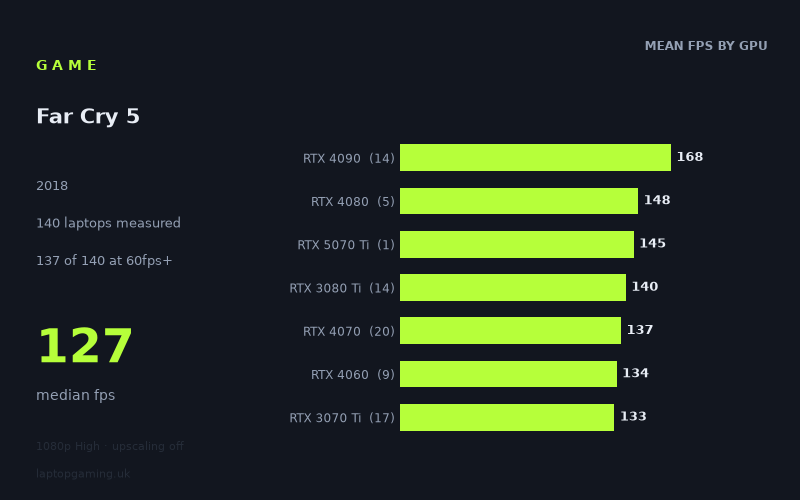
Every laptop we have figures for
Frame rates measured by Notebookcheck.
What it asks of a laptop
At 1920x1080 on the High preset with upscaling off, Far Cry 5 is forgiving by modern gaming-laptop standards. Notebookcheck’s figures cover a substantial 140 laptops, with a median result of 127fps. Of those machines, 137 reached 60fps, 125 reached 100fps, and 39 reached 144fps.
That does not mean every laptop produces the same result. The full spread is wide, from 232fps on the Asus ROG Strix Scar 17 with RTX 4090 down to 36fps on the MSI Prestige 15 with RTX 3050 Ti. However, the low-end results are the exception rather than the norm. Even several laptops using older or entry-level dedicated GPUs exceeded 60fps comfortably.
The GPU tiers separate in a fairly orderly fashion at the top end, but there is meaningful overlap between generations and product classes. The RTX 4090 group averaged 168fps across 14 laptops, versus 148fps for RTX 4080 systems and 140fps for RTX 3080 Ti machines. Below that, the RTX 4070 averaged 137fps, RTX 4060 134fps and RTX 3070 Ti 133fps. Those results suggest that Far Cry 5 does not require a flagship GPU for a fast 1080p experience.
Configuration still matters. Notebookcheck’s numbers include, for example, RTX 4050 laptops from 81fps to 133fps, while RTX 3050 Ti results range from 36fps to 94fps. Buyers should therefore avoid treating the GPU name alone as a promise of a particular frame rate, especially with thinner laptops and lower-powered configurations in the mix.
What runs it
For 60fps: the measured results are overwhelmingly positive. Every RTX 4090, RTX 4080, RTX 3080 Ti, RTX 4070, RTX 4060, RTX 3070 Ti, RTX 3080, RTX 3070 and RTX 3060 laptop in the list is above 60fps. The tier averages are all well clear: 168fps for RTX 4090, 148fps for RTX 4080, 140fps for RTX 3080 Ti, 137fps for RTX 4070, 134fps for RTX 4060, 133fps for RTX 3070 Ti, 124fps for RTX 3080, 115fps for RTX 3070 and 108fps for RTX 3060.
The entry-level results remain mostly workable. RTX 4050 machines averaged 107fps across 10 laptops, although the measured range includes 133fps on the Medion Erazer Crawler E40 and 51fps on the Acer Swift X. The RTX 3050 averaged 74fps across two laptops, with 78fps on the Asus V16 and 70fps on the Lenovo Yoga Slim 7 Pro X 14IAH7. RTX 3050 Ti systems averaged 73fps across five laptops, but results range from 94fps on the Asus ROG Strix G17 to 36fps on the MSI Prestige 15. The sole RTX 2050 result, the HP Envy 17-cr0079ng, managed 53fps.
For 100fps: the data is also encouraging: 125 of the 140 measured laptops hit this mark. The tier means from RTX 3060 upwards all exceed 100fps, as does the RTX 4050 average. Concrete examples include the Asus TUF Gaming F17 with RTX 3060 at 100fps, the Dell G15 with RTX 4060 at 146fps, and the MSI Pulse 17 with RTX 4070 at 154fps. There are exceptions, though: the MSI Thin GF63 with RTX 4050 reached 82fps, and the Samsung Galaxy Book4 Ultra with RTX 4050 reached 88fps.
For 144fps: this is where the choice of laptop becomes more significant. Only 39 of 140 systems reached that level. Flagship hardware has ample headroom: the RTX 4090 tier averaged 168fps, while the fastest result was 232fps from the Asus ROG Strix Scar 17. Yet fast results are not exclusive to flagship GPUs. The Lenovo Legion Pro 5 16IRX9 G9 with RTX 4060 recorded 158fps, and the Schenker XMG Fusion 15 (Early 24) with RTX 4070 at 140W reached 166fps.
There are also several 144fps-or-better examples among RTX 3070 Ti and RTX 3080 Ti laptops: the MSI Vector GP76 with RTX 3070 Ti at 150W achieved 147fps, while the MSI Raider GE77 HX with RTX 3080 Ti at 175W reached 167fps. These are specific measured laptops, not a guarantee that every system with those GPU names will do the same.
The cheapest laptop that handles it
The lowest-priced machine in the supplied figures that clearly handles Far Cry 5 at this test setting is the Asus V16 with RTX 3050, listed at £900. It delivered 78fps at 1080p High with upscaling off, giving it a measured margin over 60fps.
If spending slightly more, the Asus ROG Zephyrus G14 2024 with RTX 4070 at 75W, listed at £988, produced 110fps. The Razer Blade 14 Ryzen 9 with RTX 3070 Ti at 100W, listed at £1,020, reached 116fps, while the RTX 3070 version of the Razer Blade 14 is listed at the same £1,020 and recorded 105fps.
For a measured 144fps result among laptops with stated prices, the Asus ROG Strix Scar 15 with RTX 3070 Ti at 150W was listed at £1,952 but reached 138fps, just short of that target. The first clearly 144fps-plus examples in the supplied list do not have prices attached, so the figures do not support naming a cheapest 144fps laptop.
What this means if you’re buying
For a 60fps-focused 1080p laptop, Far Cry 5 does not justify buying a high-end GPU on its own. The measured £900 Asus V16 already reached 78fps, and many RTX 3050, RTX 3050 Ti, RTX 3060 and RTX 4050 laptops delivered acceptable results.
For a more consistently fast experience, the measured figures favour RTX 3060, RTX 4050, RTX 4060, RTX 4070 and above, but laptop implementation matters. An RTX 4060 result ranges from 112fps to 158fps in this data, while RTX 4070 laptops span 110fps to 166fps. Check reviews of the exact laptop configuration rather than assuming a GPU tier will automatically match the best result here.
If a 144Hz display is the aim, look for a laptop with measured performance at or above 144fps rather than relying on an average. The data shows that suitable machines exist with RTX 4060, RTX 4070, RTX 3070 Ti, RTX 3080 Ti, RTX 4080 and RTX 4090 graphics, but only 39 tested laptops actually crossed that threshold.
How these numbers were produced
Frame rates here are not measured by us, and we label how each one was arrived at. A figure marked measured comes from a published run on that exact machine. A figure marked representative is derived from the GPU and its power limit (TGP) and cross-referenced against published reviews - a sound estimate of what that configuration delivers, but not a measurement of that specific laptop. Unless stated otherwise, numbers are 1920x1080, High preset, upscaling off. Where a laptop ships in several power configurations we use the wattage of the exact SKU listed, because a 140W RTX 5070 and a 115W one are not the same product.