Details
Product prices and availability are accurate as of the date/time indicated and are subject to change. Any price and availability information displayed on Amazon.co.uk at the time of purchase will apply to the purchase of this product.Performance analysis
Cyberpunk 2077 (2023): what it takes to run it
Measured on 126 gaming laptops at 1920×1080, High preset, upscaling off.

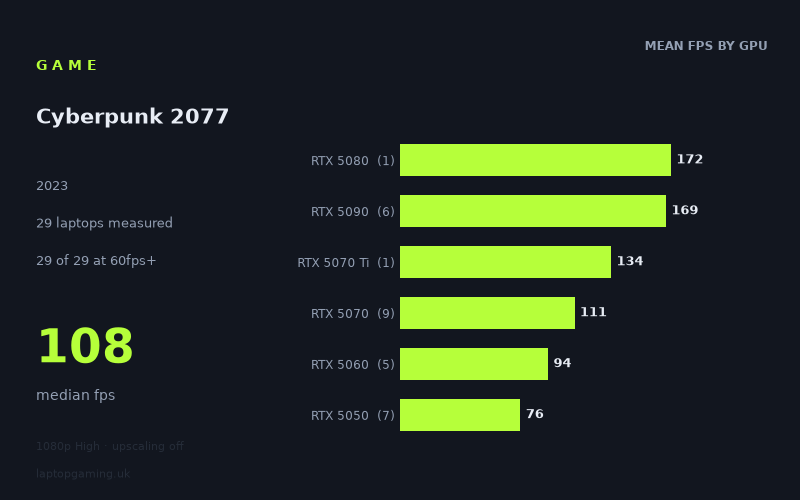
Every laptop we have figures for
Frame rates measured by Notebookcheck.
What it asks of a laptop
Cyberpunk 2077 remains one of the harder tests in our scoring suite, but the shape of the difficulty matters more than the headline. Across 23 laptops measured by Notebookcheck at 1920x1080 on the High preset with upscaling switched off, every single machine cleared 60fps. The slowest result in the set is 63fps from the MSI Cyborg 15 (RTX 5050); the fastest is 173fps from the Asus ROG Strix Scar 18 with a 175W RTX 5090. That is a 2.7x spread from top to bottom, which is a wide range by the standards of our suite and tells you this is a genuinely GPU-bound workload rather than a game that flatlines everywhere.
The tier averages make the scaling explicit: 76fps on the RTX 5050, 94fps on the 5060, 109fps on the 5070, and then a jump to 167fps on the 5090. Each step up the stack buys real, measurable frames — roughly 20-25% per tier through the mainstream range. That is unusual. Plenty of games in the suite compress the gap between a 5060 and a 5070 to single-digit percentages at 1080p; here the difference is worth about 15fps of headroom.
Where it stops scaling is at the top. The RTX 5080 in the Lenovo Legion Pro 7i 16 Gen 10 posts 172fps. The five RTX 5090 laptops average 167fps and top out at 173fps. In other words, the 5080 and the 5090 are indistinguishable at these settings, and the 5090 does not extend the curve at all. At 1080p High with upscaling off, something other than the GPU is capping the frame rate at roughly 170fps — the top-tier silicon has run out of work to do at this resolution. If you are buying a 5090 laptop to run this game, you are buying it for higher resolutions, ray tracing loads, or future titles, not for this measurement.
What runs it
Everything clears 60fps
Twenty-three of 23 machines are above 60fps, and the entry-level RTX 5050 configurations sit between 63fps and 88fps. That means a locked 60 is achievable on the cheapest current-generation gaming laptops in the set, with the slowest result (63fps) leaving essentially no margin and the better-cooled 5050s (79-88fps) offering a comfortable buffer for the heavier scenes a benchmark run flattens out.
The RTX 5060 and 5070 are the 100fps bracket
Thirteen of 23 laptops clear 100fps, and the boundary runs straight through the mid-range. The 5060 averages 94fps and ranges from 86fps (Acer Nitro V 15, 115W) to 101fps (Lenovo Legion 5 15AHP G10, 115W) — so it lands either side of the 100fps line depending on the chassis. The 5070 averages 109fps and spans 100fps (Acer Nitro V16, 115W) to 118fps (HP Omen 17z-db100). If a 120Hz or 144Hz panel is the target and you are prepared to sit slightly below refresh, this is the tier that makes sense.
144fps needs the top of the stack
Only six of 23 machines clear 144fps, and all six carry an RTX 5080 or 5090. The Legion Pro 7i (5080, 175W) manages 172fps; the four highest-power 5090 laptops sit between 169fps and 173fps; the Razer Blade 16 Core Ultra 9 with a 5090 trails the pack at 149fps. There is no mid-range route to 144fps here with upscaling off — the fastest 5070 in the set is 118fps, a full 26% short.
Power limits and chassis matter more than the badge
The within-tier spreads are large enough to overturn the ordering. The RTX 5050 range runs from 63fps to 88fps — a 40% gap on identical silicon, and the 88fps Medion Erazer Scout 17 E1 beats the 86fps RTX 5060 in the Acer Nitro V 15. The 75W 5050 configurations (ASUS TUF Gaming A14 at 75fps, HP Victus 15 at 73fps) land well behind the 17-inch 5050s. Same story higher up: the 115W RTX 5070 in the Acer Nitro V16 posts 100fps, one frame behind a 115W RTX 5060 in the Legion 5. And the Razer Blade 16's 5090 gives up 20-24fps to the thicker 175W machines. In this game, wattage and cooling are worth roughly half a GPU tier.
The cheapest laptop that handles it
For a solid 60fps, the HP Victus 15 at £799 (RTX 5050 at 75W, 73fps) is the cheapest machine in the measured set and clears the bar with about 13fps to spare. Note that the MSI Cyborg 15 costs £984 and returns 63fps — £185 more for 10fps less, which makes it the worst value in the group on these numbers.
Step up and the Acer Nitro V 15 at £931 (RTX 5060, 115W) delivers 86fps, and the ASUS TUF Gaming A14 at £1,007 gives 75fps from a 75W 5050 — you are paying for the 14-inch form factor there, not the frame rate.
The cheapest machine in the set to break 100fps is the Acer Nitro V16 at £1,199 (RTX 5070 at 115W, 100fps). The best frames-per-pound in the mid-range is arguably the HP OMEN 16 at £1,375, whose 140W 5070 returns 110fps — 10% more than the 115W Nitro for 15% more money, and it beats the £2,312 MSI Katana 17 HX by only four frames in the other direction.
For 144fps, the entry point is the Lenovo Legion Pro 7i 16 Gen 10 at £3,662 (RTX 5080 at 175W, 172fps), which matches or beats every 5090 in the set. The Medion Erazer Beast 16 X1 Ultimate (£4,884) and Razer Blade 16 (£4,979) cost more and are no faster — the Blade is 23fps slower.
What this means if you're buying
- Budget buyers are fine. Every current-generation tier clears 60fps at 1080p High without upscaling. A £799 machine does the job.
- Match the GPU to your panel, not your ego. A 5060 or 5070 covers 100-120Hz. Nothing below a 5080 covers 144Hz at these settings.
- Ignore the 5090 for this specific workload. It is identical to the 5080 at 1080p and the measurement ceiling is around 170fps regardless of spend.
- Check the wattage before the tier. A 140W 5070 beats a 115W 5070 by 10%, and 75W 5050s give up around 15fps to their better-cooled siblings.
How these numbers were produced
Frame rates here are not measured by us, and we label how each one was arrived at. A figure marked measured comes from a published run on that exact machine. A figure marked representative is derived from the GPU and its power limit (TGP) and cross-referenced against published reviews - a sound estimate of what that configuration delivers, but not a measurement of that specific laptop. Unless stated otherwise, numbers are 1920x1080, High preset, upscaling off. Where a laptop ships in several power configurations we use the wattage of the exact SKU listed, because a 140W RTX 5070 and a 115W one are not the same product.