Review
Acer Nitro V14 AI review
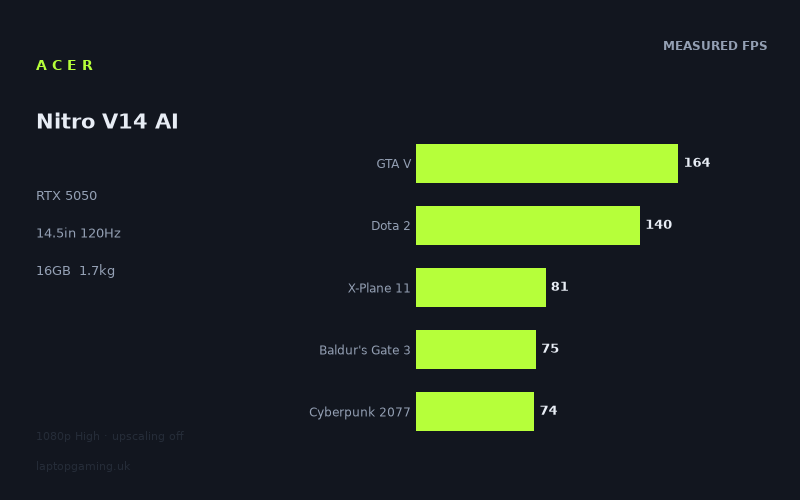
Frame rates
1920×1080, High preset, upscaling off. Averages 106fps across the 5 core benchmark games.
Measured on this machine. Source: Notebookcheck, 2025-12-27.
Not scored: no confirmed UK price
We have the full benchmark suite for this machine, so it ranks on the frame rate leaderboard like any other. What we don't have is a UK listing for this exact configuration - it's sold as a European review unit, or only in specifications that differ from the one tested. Since 30% of our score is value for money, scoring it would mean pretending price is no object, which would flatter it against every laptop you can actually buy. The frame rates below are real and comparable; there is just no buying recommendation to make yet.
How these numbers were produced
Frame rates here are not measured by us, and we label how each one was arrived at. A figure marked measured comes from a published run on that exact machine. A figure marked representative is derived from the GPU and its power limit (TGP) and cross-referenced against published reviews - a sound estimate of what that configuration delivers, but not a measurement of that specific laptop. Unless stated otherwise, numbers are 1920x1080, High preset, upscaling off. Where a laptop ships in several power configurations we use the wattage of the exact SKU listed, because a 140W RTX 5070 and a 115W one are not the same product.
In use
The short version
The Nitro V14 AI is Acer's attempt to put a discrete gaming GPU into a chassis that a student or a commuter would actually be willing to carry every day, and on the evidence of the benchmark data it mostly succeeds at that narrower job rather than at the broader one of being a fast gaming laptop. The combination here is an RTX 5050 with 8GB of VRAM, a Ryzen AI 5 340, 16GB of memory, a 1TB SSD and a 14.5in 1920x1200 IPS panel running at 120Hz, all inside something that weighs 1.728kg and carries a 76Wh battery. That is a genuinely portable machine by gaming-laptop standards, and it is the reason to look at this one rather than at any of the 15in, 16in and 17in alternatives sitting next to it in our database with the same graphics chip.
The performance picture is exactly what an RTX 5050 with 8GB delivers in late 2025, which is to say: comfortable in older and lighter titles, adequate in the mid-weight modern ones if you accept 40-something frames per second, and genuinely struggling in the heaviest current releases. Notebookcheck's numbers, measured at 1920x1080 on High presets with upscaling switched off, put GTA V at 164fps and Dota 2 at 140fps, both comfortably clear of the panel's 120Hz ceiling. They also put Borderlands 4 at 29fps, Oblivion Remastered at 40fps, Doom: The Dark Ages at 42fps and Assassin's Creed Shadows at 43fps. Eight of the fourteen measured titles land below 60fps. That spread is the whole story of this machine, and any honest recommendation has to be built around it rather than around the headline average.
One piece of housekeeping, stated once and then left alone: we have no confirmed UK price for this exact configuration, so this review carries no score. That is a gap in our pricing data, not a criticism of the laptop. The benchmark suite is complete, the machine ranks normally on the frame rate leaderboard, and everything in the performance analysis below is as solid as it is for any other laptop on the site. Value accounts for a substantial share of how we score, and it simply cannot be computed without a number to divide by. When a confirmed price appears, the page will score it automatically.
Who should buy it: someone who wants one laptop that goes to lectures or the office in a normal-sized bag and still plays games in the evening, who plays a mix of esports, older titles and mid-weight single-player games, and who is willing to reach for upscaling and turn settings down in the newest releases. Someone, in other words, for whom 14.5in and 1.728kg is a requirement rather than a preference.
Who should not: anyone whose game list is dominated by 2025's heaviest releases, anyone who wants to see the 120Hz panel actually saturated in something other than Dota 2, and anyone who is buying a machine to sit permanently on a desk. If the laptop is not going to move, the same GPU in a 15in or 16in chassis gives you more frames for the same silicon, and a step up to an RTX 5060 gives you more again.
Performance
All the frame rates below come from Notebookcheck's measurements dated 27 December 2025, taken at 1920x1080 on High presets with upscaling disabled. That last detail matters more than it used to. A measurement suite run without DLSS is a measurement of the raw hardware, which is what you want for comparison purposes, but it is not a measurement of how most people will actually configure these games on a machine of this class. Hold that thought; it comes back later.
The shape of the results
Fourteen games, and they fall into four fairly clean clusters.
- Well above the panel's refresh rate: GTA V at 164fps and Dota 2 at 140fps. Two titles.
- Comfortably playable, well short of 120Hz: X-Plane 11 at 81fps, Baldur's Gate 3 at 75fps, Cyberpunk 2077 at 74fps, ARC Raiders at 72fps. Four titles.
- Playable with compromise: Kingdom Come Deliverance 2 at 58fps, The Outer Worlds 2 at 52fps, Anno 117: Pax Romana at 48fps, Monster Hunter Wilds at 44fps, Assassin's Creed Shadows at 43fps, Doom: The Dark Ages at 42fps, Oblivion Remastered at 40fps. Seven titles.
- Not playable at these settings: Borderlands 4 at 29fps. One title.
The mean across the five scoring-suite games is 107fps, and that number is technically accurate and practically misleading if you read it without context. Two of those five games are GTA V and Dota 2 — a 2013 release and a title engineered from the ground up to run on office hardware. They drag the average up by a huge margin. The other three scoring games, X-Plane 11 at 81fps, Baldur's Gate 3 at 75fps and Cyberpunk 2077 at 74fps, cluster tightly and tell you far more about what this GPU does in a modern engine.
A better way to read the fourteen-game list is to look at where the middle of it sits. Rank them from fastest to slowest and the centre of the distribution falls between Kingdom Come Deliverance 2 at 58fps and The Outer Worlds 2 at 52fps. That is the realistic expectation for a modern game on this laptop at 1080p High with no upscaling: somewhere in the low-to-mid 50s. Not unplayable, not remotely close to the refresh rate of the screen it is attached to, and a long way from the 107fps headline.
Where the spread comes from
The gap between 164fps and 29fps is a factor of more than five, and it is not random. Three separate constraints are producing it, and knowing which one is biting in a given game tells you what to do about it.
Raw shader throughput. The RTX 5050 is the entry point to the current mobile Nvidia stack, and there is a floor below which no amount of settings-fiddling helps. Games with heavy pixel-shading loads — dense foliage, complex materials, screen-space effects layered on top of each other — simply cost what they cost. Monster Hunter Wilds at 44fps and Assassin's Creed Shadows at 43fps are both in this category. Both are open-world games with expensive lighting and vegetation, and both land in the low 40s. Neither is a VRAM problem in the first instance; they are a "this chip only has so many shaders" problem.
Ray tracing. Doom: The Dark Ages at 42fps is the clearest case. That engine uses ray tracing as a baseline rather than an option, which means the RT hardware on the smallest die in the current generation is being asked to carry a load designed around considerably larger cards. Oblivion Remastered at 40fps has a similar profile — a modern renderer bolted onto older content, with lighting costs that scale badly downwards. When the constraint is ray tracing, dropping raster settings helps less than you would hope, because the expensive part of the frame is not the part you are turning down.
Video memory. This is the one that will define how well the machine ages, and it deserves its own discussion.
8GB of VRAM in 2025
Eight gigabytes was a generous allocation in 2019, a normal one in 2022 and is now the single most common reason a modern game falls off a cliff on entry-level hardware. Texture streaming budgets in current engines are built around consoles with a unified memory pool considerably larger than 8GB, and PC ports increasingly assume you either have more VRAM or are willing to run reduced texture settings.
The measured data here is consistent with a card that is bumping into that ceiling in the newest titles. Borderlands 4 at 29fps is the outlier of the entire fourteen-game set — the next slowest result, Oblivion Remastered, is more than a third faster. When a single title sits that far below the trend line established by thirteen others on the same hardware, it is usually not a driver quirk or a bad benchmark run. It is a game whose memory footprint at the tested settings exceeds what the card can hold, forcing constant traffic across the PCIe bus to system memory. That produces exactly this signature: a frame rate far below what the shader hardware alone would predict, and one that improves dramatically when you reduce texture quality rather than reducing resolution.
The practical consequence is straightforward. On this machine, the texture quality slider is the first one you touch, not the last. Conventional advice — drop shadows, drop volumetrics, leave textures alone because they are cheap — is advice written for cards that are not memory-constrained. Here it is backwards. Dropping textures from Ultra to High or Medium in a game that is spilling out of 8GB frequently recovers more performance than any other single change, and costs less visual quality than the equivalent hit to lighting or geometry.
It also means the useful life of this machine as a "current releases at reasonable settings" device is shorter than the CPU and the chassis would suggest. The trend in memory demand is one-directional. A laptop with 8GB of VRAM bought at the end of 2025 will spend 2027 running new releases at Medium textures. That is a real thing to weigh, and it is not a reason to avoid the machine outright — plenty of people play mostly older games, and a two-year-old game at High settings looks perfectly good — but it should shape what you expect.
What the graphics power limit means here
Our fact sheet does not carry a confirmed graphics power limit for this configuration, and inventing one would be worse than admitting the gap. What we can do is infer from the comparative data, which is informative.
Against the Acer Nitro V 16 AI — the same RTX 5050, in a 16in chassis, running at a confirmed 115W — this 14.5in machine averages 3fps slower across the nine games they share. Against the Medion Erazer Scout 17 E1, also on an RTX 5050, it is 6fps slower across nine shared games. Two things follow from that.
First, the deficit is small. A three-frame average gap against a 16in machine with a confirmed 115W ceiling means the graphics chip in this laptop is not being aggressively throttled. If the smaller chassis were running the GPU at, say, 60 or 75W, the gap would not be three frames; it would be substantial and it would widen in the heavier titles where sustained power draw matters most. A gap this narrow is consistent with a power limit in the same broad territory as the 16in model, with the difference coming down to the thermal headroom of a smaller cooling system rather than a fundamentally different configuration.
Second, the direction of the deficit is exactly what physics predicts. A 14.5in chassis has less surface area for heat exchange, smaller fans, shorter heat pipes and less room for the air to go. Even when the nominal power limit is identical, the smaller machine spends more of a long session at the bottom of its clock range rather than the top. The measured spread across the three RTX 5050 machines in our comparison set — this one, the 16in Acer and the 17in Medion — reads like a straightforward size ladder, with the largest chassis at the top and the smallest at the bottom, separated by single-digit frame averages.
The honest summary is that you are paying a small performance tax for the size, and it is small enough to be worth paying if you actually need the size. Six frames on a 17in machine you were never going to carry is not a meaningful advantage. Six frames on a machine you were going to buy anyway is.
One caveat on all of this: we have no measured noise or surface temperature data for this configuration in our fact sheet, so I cannot tell you how loud it gets under sustained load or how hot the keyboard deck runs. Compact gaming laptops generally trade acoustics for size — that is the mechanism by which they hold their clocks — but "generally" is not a measurement, and I am not going to present an expectation as a finding. If you are noise-sensitive, that is a gap you should fill from another source before buying.
The processor and the memory configuration
The Ryzen AI 5 340 is a mid-tier part in AMD's current mobile line, and in a laptop with an RTX 5050 attached it is very unlikely to be the limiting factor in most of the games measured. At 1080p on a GPU of this class, the graphics chip is the bottleneck in essentially every title on the list except the two lightest.
Dota 2 at 140fps and GTA V at 164fps are the interesting ones, because those are the games where the CPU can plausibly become the constraint. Both are running well clear of the panel's 120Hz refresh, so it makes no practical difference here, but it is worth understanding what those numbers represent: they are not a measure of how fast the GPU is, they are a measure of how fast the whole system can push frames when the GPU has capacity to spare. For competitive players who care about frame times in esports titles, that is the more relevant figure, and it is a healthy one relative to a 120Hz screen.
Simulation-heavy games are the other place CPU performance shows up, and X-Plane 11 at 81fps is the closest thing on the list to a test of that. It sits at the top of the non-trivial results, above Baldur's Gate 3 and Cyberpunk 2077, which suggests the processor is holding up its end.
The AI in the product name refers to the neural processing unit on the AMD silicon. For gaming purposes it is irrelevant — no game on the measured list uses it, and Nvidia's upscaling runs on the GPU's own tensor hardware, not on the CPU's NPU. It may matter to you for local model inference or for whatever Windows decides to route through it, but it should not feature in a gaming purchase decision either way.
Sixteen gigabytes of system memory is the configuration here, and it is adequate rather than generous. Modern games plus a browser plus Discord plus whatever else is resident will use a substantial share of it, and on machines where the GPU is already short of video memory, system RAM pressure compounds the problem — the overspill from VRAM has to live somewhere. I would call 16GB the floor for this class of machine in 2025 rather than a comfortable allocation. Whether it can be increased depends on whether the memory is socketed, which our fact sheet does not confirm and I am not going to guess at.
Storage at 1TB is the right call and worth acknowledging: a 512GB drive on a gaming laptop is an active annoyance within months, because three or four current-generation installs will fill it. A terabyte gives you room for a reasonable library before you start uninstalling things to make space.
What upscaling changes
Every frame rate above was measured with upscaling switched off, and that is the correct methodology for comparing hardware. It is not, however, how most people will run this laptop. The RTX 50-series supports Nvidia's current upscaling and frame generation features, and the majority of the demanding titles on this list — Cyberpunk 2077, Doom: The Dark Ages, Monster Hunter Wilds, Assassin's Creed Shadows, Kingdom Come Deliverance 2, The Outer Worlds 2 — ship with support for them.
I am not going to put a number on what that buys you, because we do not have measured upscaled figures for this machine and inventing a multiplier would be exactly the kind of thing this site exists not to do. What I will say is directional and safe: upscaling changes the character of this machine more than it changes the character of a faster one. On a laptop where the native-resolution results cluster in the 40s and 50s, moving those results up is the difference between "compromised" and "fine". On a laptop already running at 90fps, it is the difference between fine and slightly better. The lower down the stack you go, the more the upscaler is doing structural work rather than cosmetic work.
There is a real trade-off attached. At 1080p — or 1200p, on this panel — the internal render resolution that an upscaler works from is already low, and image quality at the more aggressive presets degrades visibly. Upscaling from 1080p is a harder problem than upscaling from 1440p, because there is simply less information in the source frame. Expect to use the quality-oriented presets rather than the performance ones, and expect the benefit to be correspondingly smaller than the marketing suggests. Frame generation is a separate consideration: it raises the number on screen without reducing input latency, and on a machine whose native frame rate is in the 40s, generated frames sit on top of a base latency that some players will find noticeable.
Frame rates against the refresh rate
The panel runs at 120Hz. Of the fourteen measured games, exactly two exceed that: GTA V and Dota 2. Four more land in the 70s and low 80s, which is a comfortable, smooth experience but leaves a third of the panel's capability unused. The remaining eight sit below 60fps.
That is not a criticism of Acer specifically — it is the normal state of affairs for entry-level gaming hardware, where the panel is specified to serve the games that run fast rather than the games that run slow. But it does mean you should be clear-eyed about what the 120Hz is for. It is for esports titles, for older games, for the Windows desktop, and for the ceiling it provides when you enable upscaling and frame generation in something heavier. It is not a spec that the GPU will routinely saturate in modern single-player games, and buying this machine expecting 120fps in current releases would be a mistake.
The screen
A 14.5in IPS panel at 1920x1200, running at 120Hz. Three things about that specification are worth pulling apart.
The 16:10 aspect ratio
1920x1200 is a 16:10 panel rather than the 16:9 that gaming laptops defaulted to for a decade, and on balance this is a good thing. The extra vertical space is genuinely useful for anything that is not a game — documents, code, spreadsheets, timelines — and on a 14.5in screen where vertical room is scarce, it matters more than it would on a 17in. Given that the entire premise of this machine is portability, and that a portable machine is one you use for work as well as play, 16:10 is the correct choice.
The complication is that the benchmark data was measured at 1920x1080, not at the panel's native 1920x1200. That is 2,073,600 pixels versus 2,304,000 — the native panel is rendering roughly a tenth more pixels than the tested resolution. In a GPU-bound scenario, which describes most of the games on this list, some of that difference will show up as a frame rate cost. I am not going to quantify it per-game because we do not have native-resolution measurements and the relationship is not perfectly linear, but the direction is certain and the magnitude is modest.
What that means in practice: the sub-60fps results get slightly worse at native resolution, and a couple of the borderline ones move the wrong side of a threshold you might care about. Kingdom Come Deliverance 2 at 58fps in the measured data is already just under 60; at 1200p it will be a little further under. You have the option of running games at 1920x1080 with black bars or with scaling, which is an ugly compromise on a screen this size, or of accepting the small cost. Most people will accept the cost, and most people will not notice it.
120Hz, and what it isn't
120Hz is a step above the 60Hz office standard and a step below the 144Hz and 165Hz panels that are common even on inexpensive gaming machines. In isolation it is fine — the jump from 60 to 120 is enormous and obvious, and the jump from 120 to 144 is small and subtle. But it is worth noting as a place where this laptop's specification is a little conservative, and it is consistent with a machine designed around portability constraints rather than around maximum gaming credentials.
Given the measured frame rates, the refresh rate is not the limiting factor in twelve of the fourteen games. If you play primarily competitive shooters and would benefit from a faster panel, this is not the laptop for you regardless — but if that were your priority, an RTX 5050 would not be your GPU either.
IPS, and the things we cannot tell you
IPS is the sensible panel choice for this class. It gives you viewing angles that hold up when the screen is not perfectly square to your face — which matters on a machine that will be used on trains, sofas and lecture-hall desks — and colour behaviour that is generally predictable. The alternatives at this price level are TN panels, which are worse in almost every respect except response time, and OLED, which is not appearing in machines built to this brief.
What we do not have, and I will not pretend otherwise: no measured brightness figure, no contrast ratio, no colour gamut coverage, no response time measurement. Those are the numbers that separate a good IPS panel from a mediocre one, and the gap between them is large. A 250-nit panel with 60% sRGB coverage and lazy pixel transitions is a genuinely unpleasant thing to look at; a 400-nit panel with full sRGB and decent overdrive tuning is excellent. Both would be described on a spec sheet as "14.5in IPS". Our fact sheet does not distinguish between them, so neither can this review.
If you are buying primarily for portability, brightness is the specification I would want to confirm before committing. A laptop that goes outdoors and sits near windows lives or dies on how bright the screen goes, and it is the single most common area where budget gaming laptops cut corners. Find that number from a source that has measured it.
Build, size and portability
At 1.728kg with a 14.5in screen, this is a small gaming laptop by any reasonable definition. For context on what that means day to day rather than on a spec sheet: it is in the weight class of a mainstream business ultraportable rather than a gaming machine, it fits in a normal rucksack sleeve rather than requiring a dedicated bag, and carrying it across a campus or through a station is unremarkable rather than something you plan around.
That is the entire argument for this laptop over its rivals. Every alternative in our comparison set is a 15in, 16in or 17in machine, and every one of them is faster. If the size is not worth something specific to you, the logic points elsewhere. If it is, the calculation changes completely, because a laptop you leave at home because it is annoying to carry delivers zero frames per second in the place you actually wanted to play.
The weight figure comes with a caveat that applies to every laptop and is easy to forget: it does not include the power adapter. A machine with a discrete GPU needs a substantial brick to run at full performance, and that brick travels with you. The 1.728kg number is the thing you pick up off the desk; the number in your bag is meaningfully higher. Our fact sheet does not give an adapter weight, so I cannot tell you how much higher, but it is not negligible on any gaming machine.
The battery
Seventy-six watt-hours is a large battery for a 14.5in laptop — it is the sort of capacity you would expect in a 15in or 16in machine, and it is a clear signal about how Acer expects this thing to be used. A manufacturer that fits a battery this size to a compact chassis is building a laptop that leaves the desk.
What that translates to in hours, I cannot tell you. We have no measured battery life figure for this configuration. Battery runtime on a gaming laptop is not a single number anyway — it depends enormously on whether the discrete GPU is active, on screen brightness, on refresh rate, and on whether the workload is a video call or a game. What I can say with confidence is structural rather than numerical:
- Away from the mains, the discrete GPU will run well below its plugged-in performance. This is universal across gaming laptops and not a fault of this one. The measured frame rates in this review describe the machine on mains power and nothing else.
- For non-gaming work — browsing, documents, video — a 76Wh battery driving a 14.5in 1200p panel on an AMD mobile chip should be reasonable, and there is a good case for dropping the refresh rate to 60Hz when unplugged to extend it.
- Gaming on battery, on any laptop of this class, is a short-session proposition measured in a small number of hours at reduced performance.
The one solid conclusion is that the capacity is well chosen for the brief. A compact gaming laptop with a small battery is a machine that has to be near a socket, which defeats the point.
What we cannot assess
We are working from published measurements and specifications, not from time spent with the machine, and there is a set of things that only reveals itself through use. Keyboard feel and layout, trackpad quality, hinge stiffness, chassis flex, port selection and placement, fan behaviour under mixed loads, whether the exhaust vents blow onto your mouse hand — none of that is in the data. Nitro-line machines have historically been built to a price with plastic construction, but "historically" and "this model" are different claims and I am not going to make the second one on the strength of the first.
What I would flag as worth checking in person, if you can, is thermal behaviour at the palm rest and the acoustic profile under sustained load. Compact chassis with discrete GPUs are the hardest thermal design problem in laptops, and the compromises land in different places on different machines. The comparative frame rate data suggests Acer has not solved it by simply throttling the GPU into the ground — the deficit against larger machines is small — which usually means the heat is going somewhere else, most often into fan speed.
How it compares
All five rivals in our comparison set share the constraint that we have no confirmed UK price for them either, which means every comparison in this section is performance-only. That is a real limitation. Value is a large part of any sensible buying decision, and it is entirely absent from what follows. Read this section as "which of these is faster", not as "which of these is the better buy", because the second question cannot be answered with the data we have.
Acer Nitro V 16 AI — RTX 5050 at 115W
The most directly instructive comparison, because it is Acer's own machine with the same GPU in a bigger box. Across the nine games both machines have measured, the Nitro V14 AI averages 3fps slower.
Three frames is nothing. It is within the range where a driver update or a game patch could reverse the ordering. What it tells you is that the 14.5in chassis is not costing you meaningful performance relative to the 16in one — the smaller machine is running its GPU hard enough to stay within touching distance of a confirmed 115W configuration in a chassis with substantially more thermal headroom.
That makes this a fairly clean decision. If you want the bigger screen and the bigger keyboard and you do not care about carrying weight, take the 16in. If you want the portability, the three-frame cost is not a reason to hesitate. Neither machine is going to change what is playable and what is not — the games that run at 43fps on one run at roughly 43fps on the other, and both are on the wrong side of comfortable in the same titles.
Medion Erazer Scout 17 E1 — RTX 5050
The largest chassis in the set and the fastest of the three RTX 5050 machines. Across nine shared games, the Nitro V14 AI averages 6fps slower.
This is the size ladder working exactly as you would expect. A 17in chassis has room for a cooling solution that a 14.5in one does not, and six frames is the price of that difference. In percentage terms it is more significant than the three-frame gap to the 16in Acer, but it is still not a category difference — a game at 43fps on this machine is not at 60fps on the Medion.
The two machines are also aimed at completely different people. A 17in laptop is a desktop replacement that happens to fold; it goes from one desk to another desk, occasionally, in a large bag. This is a machine you carry daily. If you are genuinely cross-shopping a 17in Medion against a 14.5in Acer, you have not yet decided what you want the laptop to do, and that is the question to answer before comparing frame rates.
HP Victus 15-fa2160ng — RTX 5050
The only machine in the comparison set that this one beats. Across eight shared games, the Nitro V14 AI averages 5fps faster.
That is a useful result, because it shows the size ladder is not the only variable. A 15in chassis has more room than a 14.5in one, and this machine still comes out ahead — which points to a difference in how the two are configured or cooled rather than in how much space they have. Without a confirmed power limit for either machine in our data I will not speculate about the mechanism, but the outcome is clear enough: being smaller than the Victus has not made this machine slower than it.
Five frames in favour of the more portable machine is the strongest single argument in this comparison set. If both were available at similar money, the Nitro V14 AI would be the more sensible choice on the evidence — faster and easier to carry.
Lenovo Legion 5 15AHP G10 — RTX 5060 at 115W
A step up in GPU class. Across the six games both machines have measured, the Nitro V14 AI averages 7fps slower.
Two things to note. First, the sample is smaller — six shared games rather than nine — so the average is less robust than the others in this section, and I would weight it accordingly. Second, a seven-frame average against a full GPU tier up is a narrower gap than you might have expected. The RTX 5060 at 115W is a meaningfully more capable chip, and if the comparison were weighted towards the heaviest titles rather than the full mix, I would expect it to widen.
The more important difference is one the frame rate average does not capture. Where the 5060 pulls decisively ahead is not in the average but in the tail — the games where 8GB of VRAM is the binding constraint. A seven-frame gap in the mean understates how much better a card with more memory headroom will handle the Borderlands 4-shaped problems, both now and over the next two years. If you are buying for longevity rather than for today's game list, that matters more than the average suggests.
Lenovo LOQ — RTX 5060 at 115W
The largest deficit in the set: across nine shared games, the Nitro V14 AI averages 9fps slower. With nine shared titles this is a more reliable figure than the Legion comparison, and it is the clearest statement of what an RTX 5060 at 115W buys you over an RTX 5050 in a compact chassis.
Nine frames is enough to change outcomes. It is the difference between a game in the low 40s and a game in the low 50s — not a transformation, but a shift from "I should probably turn something down" to "this is fine". Applied across the heavier half of the game list, that is a real quality-of-life difference over the life of the machine.
So the ordering is unambiguous on raw performance: LOQ, then the Legion, then the Medion, then the 16in Acer, then this machine, then the Victus. What that ordering leaves out is that the Nitro V14 AI is the only one of the six built to be carried, and that the difference between fifth place and first place in this list is nine frames per second on average — not a generational leap. Whether nine frames is worth several hundred grams and several inches of screen is a question only you can answer, and it is the question this comparison actually poses.
Who it's for
Strip away the specification sheet and this is a machine with a single clear proposition: a discrete gaming GPU in something you will genuinely carry. Every judgement about it should start there.
Buy it if
You need one laptop that does everything. Students are the obvious case. A 14.5in 16:10 machine at 1.728kg with a 76Wh battery is a perfectly reasonable device for lectures, essays and a full day away from a socket, and it plays games in the evening in a way that an ultrabook cannot. The alternative — a light laptop for portability plus a desktop for games — is better at both jobs and costs considerably more, and requires you to have somewhere to put a desktop.
Your game library skews towards esports, older titles and mid-weight single-player games. The measured data is emphatic on this point. GTA V at 164fps and Dota 2 at 140fps are not close calls; those experiences are excellent and the panel is the limiting factor, not the GPU. Baldur's Gate 3 at 75fps and Cyberpunk 2077 at 74fps are comfortable. ARC Raiders at 72fps is comfortable. If that describes most of what you play, this machine handles it well and the compact size is close to free.
You are willing to manage settings. This is a laptop that rewards a player who understands what the sliders do — who knows to drop textures first when VRAM is the constraint, who will enable upscaling at a quality preset rather than a performance one, and who is comfortable running a demanding game at Medium to hold a stable frame rate. If that sounds like reasonable effort rather than an imposition, the sub-60fps results become manageable rather than disqualifying.
You value the 16:10 panel for non-gaming work. On a 14.5in screen, the extra vertical space is a real productivity benefit, and it is a specification that reflects a machine designed to be used rather than just benchmarked.
Buy something else if
The laptop is going to live on a desk. This is the clearest disqualifier. If the machine will be plugged in, connected to peripherals and never moved, you are paying a performance tax — up to nine frames per second on average against an RTX 5060 machine in this comparison set — for a portability benefit you will never use. Buy the biggest chassis you have room for. It will be faster, quieter and cooler for the same silicon.
Your list is dominated by 2025's heaviest releases. Borderlands 4 at 29fps is not a playable result at the tested settings, and Doom: The Dark Ages at 42fps, Assassin's Creed Shadows at 43fps and Monster Hunter Wilds at 44fps are all compromised. Upscaling will improve those numbers, but it starts from a low base and it does not fix a VRAM ceiling. If you buy day-one AAA releases and want to see them looking their best, this is the wrong tier of hardware and no amount of chassis engineering changes that.
You want the 120Hz panel saturated. Two games out of fourteen exceed the refresh rate in the measured data. If high frame rates in modern games are the point of the purchase, you need a faster GPU, and probably a faster panel to go with it.
You are buying for a four or five-year horizon. Eight gigabytes of VRAM is the constraint that will define this machine's decline, and the trend in memory requirements only goes one way. The RTX 5060 machines in this comparison set are the better long-term proposition, and the gap between them and this one will widen rather than narrow as new releases assume more memory. If you replace laptops every two years, this is not your problem. If you keep them until they die, it is.
You need certainty about the screen or the acoustics. Our data covers resol