Details
Product prices and availability are accurate as of the date/time indicated and are subject to change. Any price and availability information displayed on Amazon.co.uk at the time of purchase will apply to the purchase of this product.Most powerful
HP OMEN 16 review
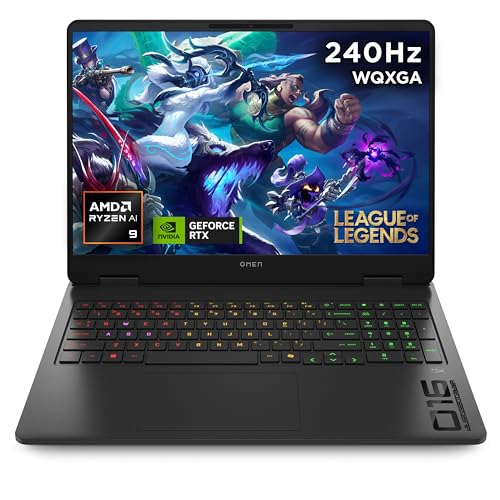
The most powerful machine here by a clear margin - a full-power 140W RTX 5070, a 16-core Ryzen 9 and the best display of the group, for less than the 18-inch model.
What it gets right
- 140W RTX 5070 - the fastest GPU in this guide
- 16-core Ryzen 9 8940HX crushes CPU-heavy games and editing
- Sharp 16in QHD+ 240Hz display
- 24GB RAM as standard
What it doesn't
- Still only 8GB VRAM (the budget ceiling in 2026)
- Heavier and louder under load
- QHD+ panel asks more of the GPU than 1080p
Frame rates
1920×1080, High preset, upscaling off.
Representative figures, not measurements of this specific machine: derived from the RTX 5070 at 140W and cross-referenced against published reviews. Source: Tom's Hardware, Notebookcheck, PC Gamer, LaptopMedia and GamersNexus, 2026-07-01.
Not scored: incomplete benchmark suite
Every scored laptop on this site is averaged over the same 5 games, and this one is short of Baldur's Gate 3, GTA V, X-Plane 11, Dota 2. A mean over 1 games is not comparable to a mean over 5, so we publish the figures we have and leave the score blank rather than rank it against machines tested on a different set. The numbers below are real - the suite is just incomplete.
How these numbers were produced
Frame rates here are not measured by us, and we label how each one was arrived at. A figure marked measured comes from a published run on that exact machine. A figure marked representative is derived from the GPU and its power limit (TGP) and cross-referenced against published reviews - a sound estimate of what that configuration delivers, but not a measurement of that specific laptop. Unless stated otherwise, numbers are 1920x1080, High preset, upscaling off. Where a laptop ships in several power configurations we use the wattage of the exact SKU listed, because a 140W RTX 5070 and a 115W one are not the same product.
In use
The short version
The HP OMEN 16 (ap0301na) is an RTX 5070 laptop that has been allowed to behave like one. The GPU runs to a 140W power limit, which is at the upper end of what mainstream 16-inch chassis are configured for, and the published frame rates reflect that: at 1920x1080, High preset, upscaling off, it turns in 110fps in Cyberpunk 2077, 110fps in Black Myth: Wukong, 126fps in Forza Horizon 5, 106fps in both Hogwarts Legacy and Red Dead Redemption 2, and 255fps in Counter-Strike 2. That is a coherent, undramatic set of results for a well-fed 5070, and it is meaningfully quicker than the same GPU running at a lower ceiling.
At GBP 1,375 it is not cheap, and the machine it has to beat on paper is the Acer Nitro V16, which pairs the same RTX 5070 with a 115W limit for GBP 1,199. Across the six games both machines have measured figures for, the OMEN averages 11fps ahead. That is a real gap and it is consistent with the power difference, but it is roughly a nine per cent performance advantage for roughly a fifteen per cent price increase, and whether that trade works depends entirely on what else you think the extra money is buying — a 2560x1600 240Hz panel, 24GB of DDR5, a 1TB SSD, and whatever value you place on the HX-class Ryzen 9 in the OMEN.
Two things should give a buyer pause. The first is 8GB of VRAM behind a 2560x1600 screen. Every measured figure here is at 1080p, and 8GB at 1080p is workable in the titles listed; 8GB driving the panel's native resolution with high-resolution texture packs in newer releases is a different proposition, and there are no measurements here to tell you how it goes. The second is that the panel runs at 240Hz and, in five of the six measured games, the GPU delivers somewhere between 44 and 53 per cent of that. Only Counter-Strike 2 clears the refresh rate. If the 240Hz figure is the reason you are drawn to this machine, be clear-eyed about which games will actually use it.
Buy it if you want a 5070 that runs near the top of its power band, you play a mix of competitive shooters and heavy single-player titles, you intend to sit at a desk with it plugged in, and the price gap to the Nitro V16 does not sting. Look elsewhere if you are shopping primarily on frames per pound, if you need a machine you carry daily, or if you were planning to run this panel at native resolution with maximum textures for the next four years.
Performance
All the frame rates discussed here were measured at 1920x1080, High preset, with upscaling off, and they come from published benchmark work — Tom's Hardware, Notebookcheck, PC Gamer, LaptopMedia and GamersNexus — rather than from anything conducted at this site. That matters for how you read them. A fixed preset and a native render resolution give you a clean comparison between machines, which is exactly what a buying decision needs, but it is not how most people will actually play. Turn DLSS on, and every number below moves up; push the resolution to the panel's native 2560x1600, and every number below moves down. The measured set is a reference point, not a prediction of your experience.
What 140W actually buys
The single most useful number on the spec sheet is not the GPU name, it is the 140W power limit. Mobile RTX 5070 implementations are configured across a wide band by the laptop maker, and two machines carrying identical GPU branding can be separated by double-digit percentages purely on how much power the chassis is willing to deliver and dissipate. This is the reason the "RTX 5070 laptop" category is close to meaningless as a shopping filter, and why the power figure deserves to sit next to the GPU name every time.
We have an unusually direct illustration of this in the comparison set. The Acer Nitro V16 runs the same RTX 5070 at 115W. Across the six games both machines have measured figures for, the OMEN 16 averages 11fps ahead. Run the arithmetic on the OMEN's own numbers — the six measured titles average out at roughly 135fps — and an 11fps lead works out at something in the region of nine per cent. So a 22 per cent increase in GPU power budget yields, on this evidence, something under half that in frames.
That is exactly the shape you should expect. GPU performance against power is a curve with a flattening top: the first watts do the most work, and by the time you are pushing an already well-supplied chip another 25W, you are paying for clock speed increments that are getting progressively more expensive in thermal terms. It does not mean 140W is pointless — nine per cent is nine per cent, and it is a permanent, no-effort advantage that shows up in every title — but it does mean you should not expect a 140W part to feel like a different class of machine from a 115W part. It feels like the same machine with the settings slider nudged.
One honest caveat on that comparison: the OMEN and the Nitro V16 differ in more than GPU power. The OMEN has a Ryzen 9 8940HX and 24GB of DDR5; the comparison figures we hold for the Nitro V16 cover the GPU, its power limit and the price, not the rest of its configuration. The 11fps gap is the observed difference between two complete machines, and attributing all of it to the 25W is a simplification. In titles where the CPU has a say — and Counter-Strike 2 is emphatically one of them — the processor and memory will be doing some of that work.
The measured numbers, title by title
Counter-Strike 2 — 255fps. This is the outlier and it is supposed to be. CS2's rendering load at 1080p High is trivial for a 5070-class GPU; what limits the frame rate is how fast the CPU can feed it, plus engine overhead. A figure of 255fps means two things for a buyer. First, this is a machine on which the 240Hz panel is genuinely usable in the competitive title most likely to be played on it — the frame rate is above the refresh ceiling, so you are getting the full latency and motion-clarity benefit the panel exists to provide. Second, the Ryzen 9 is doing its job. CPU-bound results are where an HX-class part earns its place, and 255fps is a strong showing rather than a merely adequate one.
Forza Horizon 5 — 126fps. The fastest of the genuinely GPU-bound titles here, and unsurprising: Forza Horizon 5 is one of the better-optimised big-budget PC games of recent years, with a rendering pipeline that scales cleanly and does not lean hard on ray tracing at the High preset. 126fps at 1080p gives you real headroom — enough that you could push settings up, enable upscaling and target the panel's native resolution, or simply enjoy a very consistent frame delivery. In a racing game, where frame-time consistency matters more than peak numbers because the camera is in constant smooth motion, this is a comfortable result.
Black Myth: Wukong — 110fps. This is the number that tells you the 140W is doing something. Wukong is a heavy Unreal Engine 5 title and one of the more punishing things in a modern benchmark suite, and 110fps at 1080p High with upscaling off is a solid result for a mainstream laptop GPU. It is worth stressing the "upscaling off" part here, because Wukong is a game most people will play with DLSS enabled and frame generation available; the measured figure represents the hard, unassisted floor.
Cyberpunk 2077 — 110fps. Cyberpunk remains the standard reference load for this class of hardware, and 110fps at 1080p High is a comfortable, plainly playable result. It is also the only title in this set that belongs to our scoring suite, which has consequences discussed below. What 110fps means practically is that you have room to trade: you could raise the preset, you could turn on ray tracing at a modest level and claw the frame rate back with upscaling, or you could take the frames as-is at native 1080p and enjoy a very stable experience. What you cannot do, on this evidence, is assume 110fps at 1080p translates into anything like that at 2560x1600 native with ray tracing on.
Hogwarts Legacy — 106fps and Red Dead Redemption 2 — 106fps. The floor of the set, and the two results a prospective buyer should anchor on. Both are large open-world games with heavy streaming loads, and both are known for punishing memory subsystems as much as raw shader throughput. 106fps is a good number in absolute terms — it is above 100, it is comfortably above the 60fps threshold that most people actually care about, and it leaves headroom for settings that go beyond the High preset. But it is also 44 per cent of the panel's refresh rate, and it is the number that should shape your expectations for the next demanding open-world release rather than the CS2 figure.
Where the spread comes from
Set CS2 aside and the spread across the remaining five titles is narrow: 106fps to 126fps, a range of 20fps, or roughly 19 per cent between the slowest and fastest. That tightness is itself informative. It says the machine is consistently GPU-limited across a range of engines and workloads, which is what you want from a mainstream gaming laptop with a well-supplied GPU — the performance is predictable, and a title you have not seen benchmarked is likely to land somewhere inside that band rather than surprising you at either end.
The two ends of the band map onto the workloads you would expect. Forza Horizon 5 sits at the top because it is efficient and because its rendering approach — high geometric detail, comparatively restrained post-processing and lighting cost at High — plays to a GPU with plenty of shader power. Red Dead Redemption 2 and Hogwarts Legacy sit at the bottom because both are asset-streaming heavy: large worlds, constant texture and geometry loading, and a lot of memory traffic. Black Myth: Wukong lands in the middle, at parity with Cyberpunk, which is a slightly better result for the OMEN than you might guess given Wukong's reputation — it suggests the GPU's raw throughput at 140W is holding up well against the UE5 workload at this resolution and preset.
The gap between CS2 and everything else — 255fps against a 106-126fps band, a factor of well over two — is the clearest illustration of why "average frame rate across a suite" is a useful summary statistic and a terrible guide to a specific purchase. If you play Counter-Strike 2 and nothing else, this machine has vastly more capability than you need, and you would be better served putting the money into a cheaper laptop with a fast panel. If you play Hogwarts Legacy and nothing else, the CS2 number is irrelevant to you. Most people are somewhere in between, and the honest answer is that this machine handles both ends of that range without complaint — the shooters run above the refresh rate, the heavyweights run above 100fps at 1080p High.
The 8GB VRAM question
The RTX 5070 in this configuration carries 8GB of VRAM, and this is the specification most likely to age badly. It needs to be discussed carefully, because it is easy to be either alarmist or complacent about it.
What the data supports: at 1920x1080 with the High preset, 8GB is not visibly constraining this machine in any of the six measured games. Red Dead Redemption 2 and Hogwarts Legacy are both memory-hungry open-world titles, and both land at 106fps, comfortably in line with the rest of the GPU-bound set. If VRAM were being exhausted at these settings you would generally expect to see a title fall out of the band — a stutter-prone result well below where its rendering load would otherwise place it. That is not what the numbers show.
What the data does not support, in either direction: any conclusion about behaviour at 2560x1600. There are no measurements here at the panel's native resolution, and framebuffer and texture demands rise with resolution. There are also no measurements with ultra-quality texture settings, which is where 8GB parts have historically run into trouble first — texture resolution is the setting that consumes VRAM most directly and, awkwardly, the one that costs the least performance when you have enough of it. The honest position is that we do not have the figures to tell you where the ceiling is on this machine, only that it has not been hit at 1080p High.
What is reasonable to say as analysis rather than measurement: 8GB is now the low end of what a GBP 1,375 gaming laptop can be sold with, it will constrain settings choices in some future releases before the GPU runs out of shader performance, and pairing it with a screen whose native resolution is 63 per cent more pixels than 1080p is a slightly uncomfortable combination on paper. If you keep laptops for five years and play the newest, heaviest releases at maximum texture quality, this is a genuine reason to think hard. If you upgrade every three years, or you are content to run the texture slider one notch down when a game demands it, it is a footnote.
The CPU and memory
The Ryzen 9 8940HX is an HX-class part, which in AMD's naming convention indicates the higher-power tier of mobile silicon rather than the efficiency-oriented HS chips. The specifics of core count and clocks are not in front of us, so we are not going to state them, but the class tells you what to expect: this is a processor chosen because the chassis can feed and cool a substantial CPU power draw alongside a 140W GPU, not one chosen to preserve battery life.
The place that shows in the measured data is Counter-Strike 2. A 255fps result at 1080p High is a CPU-influenced number, and it is a strong one. In the five GPU-bound titles the processor is largely along for the ride, which is why they cluster so tightly — but CPU headroom matters more than benchmark charts suggest in real use. It is what keeps frame times stable when a game's simulation load spikes, what handles background processes without stealing frames, and what stops the machine feeling laboured when you are streaming, recording or running a browser full of tabs alongside a game. An HX-class chip here is not overkill; it is the correct pairing for a GPU running at this power level.
The 24GB of DDR5 is an unusual capacity and a welcome one. 16GB is the standard fitment at this price and is increasingly marginal — modern open-world games with high texture settings, a browser, a voice client and a game launcher will use it. 24GB gives real headroom without pushing the price up the way 32GB configurations tend to. One thing worth flagging honestly: the fact sheet tells us the capacity, not the module arrangement, and memory bandwidth on a machine like this depends on whether the configuration runs in dual channel across matched capacities or in a mixed arrangement. That distinction can be worth a few per cent in CPU-bound and integrated-graphics workloads. We do not have the information to tell you which it is, and it is worth checking against HP's own documentation before purchase if you care about that level of detail.
The 1TB SSD is the right size and no more. Two or three current-generation open-world installs plus an operating system and the usual clutter will fill it. That is not a criticism of this machine specifically — it is the standard fitment at this price — but it is worth building into your budget if your library is large.
Why this machine does not carry a score
Our scoring system averages every laptop across the same five games, so that the comparison is like for like. Of those five, only Cyberpunk 2077 has a published figure for this configuration. Baldur's Gate 3, GTA V, X-Plane 11 and Dota 2 do not. The "mean across scoring-suite games" that appears in our data — 110fps — is therefore just the Cyberpunk number wearing a different hat, and it cannot be ranked against machines that have the full five.
We are stating that plainly rather than quietly averaging what we have, because the six measured titles are not a representative substitute for the scoring five. They skew towards modern, GPU-heavy releases; the scoring suite deliberately includes lighter and more CPU-dependent workloads, which is exactly where a machine like this would look different. Averaging six modern GPU-bound games and comparing that to another laptop's average across a suite containing Dota 2 and GTA V would produce a number that looks authoritative and means nothing.
What this does not undermine is the head-to-head comparisons later in this review. Those are computed only on games where both machines have figures, which is a valid comparison regardless of whether either machine has a complete scoring set. You can trust the "+11fps versus the Nitro V16" figure in a way you could not trust a synthesised overall ranking.
The screen
A 16-inch, 2560x1600, 240Hz IPS panel. On paper that is a strong specification for the money — 16:10, above 1080p, and a refresh rate at the fast end of what mainstream gaming laptops offer. In practice it needs unpacking, because the GPU behind it does not comfortably serve both of the panel's headline numbers at once.
240Hz against the measured frame rates
Take the six measured results and hold them against 240Hz. Counter-Strike 2, at 255fps, is above the refresh ceiling — the panel is the limiting factor, which is the correct state of affairs for a competitive shooter and means you are getting everything the display can give. Everything else falls well short. Forza Horizon 5 at 126fps runs at roughly 53 per cent of the panel's capability. Cyberpunk and Wukong at 110fps sit at about 46 per cent. Hogwarts Legacy and Red Dead Redemption 2 at 106fps are at roughly 44 per cent.
That is not a failure — it is the normal condition of a fast panel on a mainstream GPU, and it applies to essentially every 240Hz laptop in this price bracket. But it does reframe what the 240Hz is for. It is for competitive titles: shooters, MOBAs, anything where the engine is light and the input latency matters. In heavy single-player games it functions as a very good high-refresh panel rather than a 240Hz one, and the practical benefit there is smoother motion at whatever frame rate you achieve plus lower display latency, not 240 frames on screen.
The related point is variable refresh. The fact sheet does not state whether this panel supports adaptive sync, and we are not going to assume it does. If it does, the mismatch between a 106fps game and a 240Hz panel is almost entirely a non-issue — the display simply matches the GPU. If it does not, that gap becomes something you can perceive as judder in fast camera movement, and it is worth confirming before you buy. This is a specification worth chasing down on HP's own product page, because on a machine where five out of six measured games land at under half the refresh rate, it materially affects how the display behaves in normal use.
2560x1600, and what the frame rates do not tell us
The panel's native resolution is 63 per cent more pixels than the 1920x1080 at which every measured figure here was recorded. There are no native-resolution measurements in this data set, so any number we gave you for 2560x1600 performance would be an estimate dressed up as a fact, and we are not doing that.
What we can say usefully is structural. In GPU-bound titles — which, on this evidence, is five of the six measured games — raising resolution costs frames roughly in proportion to the pixel increase, moderated by whatever parts of the workload are resolution-independent. In CPU-bound titles like Counter-Strike 2, raising resolution costs comparatively little, because the bottleneck is elsewhere. So the practical shape of the thing is: CS2 will remain very fast at native resolution; Hogwarts Legacy and Red Dead Redemption 2, at 106fps at 1080p, will not remain at 106fps.
This is where upscaling stops being an optional extra and becomes the intended operating mode. DLSS at Quality on a 2560x1600 target renders at a lower internal resolution and reconstructs — that is precisely the workload the panel and this GPU pairing is built around. The measured figures with upscaling off are the honest baseline that lets you compare machines; they are not how you should expect to play. A buyer looking at this machine should assume they will be running native resolution with upscaling enabled in demanding titles, and 1080p or upscaled 1440p-class internal resolutions in the very heaviest ones.
IPS, and what we do not know about it
IPS is the right technology at this price. It gives you viewing angles and colour consistency that TN cannot, without the price premium or the burn-in caution that comes with OLED. It also, generally, gives you worse contrast than OLED and worse black levels — a fact of the panel type rather than a criticism of this particular unit.
Beyond that we are limited by what we hold. We do not have measured brightness, colour gamut coverage, contrast ratio or response time figures for this display, and we are not going to characterise a panel we have no measurements for. Those figures vary substantially between IPS panels — two laptops with identical "16in 2560x1600 240Hz IPS" spec lines can differ by hundreds of nits and by a large margin in colour coverage. If the screen is a primary reason you are considering this machine, particularly if you intend to do colour-sensitive work on it, seek out a panel-level measurement before committing. A 240Hz IPS panel that is dim or has poor gamut coverage is a worse buy than a 165Hz one that is bright and accurate, and the specification line alone cannot tell you which you are getting.
Build, size and portability
The OMEN 16 weighs 2.45kg. That is the one physical figure we hold, and it does a lot of work in describing how this machine will be used.
What 2.45kg means in practice
It is a normal weight for a 16-inch gaming laptop with a 140W GPU and an HX-class processor, and it is not a weight you carry casually. For context on the category: sub-2kg gaming laptops exist but they are almost always 14-inch machines with substantially lower GPU power limits; anything with a 140W GPU and the cooling to sustain it is going to sit in the 2.3-2.7kg range. The OMEN is squarely inside that band. There is no penalty being paid here for the performance, but there is no portability advantage either.
Practically, 2.45kg is a machine that lives on a desk and travels occasionally. It goes in a rucksack for a weekend at a friend's house or a trip home from university, and it is a nuisance rather than a pleasure to carry every day on a commute. Once you add the power adapter — and a machine with a 140W GPU alongside an HX processor requires a substantial one; we do not have a wattage figure for it, but it will not be a small brick — the practical carry weight is meaningfully above the 2.45kg on the spec sheet. Anyone weighing this against a 14-inch machine should be doing that comparison including chargers, because that is where the difference actually bites.
We do not have dimensions, thickness or chassis material information for this configuration, and we are not going to describe a machine's build quality, hinge feel, keyboard or chassis flex on the basis of not having handled it. Everything in this review comes from published measurements and specifications. If chassis rigidity and keyboard quality are decisive for you — and for a machine you will type on daily, they reasonably might be — that is a case for seeing one in person, because it is not something benchmark data can answer.
The desk-bound reality
There is a broader point here that applies to every laptop configured this way. A 140W GPU power limit is only available on mains power. Unplugged, mobile GPUs run at drastically reduced power ceilings, and the performance characteristics that make this machine interesting simply do not exist on battery. We hold no battery life measurement for this configuration, so we will not quote one, but the general shape is not in doubt: a 16-inch machine with an HX-class CPU and a 140W GPU is not a long-runtime laptop, and gaming on battery is not a realistic use case regardless of what the runtime number turns out to be.
That is not a mark against the OMEN. It is a statement about what kind of purchase it is. This is a desktop replacement in the honest sense — a machine that gives you desktop-class gaming performance in a form you can move between rooms and take home for the holidays, at the cost of needing a socket to do anything interesting. If your requirement is genuinely mobile computing with occasional gaming, the correct answer is a lighter machine with a lower-power GPU, and the ASUS TUF Gaming A14 in the comparison set exists to serve exactly that requirement.
Cooling and noise: what we cannot tell you
We hold no temperature or noise measurements for this machine, so this section is short and honest. A 140W GPU generates 140W of heat that has to go somewhere, and moving that much heat out of a 16-inch chassis requires fans doing real work. Whether the OMEN does that quietly or loudly, whether it sustains its power limit under long sessions or throttles back, and how hot the keyboard deck gets in use are all questions that matter enormously to the daily experience of owning one — and all questions the frame rate data cannot answer.
The one indirect signal we have is that the measured frame rates are consistent with a 140W part performing as a 140W part, which suggests the cooling is at least adequate to the task in benchmark runs. Benchmark runs are short. If you play three-hour sessions, seek out a sustained-load thermal review before buying. That applies to every laptop in this class, not just this one.
How it compares
Every comparison below is computed only across games where both machines have published figures, which in each case is six shared titles. That is a genuine like-for-like comparison and it is the most reliable thing in this review. What it does not capture is anything that is not a frame rate — panel quality, build, cooling behaviour, keyboard, port selection, warranty. Where we do not have those figures for the rivals, we say so rather than guessing.
Acer Nitro V16 — RTX 5070 at 115W, GBP 1,199
This is the comparison that decides whether the OMEN is worth buying. Same GPU generation, same GPU tier, 25W less power, GBP 176 less money. Across six shared games, the OMEN averages 11fps ahead.
Eleven frames is not nothing. On the OMEN's own numbers it works out at around nine per cent, and it applies uniformly rather than showing up only in one favourable title. If the shared-game set includes the heavy open-world titles — and given the measured list, it will — then it is nine per cent in exactly the games where you would want it. In practical terms it is the difference between running a preset one notch higher, or holding a frame rate target with slightly more margin.
But the price gap is fifteen per cent for a nine per cent performance gain, which is the wrong side of the line on frames-per-pound alone. The OMEN only justifies itself if the rest of the package does work. Here is where honesty about the limits of our data matters: we hold the Nitro V16's GPU, power limit and price, not its screen specification, memory capacity or storage. If the Acer comes with a lower-resolution or slower panel, less memory, or a smaller SSD, then the OMEN's 2560x1600 240Hz screen, 24GB of DDR5 and 1TB drive close that value gap quickly and possibly reverse it. If the Acer matches on those specifications, the OMEN is asking a premium for nine per cent and a badge, and the Acer is the better buy.
Our recommendation is therefore conditional rather than emphatic: check the Nitro V16's panel and memory configuration against this machine's, and if they are comparable, take the cheaper one. The performance difference is real but it is not large enough to override a GBP 176 gap on its own.
Acer Nitro V 15 — RTX 5060 at 115W, GBP 931
A tier down on GPU and GBP 444 cheaper. Across six shared games the OMEN averages 26fps ahead, which on the OMEN's numbers is roughly a 24 per cent advantage.
This is a much cleaner comparison than the Nitro V16 one, because the gap is proportionate. You are paying about 48 per cent more money for about 24 per cent more performance, which is the normal shape of the market — performance gets more expensive as you climb, always has. The question is not whether the OMEN is better; it plainly is. The question is whether 24 per cent matters to you at GBP 444.
Where it matters: if you want a demanding open-world game to sit comfortably above 100fps at 1080p rather than hovering around it, or if you intend to run at higher resolutions where the extra headroom buys you settings you would otherwise have to give up. Where it does not: if your target is 60fps at 1080p, in which case both machines clear it comfortably in all six shared titles and the Nitro V 15 leaves you GBP 444 for a monitor, a chair or three years of games.
The additional consideration is longevity. A 5060 at 115W will run out of headroom sooner than a 5070 at 140W, and the gap will widen as games get heavier. If you replace machines every five years rather than every three, that argues for the OMEN. If you replace often, the cheaper machine plus an earlier upgrade is frequently the better financial strategy.
ASUS TUF Gaming A14 — RTX 5050 at 75W, GBP 1,007
The OMEN averages 48fps ahead across six shared games, which is a gap of roughly 55 per cent on the OMEN's own numbers. This is not a close comparison on performance, and the A14 costs GBP 368 less.
What is interesting here is that the A14 costs GBP 76 more than the Acer Nitro V 15, which is meaningfully faster than it. That tells you what the A14's price is buying, and it is not frames — it is the 14-inch form factor implied by its name, and whatever build and portability advantages come with it. A 75W GPU in a 14-inch chassis is a different product category with a different purpose.
So the comparison is not really OMEN versus A14 on merit; it is a question about what you want a laptop to be. If you need a machine you can carry every day and game on in the evenings, and you accept that a 75W RTX 5050 will require settings compromises in heavy titles, the A14 answers a question the OMEN cannot. If you want a gaming machine and the portability is incidental, the OMEN is dramatically faster and the A14 makes no sense at this price — the Nitro V 15 would beat it on frames for less money.
A caution on the raw numbers: a 48fps average gap across six games includes the Counter-Strike 2 result, where the OMEN's 255fps will be inflating the average considerably because CS2 is the easiest title in the set and scales most freely with capable hardware. The gap in the heavier open-world titles will be smaller in absolute frames, though probably similar in proportion. This applies to every one of these comparisons and is worth bearing in mind whenever an average includes a CPU-bound outlier.
HP Victus 15 — RTX 5050 at 75W, GBP 799
The OMEN averages 50fps ahead across six shared games — around 58 per cent — for GBP 576 more. This is HP's own budget line and the comparison is the clearest illustration of what money buys in this segment.
The Victus 15 is not a bad machine on this evidence. Working back from the gap, it is delivering somewhere in the region of 85fps averaged across six games including Counter-Strike 2, which means it will be delivering playable frame rates in every one of the heavy titles at 1080p, just with less headroom and almost certainly with settings dialled down from High in the worst cases. For GBP 799, that is a coherent product.
What the OMEN's GBP 576 premium buys is not just 58 per cent more frames. It is a 5070 rather than a 5050, 140W rather than 75W, 24GB rather than whatever the Victus ships with, a 2560x1600 240Hz screen rather than whatever the Victus has, and roughly twice the useful lifespan before the GPU becomes the reason you upgrade. If you have the money, the OMEN is a substantially more capable machine and will remain one for longer. If GBP 799 is what you have, the Victus is not a machine you should feel bad about — it is a considerable step down, but the frame rate arithmetic suggests it clears 60fps in the titles measured here.
The value picture overall
Set the four comparisons side by side and a pattern emerges. Against the two 75W RTX 5050 machines, the OMEN's premium buys a large, obvious, well-proportioned performance increase — you are paying roughly 40 to 70 per cent more money for roughly 55 to 58 per cent more frames, and getting a better screen and more memory besides. That is a defensible purchase. Against the RTX 5060 Nitro V 15, the premium is less proportionate but still within normal market behaviour for a tier step.
Against the Nitro V16 — the direct competitor, same GPU, lower power limit, less money — the OMEN's case is weakest and depends on specifications we do not have measurements for. This is the comparison to research properly before you spend. Nine per cent more performance for fifteen per cent more money is only good value if the rest of the machine is better too, and the frame rate data alone cannot tell you whether it is.
Who it's for
The student or professional who wants one machine that games properly. This is the core case. 24GB of DDR5 and an HX-class Ryzen 9 handle non-gaming workloads without complaint, the 16-inch 2560x1600 panel gives you enough screen real estate to actually work on, and the 5070 at 140W plays everything measured here above 100fps at 1080p High. The 2.45kg is carryable when you need to carry it. If you want one device that does university or office work during the day and Cyberpunk in the evening, this configuration is well-judged for that.
The mixed-genre player. The data says this machine is good at both ends of the spectrum. 255fps in Counter-Strike 2 means the 240Hz panel gets used properly in competitive titles; 110fps in Wukong and Cyberpunk means the heavy single-player releases run well too. Machines that are strong in one and merely adequate in the other are common; this one is not that.
Someone who intends to keep it four or five years and is realistic about settings. A 5070 at 140W has the shader performance to stay relevant. If you accept that you will be running upscaling by default and turning textures down a notch in the heaviest future releases, this will hold up. The GPU will not be the first thing to feel old.
Who should buy something else
Anyone shopping primarily on frames per pound. The Acer Nitro V 15, with an RTX 5060 at 115W for GBP 931, gives up around 24 per cent of the OMEN's performance for 32 per cent less money. If your target is a stable 60fps at 1080p and nothing more, it clears that comfortably in every shared title and leaves you GBP 444. The HP Victus 15 at GBP 799 goes further down the same road. Neither machine is exciting; both are rational.
Anyone who carries a laptop every day. 2.45kg plus a large power adapter, on a machine that needs mains power to perform, is not a commuting device. The ASUS TUF Gaming A14 exists precisely for people who need a laptop that goes with them and games in the evenings, and it costs GBP 368 less than the OMEN. You give up a lot of performance for that, but you are buying a different thing.
Anyone who wants to run this panel at native resolution with maximum textures for years. 8GB of VRAM behind a 2560x1600 display is the specification most likely to be the limiting factor before the GPU is. If you play the newest, heaviest releases at maximum texture quality and it bothers you to turn a slider down, look for a machine with more VRAM even if it means accepting fewer measured frames today.
Anyone who needs certainty about panel quality, thermals or noise. We hold none of those measurements for this configuration. The frame rate data is solid; brightness, colour coverage, sustained thermal behaviour under long sessions, fan noise and battery runtime are not things we can tell you about this machine, and they are not trivial. If any of them is decisive for you, seek out a review that has measured them, or find one in a shop and look at it.
Anyone who has not yet compared it properly to the Acer Nitro V16. Same GPU, 115W, GBP 1,199. The OMEN is 11fps faster across six shared games and GBP 176 more expensive. That is a defensible price if the OMEN's screen, memory and storage are meaningfully better; it is a poor one if they are comparable. Fifteen minutes checking the two specification sheets against each other is the single highest-value thing a prospective buyer of this machine can do.
What we would want measured next
Two gaps in the data would materially change this review if they were filled. The first is the four missing scoring-suite titles — Baldur's