Details
Product prices and availability are accurate as of the date/time indicated and are subject to change. Any price and availability information displayed on Amazon.co.uk at the time of purchase will apply to the purchase of this product.Review
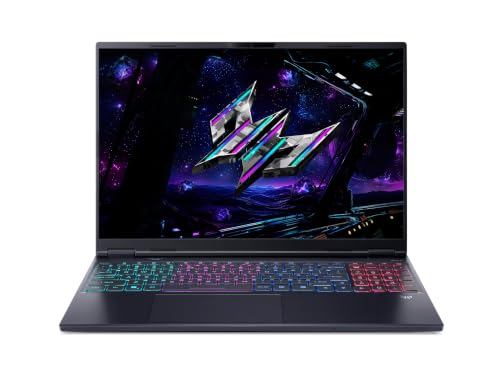
Acer Predator Helios Neo 16S AI review
Frame rates
1920×1080, High preset, upscaling off. Averages 145fps across the 5 core benchmark games.
Measured on this machine. Source: Notebookcheck, 2026-01-14.
How these numbers were produced
Frame rates here are not measured by us, and we label how each one was arrived at. A figure marked measured comes from a published run on that exact machine. A figure marked representative is derived from the GPU and its power limit (TGP) and cross-referenced against published reviews - a sound estimate of what that configuration delivers, but not a measurement of that specific laptop. Unless stated otherwise, numbers are 1920x1080, High preset, upscaling off. Where a laptop ships in several power configurations we use the wattage of the exact SKU listed, because a 140W RTX 5070 and a 115W one are not the same product.
In use
The short version
The Acer Predator Helios Neo 16S AI is a very expensive gaming laptop with a genuinely strong measured 1080p result, a high-specification screen and a sensible amount of memory and storage. It is also difficult to recommend on value alone at £2,679. The problem is not that it is slow. Notebookcheck’s figures show that it is quick in a broad spread of games, with especially convincing results in Dota 2, GTA V, Baldur’s Gate 3, Cyberpunk 2077 and X-Plane 11. The problem is that its performance lead over several close rivals is effectively absent despite the price placing it above at least some of them.
At its measured settings of 1920x1080, High preset and upscaling disabled, the Helios Neo 16S AI produces 192fps in Dota 2, 183fps in GTA V, 130fps in Baldur’s Gate 3, 112fps in Cyberpunk 2077 and 109fps in X-Plane 11. Across the five scoring-suite games, the mean is 145fps. Those are strong results for a machine with a 16in 2560x1600 OLED display, particularly if your priorities are responsive competitive games alongside demanding single-player releases.
However, the measured figures also show why the specification needs to be read carefully rather than simply admired. The screen refresh rate is 240Hz, but only Dota 2 reaches that kind of territory in the published data, and even that result remains below the display’s maximum refresh rate. GTA V is also very fast at 183fps, while Baldur’s Gate 3 at 130fps, Cyberpunk 2077 at 112fps and X-Plane 11 at 109fps are clearly smooth-looking figures but are not close to making full use of a 240Hz panel without changing settings or enabling technologies that are outside the supplied benchmark conditions.
The tougher games underline the same point. ARC Raiders records 114fps, The Outer Worlds 2 records 82fps and Anno 117: Pax Romana records 78fps. Borderlands 4 is the outlier at 52fps. A laptop that can produce very high frame rates in older, lighter or especially well-suited games can still be a much more conventional high-refresh experience in newer and heavier releases. The Helios Neo 16S AI has substantial headroom in some titles, but it is not a machine that turns every modern game into a 240fps experience.
Buy this Acer only if the combination of RTX 5070 Ti graphics, 12GB of VRAM, Core Ultra 9 275HX processor, 32GB of memory, 1024GB SSD and 240Hz OLED screen is more important to you than straightforward value. It makes sense for a buyer who wants a premium 16in gaming specification and is prepared to pay for that particular package. It makes less sense for someone whose priority is simply getting the highest possible gaming performance for their money, because the closest comparable laptops are either level with it or very close to it in shared-game results.
The strongest caution is the Lenovo Legion Pro 5 16IAX10. That laptop has an RTX 5070 rather than an RTX 5070 Ti, is listed at £2,173, and the Acer is only 1fps ahead across five shared games. That is not a meaningful practical advantage in the published comparison. The Alienware 16X Aurora is listed at £2,569 and the Acer is again only 1fps ahead, this time across four shared games. The Helios Neo 16S AI may have an attractive display specification, but the gaming data does not show a price-premium performance advantage over these specific alternatives.
Performance
What the benchmark data says
Notebookcheck measured the Acer Predator Helios Neo 16S AI at 1920x1080 using the High preset with upscaling off. That matters because these are native rendered results at the stated benchmark settings rather than figures assisted by an upscaling mode. It also means the data provides a clean view of how the RTX 5070 Ti and Core Ultra 9 275HX combination behaves in the listed games, but it does not directly tell us what frame rates to expect at the laptop’s native 2560x1600 screen resolution.
The headline result is the 145fps mean across the five scoring-suite games: Dota 2, GTA V, Baldur’s Gate 3, Cyberpunk 2077 and X-Plane 11. A mean is useful as a broad indication of gaming capability, but it should not be mistaken for the experience in every game. The measured results span from 192fps in Dota 2 to 52fps in Borderlands 4. That is a wide spread, and it is the spread rather than the average that should guide a purchase decision.
Dota 2 is the best result in the supplied data at 192fps. For a player who spends most of their time in Dota 2, that is an excellent outcome and a good fit for the 240Hz screen, even though the measured result remains below the panel’s full refresh rate. It indicates that the Helios Neo 16S AI can deliver a very fast experience in this title under the stated settings. It also makes the high-refresh screen more than a decorative specification for the right kind of game.
GTA V follows at 183fps. That is another very high result, and it places the Helios Neo 16S AI firmly in high-refresh territory in the measured configuration. A player focused on games with similar performance demands will get much more visible benefit from the 240Hz panel than someone buying mainly for the newest graphically intensive releases. The difference between a system that is broadly in the 100fps region and one that can reach 183fps is meaningful for the sort of player who values fluid motion and immediate input response, although the supplied data does not include input-latency measurements.
Baldur’s Gate 3 comes in at 130fps. That is still a strong result, but it begins to show the distinction between “high refresh” and “fully exploiting a 240Hz display”. At 130fps, the screen can still present a highly fluid experience, but the benchmark figure does not suggest that the game is running near the panel’s maximum refresh rate under the stated conditions. This is exactly where a 240Hz screen should be understood as providing headroom rather than a promise that every game will run at 240fps.
Cyberpunk 2077 records 112fps. For a demanding game, that is a good result at 1920x1080, High and with upscaling off. It is also one of the most informative figures in the whole set because it demonstrates that the Acer is not dependent on easier games to show convincing performance. At the same time, 112fps is substantially different from the results in Dota 2 and GTA V. The machine has the performance to run Cyberpunk 2077 smoothly at the measured settings, but its 240Hz panel is far ahead of the frame rate that this particular benchmark reports.
X-Plane 11 is measured at 109fps. That result sits very close to Cyberpunk 2077, but the two games should not be treated as identical workloads simply because their frame rates are similar. The point for a buyer is that the Helios Neo 16S AI can maintain a solid three-figure result in both a demanding action game and a flight simulator at the stated settings. It is a useful sign that the platform is not narrowly optimised for one genre.
The 145fps mean across the scoring suite is therefore supported by two very fast results, one 130fps result and two results close to the 110fps region. That is a healthy benchmark profile. It is not a profile that supports calling the Acer unmatched, because the rival data says otherwise, but it does support calling it capable and consistently fast across the five games used in the scoring suite.
The games outside the scoring suite matter too
The broader game list is more revealing than the five-game mean alone. ARC Raiders records 114fps, which is effectively in the same broad performance territory as Cyberpunk 2077 at 112fps and X-Plane 11 at 109fps. That supports the view that the Helios Neo 16S AI has enough gaming performance for fast, smooth play in a range of modern games at the measured 1920x1080 High setting, without relying on upscaling.
The Outer Worlds 2 is measured at 82fps. Anno 117: Pax Romana follows at 78fps. These results remain comfortably above the sort of frame rates that would make a gaming laptop feel obviously underpowered, but they also make clear that the Acer’s performance is not uniformly in the triple-digit range. A buyer looking at the RTX 5070 Ti badge, 32GB of memory and Core Ultra 9 275HX processor should not assume that the laptop’s measured performance will always resemble Dota 2 or GTA V.
Borderlands 4 is the most demanding result here at 52fps. That figure is important because it prevents the average from creating a misleadingly simple impression. The Acer is capable of 192fps in Dota 2 and 183fps in GTA V, yet only 52fps in Borderlands 4 under the same stated benchmark framework of 1920x1080, High preset and upscaling off. That is not a contradiction. It is a demonstration of how heavily game engine demands, rendering features, CPU load and general optimisation can affect a laptop’s performance.
For a prospective owner, the practical lesson is straightforward. If your game library is heavy on esports titles, long-established games or titles that resemble Dota 2 and GTA V in their demands, the Helios Neo 16S AI’s high-refresh OLED display has real potential to be used well. If your library is centred on current demanding releases that resemble The Outer Worlds 2, Anno 117: Pax Romana or Borderlands 4, then the screen remains a premium feature but the published figures do not show the laptop operating anywhere near 240fps at the measured settings.
That does not make the 240Hz screen pointless in demanding games. A high-refresh display can still be useful whenever frame rates vary, whenever settings are adjusted, or when less demanding games are played. But it is essential not to buy this laptop on the assumption that the 240Hz number is a direct forecast of real game frame rates. Notebookcheck’s figures show that the relationship between refresh rate and game performance varies dramatically by title.
What the RTX 5070 Ti means here
The Helios Neo 16S AI uses an RTX 5070 Ti with 12GB of VRAM. On paper, that places it above the RTX 5070 graphics specification used by several of the listed rivals. In the published shared-game comparisons, however, the advantage is not obvious. The Acer matches the Lenovo Legion 5 Pro across five shared games, despite the Legion also being specified with an RTX 5070 Ti. Against the RTX 5070 machines, the Acer is ahead by only 1fps against the MSI Crosshair 16 HX AI across five shared games, 1fps against the Lenovo Legion Pro 5 16IAX10 across five shared games, 1fps against the Alienware 16X Aurora across four shared games, and 2fps against the Asus ROG Strix G18 2025 across five shared games.
That does not mean the RTX 5070 Ti is irrelevant. It means the laptop’s full implementation matters more than the badge alone. Gaming laptop performance is affected by the processor, cooling design, power allocation, firmware settings, memory configuration and the particular game benchmark. The supplied data does not provide the Acer’s GPU power limit, and it does not provide the GPU power limits of the rivals. We therefore cannot attribute the close results to a low power limit, a high power limit, cooling behaviour or any other specific implementation detail.
This is particularly important because the requested question of GPU power limit cannot be answered from the fact sheet. There is no confirmed GPU wattage listed for the Predator Helios Neo 16S AI. It would be wrong to invent one, and it would be equally wrong to claim that Acer has restricted or maximised the RTX 5070 Ti without published evidence in the supplied material. The performance data tells us what the machine achieved in the measured games; it does not explain the exact power configuration that produced those figures.
What can be said is that the results do not establish a major practical lead over the RTX 5070 rivals named here. An RTX 5070 Ti laptop that is only 1fps or 2fps ahead on shared-game averages is not giving the buyer a visible performance separation in those comparisons. The differences are so small that they should not be the basis for choosing the Acer over a cheaper alternative. The screen specification, storage, memory, weight and price are more useful deciding factors.
The 12GB VRAM allocation is part of the Acer’s stated specification, but the benchmark data does not identify any game as being limited by VRAM. It would therefore be speculative to claim that 12GB is responsible for a particular result or that it guarantees performance in future games. The useful factual point is simply that this configuration has 12GB of VRAM alongside 32GB of system memory, and its measured 1080p High performance ranges from 52fps to 192fps in the supplied games.
CPU, memory and the limits of the available evidence
The Core Ultra 9 275HX and 32GB of memory form a high-end surrounding specification for the RTX 5070 Ti. The benchmark data includes titles with very different demands, including Dota 2, GTA V, Baldur’s Gate 3, Cyberpunk 2077, X-Plane 11, ARC Raiders, The Outer Worlds 2, Anno 117: Pax Romana and Borderlands 4. That variety is helpful, because it avoids judging the laptop on a single game.
Even so, the fact sheet does not include processor-only benchmarks, memory speeds, storage performance measurements, game load times or minimum frame rates. We cannot say how much of a given result comes from the Core Ultra 9 275HX, how much comes from the RTX 5070 Ti, or whether the 32GB memory configuration has a measurable effect in a specific title. We also do not have frame-time data. The published figures are average frame rates, and average frame rate does not show stutter behaviour or momentary drops.
For a buyer who also wants a laptop for demanding non-gaming tasks, the Core Ultra 9 275HX, 32GB of memory and 1024GB SSD indicate a substantial configuration. But this review should not pretend that gaming benchmarks prove workstation performance. The fact sheet does not provide rendering results, compilation results, video export results or battery-life measurements. The available evidence is strongest when discussing gaming at 1920x1080 High with upscaling off.
The screen
A premium display specification with a clear performance caveat
The Acer has a 16in OLED display with a 2560x1600 resolution and a 240Hz refresh rate. This is one of the strongest parts of the specification. A 16in panel at 2560x1600 gives the laptop a higher-resolution screen than the 1920x1080 benchmark setting, while the 240Hz refresh rate provides substantial refresh headroom for fast games. OLED is also a premium panel technology rather than a basic display label.
However, the benchmark data does not measure games at 2560x1600. Every published frame rate in the fact sheet is from 1920x1080, High preset and upscaling off. That distinction needs to be central to the buying decision. The Acer’s measured 192fps in Dota 2, 183fps in GTA V and 130fps in Baldur’s Gate 3 should not be repeated as if they are native-resolution 2560x1600 results. They are not. Anyone intending to play primarily at the panel’s native resolution should treat the published data as a useful lower-resolution reference point, not as a direct native-resolution forecast.
The same warning applies most strongly to the demanding games. Cyberpunk 2077 at 112fps, X-Plane 11 at 109fps, ARC Raiders at 114fps, The Outer Worlds 2 at 82fps, Anno 117: Pax Romana at 78fps and Borderlands 4 at 52fps are all measured at 1920x1080. There is no supplied 2560x1600 benchmark set, no Ultra-preset set and no upscaling comparison. We do not have the evidence to say which settings will be required for a given frame-rate target at native resolution.
The screen is therefore best understood as providing flexibility. It has a high native resolution for work, media and games where visual detail is the priority, and a 240Hz refresh rate for games where frame rate is the priority. The laptop’s benchmark results demonstrate that some games can run at very high frame rates at 1920x1080 High, while other games are much more demanding. The display gives the owner options, but the game list shows that those options will need to be used differently depending on the title.
Can the GPU drive 240Hz?
In the supplied figures, no game reaches 240fps. Dota 2 comes closest at 192fps. GTA V reaches 183fps. Those are the two results that most clearly justify the 240Hz panel for gaming, because they are far above the frame rates recorded in the rest of the supplied list. They are still below the screen’s stated refresh rate, but they demonstrate that the laptop can operate in a high-frame-rate range in suitable games.
Baldur’s Gate 3 at 130fps is also a strong showing, but it is a different class of result from 192fps or 183fps. Cyberpunk 2077 at 112fps, ARC Raiders at 114fps and X-Plane 11 at 109fps indicate that the laptop can offer smooth performance in demanding games without coming close to the panel’s maximum refresh rate. The Outer Worlds 2 at 82fps and Anno 117: Pax Romana at 78fps are further from the display’s 240Hz ceiling, while Borderlands 4 at 52fps is plainly a case where the GPU workload is the main limitation rather than screen refresh.
This is not a criticism unique to the Acer. A 240Hz screen is an ambitious target for many modern games, particularly at higher resolutions. The issue here is simply honesty about the match between the display and the benchmark results. The Helios Neo 16S AI is capable of taking advantage of a 240Hz panel in some games. It cannot be described, on this data, as a laptop that drives a 240Hz panel to its limit across the game list.
There are no supplied measurements for panel brightness, colour coverage, response times, contrast, HDR behaviour, reflection handling or screen calibration. OLED tells us the panel type, but it does not tell us how this particular OLED panel performs in those other areas. Buyers who need verified colour accuracy, measured brightness or specific HDR behaviour should not assume those details from the OLED label alone.
Build, size and portability
The weight is reasonable, but the physical picture is incomplete
The Acer Predator Helios Neo 16S AI weighs 2.19kg. For a 16in gaming laptop with an RTX 5070 Ti, Core Ultra 9 275HX, 32GB of memory, 1024GB SSD and a 240Hz OLED screen, that is a manageable weight rather than an ultra-light one. It is realistic for regular transport between home, work, university or a gaming venue, but it remains a substantial laptop rather than something that disappears into a bag.
The supplied information does not include dimensions. There is no width, depth or thickness measurement in the fact sheet, so we cannot say whether the Helios Neo 16S AI has a particularly compact footprint for a 16in machine, whether it is unusually slim, or how it compares physically with the listed rivals. Weight alone tells only part of the portability story.
We also do not have the weight of the power adaptor, any chassis material information, port layout, keyboard description, touchpad measurements, webcam details, speaker measurements or fan-noise data. It would be wrong to claim that the laptop is quiet, loud, rigid, flexible, comfortable to type on or easy to carry in a specific bag. Those are all areas where a hands-on review or published measurements would be required.
The 76Wh battery is a useful specification to know, but there are no battery-life results supplied. A 76Wh battery capacity does not establish how long the laptop lasts in web browsing, video playback, light work or gaming. Gaming battery life in particular cannot be inferred from the capacity alone. Anyone for whom unplugged use is a priority should treat the absence of measured battery results as an important gap rather than assuming that a 76Wh figure will meet a particular runtime expectation.
What portability means for this buyer
At 2.19kg, the Helios Neo 16S AI is not restricted to a desk. It is a plausible machine for someone who needs one laptop for both stationary gaming and regular travel. The 16in screen is large enough to make its display specification meaningful, while the weight is low enough that the machine can be moved without treating it as a permanently fixed desktop replacement.
But portability is not only about whether a laptop can be carried. It is also about battery life, charging hardware, physical dimensions and how frequently the machine needs mains power to provide its best gaming performance. The supplied data does not answer those questions. The responsible conclusion is limited: the 2.19kg weight is workable for a gaming laptop, while the 76Wh battery capacity and unknown dimensions leave the wider portability picture unresolved.
The laptop’s name includes “16S”, but the fact sheet does not define what that means for thickness or chassis design. Do not read a naming convention as a measurement. The only confirmed physical portability figure is 2.19kg.
How it compares
Lenovo Legion 5 Pro
The closest listed performance match is the Lenovo Legion 5 Pro with RTX 5070 Ti graphics. Across five shared games, the Acer averages 0fps against it. That is a dead heat in the supplied comparison. For performance alone, there is no measurable reason here to prefer one over the other.
The Legion 5 Pro has no confirmed UK price in the fact sheet, so it cannot be used for a direct value comparison in pounds. We also do not have its screen specification, weight, battery capacity, memory or storage configuration in the supplied material. The only safe conclusion is that the Helios Neo 16S AI does not establish a shared-game performance advantage over this RTX 5070 Ti rival.
MSI Crosshair 16 HX AI
The MSI Crosshair 16 HX AI is listed with an RTX 5070, while the Acer has an RTX 5070 Ti. Yet across five shared games the Acer is only 1fps ahead. That is a negligible lead in practical terms. It demonstrates why a graphics-chip label should not be treated as a complete answer to laptop performance.
There is no confirmed UK price for the MSI in the fact sheet, so again we cannot calculate a cost-per-performance comparison. Still, the shared-game data puts the Acer’s £2,679 asking price under pressure. A buyer paying more for the RTX 5070 Ti model would reasonably expect a clear measured advantage over a close RTX 5070 competitor. The listed result does not show one.
Lenovo Legion Pro 5 16IAX10
The Lenovo Legion Pro 5 16IAX10 is the most significant value comparison because it has both an RTX 5070 and a confirmed UK price of £2,173. The Acer costs £2,679, while its shared-game advantage is only 1fps across five games. The data therefore does not support paying the Acer’s price premium purely for gaming frame rates.
This does not automatically make the Lenovo the better purchase for every buyer. The Acer has confirmed 32GB memory, a 1024GB SSD, a 16in 2560x1600 240Hz OLED screen, a 2.19kg weight and a 76Wh battery. The supplied rival summary does not give the Lenovo’s equivalent specifications, so we cannot say whether it matches or exceeds the Acer in those areas. But if the question is narrowly “which one offers materially higher measured gaming performance?”, the answer is not the Acer. A 1fps shared-game lead is not a meaningful differentiator.
Alienware 16X Aurora
The Alienware 16X Aurora is listed at £2,569 with an RTX 5070. The Acer is only 1fps ahead across four shared games. The Acer is therefore more expensive and barely ahead in the available performance comparison.
The comparison covers four shared games rather than five, so it is slightly narrower than the Lenovo and MSI comparisons. Even with that limitation, the outcome is clear enough: there is no large gaming-performance gap. If the Acer is chosen over the Alienware, the decision should be based on its confirmed OLED 240Hz 2560x1600 screen, its 32GB memory, its 1024GB SSD, its 2.19kg weight or a preference for the Acer package. It should not be based on an expectation of a substantial measured frame-rate lead.
Asus ROG Strix G18 2025
The Asus ROG Strix G18 2025 is also listed with an RTX 5070 and has no confirmed UK price. The Acer leads by 2fps across five shared games. That is the largest lead in the listed rival group, but it is still extremely small. It does not alter the overall conclusion that the Helios Neo 16S AI is competing very closely with RTX 5070 laptops rather than clearly separating itself from them.
Because there is no confirmed UK price for the Asus, we cannot judge whether the Acer’s £2,679 price is higher or lower than the Strix G18 2025. We also cannot compare their screens, weights, batteries or storage from the supplied data. The only conclusion supported by the shared-game figures is that the Acer is marginally ahead, not decisively ahead.
The broader comparison conclusion
The Acer’s rival position is unusually clear. It is level with the RTX 5070 Ti Lenovo Legion 5 Pro. It is only 1fps ahead of the RTX 5070 MSI Crosshair 16 HX AI and Lenovo Legion Pro 5 16IAX10. It is 1fps ahead of the RTX 5070 Alienware 16X Aurora. It is 2fps ahead of the RTX 5070 Asus ROG Strix G18 2025.
That is not the comparison profile of a laptop that can justify £2,679 through frame rate alone. The measured figures are good in isolation, but the nearby alternatives show that similar gaming performance is available in this class. The £2,173 Lenovo Legion Pro 5 16IAX10 is the clearest warning: the Acer’s small lead in shared games is not enough to make the higher price look sensible for a performance-first buyer.
The Acer’s defence is its overall specification, especially the 240Hz OLED display. It may be a more appealing package to someone who values that screen highly and wants confirmed 32GB memory and 1024GB of storage. But that is a specification-led argument, not a frame-rate-led one. Laptop Gaming’s benchmark data is clear: the price premium does not buy a significant gaming lead against the specific rivals listed.
Who it’s for
Buy it if the screen matters as much as the graphics card
The Predator Helios Neo 16S AI makes the most sense for a buyer who specifically wants a 16in 2560x1600 OLED screen with a 240Hz refresh rate and also wants strong 1080p gaming performance. The OLED panel and 240Hz refresh rate are the most distinctive confirmed parts of the package. If you want a high-resolution display for general use and a high-refresh display for games that can run quickly, the Acer is easy to understand.
It also suits someone whose regular games resemble the higher-performing titles in the published data. Dota 2 at 192fps and GTA V at 183fps show the sort of performance that makes a 240Hz screen feel worthwhile. Baldur’s Gate 3 at 130fps is also a very strong result. A player who spends substantial time in those games, while still wanting the ability to play Cyberpunk 2077 at 112fps, X-Plane 11 at 109fps or ARC Raiders at 114fps at the stated settings, will find the Acer’s performance credible.
The 32GB memory and 1024GB SSD make it a sensible choice for someone who does not want to start with a minimal configuration. Again, the fact sheet does not provide upgrade details, storage speed or memory speed, so this is not a claim about expandability or performance beyond the stated capacity. It is simply a practical observation that 32GB and 1024GB are substantial included capacities.
The 2.19kg weight also makes the Acer suitable for a buyer who intends to move it regularly rather than leave it permanently on a desk. It is not a lightweight ultraportable, but it is not so heavy that regular transport is inherently unrealistic. Just remember that battery-life measurements are not available, so portability should be judged primarily on the confirmed weight rather than assumed unplugged endurance.
Do not buy it solely for 240Hz gaming
Do not buy the Helios Neo 16S AI if your main expectation is that every demanding game will run close to 240fps. The benchmark data does not support that expectation. No supplied result reaches 240fps. Dota 2 at 192fps and GTA V at 183fps are very strong, but the rest of the list falls away from there: Baldur’s Gate 3 at 130fps, ARC Raiders at 114fps, Cyberpunk 2077 at 112fps, X-Plane 11 at 109fps, The Outer Worlds 2 at 82fps, Anno 117: Pax Romana at 78fps and Borderlands 4 at 52fps.
The screen is capable of 240Hz, but the GPU does not drive every measured game at that rate under the stated benchmark settings. That is not a failure; it is simply the reality of modern gaming workloads. Buyers who understand that and want a screen with both high resolution and high refresh will be satisfied by the specification. Buyers who see “240Hz” and expect a universal 240fps gaming machine should look more carefully at game-specific benchmark data before spending £2,679.
Do not buy it for value alone
The strongest reason to choose something else is value. At £2,679, the Acer is expensive. The benchmark results are good, but the closest rivals make its performance position look weak relative to the asking price. The Lenovo Legion Pro 5 16IAX10 costs £2,173 and trails by only 1fps across five shared games. The Alienware 16X Aurora costs £2,569 and trails by only 1fps across four shared games. Those are not results that support paying more for the Acer if gaming frame rate is your deciding factor.
The MSI Crosshair 16 HX AI, Asus ROG Strix G18 2025 and Lenovo Legion 5 Pro do not have confirmed UK prices in the supplied information, so there is no honest way to declare any of them better value in pounds. But their shared-game performance positions still matter. The Acer is level with the Lenovo Legion 5 Pro, 1fps ahead of the MSI, and 2fps ahead of the Asus. It is not pulling away from the field.
If you can place a high personal value on the Acer’s OLED panel, 240Hz refresh rate, 32GB memory, 1024GB SSD and 2.19kg weight, then the package may justify the price to you. If you cannot, the benchmark data gives little reason to pay extra merely for the RTX 5070 Ti label. This is a premium-specification laptop with good performance, not a clear price-to-performance winner.
Final buying advice
The Acer Predator Helios Neo 16S AI is a capable gaming laptop whose strengths are real but narrowly defined by the available evidence. Notebookcheck’s figures show excellent results in Dota 2 and GTA V, strong results in Baldur’s Gate 3, Cyberpunk 2077, X-Plane 11 and ARC Raiders, and more restrained results in The Outer Worlds 2, Anno 117: Pax Romana and Borderlands 4. The 145fps scoring-suite mean is strong, but the range from 192fps to 52fps is the more useful guide to what ownership will feel like.
The 16in 2560x1600 240Hz OLED display is the part of the specification that gives the Acer a distinct premium appeal. The GPU can make meaningful use of that refresh rate in some games, especially Dota 2 and GTA V, but the supplied figures do not show universal 240fps performance. The 2.19kg weight is manageable for a 16in gaming laptop, while the 76Wh battery capacity is not enough on its own to make battery-life claims.
Most importantly, the Acer’s £2,679 price is difficult to defend with the rival gaming data. It is level with one RTX 5070 Ti rival and only marginally ahead of several RTX 5070 rivals. Choose it for the screen and the complete stated configuration if those are your priorities. Choose a rival, especially the £2,173 Lenovo Legion Pro 5 16IAX10, if you are primarily shopping for measured gaming performance per pound.