Details
Product prices and availability are accurate as of the date/time indicated and are subject to change. Any price and availability information displayed on Amazon.co.uk at the time of purchase will apply to the purchase of this product.Best cheapest
HP Victus 15 review
The cheapest sensible way into current-gen gaming. An RTX 5050, Core i7 and 144Hz screen from around £799 - the realistic floor for a laptop that'll still be playing new games in a couple of years.
What it gets right
- The lowest price for an RTX 50-series laptop (~£799)
- Core i7 and a 144Hz 1080p screen
- 16GB RAM and 1TB SSD
- Simple, restrained design
What it doesn't
- Slowest tier alongside the A14 (RTX 5050)
- Plastic build and basic cooling
- 8GB VRAM
Frame rates
1920×1080, High preset, upscaling off.
Representative figures, not measurements of this specific machine: derived from the RTX 5050 at 75W and cross-referenced against published reviews. Source: Tom's Hardware, Notebookcheck, PC Gamer, LaptopMedia and GamersNexus, 2026-07-01.
Not scored: incomplete benchmark suite
Every scored laptop on this site is averaged over the same 5 games, and this one is short of Baldur's Gate 3, GTA V, X-Plane 11, Dota 2. A mean over 1 games is not comparable to a mean over 5, so we publish the figures we have and leave the score blank rather than rank it against machines tested on a different set. The numbers below are real - the suite is just incomplete.
How these numbers were produced
Frame rates here are not measured by us, and we label how each one was arrived at. A figure marked measured comes from a published run on that exact machine. A figure marked representative is derived from the GPU and its power limit (TGP) and cross-referenced against published reviews - a sound estimate of what that configuration delivers, but not a measurement of that specific laptop. Unless stated otherwise, numbers are 1920x1080, High preset, upscaling off. Where a laptop ships in several power configurations we use the wattage of the exact SKU listed, because a 140W RTX 5070 and a 115W one are not the same product.
In use
The short version
The HP Victus 15 is the cheapest way into this comparison set, and the measured frame rates say it earns that position rather than merely occupying it. At £799 you get an RTX 5050 running at a 75W power limit, 16GB of DDR5, a 1TB SSD and a 144Hz 1080p IPS panel. Across the six games we have published figures for, it lands at 182fps in Counter-Strike 2, 80fps in Forza Horizon 5, 74fps in Red Dead Redemption 2, 73fps in Cyberpunk 2077, 60fps in Hogwarts Legacy and 46fps in Black Myth: Wukong — all at 1920x1080, High preset, upscaling switched off.
That is a coherent, unembarrassing set of numbers for the money. It is not a machine that will hold 144fps in anything demanding, and it is not a machine that will still be comfortable at High settings in three years of new releases. What it does is play the current catalogue at native 1080p, at the preset most people actually use, at frame rates between the low 70s and the mid 40s depending on how heavy the game is — with esports titles running far ahead of that, which is the whole reason the 144Hz panel is there.
The buying case is straightforward and it is almost entirely about price. The ASUS TUF Gaming A14 has the same GPU at the same 75W and averages just 2fps ahead across the six games both machines share, for £1,007. That is £208 for a rounding error in frame rate; whatever else the TUF offers, it is not offering performance. Against that, the Acer Nitro V 15 at £931 runs an RTX 5060 at 115W and averages 24fps ahead across the same six games. That is £132 for a real, felt, across-the-board increase — and it is the single most important comparison on this page. If your budget can stretch by £132, it should.
So: buy the Victus 15 if £799 is a genuine ceiling rather than a preference, if you play at 1080p and intend to keep playing at 1080p, and if you are content to turn settings down as games get heavier. Buy something else if you can find another £132, if you care about ray tracing, if you want headroom past 2027, or if you want a machine that is pleasant to carry every day. And read the section below on the scoring suite before you compare this page to any of our scored reviews, because the comparison you would want to make is one we cannot honestly make yet.
Performance
Everything below comes from published benchmark data at 1920x1080, High preset, upscaling off, gathered from the outlets we source from. None of it is ours. That matters for how you read it: these are repeatable measurements of a fixed configuration under a fixed test procedure, not impressions of a machine sat on a desk. What they cannot tell you is how the laptop behaves after two hours in a warm room, or how it sounds while doing it, and we have no measured acoustic or thermal figures for this model, so we are not going to speculate about either.
What a 75W RTX 5050 actually is
The single most useful number on the spec sheet is not the GPU name. It is the 75W power limit. Mobile Nvidia parts ship in a wide power band, and the same silicon behaves very differently at the bottom of that band than at the top. A GPU's name tells you how many shaders it has; the power limit tells you how fast it is allowed to run them. Two laptops with identical GPU names and a 40W gap between their power limits are not close to being the same product, and the entry-level tiers are usually configured near the bottom of the band, because that is what lets a chassis at this price stay within its cooling and power budget.
The RTX 5050 is already the smallest of the current mobile Blackwell parts, and 75W is a conservative allocation for it. The practical consequences show up in a consistent pattern in the measured numbers, and it is worth naming that pattern because it explains almost every result below. A power-limited GPU loses the least ground in workloads that do not saturate it — lightweight esports titles where the CPU and the engine, not the graphics card, decide the frame rate — and loses the most ground in workloads that hammer every part of the GPU at once: heavy shading, dense geometry, expensive post-processing, ray tracing. That is exactly the shape of the spread here, from 182fps at the top to 46fps at the bottom, and it is why a single "average frame rate" for this machine would mislead you about both ends.
The second consequence of a 75W limit is that this laptop is less sensitive to ambient conditions than a higher-powered machine would be. There is simply less heat to remove. We have no measured temperature or noise data for the Victus 15 and will not invent any, but as a general property of the class, a 75W GPU alongside a mid-tier H-series CPU is a far easier cooling problem than a 140W GPU in a similar-sized chassis. Whether HP has solved even that easy problem well is not something published frame rates can tell you.
Counter-Strike 2: 182fps, and why it is the least informative number here
182fps in Counter-Strike 2 is comfortably the highest figure in the set, and it is the one result that fully exploits the 144Hz panel with room to spare. If your gaming is primarily competitive shooters of that vintage and complexity, the Victus 15 will not be your bottleneck — you will be running above refresh rate, which means you can use the panel's full 144Hz and still have frames to throw away.
But treat this number as a category indicator rather than a measure of the GPU. Counter-Strike 2 is a comparatively light workload for a modern discrete graphics card, and results in it are heavily shaped by CPU performance, engine behaviour and driver overhead. A 182fps result tells you that the Intel Core i7-13620H is not holding the machine back in that class of title, and that the GPU has ample headroom for esports rendering. It tells you very little about how the graphics card will cope when a game starts asking for everything at once. Every laptop in this comparison set will produce a high Counter-Strike 2 number; the differences between them live in the other five games.
The useful takeaway is narrower than "this laptop is fast". It is: if your library is dominated by competitive titles built to run on modest hardware, the cheapest machine here is already sufficient, and paying more buys you nothing you will notice in those games. That is a genuinely important finding for a particular kind of buyer, and it is one of the two strongest arguments for the Victus 15 over the pricier options.
The 70s cluster: Forza Horizon 5, Red Dead Redemption 2, Cyberpunk 2077
Three games land within a 7fps band of each other: Forza Horizon 5 at 80fps, Red Dead Redemption 2 at 74fps and Cyberpunk 2077 at 73fps. This cluster is the honest centre of the machine's performance, and it is what you should picture when you imagine playing a big-budget game on it at High.
Forza Horizon 5 at 80fps is a comfortable result. It is a well-optimised game, and 80fps at native 1080p on High means smooth motion with the frame rate high enough that the occasional dip will not read as a stutter. A racing game benefits from consistency more than from peak numbers, and 80fps is comfortably above the threshold where input feels sluggish.
Red Dead Redemption 2 at 74fps is arguably the most impressive result in the set given the game's reputation for punishing mid-range hardware at High settings. It is a title with dense vegetation, heavy volumetrics and long draw distances, and it is not the kind of game that flatters a power-limited GPU. 74fps at native 1080p is a genuinely good outcome at this price.
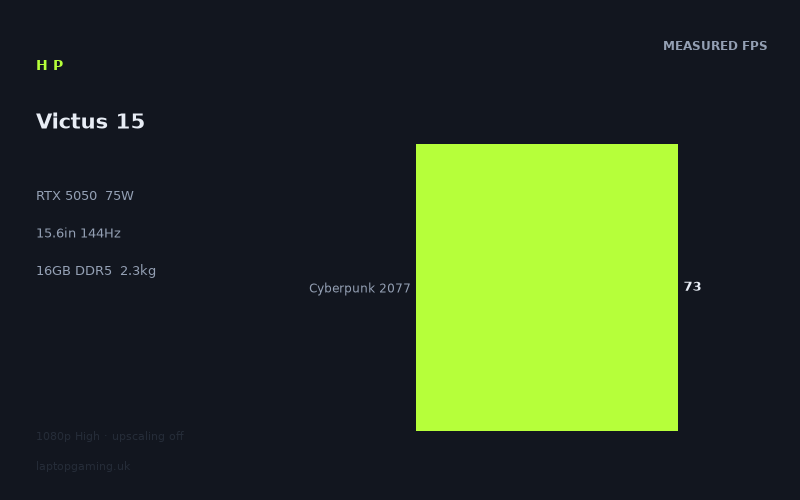
Cyberpunk 2077 at 73fps is the result that matters most for our scoring, and it deserves a caveat that we will return to. 73fps at High, native, with upscaling off, is solidly playable — noticeably better than a locked 60, well short of the panel's 144Hz. Cyberpunk is the standard stress test for modern rasterisation, and a low-power card producing 73fps in it at native resolution is a reasonable showing. Note that these are raster figures. We have no measured ray-tracing results for this machine, and given the pattern of the numbers we have, it would be irresponsible to guess. Ray tracing is the workload that punishes power-limited cards hardest, and a card that produces 73fps at High raster is not going to hold that anywhere near it with path tracing enabled. If ray tracing is important to you, this is the wrong laptop, and we cannot even tell you by how much it is the wrong laptop.
What this cluster tells you collectively is that the Victus 15 has a working range in the low-to-mid 70s for current AAA games at High. That is above 60, which is the threshold most people care about, and comfortably below 144, which is the threshold the panel advertises. If you want to close that gap you have three levers: drop from High to Medium, enable upscaling, or accept the frame rate you have. All three are legitimate, and all three are things a buyer at £799 should expect to be doing.
Hogwarts Legacy at 60fps: the edge of comfortable
60fps in Hogwarts Legacy is the result that best defines the machine's ceiling. It is playable — 60fps at native 1080p is what an enormous number of people have played games at for years — but it is playable with no margin. A game averaging 60fps will have sections that dip meaningfully below it, and Hogwarts Legacy is well known for uneven frame pacing when traversing between areas, regardless of hardware. An average of exactly 60 means the moment-to-moment experience will include stretches in the 40s and 50s.
This is where the settings menu stops being optional. On a machine like this, in a game like this, dropping to Medium or enabling upscaling is not a compromise you make grudgingly — it is the intended operating mode. The measured figures are deliberately taken with upscaling off, because that is the only way to compare hardware fairly across machines and across time. In practice, nobody with an Nvidia card and a demanding game turns upscaling off. The card supports Nvidia's upscaling technologies and they will raise these numbers, but we do not have measured figures for this machine with upscaling on, so we are not going to put a number on how much. Assume it helps meaningfully in the heavier titles and treat the native figures below as a floor, not a forecast.
Black Myth: Wukong at 46fps: the honest bottom
46fps is below what most people would call comfortable, and it is the number that tells you where this configuration runs out. Black Myth: Wukong is one of the heaviest current releases — an Unreal Engine 5 title using expensive lighting and geometry techniques that scale directly with available GPU power. A 75W card is precisely the wrong tool for that workload, and 46fps at High, native, is the result.
It is not unplayable. A single-player action game at 46fps is tolerable in a way that a competitive shooter at 46fps is not. But it is the clearest signal in the data of what the next few years look like on this machine. Wukong is not an outlier of poor optimisation; it is an indicator of where big-budget development is heading. The gap between 182fps in Counter-Strike 2 and 46fps in Wukong — a factor of nearly four — is the gap between the era this GPU comfortably serves and the era it is being asked to enter.
If your interest is specifically in the newest, heaviest Unreal Engine 5 releases at High settings, this is the wrong machine and it will get more wrong over time. If your interest is a broad library that includes those games occasionally, you will play them at Medium with upscaling on and be fine.
The 8GB VRAM question
The Victus 15 has 8GB of VRAM. At 1920x1080 with upscaling off, that is currently adequate for the games measured here — the frame rates above are the frame rates, and they do not show the catastrophic collapse that VRAM exhaustion produces. A card that has run out of memory does not produce 73fps in Cyberpunk; it produces stutter, texture pop-in and frame-time spikes that a simple average hides poorly.
The concern is forward-looking rather than present-tense. 8GB has been the mainstream figure for long enough that developers target it, but the pressure on it is increasing, and the games that push past it tend to do so at higher resolutions and higher texture settings than this machine will be running anyway. The mitigating factor here is that the Victus 15 is a 1080p machine driving a 1080p panel — the resolution that puts the least pressure on the frame buffer. A buyer who intends to drive an external 1440p or 4K display from this laptop should think harder about the 8GB figure than a buyer who will use the built-in panel, because at higher output resolutions the same games will demand meaningfully more memory while the GPU is simultaneously less able to feed them.
The practical advice: at 1080p on the internal panel, 8GB is not the thing that will limit this machine first. The 75W power limit is. If you want higher texture settings than the GPU can comfortably render at anyway, memory becomes a co-conspirator rather than the primary constraint.
The CPU and the memory
The Core i7-13620H is a previous-generation Intel H-series part, and pairing it with a current-generation entry GPU is a common cost-saving decision in this bracket. The Counter-Strike 2 result at 182fps is the best evidence we have that it is not a bottleneck in the workloads that expose CPUs, because that is precisely the kind of title where a weak processor shows up immediately. In the GPU-bound games — everything from Forza Horizon 5 downwards — the processor has slack, because a 75W graphics card is the constraint long before the CPU is.
That balance is arguably the right one for this price. Spending the budget on a faster CPU while leaving the GPU at 75W would have produced worse gaming results, not better ones. Where the older CPU generation might matter is outside gaming — in the efficiency of the platform, and therefore in battery behaviour away from the mains. We have no measured battery-life figure for this laptop and are not going to estimate one; a 15.6in gaming chassis with a discrete GPU is not a machine anyone buys for endurance, but if unplugged runtime matters to you, look for a measured figure before you buy rather than trusting any general reasoning, including ours.
16GB of DDR5 is the right amount for a gaming laptop in 2026 and the wrong amount to be complacent about. It is sufficient for every game measured here. It is also the point at which some newer titles begin to want more when running alongside a browser, a voice client and a launcher. The saving grace is that memory is the one component in a machine like this that is usually straightforward to upgrade later, though we have not verified the internal layout on this specific model and will not claim to know whether both slots are occupied or whether any memory is soldered. Check before you plan around it.
1TB of storage is a genuine strength at this price, and an underrated one. A 512GB drive in a gaming laptop is a permanent management chore — three large modern installs and it is full. 1TB is the difference between deleting games to make room and not thinking about it. Combined with the price, it is one of the places where the Victus 15's configuration is straightforwardly better value than its rivals rather than merely cheaper.
Why we cannot give this laptop a score
Every scored laptop on this site is averaged over the same five-game scoring suite, so that the numbers on one review page mean the same thing as the numbers on another. For the Victus 15, we have measured figures for only one of those five games — Cyberpunk 2077, at 73fps. We have no published results for Baldur's Gate 3, GTA V, X-Plane 11 or Dota 2 on this configuration.
That means the "mean across scoring-suite games" figure of 73fps is arithmetically true and analytically useless: it is a mean of one game. Ranking this machine against a fully-measured laptop on that basis would be comparing a single Cyberpunk result to a five-game average, which is not a comparison at all. So there is no score on this page, and there will not be one until the remaining figures exist.
What we can do — and have done in the comparison section below — is compare the Victus 15 against specific rivals on the games those machines share, which is a like-for-like comparison even when it is not a complete one. Six shared games is a reasonable sample and the deltas it produces are consistent enough to draw conclusions from. Just do not read those deltas as equivalent to a scored ranking, because they are not, and treating them that way is exactly the sloppiness the scoring suite exists to prevent.
The screen
The panel is a 15.6in 1920x1080 IPS display running at 144Hz. Each of those three specifications does a different job and only two of them are fully justified by the hardware behind them.
The resolution is correct. 1080p on a 15.6in panel is a sensible pixel density for gaming, and more importantly it is the resolution this GPU is built for. Putting a 1440p panel in front of a 75W RTX 5050 would have been actively harmful — the games measured here at 73fps and 60fps at 1080p would be substantially slower at 1440p, and the machine would have gone from "runs modern games at High with room to reduce settings" to "runs modern games at Medium out of necessity". HP made the right call, and buyers should read the 1080p panel as an appropriate match rather than a cost cut, even though it is also a cost cut.
IPS is the right panel technology at this price. It means viewing angles that do not shift colour when you move, which matters more than people expect on a laptop that gets used at whatever angle the desk or sofa dictates. What we do not have is measured data on this specific panel's brightness, colour gamut coverage, contrast ratio or response time, and those vary enormously between IPS panels — "IPS" describes the underlying technology, not the quality of the implementation. A budget IPS panel and a good one differ by a wide margin in every one of those metrics. We have no figures, so we are not going to characterise it as good or bad. If colour accuracy matters to your work, find a measured review of the specific panel variant before buying, and be aware that manufacturers sometimes ship more than one panel in the same model.
Can the GPU drive 144Hz?
In one of the six measured games, yes, comfortably: Counter-Strike 2 at 182fps runs above the panel's refresh rate with headroom. In the other five, no.
Forza Horizon 5 at 80fps uses a little over half the panel's capability. Cyberpunk 2077 at 73fps and Red Dead Redemption 2 at 74fps use around half. Hogwarts Legacy at 60fps and Black Myth: Wukong at 46fps use well under half. The 144Hz specification is, for the AAA portion of your library at High settings, unreachable at native resolution.
This is not a criticism of the panel — it is the standard state of affairs for a gaming laptop in this bracket, and the alternative (a 60Hz panel) would have been worse in every respect. A high-refresh panel still helps below its maximum: with variable refresh, a game running at 73fps on a 144Hz panel produces cleaner motion and no tearing, which a 60Hz panel could not do without either tearing or capping. And the panel is not wasted for the buyer whose main games are competitive titles, where the measured 182fps result shows the machine genuinely delivering high-refresh gaming.
The honest framing is this: the 144Hz specification is a real benefit for esports and a partial benefit — through smoother pacing rather than higher frame rates — for everything else. If you bought this laptop specifically to run AAA games at 144fps, the benchmark data says you will not, and turning settings down to Medium will get you closer but the 46fps Wukong result shows how far there is to go in the heaviest titles.
Build, size and portability
The Victus 15 weighs 2.3kg. That is the figure that should shape your expectations of how this machine fits into a day, and it deserves more than a passing mention, because weight is the specification people most consistently underestimate when buying online.
2.3kg is a normal weight for a 15.6in gaming laptop and a heavy weight for a laptop in general. For context on what that means in practice: it is roughly double what a thin-and-light ultraportable weighs, and it does not include the power supply. Gaming laptops ship with substantial chargers, and a machine with a discrete GPU that you intend to actually game on needs that charger with it — running a discrete GPU at full power from battery is not something any of these laptops do well. So the realistic carrying weight is 2.3kg plus a brick, and the brick is not light. We do not have a measured figure for the adapter's weight for this specific model, so treat "plus a brick" as a category observation rather than a number.
What that adds up to is a machine that moves rather than travels. It will go from bedroom to living room, from home to a friend's house, from a flat to a parent's place over a weekend. It is a poor daily commuter — carrying 2.3kg plus a charger on a train every day gets old quickly, and the chassis size that comes with a 15.6in gaming laptop makes it awkward on a small desk or a train table. If you need one machine for both gaming and a daily commute, the 15.6in gaming laptop category is a compromise you will feel every day, and a 14in machine is a materially different experience to live with.
We have not handled this laptop and cannot tell you how the chassis feels, whether the keyboard deck flexes, how the trackpad behaves or how the hinge holds up. We have no measured dimensions beyond the screen size, so we cannot tell you how thick it is or how much of a lap it covers. What we can say from the specification is that it is a conventionally-sized 15.6in gaming laptop with a modest thermal load, and the 75W GPU power limit means HP had a comparatively easy cooling target to hit — the same chassis size holding a 140W GPU would be working far harder.
One practical note that follows from the storage and the size together: a 1TB drive in a 15.6in chassis means this is a machine you can live on without an external drive hanging off it, which is a small but real quality-of-life advantage over the 512GB configurations common at the bottom of this market. It removes one accessory from the bag, and when the bag already contains 2.3kg of laptop and a charger, that counts.
How it compares
Every comparison below is drawn only from games both machines have measured figures for — six shared games in each case. That is a like-for-like comparison of the same titles at the same settings, which is the only kind worth making. It is not the same thing as our five-game scoring average, which we cannot compute for this machine, so read these as head-to-head performance deltas and nothing more.
ASUS TUF Gaming A14 — same GPU, same power limit, £208 more
The TUF Gaming A14 runs an RTX 5050 at 75W — identical GPU, identical power budget — and costs £1,007. Across the six shared games, the Victus 15 averages 2fps behind it.
2fps across six games is noise. It is the kind of gap produced by driver revisions, marginally different memory configurations, slightly better sustained clocks under the same power ceiling, or simply run-to-run variance in test methodology. Nobody has ever noticed a 2fps difference while playing a game. In performance terms, these two laptops are the same machine.
Which makes the price gap the entire story: £208, or roughly 26% more, for performance parity. Whatever the TUF A14 offers over the Victus 15, it is not frames. It offers a smaller form factor — a 14in chassis is a genuinely different proposition for portability, and if you are carrying a laptop daily, that difference is worth paying for. It may offer a better panel, better build quality, better cooling behaviour or better battery life; we do not have measured figures for those things on either machine, so we cannot adjudicate. What we can say with confidence, because the benchmark data says it directly, is that no part of the £208 buys you gaming performance.
The conclusion for a buyer choosing between these two: if the appeal of the A14 is that it is a 14in machine you can actually carry, that is a real reason and the Victus 15 does not answer it. If the appeal of the A14 is that it costs more and therefore must be faster, the numbers say otherwise, and the Victus 15 is the same GPU at the same power for £208 less.
Acer Nitro V 15 — the comparison that should change your mind
This is the important one. The Nitro V 15 runs an RTX 5060 at 115W for £931, and across the six shared games the Victus 15 averages 24fps behind it.
Consider what those two specification changes do together. A step up in GPU tier, and a 40W increase in power limit — from 75W to 115W, more than half again as much power for the graphics card to work with. Those are not independent improvements; the higher tier of silicon is only able to distinguish itself because it has been given the power to do so, and the 24fps average gap is the result of both changes compounding.
24fps across a six-game average is a large, consistent, obvious difference. Applied to the games measured here, it is roughly the difference between a game averaging in the low 70s and one averaging in the mid 90s — between "playable and smooth" and "genuinely fast". Applied to the heavier end of the library, it is the difference between the mid 40s and the high 60s, which is the difference between tolerating a game and enjoying it. Unlike the 2fps TUF gap, this is a delta you feel every session.
And it costs £132. That is 17% more money for a difference in performance that no amount of settings tweaking on the Victus 15 will close. This is, plainly, better value in the sense that matters most: cost per frame. It also buys longevity — the extra power headroom is exactly what determines how long a machine stays comfortable at High settings as games get heavier, and the Wukong result shows that pressure is already here.
There are legitimate reasons to buy the Victus 15 anyway. £799 may be a hard ceiling rather than a target — if £931 is genuinely out of reach, this comparison is academic and the Victus 15 is a good machine at its price. The Victus has 1TB of storage; if the Nitro V 15's configuration at that price has less, some of the £132 gets spent on a drive later. And if your library is dominated by competitive titles where the Victus already runs at 182fps, the extra GPU power buys you frames above the panel's refresh rate, which is to say it buys you nothing.
But for the buyer who is choosing between them on merit, with £931 within reach, and who plays modern single-player games: the Nitro V 15 is the better purchase and the benchmark data is not ambiguous about it. We would rather say so than sell you the cheaper machine.
Acer Nitro V16 — a different class, at a different price
The Nitro V16 pairs an RTX 5070 at 115W with a £1,199 price, and the Victus 15 averages 39fps behind it across six shared games.
39fps is a categorical difference, not an incremental one. It takes the games where the Victus 15 sits in the low 70s and puts them comfortably past 100fps, at which point the 144Hz panel discussion stops being theoretical for AAA titles. It takes Black Myth: Wukong from 46fps — the number that defines this machine's ceiling — to something in the mid 80s, which is a completely different experience of the same game.
The price gap is £400, half again as much as the Victus 15 costs. Whether that is worth paying depends entirely on what you want the machine to do. If the answer is "play current games at High and be done", the Victus 15 does that, and £400 is a lot of money for headroom you may not use. If the answer is "run heavy new releases at settings I do not have to think about, on a machine that will still be doing that in three years", the V16 is answering a question the Victus 15 cannot.
Note also that the V16 achieves its lead with the same 115W power limit as the Nitro V 15 — the additional 15fps over that machine comes from GPU tier alone. That is a useful illustration of how these two variables interact: power limit determines how much of a GPU's potential is available, and tier determines how much potential there is. The Victus 15 is constrained on both counts, which is why it sits where it does.
HP OMEN 16 — the ceiling of this comparison set
The OMEN 16, HP's own step up, runs an RTX 5070 at 140W for £1,375, and the Victus 15 averages 50fps behind it across six shared games. That is the largest gap in this set, and it comes from the largest specification gap: two GPU tiers and nearly double the power limit.
The comparison with the Nitro V16 is instructive on its own. Same GPU tier, 140W instead of 115W, and 11fps more average performance over the Victus 15 — which is another way of saying that raising the power limit from 115W to 140W is worth around 11fps on this six-game average, before any other differences between the machines are accounted for. That is the clearest evidence in this whole comparison for why the TGP figure belongs on every spec sheet and why buyers should look for it. The gap between the Victus 15's 75W and the OMEN's 140W is the largest single explanation for the 50fps difference between them.
The price is £576 more, which is 72% on top of the Victus 15. That is not a comparison of two options for the same buyer; it is two different budgets. What it is useful for is calibration: it shows you what the top of this bracket buys, so you can decide where on the curve you want to sit. From £799 to £931 costs £132 and buys 24fps. From £931 to £1,375 costs a further £444 and buys a further 26fps. The steepest return, by a wide margin, is the first £132.
What the pattern across all four says
Line the four comparisons up and the shape is clear. Against a machine with the same GPU at the same power, the Victus 15 is level (2fps) and hundreds of pounds cheaper. Against machines with more GPU and more power, it falls behind by 24, 39 and 50fps in an order that tracks their specifications precisely. There are no surprises in this data — no case where the Victus 15 punches above its silicon, and no case where it embarrasses itself relative to its price.
That consistency is worth something in itself. It means the Victus 15 is delivering what its specification says it should, which is not universally true of budget gaming laptops — a poorly-cooled machine or one with an aggressively conservative power profile will underperform its own spec sheet. Nothing in the benchmark data suggests that is happening here. What you are buying is exactly a 75W RTX 5050, performing like a 75W RTX 5050, at the cheapest price in this set.
Who it's for
The buyer with a hard £799 ceiling. This is the primary case and it is a strong one. If £799 is what you have, the Victus 15 gives you a current-generation GPU, 16GB of DDR5, 1TB of storage and a 144Hz IPS panel, and the measured figures show it playing every game in our set at native 1080p and High settings. Nothing here is a token specification. The storage in particular is generous for the price and will save you a purchase later.
The competitive-shooter player. 182fps in Counter-Strike 2 says everything necessary. If your hours go into esports titles, this machine runs them above its own panel's refresh rate, and every pound spent on a faster GPU would go into frames you cannot display. The 144Hz panel is genuinely earned for this buyer, and paying £931 or £1,199 for a faster card would be spending money on the wrong problem.
The player with a large back catalogue. The measured spread — 182fps at the top, 46fps at the bottom — shows a machine that is very comfortable with anything a few years old and increasingly stretched by the newest heavyweight releases. If your library is broad and mostly not brand new, the constraint rarely bites.
The buyer who is happy to use the settings menu. These figures are native, High, upscaling off, which is the strictest possible reading of the hardware. In practice, dropping to Medium and switching upscaling on transforms the heavier results. If you are the kind of player who tunes settings once and then forgets about them, the Victus 15 has more in it than the native numbers suggest.
The desk-bound buyer. At 2.3kg plus a charger, this is a machine that lives on a desk and occasionally relocates. If that is how you will use it, the weight is irrelevant and you should not pay a premium for a smaller chassis.
Who should buy something else
Anyone who can find another £132. Say it plainly: the Acer Nitro V 15 at £931 averages 24fps ahead across six shared games, and that is a difference you notice in every heavy title. If the extra £132 is findable, find it. Cost per frame is the metric that matters, and on that metric this comparison is not close.
Anyone who cares about ray tracing. We have no measured ray-tracing figures for this machine, and the raster numbers alongside a 75W power limit make optimism unwise. Ray tracing is the workload that punishes low-power GPUs hardest. If it matters to you, buy more GPU and more power, and look for measured RT figures before you commit.
Anyone planning for 2028. Black Myth: Wukong at 46fps is the warning. It is not a badly-optimised outlier; it is representative of where big-budget development has gone. A 75W entry-tier card at High settings is already at its limit in that class of game, and the trend runs one way. If you want a machine that stays comfortable at High for several years without constant setting reductions, this is not it.
Anyone driving an external high-resolution display. The 8GB frame buffer and the 75W power limit are both sized for 1080p. Pointing this machine at a 1440p or 4K monitor asks it to do the two things it is least equipped for simultaneously. It will work; it will not work well in demanding titles.
Anyone commuting daily. 2.3kg plus a charger, in a 15.6in chassis, carried every day, is a genuine imposition. The ASUS TUF Gaming A14 is £208 more for the same performance, and if that £208 is buying you a 14in machine you actually enjoy carrying, that is a defensible purchase. Portability is one of the few things the Victus 15's price advantage cannot answer.
Anyone who needs a verified panel or battery figure before committing. We do not have measured brightness, colour, contrast or battery data for this configuration, and we will not guess at them. "IPS, 144Hz, 1080p" describes the category the panel belongs to, not its quality. If those specifics are decisive for you, find measured figures for the exact variant you are buying.
The bottom line
The HP Victus 15 does what a £799 gaming laptop should do, and the published measurements back that up without qualification: 182fps in Counter-Strike 2, three big-budget games clustered in the low-to-mid 70s, Hogwarts Legacy at exactly 60fps, and the heaviest title in the set at 46fps — all at native 1080p on High. That is a complete, honest picture of an entry-level machine performing exactly to specification, with no unpleasant surprises hiding in the spread.
It is beaten on price by nothing in this comparison set and beaten on performance by everything except the ASUS TUF Gaming A14, which matches it for £208 more. The Acer Nitro V 15's 24fps average advantage for £132 is the argument we would put to any buyer who has the flexibility, and we would put it firmly. But if £799 is the number, the Victus 15 is not a consolation prize. It is a properly specified machine — 16GB of DDR5, 1TB of storage, a 144Hz IPS panel matched sensibly to a GPU that can drive it in the games that matter for high refresh — that plays the current catalogue at the resolution it was designed for.
There is no score on this page, and there should not be. We have measured figures for one of our five scoring-suite games on this configuration, and ranking a one-game sample against machines averaged over five would be a fabrication dressed as a number. The head-to-head comparisons above use six games that both machines actually have data for, which is the most rigorous comparison available to us, and it is enough to answer the question most buyers are asking: is this the right £799, or should it be £931? For most people, honestly, it should be £931. For people who do not have £931, this is a good £799.