Review
Medion Erazer Deputy 15 P1 review
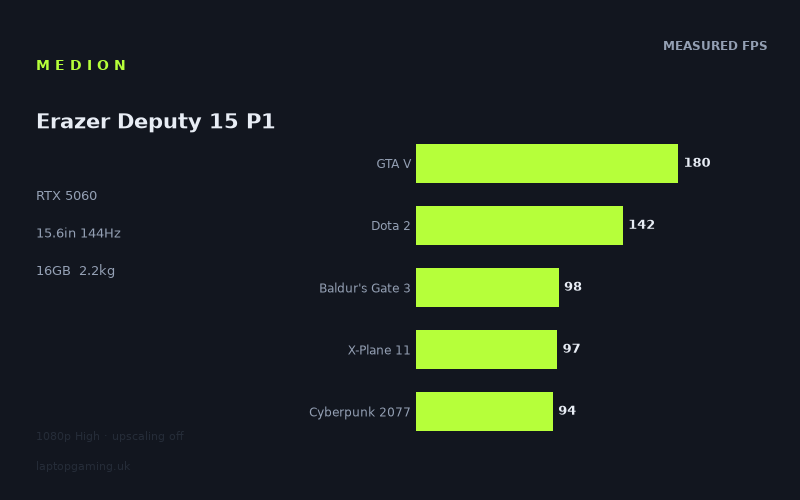
Frame rates
1920×1080, High preset, upscaling off. Averages 122fps across the 5 core benchmark games.
Measured on this machine. Source: Notebookcheck, 2026-02-24.
Not scored: no confirmed UK price
We have the full benchmark suite for this machine, so it ranks on the frame rate leaderboard like any other. What we don't have is a UK listing for this exact configuration - it's sold as a European review unit, or only in specifications that differ from the one tested. Since 30% of our score is value for money, scoring it would mean pretending price is no object, which would flatter it against every laptop you can actually buy. The frame rates below are real and comparable; there is just no buying recommendation to make yet.
How these numbers were produced
Frame rates here are not measured by us, and we label how each one was arrived at. A figure marked measured comes from a published run on that exact machine. A figure marked representative is derived from the GPU and its power limit (TGP) and cross-referenced against published reviews - a sound estimate of what that configuration delivers, but not a measurement of that specific laptop. Unless stated otherwise, numbers are 1920x1080, High preset, upscaling off. Where a laptop ships in several power configurations we use the wattage of the exact SKU listed, because a 140W RTX 5070 and a 115W one are not the same product.
In use
The short version
The Medion Erazer Deputy 15 P1, carrying the model code MD62761, is a mainstream 15.6in gaming laptop built around an RTX 5060 with 8GB of video memory, a Core 7 250H processor, 16GB of system memory and a 1TB solid-state drive. The screen is a 1920x1080 IPS panel at 144Hz. It weighs 2.242kg and carries a 53Wh battery.
The frame rate data here is unusually good. Notebookcheck measured eleven titles on 24 February 2026, all at 1920x1080 on the High preset with upscaling switched off, and the results run from 180fps in GTA V down to 39fps in Borderlands 4. Crucially, all five games in our scoring suite are covered — GTA V at 180fps, Dota 2 at 142fps, Baldur's Gate 3 at 98fps, X-Plane 11 at 97fps and Cyberpunk 2077 at 94fps — for a five-game mean of 122fps. That is a complete, comparable result and the machine ranks normally on our frame rate leaderboard.
There is no overall score on this page for one reason only: we have no confirmed UK price for this exact configuration. Value carries 30% of our score and cannot be computed from nothing. Nothing is wrong with the machine or its data — the benchmark set is complete and it stands up perfectly well against everything else measured the same way. We will not speculate about what it costs.
The most instructive thing about this laptop is what happens when you read the whole eleven-game list rather than the five-game average. Above the 90fps line sit games built on older engines and mainstream 2025 releases. Below it, in descending order, sit the newest and most demanding titles in the set: The Outer Worlds 2 at 66fps, Until Dawn at 62fps, Anno 117: Pax Romana at 59fps, Stalker 2 at 56fps and Borderlands 4 at 39fps. That is a machine comfortably fast for most of what people play and already working hard at the front edge of what is being released.
The comparison data reinforces the point in an unexpected direction. Across five shared games the Deputy 15 P1 averages 34fps more than the MSI Cyborg 15, an RTX 5050 machine at GBP 984 — a clear, real separation. It also averages 1fps more than the Gigabyte Gaming A16, an RTX 5070 machine at 85W costing GBP 1,400, and is exactly level with the Asus ROG Zephyrus G14 2025, an RTX 5080 machine at 120W costing GBP 3,811. And it sits 78fps behind the Schenker XMG Neo 16 A25 and its RTX 5090. Those four results together tell a coherent story about what a 1080p benchmark set can and cannot measure, and we will work through it properly below.
Buy it if you want a straightforward 1080p gaming laptop that runs the mainstream library well above 60fps and plays esports titles at close to the panel's refresh rate. Buy something else if your library is dominated by the newest, heaviest releases, or if you expect to keep the machine for four or five years without lowering settings — because 8GB of video memory and the results at the bottom of that eleven-game list are both pointing in the same direction.
Performance
What we know about the graphics card, and what we don't
We do not have a graphics power limit for this machine, and that is a genuine gap worth stating up front rather than glossing over. Nvidia licenses the same graphics silicon to manufacturers across a range of sustained power budgets, and where a laptop lands in that range is decided by the chassis, the cooling design and the firmware. Two laptops that both say RTX 5060 can behave quite differently once the heat has built up and the cooling system has to settle into a steady state. Without a stated figure we cannot tell you where the Deputy 15 P1 sits in that range.
What we can do is reason from the measurements, which is a more reliable guide than a specification anyway. Eleven titles measured on one machine on one day, spanning 180fps to 39fps, give a fairly complete picture of behaviour under both light and heavy load. The results at the heavy end — Borderlands 4 at 39fps, Stalker 2 at 56fps — are consistent with a graphics card working genuinely hard rather than one being held back by an unusually conservative power budget, but that is an inference and we will label it as one. If a power limit figure emerges we will use it.
The 8GB of video memory is a firmer point and does not require inference. It is the standard allocation at this tier and it is the specification most likely to age badly. Video memory is not a performance multiplier in the way core count is; it is a hard capacity limit. A game that fits comfortably within it runs at whatever the graphics card can manage. A game whose texture and buffer working set does not fit has to stream data in and out over a much slower path, and the result is not a gentle slope downwards but sudden, jarring frame-time spikes. Every measurement here is at 1920x1080 on the High preset — precisely the conditions under which 8GB is least likely to be a problem. Raise the texture settings, enable ray tracing, or run the same titles at a higher resolution on an external display, and the picture changes in ways this data does not cover.
The top of the table: games where the processor decides
GTA V at 180fps is the highest result in the set and one of the least useful as a guide to the graphics card. GTA V dates from a generation of games that predates modern multi-core scheduling, and at 1080p on capable hardware it is famously limited by single-thread processor performance rather than by graphics throughput. What that figure really measures is the Core 7 250H, the memory attached to it and the driver overhead in between. A faster graphics card in the same chassis would move that number very little.
Dota 2 at 142fps belongs to the same category. It is an esports title engineered from the outset to run acceptably on modest hardware, with a performance profile dominated by processor speed. An RTX 5060 rendering Dota 2 at 1080p High is not close to being the constraint. That said, this figure is one of the more practically relevant in the whole set for a large slice of buyers, because a great many people buying a 15.6in gaming laptop with a 144Hz panel are buying it substantially for exactly this kind of game. At 142fps Dota 2 sits within a couple of frames of the panel's refresh ceiling, which is about as good an outcome as this class of machine can produce.
These two results establish the platform's ceiling. Whatever else the Deputy 15 P1 does, in games that lean on the processor it produces frame rates in the 140–180 range at this resolution. That is the number to hold onto when someone tells you a more expensive graphics card would transform this machine — in these titles, it would not, and the comparison data further down proves it directly.
The middle band: the scoring suite's harder half
Baldur's Gate 3 at 98fps, X-Plane 11 at 97fps and Cyberpunk 2077 at 94fps land within four frames of each other and are the three results that anchor the five-game mean at 122fps. They are informative in different ways.
Baldur's Gate 3 is a modern renderer with a well-known performance cliff in its dense third act, where the number of simultaneously simulated actors climbs sharply. A benchmark run captures a specific scene, not a worst case, so 98fps should be read as a healthy result for the general case rather than a guarantee for every location. Comfortably above the 60fps mark either way.
X-Plane 11 at 97fps is the odd one out in this band, because despite being the third-lowest scoring-suite result it is not primarily a graphics workload at all. Flight simulators of that generation lean extraordinarily hard on single-thread processor performance and on the draw-call and geometry pipeline. A machine reaching 97fps there has told you a great deal about its processor and memory latency and almost nothing about whether its graphics card has 8GB or 16GB attached. It is a useful reminder that a low position in the table does not automatically mean a graphics bottleneck.
Cyberpunk 2077 at 94fps is the most useful figure in the scoring suite for judging the graphics card, because it remains the most demanding conventional rasterisation workload in wide benchmark circulation. At 1080p High with upscaling off, 94fps is a genuinely good result for a mainstream graphics part — well clear of 60fps with headroom to spare, and enough that a buyer could raise a few settings and still stay comfortable. Note the conditions carefully: High preset, no ray tracing, no upscaling. We have no ray-traced figures and no DLSS-enabled figures for this machine, and the ray-tracing question in particular is the one where an 8GB card at this tier has the most to lose.
The bottom of the table: where the machine actually meets its limits
This is the part of the data that a five-game average cannot show you, and it is the reason the eleven-title list matters so much.
ARC Raiders at 89fps is the first title below the 90 mark and still a comfortable result — smooth, responsive, nothing to worry about on a 144Hz panel even though it does not come close to filling it.
The Outer Worlds 2 at 66fps and Until Dawn at 62fps are where the character of the machine changes. Both are above 60fps, which is the line most people treat as the threshold of a good experience, but neither has much room left. On a 144Hz display, 62fps is a long way from what the panel can show, and any heavier scene, any settings increase, or any future patch that raises the rendering cost pushes these titles below the line rather than towards it.
Anno 117: Pax Romana at 59fps and Stalker 2 at 56fps are already below it. Neither figure is a disaster — both are playable, and a strategy title like Anno is far more tolerant of a mid-fifties frame rate than a shooter is — but they are results that tell you the settings need looking at rather than results you would be happy to leave alone.
Borderlands 4 at 39fps is the single most important number on this page. It is the lowest result by a wide margin, it is a recent release, and at 1080p on the High preset it is comfortably short of a smooth experience. Anyone buying this laptop specifically to play the newest, heaviest releases at High settings should look at that figure hard. It does not mean the game is unplayable — dropping the preset, enabling upscaling or accepting a lower target would all change the picture, and none of those adjustments appear in this data — but it does mean the machine has run out of headroom at the front edge of the release schedule, in 2026, at its own panel's native resolution.
Where the spread comes from
The gap between the top and bottom of this list — 180fps down to 39fps — is a spread of more than four and a half to one, measured on the same hardware, on the same day, at the same resolution and preset. None of that comes from settings, thermal throttling or measurement noise. All of it comes from how the eleven game engines distribute work.
The pattern is almost perfectly chronological. The titles at the top are built on renderers designed for hardware generations that no longer exist in this form; their per-frame graphics cost is low, so the platform runs out of processor before it runs out of graphics card. The titles at the bottom are recent releases built on modern engines with substantially higher per-pixel and per-frame costs — more complex lighting, denser geometry, larger texture sets, more expensive post-processing. On those, the graphics card becomes the constraint and the frame rate falls to whatever it can actually deliver.
That chronological ordering is the single most useful predictive tool a buyer has. It says, quite clearly, that this machine's relationship with a game is a function of when the game was made. Everything from the last decade of mainstream releases runs well. The current release schedule runs adequately. The heaviest current releases run at or below 60fps at High settings. Extrapolate that forward two or three years and the trajectory is not difficult to read.
The 122fps average, and what it does and doesn't say
The five-game scoring mean of 122fps is a legitimate, comparable number and the machine ranks normally against every other laptop we have measured the same way. That is genuinely worth something: a complete data set is rarer than it should be, and it means the Deputy 15 P1 can be placed on the leaderboard without caveats about missing titles.
But 122fps is an average of a set whose composition skews older, and the eleven-title list makes that visible in a way the five-game mean cannot. Two of the five scoring games — GTA V and Dota 2 — are processor-limited titles that pull the average up. If you rebuilt the average from the six non-suite titles instead, you would get a substantially lower and, for a buyer choosing what to play next year, arguably more relevant number. We use a fixed five-game suite because a fixed suite is the only way to compare machines fairly, but nobody should mistake a comparison tool for a complete description of behaviour. Read both.
What these numbers cannot tell you
There are no ray-traced figures for this machine, no results with DLSS or frame generation enabled, and nothing at any resolution other than 1920x1080. On a card with 8GB of video memory the upscaling question is not academic — upscaling is the standard mitigation for exactly the situation Borderlands 4 describes, and its absence from the data means we cannot tell you how much of that 39fps gap it would close.
We also have no measured battery life, no noise figures under load, no surface temperature data and nothing on how the machine behaves after an hour of sustained gaming. For a 15.6in chassis with a mainstream graphics part those are all reasonable questions and we do not have answers to them. Where we lack data we will say so rather than construct an impression.
The screen
The panel is 15.6in, 1920x1080, 144Hz, IPS. There is one enormously useful consequence of that first number: every frame rate on this page was measured at the panel's exact native resolution. That is unusual and it matters. For most gaming laptops, a 1080p benchmark sweep is a proxy — a standardised test at a resolution the buyer will not actually use. Here it is not a proxy at all. These are the numbers you would see on this screen, in these games, at the High preset. Very few reviews get to say that.
Which makes the refresh rate question unusually clean. The panel runs at 144Hz, and of the eleven measured titles exactly one exceeds it: GTA V at 180fps. Dota 2 at 142fps sits fractionally under, which in practice means the panel is essentially full. Everything else falls short, and most of it falls well short. Baldur's Gate 3 at 98fps, X-Plane 11 at 97fps and Cyberpunk 2077 at 94fps use roughly two-thirds of the display's capability. The bottom five titles use less than half of it.
That is not a criticism of the pairing. A 144Hz panel is worth having even when frame rates sit below its ceiling, because a variable frame rate on a high-refresh display with adaptive sync produces smoother motion than the same frame rate locked to a 60Hz panel, and because the panel is not the expensive part of this machine. But it does reframe what the 144Hz specification is for. It is there to serve esports and older titles, where the platform can genuinely produce 140-plus frames, and to smooth everything else. It is not a promise that current games will fill it, and the measured data is unambiguous on that point.
The panel technology is IPS, which is the sensible and expected choice at this level. IPS gives good viewing angles and accurate enough colour for gaming and general use, and it avoids both the wear considerations of OLED and the local-dimming complications of mini LED. What it gives up is contrast: blacks on an IPS panel are dark grey rather than genuinely black, which is most noticeable in dark games and in dimly lit rooms. On a machine at this tier, that trade is entirely correct — the money is better spent elsewhere, and a well-implemented 144Hz IPS panel is a perfectly good gaming display.
We have no brightness measurement, no colour gamut coverage figure and no response time data for this specific panel, so we cannot tell you how it performs near a window or how it compares with a rival's display in absolute terms. Those are real gaps. What we can say is that 1920x1080 across 15.6in is a comfortable pixel density for gaming and legible for desktop work, and that this is the one specification on the machine perfectly matched to what the graphics card can deliver.
Build, size and portability
At 2.242kg the Deputy 15 P1 is middling for a 15.6in gaming laptop: heavier than a mainstream thin-and-light, considerably lighter than the 16in and 18in machines that carry high-power graphics parts. In practical terms that is the weight at which a laptop stops being something you notice constantly and becomes something you notice occasionally. It will go into a backpack for a commute without being a daily burden, and it will move between rooms, desks and a friend's house without any thought at all.
That weight is a direct consequence of the graphics part it carries. A mainstream RTX 5060 does not demand the vapour chambers, fin stacks and structural rigidity that a high-power flagship implementation does, so the chassis can be lighter. The trade is the one visible at the bottom of the benchmark table: less thermal capability means less sustained graphics power, and less sustained graphics power is exactly why Borderlands 4 lands at 39fps rather than somewhere more comfortable. You do not get both.
The real travelling weight is higher than 2.242kg because the power adapter has to come too, and we do not have its weight in our data so we will not put a number on the total. It is worth mentioning because the adapters supplied with gaming laptops are consistently larger than people expect, and a machine that feels reasonable at 2.242kg feels different with a brick in the same compartment.
The battery is 53Wh, which is small. It is well under the 99Wh maximum permitted in aircraft cabin baggage under standard rules, and well under what flagship gaming machines carry. We have no measured battery life figure and will not estimate one, but the structural point does not require a measurement: a smaller cell in a machine with a discrete graphics card and a 144Hz panel is not a recipe for long unplugged sessions. Gaming on battery is not something any laptop in this class does well — the graphics card cannot draw anything like its full power from a cell of this size, and performance falls accordingly — but a 53Wh battery means the compromise applies to ordinary use as well, not just to gaming.
The 15.6in form factor remains the most sensible size for a gaming laptop that has to do other jobs. It fits on an aeroplane tray table, in a standard backpack sleeve and on a small desk, all of which are true of far fewer 16in machines and almost no 18in ones. If the plan is to game at a desk most evenings and carry the machine occasionally, this is the right size and the right weight for it.
On the rest of the configuration: 16GB of system memory and a 1TB solid-state drive are adequate and unremarkable. 16GB is enough for current games and light multitasking, though it is now the floor rather than a comfortable margin, and it is the specification most likely to feel tight first if the machine is kept for several years alongside a browser full of tabs and a streaming application. 1TB holds a reasonable game library given that modern installs frequently exceed 100GB, but it will require management rather than allowing you to ignore storage entirely. Neither is a reason to avoid the machine; both are worth knowing.
How it compares
Four machines from the same graphics generation, chosen to give a spread rather than just the nearest neighbours: the two closest results, the machine this laptop beats by the widest margin, and the machine that beats it by the widest margin. All comparisons use only games both machines have figures for, drawn from the same 1080p High measurement conditions.
MSI Cyborg 15 — RTX 5050, GBP 984
Across five shared games the Deputy 15 P1 averages 34fps more than the Cyborg 15. That is a real and substantial separation, and it is exactly the kind of result you would hope to see between adjacent graphics tiers: not so vast that the cheaper machine is pointless, not so small that the more expensive one is a waste.
The practical meaning of a 34fps average gap at this level is larger than the same gap would be higher up the stack. When a machine is producing 180fps, another 34 makes no visible difference on a 144Hz panel. When a machine is producing 60fps in a demanding title, 34 more is the difference between compromised and comfortable. Given where the Deputy 15 P1's harder results sit — Cyberpunk 2077 at 94fps, Baldur's Gate 3 at 98fps — a machine averaging 34fps below it would be uncomfortably close to the 60fps line in the same titles, and would be under it in the newest ones.
This comparison also does something important for the rest of the section: it establishes that the benchmark set genuinely can separate machines. Anyone inclined to dismiss the near-zero results below as a broken test should note that the same five games produce a 34fps gap here and a 78fps gap further down. The test works. What it measures is simply narrower than the spec sheets imply.
Gigabyte Gaming A16 — RTX 5070 at 85W, GBP 1,400
Across five shared games the Deputy 15 P1 averages 1fps more than the Gigabyte Gaming A16, which carries an RTX 5070 running at an 85W power limit and costs GBP 1,400. A tier-higher graphics part, and the mainstream machine is fractionally ahead.
Two things are going on and both are real. The first is the power limit. 85W is a conservative budget for an RTX 5070, and a graphics card constrained that far below its licensed maximum gives up a meaningful share of the clock speed it would otherwise hold under sustained load. That is not a defect — it is the deliberate trade a manufacturer makes to build a lighter, quieter or cheaper machine — but it does mean the gap between a well-fed 5060 and a restrained 5070 is much smaller than the model numbers suggest.
The second is the composition of the shared games. Of the five in our suite, GTA V, Dota 2 and X-Plane 11 are all limited by processor throughput rather than graphics throughput at 1080p. In a processor-limited title, adding graphics capability produces no extra frames at all — the card simply finishes each frame earlier and waits longer for the next batch of work. Three of five games compressed to near-zero difference, and only Cyberpunk 2077 and Baldur's Gate 3 giving the graphics parts room to differ, is enough to bring an average to within a single frame.
The buying advice follows directly. At GBP 1,400 the Gaming A16 is not offering more 1080p performance than this machine in the games we have data for. What it would offer is more headroom at higher resolutions, in ray-traced workloads and in the heaviest current titles, plus whatever its own panel, build and configuration bring. Whether that is worth the difference depends entirely on the Deputy 15 P1's price, which we do not have.
Asus ROG Zephyrus G14 2025 — RTX 5080 at 120W, GBP 3,811
Across five shared games the two machines are exactly level. The Zephyrus G14 2025 carries an RTX 5080 at a 120W power limit and costs GBP 3,811.
This is the most striking comparison in the set and the one most likely to be misread, so it is worth being precise about what it does and does not mean. It does not mean an RTX 5080 is no faster than an RTX 5060. It means that in these five specific games, at 1920x1080, on the High preset, with upscaling off, the two machines produce the same average — because in three of those five titles neither graphics card is the limiting factor, and in the other two the G14's card is running at a power limit well below its ceiling in a 14in chassis with correspondingly limited cooling.
The G14 is not a machine designed to win 1080p benchmark sweeps. It is a compact, light, high-specification laptop whose entire proposition is fitting serious hardware into a small package, and the 120W power limit is the price of that. Judge it on what it is for and the result looks very different. Judge it purely on these five numbers and it looks like an extremely expensive way to match a mainstream 15.6in machine.
What a buyer should take from this is not that expensive laptops are a con, but that graphics tier and price tell you far less about 1080p performance than most people assume. If your display is 1920x1080 and your games are the ones in this suite, the Deputy 15 P1 is delivering the same measured result as a machine costing GBP 3,811. That is a genuine finding and the strongest argument available for buying at this tier rather than reaching further up.
Schenker XMG Neo 16 A25 — RTX 5090, no confirmed UK price
Across five shared games the Deputy 15 P1 averages 78fps behind the Schenker XMG Neo 16 A25, an RTX 5090 machine. This is the widest gap in the comparison set in either direction, and it is the result that makes everything above it coherent.
Set the four figures side by side — plus 34, plus 1, level, minus 78 — and the benchmark's behaviour becomes clear. It is not a test that flattens everything into a heap. It separates the Deputy from a lower-tier machine decisively and from a genuinely faster platform decisively. What it does not do is separate machines whose graphics cards are not the limiting factor in the games being played. The 78fps gap is the proof that when a platform really is faster under these conditions, the numbers show it.
It is worth noting what the XMG Neo brings that produces that gap. It is a larger 16in machine with the top graphics part, and on titles that are largely processor-limited a 78fps average advantage points to a platform that feeds its graphics card faster across the board — processor performance, memory bandwidth and latency, and sustained power behaviour, not just a bigger graphics chip. That combination is what a flagship buys, and it costs accordingly. We have no confirmed UK price for it, so the value comparison cannot be made.
Reading the four results together
The comparison set describes a machine sitting in a very particular place. It is clearly and measurably faster than the tier below it. It is level with, or fractionally ahead of, two machines carrying higher-tier graphics parts at constrained power limits, one of which costs GBP 1,400 and one of which costs GBP 3,811. And it is a long way behind a genuine flagship.
For a buyer shopping at 1080p, that is close to the ideal shape of result. It says the money spent going from a 5050 to a 5060 buys real frames, and the money spent going from a 5060 to a power-limited higher tier does not — at this resolution, in these games. What it cannot tell you is where the line falls at higher resolutions, in ray-traced workloads, or in the newest releases, because the shared-game comparisons do not cover any of those. The eleven-title list on this page suggests that in the newest releases the picture would look rather different, and a buyer planning to play those should weight that accordingly.
Who it's for
The Deputy 15 P1 suits someone with a clear and honest picture of what they play. If your library is mainstream releases from the last several years, esports titles, strategy games and the sort of games that turn up in a seasonal sale, this machine runs all of it well above 60fps at its panel's native resolution and runs the lighter half of it at close to the display's 144Hz refresh. Dota 2 at 142fps, GTA V at 180fps, Baldur's Gate 3 at 98fps and Cyberpunk 2077 at 94fps describe a machine that handles the bulk of what people actually play without asking anyone to compromise.
It also suits a buyer who wants a 15.6in machine that has to do other things. At 2.242kg it is genuinely transportable, the form factor fits ordinary bags and desks, and 16GB of memory with a 1TB drive covers general use without complaint. As a single machine for a student or for someone who games in the evenings and works during the day, the size and specification are sensibly matched.
And it suits anyone who has looked at the comparison data and drawn the correct conclusion from it: at 1920x1080, in the games measured here, spending substantially more money on a higher graphics tier at a constrained power limit did not produce more frames. That is a strong argument for buying at this level and putting the difference somewhere it will be felt.
Who should buy something else
If you play the newest and heaviest releases at High settings, look elsewhere or adjust your expectations. Borderlands 4 at 39fps, Stalker 2 at 56fps and Anno 117: Pax Romana at 59fps are the evidence, all measured at this machine's own native resolution. Those games are playable with settings adjustments and upscaling — neither of which appears in this data — but a buyer whose main interest is the front edge of the release schedule is buying a machine that is already compromising there in 2026.
If you intend to keep the laptop for four or five years without lowering settings, the 8GB of video memory is the specification to worry about. Capacity limits do not degrade gracefully. The chronological pattern in the eleven-game list — older titles fast, newest titles slow — is the clearest possible indication of the trajectory, and the memory allocation will make the far end of it worse rather than better.
If you want to game at 1440p or on a higher-resolution external display, this is the wrong machine. Every figure here is at 1920x1080, and at the demanding end of the list the machine has no headroom left at that resolution, let alone above it. Buy a higher tier, or accept upscaling as a permanent part of the setup.
If you want the highest measured frame rates available, the XMG Neo 16 A25 averages 78fps ahead across five shared games. That is the honest recommendation for anyone whose criterion is simply the number, though we have no confirmed UK price for it and cannot say what that performance costs.
If you need long battery life, the 53Wh cell is small for the class and we have no measured runtime to reassure you with. Gaming laptops are not the right category for unplugged endurance, and this one carries less capacity than most of its competitors.
The bottom line
The Medion Erazer Deputy 15 P1 does the thing a mainstream gaming laptop is supposed to do: it runs the games most people play, at the resolution its own screen uses, at frame rates nobody would complain about. A 122fps five-game average is a solid, complete, comparable result, and the eleven-title measurement set is more thorough than most machines get.
The eleven-title list is also where the honest caveat lives. Above 90fps sit the games of the last decade. Below 60fps sit some of the games of the last year. That is the whole machine in one observation, and it is not a criticism so much as an accurate description of what a mainstream graphics part with 8GB of video memory does in 2026.
We cannot tell you whether it is good value, because we have no confirmed UK price and value is 30% of our score. What the data can tell you is what the performance is worth relative to alternatives: 34fps clear of an RTX 5050 machine at GBP 984, level with an RTX 5080 machine at GBP 3,811, and 78fps behind a genuine flagship. Whatever it costs, those are the reference points, and the middle one is the most eloquent of the three.