Details
Product prices and availability are accurate as of the date/time indicated and are subject to change. Any price and availability information displayed on Amazon.co.uk at the time of purchase will apply to the purchase of this product.Review
MSI Katana 17 HX review
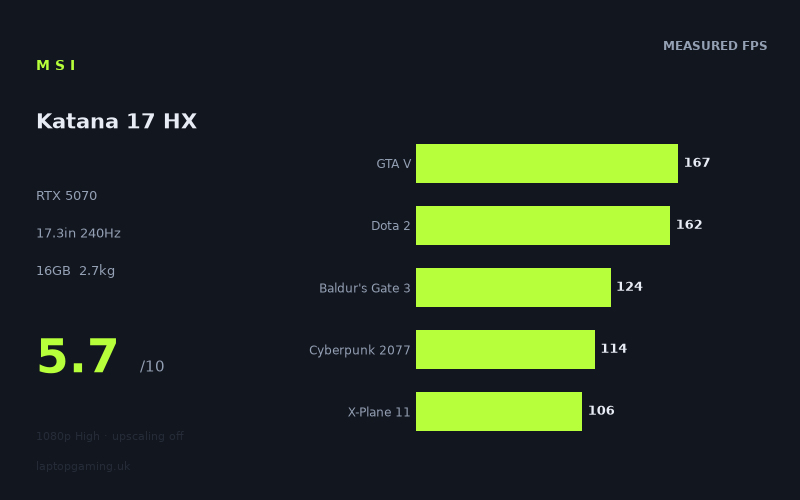
Frame rates
1920×1080, High preset, upscaling off. Averages 134fps across the 5 core benchmark games.
Measured on this machine. Source: Notebookcheck, 2025-06-23.
Not scored: no confirmed UK price
We have the full benchmark suite for this machine, so it ranks on the frame rate leaderboard like any other. What we don't have is a UK listing for this exact configuration - it's sold as a European review unit, or only in specifications that differ from the one tested. Since 30% of our score is value for money, scoring it would mean pretending price is no object, which would flatter it against every laptop you can actually buy. The frame rates below are real and comparable; there is just no buying recommendation to make yet.
How these numbers were produced
Frame rates here are not measured by us, and we label how each one was arrived at. A figure marked measured comes from a published run on that exact machine. A figure marked representative is derived from the GPU and its power limit (TGP) and cross-referenced against published reviews - a sound estimate of what that configuration delivers, but not a measurement of that specific laptop. Unless stated otherwise, numbers are 1920x1080, High preset, upscaling off. Where a laptop ships in several power configurations we use the wattage of the exact SKU listed, because a 140W RTX 5070 and a 115W one are not the same product.
In use
The short version
The MSI Katana 17 HX (B14WGK) is a fast laptop attached to a bad price. Those two things are separable, and it matters which one you care about more.
Start with what works. Notebookcheck's measurements across 21 games put this machine comfortably in the "plays everything" bracket at 1080p on High with upscaling switched off. Nothing in the measured set falls below 46fps, and the five titles that make up our scoring suite average 135fps. The panel is genuinely good for the money spent on panels: 17.3in, 2560x1440, 240Hz, IPS. That is a considerably better display than the class average, and it is the single strongest thing about the machine.
Now the problem. At £2,312, the Katana 17 HX is being asked to justify flagship money, and the benchmark data does not let it. MSI's own Crosshair 18 HX AI carries the same RTX 5070, costs £2,095, and is 7fps faster on average across the five games both machines have been measured in. That is £217 less for more frames from the same silicon, inside the same manufacturer's range. The Alienware 16X Aurora asks £257 more and returns 8fps per game on average on top. The Katana sits in the awkward middle: not the cheap option, not the fast option.
Weight is the other drag. At 2.748kg before the power brick, and with a 17.3in footprint, this is a machine that lives on a desk. The 75Wh battery is unremarkable for the class, and we do not have a measured runtime figure for it, so we are not going to guess at one.
Buy it if you have found it heavily discounted, you specifically want a 17.3in 1440p 240Hz panel, and the machine never has to leave a desk. At £2,312 it is poor value and the comparative frame rate data below shows exactly why. There are better ways to spend this money, including one sitting in MSI's own catalogue.
Performance
Everything in this section comes from Notebookcheck's measurements dated 23 June 2025, taken at 1920x1080, High preset, upscaling off. That test condition matters more than usual here and we will come back to it, because the panel fitted to this machine is 2560x1440.
The scoring suite
Five games form the consistent comparison set we use across the database, because they are the titles most widely measured and therefore the ones that let us put machines side by side without guessing. On the Katana 17 HX they land as follows:
- GTA V — 167fps
- Dota 2 — 162fps
- Baldur's Gate 3 — 124fps
- Cyberpunk 2077 — 114fps
- X-Plane 11 — 106fps
Mean: 135fps. That is a solid mid-to-upper result and it tells you the RTX 5070 in this chassis is doing an honest job. The Cyberpunk 2077 number is the one worth dwelling on: 114fps at High with no upscaling is a real result, not a marketing result. Cyberpunk remains a heavy, well-optimised, GPU-bound test, and triple-digit performance without DLSS doing any of the lifting means the GPU is being fed adequately and is not being throttled into uselessness by the cooling system.
GTA V at 167fps and Dota 2 at 162fps are the two least informative numbers in the suite for a machine of this class. Both are old, both are far more sensitive to CPU and driver behaviour than to raw GPU throughput at 1080p, and both will be sitting somewhere near a platform ceiling rather than a graphics ceiling. Their value is comparative — they let us line this machine up against others measured under identical conditions — rather than descriptive. Do not read 167fps in GTA V as evidence that this laptop will produce 167fps in anything else from the last five years, because the rest of the measured set makes clear that it will not.
The full 21-game spread, and where it comes from
The wider measured set is where the machine's actual character shows up. Ordered from fastest to slowest:
- Prince of Persia: The Lost Crown — 356fps
- Counter-Strike 2 — 170fps
- GTA V — 167fps
- Dota 2 — 162fps
- Civilization 7 — 143fps
- Baldur's Gate 3 — 124fps
- Cyberpunk 2077 — 114fps
- X-Plane 11 — 106fps
- Helldivers 2 — 101fps
- Kingdom Come: Deliverance 2 — 91fps
- Ghost of Tsushima — 80fps
- Horizon Forbidden West — 75fps
- Doom: The Dark Ages — 66fps
- Dragon's Dogma 2 — 66fps
- Space Marine 2 — 62fps
- The Elder Scrolls IV: Oblivion Remastered — 62fps
- Indiana Jones and the Great Circle — 60fps
- Until Dawn — 60fps
- Star Wars Outlaws — 58fps
- Stalker 2 — 54fps
- Senua's Saga: Hellblade 2 — 46fps
The spread from 356fps to 46fps is nearly eight to one, and that ratio is the most useful single fact about this laptop. It is not a machine with one performance level. It has at least three, and which one you get depends entirely on what you play.
The top group is Prince of Persia: The Lost Crown, sitting alone at 356fps. A 2D-plane action platformer with a stylised art direction is simply not asking the GPU for much, and this number tells you almost nothing about the hardware except that nothing is catastrophically wrong with it. It is a useful sanity check and a poor benchmark.
The competitive and strategy group — Counter-Strike 2 at 170fps, GTA V at 167fps, Dota 2 at 162fps, Civilization 7 at 143fps — clusters tightly. This tightness is itself informative. When four structurally different games land within 27fps of each other, you are usually looking at a CPU and platform ceiling rather than a graphics ceiling. The Core i7-14650HX is doing the limiting here, not the RTX 5070. That has a practical consequence: if your play is mostly esports and strategy, a more expensive GPU in the same chassis would buy you very little, and a cheaper one would cost you very little. Which is another way of saying that anyone in that group is badly served by a £2,312 laptop.
Counter-Strike 2 at 170fps deserves a note on its own. That is a good figure in absolute terms, but it is a long way short of the 240Hz the panel is capable of. Competitive players buying a 240Hz screen usually intend to feed it, and at High preset this machine does not. Dropping settings will raise it — CS2 responds well to that — but we do not have measurements at lower presets and we are not going to invent them. What the data supports is this: at High, the panel's refresh headroom is unused in the game most likely to want it.
The modern single-player group is where the machine spends most of its time, and it is a long tail. Helldivers 2 at 101fps and Kingdom Come: Deliverance 2 at 91fps sit at the top of it. Ghost of Tsushima at 80fps and Horizon Forbidden West at 75fps sit in the middle. Then a dense cluster around the 60fps mark: Doom: The Dark Ages and Dragon's Dogma 2 both at 66fps, Space Marine 2 and Oblivion Remastered both at 62fps, Indiana Jones and the Great Circle and Until Dawn both at exactly 60fps, Star Wars Outlaws at 58fps and Stalker 2 at 54fps.
Roughly half the measured titles land at 80fps or below. That is the number to hold in your head, because it is a far more honest summary of the machine than the 135fps scoring-suite mean. The mean is pulled upwards by GTA V and Dota 2; the median tells you what a recent, demanding, well-marketed release actually runs like.
The bottom is Senua's Saga: Hellblade 2 at 46fps, and it is alone down there by a clear margin. Hellblade 2 is an outlier by design — a short, linear, visually extravagant game built as a technical showcase rather than a game meant to run well on mid-range hardware. Its presence at the bottom of nearly every laptop's measured set is expected. What matters is the gap: 46fps against 54fps for the next slowest is a 17% drop, which suggests Hellblade 2 is finding a specific limit rather than simply being the heaviest game in a smooth continuum.
What the clustering around 60fps actually tells you
Six of the 21 measured games sit between 58fps and 66fps. That is a suspiciously tight band for six games with very different engines, art budgets and rendering approaches. Doom: The Dark Ages, Dragon's Dogma 2, Space Marine 2, Oblivion Remastered, Indiana Jones and the Great Circle, Until Dawn — these have almost nothing in common technically except that they are all recent and all demanding.
When a set of unrelated demanding titles converges on a single narrow band, the usual explanation is that they are all hitting the same hardware ceiling from different directions. In a laptop, that ceiling is normally one of two things: the sustained graphics power budget, or the video memory. We can reason about both, but we should be clear about what we have measured data for and what we do not.
On the GPU's power limit
Here is a straightforward admission: we do not have a confirmed sustained graphics power figure for this specific configuration, and we are not going to publish one we cannot source. Mobile RTX 5070 implementations vary enormously between chassis — the same GPU name covers a wide range of configured power budgets, and two laptops with identical GPU labels can differ by tens of percent in real output. That variation is the single largest source of confusion in laptop GPU buying, and quoting an unsourced wattage would make it worse rather than better.
What we can do is infer the machine's relative position from the comparative benchmark data, which is measured rather than assumed. And that data is reasonably clear.
Against the HP Omen 17z-db100, which also carries an RTX 5070, this machine averages +6fps across the six games both have been measured in. Against the MSI Crosshair 18 HX AI, also RTX 5070, it averages -7fps across five shared games. Against the Alienware 16X Aurora, also RTX 5070, it averages -8fps across five shared games.
Three machines, one GPU name, and this one sits ahead of one and behind two, with a total spread of roughly 14fps between the best and worst of the group on shared titles. That is exactly the signature of power-limit variation between chassis. The Katana 17 HX is not the most generously configured RTX 5070 laptop in our database, nor the most conservatively configured. It sits slightly below the middle of the pack among the 5070 machines we can compare it against.
The practical consequence: if you are choosing between RTX 5070 laptops, do not treat the GPU name as the specification. The measured gap between the best and worst RTX 5070 implementation here is larger than the gap between this machine and the RTX 5060 machine below it, which we will get to. The GPU tier tells you roughly what neighbourhood you are in. The measured frame rates tell you the house.
What a mid-pack power configuration means day to day is less dramatic than it sounds. A 7 or 8fps average deficit is not visible in isolation; nobody sits down at a game running 66fps and identifies that a different chassis would have delivered 74fps. It becomes visible at the boundaries — the games sitting at 54fps and 58fps here would be sitting closer to 62fps and 66fps on a more generously configured machine, and that is the difference between "just under a locked 60" and "just over it", which is a difference people do notice. The lower a game already sits, the more a fixed frame gap matters.
The 8GB VRAM question
This machine's RTX 5070 has 8GB of video memory. In 2025, on a machine costing £2,312, attached to a 2560x1440 panel, that is the specification most likely to shorten the useful life of the purchase.
Let us be careful about what the data does and does not show. The measured figures are all at 1920x1080, which is the resolution at which 8GB is least stressed. At 1080p on High, most of the measured set is clearly not memory-starved — Cyberpunk 2077 at 114fps and Helldivers 2 at 101fps are perfectly healthy results. So we cannot point at these numbers and say "here is the VRAM limit biting". The test condition was chosen, sensibly, to be comparable across machines, not to stress-test memory capacity.
What we can say is structural. The games in the 54–66fps cluster are broadly the ones known to be texture-heavy and to benefit from generous video memory, and several of them offer texture settings that a 12GB or 16GB card can use and an 8GB card cannot. The panel fitted here is 1440p, which is roughly 78% more pixels than the test resolution and correspondingly more demanding on the frame buffer. And the trend line in game requirements over the life of a laptop this expensive runs in exactly one direction.
We are not going to claim a VRAM bottleneck we have not measured. What we will say plainly is that 8GB is the specification on this machine we would most want more of, that it is the specification least likely to be adequate in three years, and that it is a strange thing to find at this price. If you are keeping a gaming laptop for two years and replacing it, this matters less. If you are keeping it for five, it matters a great deal, and it should weigh on the decision more heavily than a 7fps average gap against a rival.
The CPU
The Core i7-14650HX is a competent partner for this GPU and the evidence for that is the tight upper cluster we discussed: Counter-Strike 2, GTA V and Dota 2 all landing within 8fps of each other at the top of the CPU-bound group. Nothing in the measured set suggests the processor is holding the graphics card back in GPU-limited games. In the games where the CPU does the limiting, it delivers 160-plus frames, which is more than adequate for anything except top-tier competitive play on a 240Hz screen.
The 16GB of system memory is the other specification we would want more of at this price. It is workable — 16GB remains enough for gaming in 2025 — but it is the baseline rather than a comfortable margin, and combined with 8GB of video memory it makes this a machine specified to a budget in the two places that budget is least visible on a spec sheet and most visible three years later. The 1024GB SSD is the right size and needs no further comment; it is roughly a dozen modern installs, which is normal.
What we do not have
We have no measured figures for surface temperature, fan noise, or battery runtime for this machine, and we are not going to characterise any of them. That is a real gap for a laptop review and we would rather flag it than fill it. Fan noise in particular is the thing people most often regret about MSI's more aggressively cooled machines, and if it matters to you, find a measurement before you buy — from anyone, including us when we have one, but do not accept an impression in place of a number.
The battery is 75Wh. That is a mid-sized cell for a 17.3in gaming laptop with a discrete GPU. It does not tell you the runtime, because runtime depends on panel power draw, hybrid graphics behaviour and idle efficiency, none of which we have measured here. What 75Wh does tell you is that there is no unusual capacity advantage to lean on. Assume the machine needs its charger for anything demanding and plan accordingly.
The screen
The panel is the best part of this laptop and it is not close. 17.3in, 2560x1440, 240Hz, IPS. Every one of those four figures is above the class norm, and together they make a display that would be a selling point on a considerably more expensive machine.
Take them in turn.
The resolution. 2560x1440 across 17.3in is the correct choice for this size and it is the one manufacturers keep getting wrong in both directions. 1920x1080 stretched over 17.3in is visibly coarse — you can see the pixel structure at normal viewing distance, and text rendering suffers badly for anything other than gaming. 3840x2160 at this size is a waste of a mid-range GPU's output and forces either scaling compromises or unplayable frame rates. 1440p at 17.3in is the sweet spot: sharp enough that the pixel grid disappears, light enough that a GPU in this class has some chance of driving it.
The refresh rate. 240Hz is a genuine high-refresh panel, not the 144Hz or 165Hz that still passes for "gaming" on a lot of machines at this price. Whether you can use it is a separate question, addressed below.
The panel type. IPS, rather than TN. That means viewing angles and colour consistency that hold up across a 17.3in surface, which matters more at this size than on a 14in machine because you are physically further from the edges of the panel than you are from the centre. TN at 17.3in produces visible tonal shift towards the corners. IPS does not.
The size. 17.3in is a lot of screen, and for a machine that lives on a desk it is a straightforward benefit. It is also the primary reason the machine weighs what it weighs, which we will deal with in the next section.
Can the GPU actually drive it?
This is the question that matters and the honest answer is: partly, and not at the resolution the panel runs at.
Start with the refresh rate. Of the 21 measured games, exactly one — Prince of Persia: The Lost Crown, at 356fps — exceeds 240fps. Nothing else comes within 70fps of the panel's refresh ceiling. Counter-Strike 2, the game most likely to want 240Hz, manages 170fps at High. So on the measured settings, the 240Hz panel is running well ahead of what the GPU delivers in almost everything.
That is not a damning finding. High refresh panels remain worthwhile below their maximum: a 240Hz display running a 100fps game still presents frames with lower latency and less judder than a 100Hz display doing the same, and variable refresh handles the mismatch cleanly. But if you are buying this machine specifically because it has 240Hz and you intend to saturate it, the measured data says you will be dropping settings substantially in most titles to get there, and in the demanding half of the library you will not get there at all.
Now the harder problem. All the measured frame rates are at 1920x1080. The panel is 2560x1440. That is around 78% more pixels. We do not have measured 1440p figures for this machine and we are not going to extrapolate them into specific numbers, because the relationship between resolution and frame rate is not linear and varies by engine, by how CPU-bound a title is, and by how much of the frame time is spent on resolution-independent work.
What we can say directionally, and what any reader should assume when reading 1080p figures for a 1440p machine:
- The CPU-limited titles — Counter-Strike 2, GTA V, Dota 2, and probably Civilization 7 — will lose the least. When the processor is setting the ceiling, adding pixels costs less than you would expect.
- The GPU-limited titles — everything in the 54–101fps range — will lose the most, because they are already asking the graphics card for everything it has.
- The games measured at 54fps to 66fps at 1080p should be assumed to fall meaningfully below 60fps at the panel's native resolution on High. Stalker 2 at 54fps and Star Wars Outlaws at 58fps are already under 60 at the lower resolution.
- Senua's Saga: Hellblade 2 at 46fps at 1080p is not going to be a native-resolution High-preset experience on this machine.
The practical answer is upscaling, which is exactly what it exists for and exactly what the benchmark condition deliberately switches off in order to produce comparable numbers. In real use, a 1440p panel fed by an RTX 5070 with DLSS in quality mode is a sensible pairing and will recover most of the loss. We simply cannot quantify it from this data, and we would rather tell you that than hand you a number we made up.
The summary on the screen: it is an excellent panel, it is the strongest argument for this machine, and the GPU behind it can drive it well with upscaling and cannot fully drive it without. Anyone treating "240Hz" as a promise of 240fps should recalibrate. Anyone who simply wants a large, sharp, fast, consistent display to play on has found a good one.
Build, size and portability
We have not handled this machine and will not pretend otherwise. What we have is a weight, a screen size and a battery capacity, and those three numbers determine more about how a laptop gets used than most reviewers admit.
2.748kg. That is the machine alone. A gaming laptop with a discrete RTX 5070 requires a substantial power adapter, and while we do not have a weight for the one supplied here, adapters in this class routinely add somewhere between half a kilogram and a kilogram once you count the cable. Plan on carrying comfortably over 3.5kg in total, in a bag that has to accommodate a 17.3in chassis.
A 17.3in laptop is not a laptop in the sense most people mean the word. It does not fit on an aeroplane tray table in any usable way. It does not fit in most bags sold as laptop bags. It is awkward on a train, actively unpleasant on a lap, and conspicuous in a coffee shop. What it is, is a desktop replacement that happens to fold — a machine you set up somewhere and leave, with the ability to move it between two fixed locations a few times a month rather than carry it daily.
That is a legitimate product category and a lot of people are well served by it. If your alternative is a tower plus a monitor, this machine is dramatically more flexible, takes up a fraction of the space, and can be shoved in a cupboard when guests come. Students moving between term-time and home accommodation, people who work from two locations, anyone in shared or rented housing where a permanent desktop setup is impractical — for all of these, a 17.3in desktop replacement makes real sense.
What it does not do is travel. If you need a machine that goes in a rucksack every day, 2.748kg and a 17.3in footprint is the wrong answer, and no amount of frame rate compensates. This is the area where the Katana 17 HX is weakest in absolute terms, and it is weak because of a deliberate design choice rather than a failure. Large screen, substantial cooling, weight. You cannot have the first two without the third.
The 75Wh battery reinforces the conclusion. It is a normal size for the class, not a large one, and it is powering a 17.3in high-refresh panel. Without measured runtime figures we will not put a number on it, but the physics is unambiguous: a big, fast display draws more than a small, slow one, and 75Wh is not an unusually large reservoir to draw from. Treat this as a mains-powered machine that can survive being unplugged briefly, not a machine you game on away from a socket.
One further note on the class. The Katana line has historically been MSI's more affordable gaming range, positioned below the Vector, Raider and Crosshair families. Finding one at £2,312 is unusual, and it makes the specification decisions — 16GB of system memory, 8GB of video memory — look less like value engineering and more like a mismatch between what the machine is and what it costs. That impression is confirmed hard by the comparison data.
How it compares
Our database holds five machines close enough to this one to be worth comparing directly. In every case the comparison is made only on games both machines have been measured in, under the same test conditions, which keeps the numbers honest but means the sample size varies.
MSI Crosshair 18 HX AI — RTX 5070, £2,095
This is the comparison that decides the review. Same GPU tier. Same manufacturer. £217 cheaper. And across the five games both machines have been measured in, the Crosshair is 7fps per game faster on average.
There is no way to argue around that. Cheaper and faster, from the same company, from a range positioned above the Katana rather than below it. Whatever the Katana 17 HX offers — and the panel is a real offering — it has to be worth more than £217 plus 7fps per game to justify choosing it, and for most buyers it will not be.
The caveats are real but small. We are comparing on five shared titles, which is a modest sample; a 7fps average could shift with a broader set. We do not have the Crosshair's panel or weight listed here for a like-for-like comparison, so if the 17.3in 1440p 240Hz IPS display is your priority you cannot assume the alternative matches it. And an 18-class machine is, if anything, likely to be larger and heavier rather than smaller, so this is not a portability upgrade.
But on the two axes most buyers weigh first — how much does it cost and how fast is it — MSI's own more expensive-sounding machine beats this one on both. That is the central problem with the Katana 17 HX and it does not have a solution other than a price cut.
Alienware 16X Aurora, RTX — RTX 5070, £2,569
The Alienware costs £257 more and is 8fps faster per game on average across five shared titles. This is the more defensible comparison of the two priced rivals, because at least you are paying for the additional performance rather than paying extra for less of it.
Whether 8fps is worth £257 is a judgement call and the answer is usually no on pure frames. Eight frames on top of a 135fps average is a 6% improvement and nobody perceives 6%. Where it matters is at the bottom of the range: the games sitting at 54fps and 58fps here are the ones where an 8fps gain crosses a threshold that people genuinely feel.
What the Alienware comparison really establishes is the shape of the market. There is a faster RTX 5070 laptop above this one and a faster, cheaper RTX 5070 laptop below it. The Katana 17 HX is priced as though it sits at the top of that range and performs as though it sits below the middle. A 16-class machine will also be smaller and, in all likelihood, lighter, though we do not have its weight in this comparison and are not going to assume one.
Lenovo Legion 5 Pro — RTX 5070 Ti, no confirmed UK price
A tier up on the GPU, and it shows: 9fps faster per game on average across six shared titles, the largest measured deficit in this group and taken from the broadest shared sample, which makes it the most reliable of the five comparisons.
What is interesting is how small 9fps is for a whole GPU tier. An RTX 5070 Ti against an RTX 5070 ought to be a comfortable win, and 9fps on a 135fps base is a 7% advantage. This tells you two things. First, that the Katana's RTX 5070 is being driven reasonably hard for its class — it is not so power-starved that a tier-up card walks away from it. Second, that GPU tier names continue to compress in practice far more than they do in marketing. The measured gap between this machine and the best RTX 5070 in this group is roughly the same size as the gap to an RTX 5070 Ti.
Without a confirmed UK price we cannot say whether the Legion 5 Pro is better value, and we will not guess. What we can say is that if you find one at or near £2,312, the frame rate data makes it the stronger buy on performance, and the 5070 Ti will also, in the general case, come with more video memory than the 8GB here — though we do not have that specification confirmed for this particular machine and are not going to state it as fact.
HP Omen 17z-db100 — RTX 5070, no confirmed UK price
The Katana is 6fps faster per game on average across six shared titles, the second-broadest sample in the group. This is the clearest evidence for the argument made earlier: the same GPU name, in a different chassis, at what is presumably a different sustained power configuration, produces meaningfully different results in both directions.
Against the Omen 17z, the Katana wins by 6fps. Against the Crosshair 18, it loses by 7fps. That is a 13fps swing between two machines carrying the same graphics card, which is larger than the gap to the RTX 5070 Ti machine above. If you take one thing from this review, take that.
With no confirmed UK price for the Omen 17z we cannot judge whether beating it on frames means beating it on value. Also worth noting that the Omen 17z is, by its name, another 17-class machine, so the portability trade-off is likely similar rather than better.
HP Omen 16-ap0091ng — RTX 5060, no confirmed UK price
The Katana is 3fps faster per game on average across five shared titles. Against a machine carrying a GPU one tier down.
Three frames. That is the entire measured advantage of an RTX 5070 in this chassis over an RTX 5060 in that one, on the games they share. It is within the range where test variance, driver versions and measurement conditions could account for a meaningful chunk of it, and it is nowhere near what the difference in GPU naming implies.
This is the most damaging comparison in the set, more so than the Crosshair, because it undermines the entire premise of paying for the higher tier. If a well-configured RTX 5060 laptop lands within 3fps of this machine across shared titles, and if such a machine can be found for substantially less than £2,312 — which we cannot confirm here, since we do not have a UK price for the Omen 16 — then the tier upgrade is not buying what the badge suggests it buys.
Two caveats, in fairness. The shared-game set is five titles, and which five matters: if the overlap is weighted towards CPU-bound games like GTA V and Dota 2, the GPU difference will be compressed artificially. And an RTX 5060's video memory situation is unlikely to be better than the 8GB here, so the longevity argument does not favour stepping down. But as a check on whether GPU tier names mean what buyers assume they mean, this comparison is sobering.
What the comparison set adds up to
Five rivals. This machine is faster than two of them and slower than three. Of the two priced rivals, one is cheaper and faster, and the other is more expensive and faster. There is no rival in this set that the Katana 17 HX beats on both price and performance, because there is only one rival in this set we have a price for that it could beat, and it does not.
That is the value case, in full, from measured data. At £2,312 this is poor value, and the numbers above are the reason.
Who it's for
Concrete answers, because vague ones waste people's money.
Buy it if
You have found it substantially discounted. Everything wrong with this machine is a function of £2,312. The hardware itself is fine — a competent RTX 5070 implementation, a fast processor, a genuinely excellent panel. At a price where it undercuts the Crosshair 18 HX AI rather than exceeding it, the whole calculation flips and this becomes a reasonable buy. Gaming laptop prices move constantly. Watch this one.
The 17.3in 1440p 240Hz IPS panel is what you actually want. This is a specific and defensible priority. Large, sharp, high refresh, consistent colour across the panel — that combination is not common, and if you spend six hours a day looking at a screen, spending money on the screen rather than on 8fps is a rational allocation. Just check what the alternatives at this price offer before committing, because a panel advantage only counts if the rivals do not match it.
The machine will live on a desk. 2.748kg and a 17.3in footprint stop being a disadvantage the moment you accept the machine is not going anywhere. If you are replacing a desktop, or building a single-machine setup in a room where a tower and a monitor will not fit, the size is the point rather than the problem.
You play in the upper half of the measured range. Helldivers 2 at 101fps, Kingdom Come: Deliverance 2 at 91fps, Baldur's Gate 3 at 124fps, Cyberpunk 2077 at 114fps, Civilization 7 at 143fps — if that is your library, this machine delivers a genuinely comfortable experience at 1080p and a good one at 1440p with upscaling.
Buy something else if
You are buying at full price and MSI's Crosshair 18 HX AI is available. Cheaper, faster, same GPU tier, same manufacturer. Unless the panel or the specific chassis size is a deciding factor for you, this is not a close call.
You need to carry it. 2.748kg plus a large adapter in a 17.3in chassis is a commitment. If the machine goes in a bag more than once a week, buy something in the 14in or 16in classes and accept the smaller screen. A laptop you resent carrying is a laptop you stop carrying.
You are keeping it for five years. The 8GB of video memory and the 16GB of system memory are the specifications that will age worst, and they are unusually modest for the money. If longevity is the priority, spend the same money on more memory and less brand, or wait for a configuration with 12GB or more on the GPU. This is the argument we would push hardest on anyone treating a £2,312 laptop as a long-term purchase.
You are a competitive player chasing the refresh rate. Counter-Strike 2 measures 170fps at High, well short of the 240Hz panel. You can close that gap by dropping settings, but if saturating a 240Hz display is the core requirement, a smaller, cheaper machine with a 1080p panel and the settings turned down will get you there more reliably and for less money. The 1440p resolution here works against you in exactly the games where you want frames most.
You want the demanding end of the library at 1440p native. Stalker 2 at 54fps, Star Wars Outlaws at 58fps and Senua's Saga: Hellblade 2 at 46fps are all measured at 1080p. At the panel's native resolution on High with upscaling off, those become compromises. Upscaling addresses this well in practice, but if you are the kind of buyer who wants native resolution and maximum settings without qualification, this is not enough GPU for that at this screen resolution.
You are shopping on GPU tier alone. The comparison data in this review should discourage that approach permanently. An RTX 5060 machine landed within 3fps of this one across shared games. Another RTX 5070 machine beat it by 7fps while costing £217 less. An RTX 5070 Ti machine beat it by only 9fps. The badge on the box is not the specification. The measured frame rates are, and they are the only reason to prefer one machine over another that survives contact with the data.
The bottom line
The MSI Katana 17 HX is a capable machine with an excellent display and a price that its own manufacturer undercuts with a faster product. Notebookcheck's numbers show a competent, slightly-below-mid-pack RTX 5070 implementation: 135fps across our five scoring titles, nothing below 46fps in 21 measured games, and roughly half the library landing at 80fps or under at 1080p on High. That is a good gaming laptop. It is not a £2,312 gaming laptop, not when the Crosshair 18 HX AI exists at £2,095 and runs 7fps faster on shared titles.
The panel earns real credit and the performance earns qualified credit. The price earns none, and the weight and the 8GB frame buffer are the two things most likely to make someone regret this purchase eighteen months in. Watch for a discount. At the current figure, look elsewhere first.