Review
Schenker XMG Core 15 (M25) review
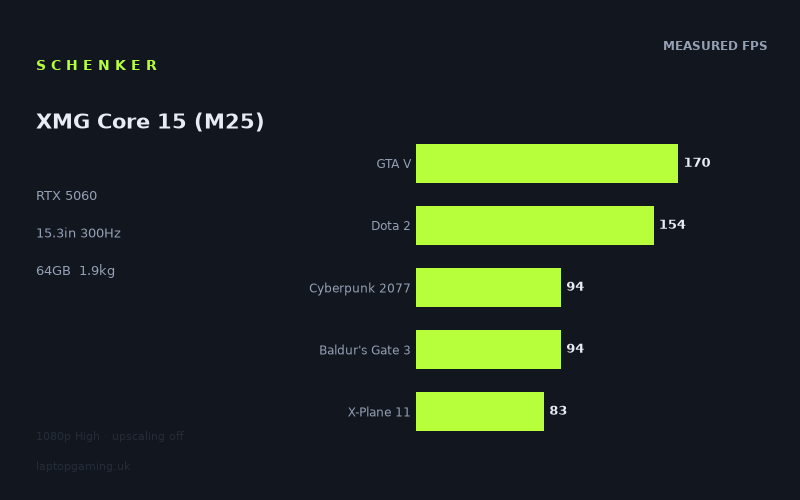
Frame rates
1920×1080, High preset, upscaling off. Averages 119fps across the 5 core benchmark games.
Measured on this machine. Source: Notebookcheck, 2025-09-28.
Not scored: no confirmed UK price
We have the full benchmark suite for this machine, so it ranks on the frame rate leaderboard like any other. What we don't have is a UK listing for this exact configuration - it's sold as a European review unit, or only in specifications that differ from the one tested. Since 30% of our score is value for money, scoring it would mean pretending price is no object, which would flatter it against every laptop you can actually buy. The frame rates below are real and comparable; there is just no buying recommendation to make yet.
How these numbers were produced
Frame rates here are not measured by us, and we label how each one was arrived at. A figure marked measured comes from a published run on that exact machine. A figure marked representative is derived from the GPU and its power limit (TGP) and cross-referenced against published reviews - a sound estimate of what that configuration delivers, but not a measurement of that specific laptop. Unless stated otherwise, numbers are 1920x1080, High preset, upscaling off. Where a laptop ships in several power configurations we use the wattage of the exact SKU listed, because a 140W RTX 5070 and a 115W one are not the same product.
In use
The short version
The XMG Core 15 (M25) is the most honestly benchmarked machine in our database, and that is not a compliment to Schenker so much as an accident of timing. Notebookcheck measured it across sixteen games, and crucially that list is not the usual mix of well-aged titles that make every laptop look competent. It includes Borderlands 4, Senua's Saga: Hellblade II, Stalker 2, Star Wars Outlaws, The Elder Scrolls IV: Oblivion Remastered and Doom: The Dark Ages — the current wave, the one built on engines that assume more graphics memory and more ray tracing hardware than a mid-tier card has.
The result is a set of figures that runs from 170fps in GTA V down to 29fps in Borderlands 4, all at 1920x1080 on High presets with upscaling off, and that range tells you more about what owning an RTX 5060 in 2026 is actually like than any average could. The five games in our scoring suite come out at 119fps, which is a perfectly respectable number and is also, in isolation, misleading — four of those five are titles this class of hardware has comfortably outgrown.
What the Core 15 is: a genuinely portable 15.3in machine at 1.94kg with a huge 64GB memory allocation, a 2TB drive and a current-generation GPU. What it is not: a machine that runs 2025 and 2026 releases at high frame rates without help from upscaling. Both of those statements are supported by the data and neither cancels the other out.
Buy it if you want a light 15in laptop that plays a deep back catalogue extremely well, handles current releases at 1080p with upscaling on, and doubles as a serious work machine because of that memory configuration. Do not buy it if your buying decision is being driven by the newest, heaviest releases at high settings without compromise — the bottom third of this benchmark list is a plain statement that an 8GB RTX 5060 is not that card.
We have no confirmed UK price for this exact configuration, so the machine carries no overall score. Nothing is wrong with it — the benchmark suite is complete and it ranks normally on our frame rate leaderboard. Value is 30% of our score, we cannot compute it without a verified price, and we are not going to speculate about what it costs.
Performance
Reading sixteen games instead of five
Most laptop benchmark sets are dominated by titles chosen for consistency and longevity rather than relevance: Strange Brigade, GTA V, Final Fantasy XV, Dota 2, X-Plane 11. They are excellent benchmarks in the narrow sense — they are repeatable, they are comparable across a decade of hardware, and they isolate specific bottlenecks cleanly. They are also, with the exception of the CPU tests, games that a mid-range laptop GPU stopped struggling with several generations ago.
This machine's data set includes those titles and then keeps going, and the useful way to read it is not top to bottom but in bands, because each band is limited by something different.
Band one: the processor sets the pace
GTA V at 170fps and Dota 2 at 154fps are the two fastest results, and neither of them is really a test of the graphics card. GTA V's engine is old and leans hard on single-thread performance; Dota 2 at 1080p High is a draw-call and simulation test. In both, the RTX 5060 finishes its work and waits.
What that means is that these two numbers are a report card on the Ryzen AI 7 350, and the grade is "good, not exceptional". This is a mainstream mobile processor — a Ryzen AI part with an NPU, aimed at thin-and-light machines — not one of AMD's HX-class chips derived from the desktop line. Laptops built around those HX processors post noticeably higher figures in exactly these two titles, because that is the only thing those titles reward. 170fps and 154fps are solid results that will not bottleneck anything you actually want to do, but if your library is heavily weighted towards CPU-limited genres, this is not the part of the market where you find the fastest results.
X-Plane 11 at 83fps is the third member of this band and the most informative of the three. X-Plane is notoriously bound by single-thread CPU throughput and largely indifferent to the graphics card past a certain point. 83fps is a perfectly usable frame rate for a flight simulator — sim pilots routinely fly happily at half that — but it is a low figure in absolute terms compared with what HX-class machines manage, and it is the clearest single indicator in this data set of where the processor's ceiling sits. If flight simulation is your primary use, note this number specifically; it is not going to improve by turning settings down, because settings are not what is limiting it.
Band two: mature modern games, comfortably handled
Baldur's Gate 3 at 94fps and Cyberpunk 2077 at 94fps landing on exactly the same figure is a coincidence, but a convenient one, because between them they cover most of what people mean by "a modern game". Cyberpunk's High preset is a rasterised load — dense geometry, heavy screen-space effects, a large open world — and 94fps at 1080p means the 5060 is doing real graphical work at a comfortable rate. Baldur's Gate 3 is a hybrid load that stresses the CPU in its busiest areas as much as the GPU anywhere.
Both sit in the range where you have genuine choices: you can push settings up, you can move to the panel's native resolution with upscaling, or you can bank the headroom against a variable-refresh display. Kingdom Come: Deliverance II at 86fps belongs in this band too — a large, detailed, expensive-looking world running well clear of 60fps.
If your mental picture of what this laptop does is set by these three numbers, you will be happy with it. The problem is that these three numbers are not the whole picture, and the games below them are the ones people are actually buying right now.
Band three: 2024-era AAA, hovering around 60
Four results cluster together here and they mark the transition. Ghost of Tsushima at 77fps and Space Marine 2 at 77fps are the top of the band — still comfortably above 60fps, still leaving something in hand. Until Dawn at 62fps and Horizon Forbidden West at 61fps are at the bottom of it, and 61fps at 1080p High is the line at which "runs well" becomes "runs".
That is worth sitting with. Horizon Forbidden West is a 2024 PC port of a game originally built for console hardware several years older than this laptop. At 1080p — not the panel's resolution, well under half of it — on High rather than Ultra, with no upscaling, this machine produces 61fps. There is no headroom left. Raise the resolution towards native, or the preset towards Ultra, and you are below 60.
The reason is not that the 5060 is a weak card in absolute terms. It is that the cost of a frame has risen sharply in the last two years, and the two things that have risen fastest — ray tracing work and texture memory footprint — are precisely the two things this GPU has least of.
Band four: the current wave, and where the 8GB frame buffer bites
Six titles sit below 60fps, and they are the six most recently released heavy games in the set. This is not a coincidence and it is the single most important thing in this review.
Doom: The Dark Ages at 58fps uses a renderer with ray tracing as a baseline requirement rather than a toggle. There is no rasterised fallback path; the ray tracing hardware is loaded on every frame whether you want it or not, and the acceleration structures that support it consume graphics memory alongside the textures.
The Elder Scrolls IV: Oblivion Remastered at 55fps is the strangest result in the list and the most instructive about how modern engines misbehave. It layers a current-generation renderer over an old simulation, and the combination is famously expensive relative to how the game looks. 55fps is what happens when a machine has to pay modern rendering costs for a twenty-year-old game.
Stalker 2 at 52fps and Star Wars Outlaws at 47fps are both large open worlds built with heavy global illumination systems. Open worlds are the worst case for a limited frame buffer, because streaming means the working set of assets is constantly changing and there is less opportunity for the driver to keep everything resident.
Senua's Saga: Hellblade II at 39fps is a corridor game with cinematic-grade assets and no interest whatsoever in performance targets. It is the closest thing in the set to a pure "how expensive can a frame be" test, and 39fps at 1080p High answers it.
Borderlands 4 at 29fps is the bottom of the ladder and the number that should govern your expectations of this machine in current releases. Twenty-nine frames per second at 1920x1080 on a High preset, with no upscaling, is not a playable experience by any reasonable standard. It is not quite as damning as it looks — that title has been widely noted for demanding hardware far out of proportion to its visual output, and it is an outlier even among the outliers — but it is a real measurement of a real game that real people are playing, and it belongs in the picture.
What is actually limiting these games
It is worth being precise, because the distinction changes what you can do about it.
Some of the bottom band is shader throughput: the GPU simply has fewer processing resources than the games are asking for. That responds well to lowering settings and extremely well to upscaling, because rendering at a lower internal resolution directly reduces the number of pixels that need shading.
Some of it is ray tracing hardware: the 5060 has RT cores, but not many, and games that make ray tracing mandatory rather than optional load them on every frame. That responds less well to settings changes, because you often cannot turn off what is architecturally required.
And some of it — the part that matters most for the life of the machine — is the 8GB frame buffer. When a game's working set exceeds what the card can hold, data starts moving across the PCIe bus mid-frame. That does not produce a smooth, proportional slowdown; it produces stutter, and stutter is felt far more than an average frame rate suggests. Critically, upscaling helps this problem much less than it helps the others: it reduces the render resolution, which shrinks the framebuffer targets, but it barely touches the texture pool. A game that wants 10GB of textures still wants 10GB of textures at a lower internal resolution.
That asymmetry is the practical reason to be cautious about this GPU tier in 2026. Upscaling is a genuine and effective answer to two of the three constraints. It is a partial answer to the third, and the third is the one that gets worse every year.
The 64GB memory configuration, and the irony of it
64GB of system memory in a gaming laptop is an unusual amount — four times what a mainstream machine ships with and double what an enthusiast configuration typically carries. It is also, in the context of the above, slightly ironic: this laptop has an enormous amount of the memory that games barely need and a constrained amount of the memory that games are desperate for.
That is not a design failure, it is a reflection of how the two are priced. System memory is cheap and user-configurable; graphics memory is soldered to the card and set by the GPU tier you buy. Schenker have given you as much as they can of the one they control.
And 64GB is genuinely useful, just not for gaming. It makes this a serious machine for virtual machines, large codebases, video timelines, big datasets, or simply the habit of leaving eighty browser tabs open while a game runs in the background. Combined with 2TB of storage — enough for a substantial game library without the constant install-and-uninstall cycle that a 512GB drive forces — the non-gaming half of this configuration is stronger than the gaming half. For a certain buyer, that is exactly the right trade.
The scoring average, in context
Our five scoring games average 119fps on this machine, and that is a real number that lets us rank it fairly against every other laptop measured on the same five titles. It is also, on its own, a poor description of what owning this laptop feels like, because four of those five games predate the difficulties that show up in the bottom half of this list.
We publish the average because consistency across machines is the only way comparison works. We publish the full ladder because the average alone would flatter this machine considerably. Both are true; the ladder is more useful to you.
The screen
15.3in, 2560x1600, 300Hz, IPS
Three of these four specifications are good and one of them is a number on a box.
15.3in is an unusual and rather sensible size. It sits between the 15.6in machines that have dominated for a decade and the 16in class that has largely replaced them, and combined with the 16:10 aspect ratio it gives noticeably more vertical space than a traditional 16:9 15.6in panel. For anything with a user interface — strategy games, RPG inventories, spreadsheets, code — that extra height is worth more than most people expect.
2560x1600 is a sharp, sensible resolution for the size. It is not 4K, which would have been an active handicap here, and it is not 1080p, which would look soft at this diagonal. It is the right choice.
It is also, and this is the point that matters, just under twice as many pixels as the 1920x1080 the benchmarks were run at. That has very different consequences depending on which band of the ladder you are looking at. In the CPU-limited titles — GTA V, Dota 2, X-Plane 11 — going to native resolution costs relatively little, because pixel count was never the limit. In the GPU-limited titles, and especially in the bottom six, it costs a great deal. We do not have measured native-resolution figures for this machine and we will not invent them, but the direction is not in doubt: a game at 47fps at 1080p is not going to be comfortable at 1600p without help.
That help is upscaling, and it is why this panel resolution is defensible despite the GPU behind it. Rendering at a lower internal resolution and reconstructing to 2560x1600 is what modern mid-range hardware is designed around, and on a 15.3in screen the reconstruction artefacts are less visible than they would be on a larger panel. This is a laptop you will run with upscaling on, at native resolution, in most modern games. If that is a compromise you object to on principle, this is not the machine for you — but it is worth noting that at this GPU tier, it is not a compromise any competitor lets you avoid either.
300Hz, and the honest maths
The 300Hz refresh rate is the specification that does not fit. Look at what the machine actually produces: the fastest measured title is GTA V at 170fps. That is a little over half the panel's capability. The second fastest is Dota 2 at 154fps. Every single other measured game — fourteen of the sixteen — runs below 100fps, which is a third of what the display can show.
This is not to say a 300Hz panel is useless when you are running at 90fps. With variable refresh, a higher maximum refresh rate reduces the display's contribution to input latency and widens the window in which a finished frame can be shown. There is a real, if small, benefit at any frame rate. But the marketing proposition of a 300Hz screen — that you will see three hundred distinct frames a second — requires a game that this hardware can run at three hundred frames a second, and the measured set does not contain one.
The counter-argument is that competitive shooters run at enormous frame rates on modest hardware and are not represented in this benchmark list. That is fair, and if your play is dominated by that tier of game, the panel is doing something for you. But note band one above: those titles are CPU-limited, and this machine's processor is a mainstream mobile part rather than one of the fastest available. The 300Hz panel and the CPU behind it are not perfectly matched either.
The panel is IPS rather than OLED, which means good viewing angles and no burn-in risk from static interface elements over years of ownership, at the cost of contrast and true blacks. For a machine that will spend thousands of hours displaying the same HUD, that is the lower-risk choice. We have no measured figures for this specific panel's brightness, colour gamut, contrast ratio or response time, so we are not going to characterise them.
Build, size and portability
1.94kg is the specification that defines this machine's identity, and it is genuinely good. A gaming laptop under two kilograms with a current-generation discrete GPU is not a given — plenty of 15in and 16in machines with similar silicon sit comfortably above 2.2kg, and 17in machines are heavier again. Sub-2kg is the threshold at which a laptop stops being a thing you plan around and starts being a thing you just put in a bag.
Combined with the 15.3in footprint, this is a machine you can realistically take to a lecture, an office, a train or a hotel. That is a meaningful category of use that most gaming laptops exclude themselves from, and it changes who this laptop is for: it is not a desktop replacement that occasionally moves, it is a portable computer that also plays games.
The qualification, as always, is the power supply. A laptop that weighs 1.94kg still needs a charger capable of feeding a discrete GPU under load, and that is not a small object. The realistic carrying weight is higher than the headline figure, and if you intend to game away from your desk you are carrying both. For the light-use-out, game-at-home pattern — which is how most people actually use these machines — you can leave the large charger at home and take a smaller USB-C supply if the machine supports it, though we do not have confirmation of that for this configuration and will not assume it.
What we do not know about the battery
We have no battery capacity figure for this configuration, and no measured runtime. That is a real gap for a machine whose main advantage is portability, and it is worth being upfront about rather than glossing over. Weight and size tell you this laptop is meant to travel; without a capacity figure we cannot tell you how long it lasts when it gets there.
What can be said generally, and holds for every machine in this class: gaming on battery is a compromised experience regardless of capacity, because discrete GPUs are power-limited when unplugged and the frame rates above are all mains-powered figures. The battery question for a laptop like this is about light use — browsing, documents, video — not about gaming. If that matters to your purchase, seek a source that has measured runtime directly.
Thermals and noise: not measured
We have no temperature or noise data for this laptop and we are not going to estimate them. It is worth noting only that a sub-2kg 15.3in chassis has less internal volume for heatsinks and fans than a larger machine does, and that physics does not make exceptions. Whether Schenker have handled that well or badly is a question this data cannot answer. If quiet operation is a priority, find a source that has measured it under sustained load before buying.
How it compares
Our comparisons only use games both machines have actually been measured in, and only against laptops from the same GPU generation. The four below are chosen as a spread rather than a cluster: the two nearest neighbours, the machine this one beats by the widest margin, and the machine that beats it by the widest margin. That spread turns out to be far more revealing than any individual row, because it shows precisely where the shared-game comparison stops working.
MSI Cyborg 15 (RTX 5050, £984) — 31fps ahead across 5 shared games
The one clear win, and the only machine here with a confirmed UK price. Across the five games of our scoring suite, the Core 15 is ahead of the Cyborg 15 by an average of 31fps. That is a genuine, comfortable margin — nothing like the noise-level differences that dominate the rest of this table — and it is exactly what you would expect when you drop a full GPU tier, from an RTX 5060 to an RTX 5050.
Note carefully what this row establishes, because the next two rows depend on it: the scoring suite is not blind. Give it a real hardware gap in the downward direction and it registers one, clearly and unambiguously. Anyone tempted to dismiss the level results below as "the benchmarks can't tell anything apart" should look here first. They can.
£984 is also the only hard price anchor available to us in this comparison group, and it is a useful one. It tells you roughly where the floor of this market segment sits, and it tells you what 31fps of measured deficit costs to avoid. We have no confirmed price for the Core 15 and are not going to guess at one, but if you are working out what a 5060 machine ought to be worth, the price of the tier below it and the size of the gap between them is the right place to start reasoning from.
Razer Blade 14 (RTX 5070 at 115W) — level across 5 shared games
A full GPU tier up, at a healthy 115W power allocation, and across the same five games the two machines are indistinguishable. Given the row above, that demands an explanation rather than a shrug.
The explanation is in what the scoring suite contains for this machine. GTA V at 170fps, Dota 2 at 154fps and X-Plane 11 at 83fps are three of the five, and all three are titles whose frame rate is set by the processor and the engine rather than by the graphics card. At 1080p High, neither a 5060 nor a 5070 is working hard in any of them; both finish early and wait on the CPU. The remaining two, Baldur's Gate 3 at 94fps and Cyberpunk 2077 at 94fps, are real graphics loads but not punishing ones at that resolution.
So the suite compresses the gap. A tier-up card has nowhere to demonstrate itself in three of the five titles and only limited room in the other two, and the average comes out flat.
The reason this matters more than usual for the Core 15 specifically is that we have this machine's other eleven measured games to check against. Look at Borderlands 4 at 29fps, Hellblade II at 39fps, Star Wars Outlaws at 47fps, Stalker 2 at 52fps. Those are the titles where a 5070 at 115W would show a gap, and they are not in the shared set because the Blade 14 has not been measured in them. The comparison is not wrong; it is simply measuring the part of the range where the two machines agree.
Schenker XMG Core 16 M25 (RTX 5070) — level across 5 shared games
The same result, this time against Schenker's own 16in Core with a tier-up GPU, and the same explanation applies without modification.
What makes this row practically useful rather than merely illustrative is that these two machines are genuine alternatives to one another — same manufacturer, same product line, adjacent sizes. If you are choosing between them, this comparison should not decide it, and the reason is now clear: the five games it covers are the five where the GPU difference cannot appear.
What should decide it is everything else. The Core 15 is the smaller and lighter machine, and 1.94kg is a genuinely portable weight for a gaming laptop. The Core 16 is larger, and a 5070 has more headroom in exactly the games at the bottom of this machine's own sixteen-game ladder — the ones where the 5060 falls below 60fps. If your play is mainstream and portability matters, the Core 15. If you want more room in current heavy releases and the laptop lives on a desk, the Core 16. Neither of those arguments comes from the shared-game average, and neither should.
Schenker XMG Neo 16 A25 (RTX 5090) — 82fps behind across 5 shared games
The other end of the spread, and the row that completes the picture. Across the same five games that could not separate this machine from two different 5070 laptops, an RTX 5090 machine is 82fps ahead.
Put the three results side by side and the shape of the market becomes visible. A tier down is worth 31fps in this suite. A tier up is worth nothing. Three tiers up is worth 82fps. That is not a linear ladder, and understanding why is worth more to a buyer than any single comparison.
What is happening is that the CPU-bound titles in the suite impose a ceiling, and this machine's hardware sits close enough to that ceiling to be pressed against it. Below the ceiling — where the RTX 5050 in the Cyborg 15 is operating — there is room for the GPU to be the limiting factor, so a gap appears. At the ceiling, extra graphics performance has nowhere to go, which is why both 5070 machines tie. Only when the graphics uplift is large enough to change the result in the two genuinely GPU-bound titles as well does the average move again, and that takes a 5090 to achieve.
The practical reading is uncomfortable but honest: in the games that make up our scoring suite, this machine is already near the point of diminishing returns. Spending more on graphics buys you very little there. The place it buys you something is the bottom half of this machine's own benchmark ladder — and that is precisely where a 5060 with 8GB is weakest.
Reading the table honestly
Four rivals: one a tier below and clearly slower, two a tier above and indistinguishable, one three tiers above and dramatically faster. Every one of those results is real. None of them means that a 5060 and a 5070 perform the same in general.
The lesson to carry away is about method rather than about any of these laptops. Shared-game averages built on a suite weighted towards CPU-limited titles compress genuine hardware differences, and they compress them most severely in the range where most buyers are actually choosing — between adjacent tiers. That is why we publish this machine's full sixteen-game ladder alongside the average, and why you should read the ladder first.
If your games look like the scoring suite, the level results above are good news: you do not need to spend more, and the Core 15 will serve you as well as a 5070 machine would. If your games look like the bottom of the ladder — Borderlands 4, Hellblade II, Stalker 2, Star Wars Outlaws — then none of these comparisons is measuring your experience, and the 5090 row is the only one that hints at what real headroom costs.
Who it's for
The portable-first buyer. 1.94kg with a 15.3in 2560x1600 panel is a genuinely carryable machine, and that is the Core 15's strongest and least ambiguous advantage. If the laptop needs to go to work, to a lecture theatre, on a train, or into hand luggage, and it also needs to play games in the evening, this configuration is aimed squarely at you.
The back-catalogue player. The upper two bands of this benchmark ladder are excellent. GTA V at 170fps, Dota 2 at 154fps, Baldur's Gate 3 and Cyberpunk 2077 at 94fps, Kingdom Come: Deliverance II at 86fps — if your library is deep rather than new, this machine handles it comfortably and will keep doing so.
The person who works on their gaming laptop. 64GB of memory and 2TB of storage is not a gaming specification, it is a workstation specification that happens to be attached to a gaming GPU. Compiling, virtual machines, large media projects, data work — those benefit directly from this configuration in a way that no frame rate chart will show. If half your reason for buying is not gaming, the value case here improves considerably.
The player who is comfortable with upscaling. If turning on frame reconstruction to run current games at native resolution is a non-issue for you — and for most people in 2026 it genuinely is — then the bottom band of this list is less alarming than it appears, and the machine's practical performance is materially better than the raw figures suggest.
Who should buy something else
Anyone buying for the current AAA wave at high settings. This is the clearest exclusion and the sixteen-game list makes the case without help from us. Six titles below 60fps at 1080p High with no upscaling, and 29fps in one of them, is what an 8GB mid-tier GPU does with games built on current engines. If your reason for buying a new laptop is a specific 2025 or 2026 release, look at a higher GPU tier with a larger frame buffer. The gap will only widen.
Anyone whose library is dominated by CPU-limited genres. X-Plane 11 at 83fps is a usable figure but not an outstanding one, and the same applies to the other results in band one. Flight simulation, heavy grand strategy, large-scale city building and factory games all live or die on single-thread processor performance, and a mainstream Ryzen AI part is not where the best of that lives. Machines built around HX-class processors do better in exactly these titles.
Anyone buying the 300Hz panel for the 300Hz. The measured data does not contain a single game this machine runs at anything close to 300fps. If high-refresh competitive play is the point of the purchase, be aware that the frame rate ceiling in those titles will be set by the processor, and this is not the fastest processor available in a gaming laptop.
Anyone who needs a known battery figure before committing. We do not have a capacity specification for this configuration, let alone a measured runtime. For a machine whose main selling point is portability, that is a gap worth closing from another source before you spend money.
Anyone shopping on the comparison table above. Two of the four rows are dead heats against RTX 5070 machines, and they cannot distinguish those laptops from this one because the five games they cover are the five where the difference cannot appear. Look at the sixteen-game ladder instead, find the games you actually play, and judge from there.
The verdict, restated
The XMG Core 15 (M25) is a well-conceived portable machine with an unusually complete benchmark record, and that record is doing it no favours — not because the laptop is bad, but because it is one of the few machines in our database measured against the games that expose what a mid-tier GPU with 8GB of memory cannot do. Most competitors have simply not been tested in Borderlands 4 or Hellblade II. That does not mean they would do better.
Judged on what it is — a sub-2kg 15.3in laptop with a current GPU, 64GB of memory and 2TB of storage — it is a coherent and appealing machine for someone who values portability and works as well as plays. Judged on whether it will run the heaviest games of the moment at high settings without compromise, the answer is plainly no, and the data says so in sixteen different ways.
Whether it is good value we genuinely cannot tell you, because we have no confirmed UK price for this configuration. At this end of the market that is not a small omission, and we would rather say so than fill the gap with a guess.