Details
Product prices and availability are accurate as of the date/time indicated and are subject to change. Any price and availability information displayed on Amazon.co.uk at the time of purchase will apply to the purchase of this product.Best budget buy
Acer Nitro V 15 review
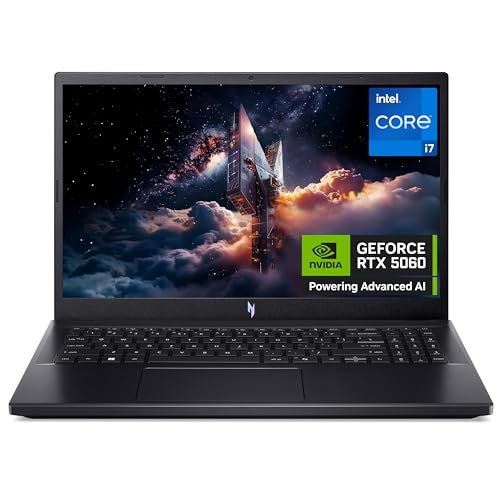
The best value entry point for proper 1080p gaming - an RTX 5060, Core i7 and 165Hz screen for around £849, often less on offer.
What it gets right
- RTX 5060 + Core i7 at a low price (often ~£799 on offer)
- Fast 165Hz 1080p display
- 16GB RAM and 1TB SSD as standard
- Lightest of the 15in picks
What it doesn't
- Battery life and build show where money was saved
- 8GB VRAM
- Speakers are average
Frame rates
1920×1080, High preset, upscaling off.
Representative figures, not measurements of this specific machine: derived from the RTX 5060 at 115W and cross-referenced against published reviews. Source: Tom's Hardware, Notebookcheck, PC Gamer, LaptopMedia and GamersNexus, 2026-07-01.
Not scored: incomplete benchmark suite
Every scored laptop on this site is averaged over the same 5 games, and this one is short of Baldur's Gate 3, GTA V, X-Plane 11, Dota 2. A mean over 1 games is not comparable to a mean over 5, so we publish the figures we have and leave the score blank rather than rank it against machines tested on a different set. The numbers below are real - the suite is just incomplete.
How these numbers were produced
Frame rates here are not measured by us, and we label how each one was arrived at. A figure marked measured comes from a published run on that exact machine. A figure marked representative is derived from the GPU and its power limit (TGP) and cross-referenced against published reviews - a sound estimate of what that configuration delivers, but not a measurement of that specific laptop. Unless stated otherwise, numbers are 1920x1080, High preset, upscaling off. Where a laptop ships in several power configurations we use the wattage of the exact SKU listed, because a 140W RTX 5070 and a 115W one are not the same product.
In use
The short version
The Acer Nitro V 15 is a £931 laptop built around an RTX 5060 running at a 115W total graphics power, which is close to the top of the range that particular GPU is allowed to run at. That matters more than the model name does. The same silicon appears in machines configured at much lower power ceilings, and the published frame rates from those configurations look nothing like these ones. What Acer has done here is the sensible thing: take a mid-range GPU, give it most of the power it can use, and pair it with a 1920x1080 panel that the GPU has a realistic chance of driving.
The measured figures back that up. Across six games at 1080p on High presets with upscaling switched off, five of the six land between 85 and 101fps, and the sixth — Counter-Strike 2 — sits at 212fps. There is no game in the measured set that drops below 85fps. That is the headline, and it is a good one for the money: at this price you are looking at a machine that plays everything in the test set comfortably above 60fps at native resolution, without leaning on DLSS to get there.
The catch is the panel. It is a 165Hz IPS screen, and the GPU can only feed it that many frames in one of the six games measured. In the other five, the display is running at roughly half its capability or less. That is not a fault — it is what a 165Hz panel on a mid-range GPU always looks like, and variable refresh smooths over the mismatch — but if you are buying this specifically because 165Hz is printed on the spec sheet, understand that the number describes the ceiling of the screen, not what the graphics card will deliver in a modern single-player game.
The second reservation is 8GB of VRAM. At 1080p, on the settings used for these measurements, it is evidently sufficient — the frame rates are consistent and there is no collapse in any title. Over a three or four year ownership window, with texture packs growing and ray tracing becoming less optional in new releases, 8GB is the specification on this machine most likely to be the thing that forces a settings compromise first. It is not a reason to avoid the laptop at this price. It is a reason not to expect it to age gracefully into 1440p external-monitor duty.
Against its nearest rivals in our database, the picture is clear and consistent. It is meaningfully faster than the cheaper RTX 5050 machines — by more than twenty frames per second on average across shared games against both the ASUS TUF Gaming A14 and the HP Victus 15 — and meaningfully slower than the RTX 5070 machines above it, by fifteen frames per second against the Acer Nitro V16 and twenty-six against the HP OMEN 16. What makes the Nitro V 15 interesting is where those gaps sit relative to the price gaps. The 5050 machines are not proportionally cheaper for how much slower they are. The 5070 machines are, roughly speaking, priced fairly for the performance they add — but they add it at a considerably higher entry cost.
Buy it if you want native-resolution 1080p gaming with genuine headroom over 60fps, you are spending under a thousand pounds, and you accept that the machine's ambitions stop at 1080p. Look elsewhere if you want a laptop that will drive a high-refresh esports experience across your whole library, if you are planning to run it on an external 1440p panel, or if portability is the main criterion — 2.1kg plus a gaming power brick is a machine you carry occasionally, not daily.
Performance
All the frame rates discussed here were measured at 1920x1080 on High presets with upscaling disabled, and were published on 1 July 2026 by Tom's Hardware, Notebookcheck, PC Gamer, LaptopMedia and GamersNexus. We did not run them. The value of the set is that it uses a consistent methodology across machines, which is what makes the rival comparisons later in this review meaningful rather than anecdotal.
What 115W actually buys you
The single most important number on this spec sheet is not the GPU name. It is the 115W TGP. Nvidia allows laptop manufacturers a wide band of power configurations for the same GPU, and the difference between the bottom and the top of that band is large enough that two laptops with identical GPU names can be twenty per cent apart in frame rate. A vendor who wants a thinner chassis, a quieter cooler, or a lower bill of materials for the thermal solution can specify the same chip at a much lower ceiling and still print "RTX 5060" on the box.
Acer has not done that here. 115W is a configuration that expects a proper cooling solution behind it, and the Nitro line has historically been built as a chunky-but-effective chassis rather than a slim one. The 2.1kg weight is consistent with that approach — this is not a machine that has been thinned down at the expense of the thermal envelope.
What that means in practice is that the frame rates you see below are close to what this GPU is capable of in a laptop. If you shop around and find an RTX 5060 machine that is two hundred pounds cheaper, the first thing to check is its power limit, because that is the most likely place the cost has been taken out. A lower-power RTX 5060 is a different product with the same name.
The corollary is that there is not much upside left. Undervolting, repasting, or running an aggressive fan profile might claw back a few frames on a machine that is thermally limited, but a 115W part in a chassis designed around 115W should already be delivering most of what it has. Treat these numbers as what you will get, not as a floor to be improved on.
One thing we cannot tell you: what that 115W does to noise and surface temperatures. We have no measured acoustic figures and no thermal data for this machine, so anything we said about how loud it gets under load would be invention. Gaming laptops at this power level are generally not quiet, and if silence matters to you, that is a question to resolve with a hands-on look rather than a spec sheet.
The cluster at 86fps
Strip out Counter-Strike 2 and Forza Horizon 5 for a moment and look at what remains: Red Dead Redemption 2 at 88fps, Black Myth: Wukong at 86fps, Cyberpunk 2077 at 86fps, and Hogwarts Legacy at 85fps. That is four heavyweight modern single-player games sitting within three frames per second of each other. It is a remarkably tight grouping, and it tells you something specific about this machine.
When a laptop's results across genuinely different game engines converge that tightly, the bottleneck is almost always the GPU rather than the CPU or memory. Red Dead Redemption 2 and Cyberpunk 2077 stress a system in quite different ways — RDR2 is heavy on geometry and draw distance with a famously CPU-sensitive first-person mode, Cyberpunk 2077 is a shader and lighting monster with heavy demands on memory bandwidth. Black Myth: Wukong is Unreal Engine 5 with all the traversal and shader-compilation baggage that implies. Hogwarts Legacy has its own reputation for stuttering under memory pressure. If those four produce the same answer to within three frames, the graphics card is the thing setting the pace in all of them, and it is doing so consistently.
That consistency is genuinely useful information for a buyer. It means the performance you see in one demanding game is a fair predictor of what you will see in the next one. A machine with a wildly variable profile — 110fps here, 55fps there — is harder to plan around, because you never know whether the next release will land on the good side of the split. This one gives you a reliable expectation: mid-eighties at native 1080p on High in a demanding modern game. That is a number you can carry into any purchase decision.
It also means the settings knobs behave predictably. Dropping from High to Medium in any of these titles should move all of them in roughly the same direction, because they are all constrained by the same resource. If mid-eighties is not enough for you in a particular game, the fix is the same fix in every game.
Forza Horizon 5 and the 100fps line
Forza Horizon 5 at 101fps is the only non-esports title in the set to clear a hundred, and it is not a surprise. Forza Horizon 5 is exceptionally well optimised — it was built to run on console hardware of a specific generation and scales upward with unusual grace, and its High preset is not as punishing as the High preset in, say, Cyberpunk 2077. Racing games also benefit from relatively predictable scene composition compared to open-world RPGs with dense NPC crowds and volumetric weather.
The practical significance is that this is the one demanding game in the set where the frame rate is comfortably above the threshold most people consider "high refresh" territory rather than merely smooth. In a racing game, where the camera moves fast and consistently and motion clarity matters more than it does in a slower title, the extra fifteen frames over the 86fps cluster is worth something. It is not going to feel like a 165fps experience, but it is meaningfully above the rest of the set.
The wider point is that the gap between Forza's 101fps and Hogwarts Legacy's 85fps — sixteen frames — is entirely about how the games are built, not about anything you can change. There is no configuration of this laptop that closes that gap. It reflects the fact that some studios optimise better than others, and that some engines demand more for the same visual result.
Counter-Strike 2 at 212fps
The 212fps result in Counter-Strike 2 is the outlier that gives the panel a reason to exist. It is comfortably above the 165Hz refresh rate, which means that in this specific game the display is the limiting factor rather than the GPU, and you are getting every frame the screen can show plus a healthy surplus.
That surplus is not wasted. Running above the panel's refresh in a competitive shooter reduces input latency slightly even though you cannot see the additional frames, because the frame being displayed is more recent. Whether you can perceive the difference is another argument entirely, but the mechanism is real and it is why competitive players uncap frame rates.
Counter-Strike 2's number tells you what this machine can do when the GPU is not the constraint, which is a useful diagnostic. It is a lightly-loaded, CPU-and-engine-bound scenario, and 212fps in that scenario means the CPU is not the weak link in this configuration. If the i7-13620H were holding the system back in a general sense, you would expect the esports number to be far more modest.
Extrapolating from one esports title to the whole category is not something the data supports, though. Counter-Strike 2 is unusually well behaved. Other competitive titles have their own characteristics — some are far heavier on the CPU, some have effects passes that hit the GPU harder than CS2 does. We have one esports data point, and it is a good one, but it is one data point.
Where the spread comes from
The full range across the measured set runs from 85fps to 212fps — a factor of two and a half. That sounds dramatic until you notice that the entire spread is one game. Remove Counter-Strike 2 and the range collapses to 85–101fps, a sixteen-frame band across five titles.
This is the normal shape of a modern gaming laptop's results, and it is worth understanding because it affects how you should read any benchmark chart. Esports titles and demanding single-player titles are effectively two different tests. A machine can look transformative in one and ordinary in the other. Averaging them together produces a number that describes neither.
For the Nitro V 15, the honest summary is: outstanding in a lightweight competitive shooter, solidly mid-eighties in everything demanding. Which of those two facts matters to you depends entirely on what is in your library. Someone who plays CS2 and little else is getting a machine that saturates its own display. Someone who plays story-driven open-world games is getting a machine that runs them well above 60fps but nowhere near the panel's ceiling.
The 8GB VRAM question
Eight gigabytes of video memory in 2026 is a live topic, and the measured data here gives a partial answer to it. At 1920x1080 on High presets, none of the six games shows the kind of collapse that signals a memory shortfall — the sort of result where a title runs at half the frame rate you would expect from the GPU's raw capability, or where the average looks fine but the experience is punctuated by hitching. Hogwarts Legacy in particular has a reputation for punishing 8GB cards, and its 85fps here sits exactly where the rest of the demanding titles do. That is reassuring.
So at the resolution and settings this machine is built for, 8GB is doing the job today. The concerns are all forward-looking, and they fall into three areas.
The first is texture settings specifically. Texture quality is the setting most directly tied to VRAM and, crucially, the one with the best visual return per unit of performance cost on a card that has enough memory. On an 8GB card, the highest texture preset in a new release is increasingly the setting you cannot use, which is a shame because it is usually close to free on a card with headroom.
The second is ray tracing. Ray-traced effects carry a substantial memory overhead on top of their compute cost. We have no ray-tracing figures for this machine in the measured set, so we cannot tell you what it does with RT enabled — that is a genuine gap in the data rather than a judgement. But the general principle holds: an 8GB card running RT in a demanding title is working against two constraints at once.
The third is resolution. If you connect this laptop to a 1440p external monitor — which is an entirely reasonable thing to want to do with a machine that has an HDMI output and this much GPU behind it — the memory demand rises with the pixel count, and the games that are comfortable at 1080p become less so. This is where 8GB starts to bite in ordinary use rather than in edge cases.
None of this makes the machine a bad buy at £931. It makes it a machine with a defined lifespan at its current settings, and a buyer who understands that is better off than one who does not.
The processor
The Core i7-13620H is not a current-generation part. It belongs to an older Intel H-series family, and by 2026 it is a chip that has been in circulation for a while. In a gaming laptop at this price, that is a defensible cost decision rather than a cut corner — GPU-bound gaming workloads are not where a slightly older CPU shows its age most obviously, and the 115W GPU is where the money has clearly gone.
The evidence in the measured data is consistent with that reading. The 212fps Counter-Strike 2 figure is the relevant test, because CS2 is the title in the set most likely to expose a CPU limitation. A processor that was genuinely holding this system back would show up there before it showed up anywhere else, and it does not. Similarly, the tight clustering of the four heavy titles in the mid-eighties points to a GPU constraint, not a CPU one — if the processor were the bottleneck, you would expect the results across four very differently-structured engines to diverge more than three frames.
Where an older CPU can matter is in scenarios the measured set does not cover: heavily simulated open worlds with dense crowds, strategy games with large late-game states, flight simulation, and streaming while playing. It is worth noting that two of the games missing from our scoring suite — X-Plane 11 and, to a lesser extent, Baldur's Gate 3 in its later acts — are exactly the kind of CPU-sensitive workloads that would tell you more about this chip. We do not have those figures for this machine, which is a real limitation of what we can say about it.
For the majority of what people buy a £931 gaming laptop to do, the processor here is adequate and correctly prioritised. If your library is weighted towards simulation and strategy rather than action and shooters, the CPU is the component you should be researching hardest, and our data does not answer that question.
What upscaling would add
Every figure quoted here was measured with upscaling off, at native 1920x1080. That is the right way to benchmark, because it isolates the hardware from vendor-specific software features that change between driver versions. But it is not how most people will actually play.
An RTX 5060 has access to Nvidia's current upscaling and frame generation feature set, and in games that support it, enabling upscaling at 1080p will raise the frame rate above what is quoted here. We have no measured figures for how much, so we are not going to put a number on it. The direction is not in doubt; the magnitude is game-dependent and we would be guessing.
What we will say is that upscaling at 1080p is a different proposition from upscaling at 4K. The lower the output resolution, the lower the internal render resolution for any given quality setting, and the more visible the reconstruction artefacts become. At 1080p, quality-mode upscaling is generally acceptable and performance-mode upscaling generally is not. This limits how much of a rescue upscaling can be on a 1080p machine, which is another reason why the native figures matter here more than they would on a higher-resolution laptop.
Frame generation is a separate consideration. It is most useful when the base frame rate is already reasonably high, because it does not improve input latency and can make a low base frame rate feel worse rather than better. With a base of 85–100fps in the demanding titles, this machine is in a range where frame generation could push towards the panel's refresh rate with a decent result. That is an argument in its favour, though again, we have no measured figures to quantify it.
Why there is no score on this page
We rank laptops using a fixed five-game suite so that every machine is measured against every other machine on identical terms. For the Nitro V 15, we have measured figures for only one of those five games — Cyberpunk 2077, at 86fps. We have nothing for Baldur's Gate 3, GTA V, X-Plane 11 or Dota 2.
Averaging one game and calling it a suite result would be dishonest, and comparing a one-game average against other machines' five-game averages would be worse than dishonest — it would be actively misleading, because the games in the suite are not equally demanding and a partial set is biased by whichever games happen to be missing. So there is no ranked position for this machine, and we would rather say that plainly than manufacture one.
What we do have is six measured games, which is a substantial and internally consistent picture of how the laptop performs, and four rival comparisons drawn only from games both machines have in common. That is enough to write a useful review. It is not enough to slot the machine into a ranked table, and we will not pretend otherwise. If the missing figures appear, this page will be updated.
The screen
A 15.6-inch 1920x1080 IPS panel at 165Hz. Each of those four specifications does a different job, and they do not all pull in the same direction on this machine.
The resolution is the right call. 1080p on a 15.6-inch screen gives a pixel density that is perfectly workable for gaming — sharper than most people are used to from a television, and at a normal laptop viewing distance, individual pixels are not a distraction. More importantly, it is a resolution this GPU can actually drive. Put a 1440p panel in front of this RTX 5060 and every one of those mid-eighties results would drop substantially, and the machine would go from comfortable to compromised. Acer has matched the display to the hardware rather than to the spec-sheet arms race, and that is worth crediting.
IPS is the appropriate panel technology at this price. It gives you viewing angles that hold up when you are not sitting perfectly square to the screen and colour that does not shift when you tilt the lid, which is more than can be said for the cheaper TN panels that used to appear at this end of the market. IPS has a known weakness — black levels, and the associated grey glow in dark scenes — and if you play a lot of horror games or anything set predominantly at night, an OLED panel is visibly better. But OLED at £931 in a machine with a 115W GPU is not a combination that currently exists, so this is a theoretical complaint rather than a practical one.
We have no measured brightness or colour gamut figures for this panel. That is a genuine gap. Panel quality varies considerably between machines that share the same headline specification, and the difference between a dim, washed-out 1080p IPS screen and a bright, well-calibrated one is one of the most noticeable differences in day-to-day use. Anyone buying this machine for anything beyond gaming — photo work, video, colour-critical anything — should treat the panel as an unknown quantity until they have seen it.
Can the GPU feed a 165Hz panel?
In one of the six measured games, yes, and comfortably: Counter-Strike 2's 212fps is well beyond what the panel can display. In the other five, no. Forza Horizon 5's 101fps is the closest, and it still leaves the display running at well under two-thirds of its capability. The four heavy titles in the mid-eighties are roughly half the panel's refresh rate.
This is not a criticism of the machine so much as a description of what a 165Hz panel does on mid-range hardware. High-refresh panels have become standard fitment on gaming laptops at every price point, and the panel is almost always ahead of the GPU except in esports titles. The alternative — fitting a 60Hz panel because that is what the GPU can sustain in demanding games — would be worse, because it would cap the esports experience and eliminate the benefit of variable refresh.
Variable refresh is the point, in fact. On a fixed-refresh display, a game running at 86fps on a 165Hz panel produces uneven frame pacing because the frames do not divide neatly into the refresh interval — you get judder that is perceptible even though the average frame rate is healthy. With adaptive sync, the panel matches its refresh to whatever the GPU is producing, and 86fps feels like a clean 86fps rather than a stuttering approximation of it. The practical value of the 165Hz specification on this machine is largely that it gives the adaptive sync range room to work in, not that you will regularly see 165 frames.
So: read the 165Hz figure as a ceiling that CS2 hits and that most of your library will not. If your gaming is predominantly competitive multiplayer with light rendering demands, the panel and the GPU are well matched and you will get real value from the refresh rate. If it is predominantly demanding single-player games, you are buying a panel that is more capable than the GPU behind it, which is not a waste but is not the reason to choose this machine either.
Build, size and portability
Two point one kilograms, 15.6 inches. We have not handled this machine and we have no measured dimensions beyond the screen size and the weight, so what follows is what those numbers imply rather than a description of the experience.
2.1kg is squarely in the middle of the 15-inch gaming laptop range. It is not one of the slim, sub-2kg machines that are pitched as portable gaming systems, and it is not one of the 2.5kg-plus desktop replacements either. In practical terms it is a laptop you can carry — into a bag, onto a train, into an office — without it being the defining feature of your day, but it is not one you forget is there.
The number that is not on the spec sheet is the power supply. A 115W GPU plus a Core i7 requires a substantial charger, and gaming laptop bricks in this class are heavy, bulky objects that meaningfully change the carrying proposition. The realistic travel weight of this machine is well above 2.1kg, and unlike the laptop itself, the charger is not something you can leave behind if you intend to play games away from home. We do not have the adapter weight, so we are not going to guess at a figure, but anyone planning to carry this daily should factor it in as a real consideration rather than an afterthought.
The 115W power configuration also implies something about the chassis design. Dissipating that much heat from the GPU, plus whatever the CPU is drawing, requires a cooling system with real volume — heatpipes, fin stacks, and enough fan area to move air through them. Laptops that achieve high power limits in thin chassis do it by accepting higher temperatures and higher fan speeds. Laptops that use a thicker chassis have an easier time of it. At 2.1kg, this is not an ultra-thin design, which is consistent with a machine that has been built to sustain its power limit rather than to hit it briefly and then throttle back.
We have no sustained-load performance data, so we cannot confirm that it holds 115W indefinitely. This is one of the most useful things to know about any gaming laptop and one of the things a spec sheet never tells you. If a review with thermal logging appears for this machine, it is worth reading before you buy.
On battery life: we have no measured figures, and we are not going to invent any. What can be said generally is that gaming laptops with H-series Intel processors and discrete GPUs do not have good battery life by the standards of thin-and-light machines, and that gaming on battery on any such laptop involves a substantial performance reduction because the GPU cannot draw anything like its rated power from the cells. Assume this is a machine you plug in to play. If unplugged endurance is important to you, find a review that measures it.
How it compares
The four comparisons below are drawn from games both machines have measured figures for — six shared titles in each case. That is a reasonable basis for comparison, but it is worth remembering that an average across six games can conceal significant per-game variation, and that a machine which is fifteen frames behind on average might be five behind in one title and thirty behind in another. The averages tell you the direction and rough magnitude, not the detail.
Acer Nitro V16 — RTX 5070 at 115W, £1,199
This is the most instructive comparison in the set, because it is Acer's own machine, one step up the range, with the same 115W power limit and a bigger GPU. The Nitro V 15 averages fifteen frames per second behind it across six shared games.
Because the power limits are identical, that fifteen-frame gap is attributable to the GPU itself rather than to how each vendor has configured it. This is the cleanest read you will get on what an RTX 5070 adds over an RTX 5060 in a laptop when both are given the same power budget, and fifteen frames is a substantial but not transformative difference. Applied to this machine's mid-eighties results in the demanding titles, that is roughly the difference between mid-eighties and around a hundred — the difference between "comfortably above 60" and "comfortably above 60 with more room for settings increases".
The price gap is £268, or roughly twenty-nine per cent on top of the Nitro V 15's £931. Whether that is worth paying is a question about your headroom requirements, not your current requirements. Both machines play everything in the measured set well. The V16 will hold up longer as games get more demanding, will handle an external 1440p panel more convincingly, and — depending on its VRAM configuration, which we do not have listed here — may sidestep the 8GB concern entirely.
There is also the screen size difference implied by the model names. A 16-inch machine is a different physical proposition from a 15.6-inch one, and if the extra display area appeals, that is part of what the £268 buys. We do not have the V16's weight in our comparison data, so we cannot tell you what the size difference costs in portability.
Our read: if £1,199 is within budget, the V16 is the better long-term machine and the price premium is defensible for what it delivers. If it is not, the Nitro V 15 is not a compromised alternative — it is a properly-configured machine that plays the same games well, just with less margin.
HP OMEN 16 — RTX 5070 at 140W, £1,375
The OMEN 16 is the fastest machine in this comparison set, and by a clear margin: the Nitro V 15 averages twenty-six frames per second behind it across six shared games. That is a large gap — considerably more than a third on top of this machine's demanding-title results.
What makes the OMEN interesting is what it reveals when you set it alongside the Nitro V16. Both are RTX 5070 machines. The V16 runs at 115W and is fifteen frames ahead of the Nitro V 15; the OMEN runs at 140W and is twenty-six frames ahead. Assuming the shared-game sets are comparable — and this is an inference across two separate comparisons rather than a direct measurement, so treat it as indicative — that implies roughly eleven frames per second separating two RTX 5070 laptops, attributable to nothing but a 25W difference in power limit.
That is a striking illustration of the point made at the top of the performance section. The GPU name on the box is not the specification that determines performance. The power limit is at least as important, and in this comparison a 25W difference between identically-named GPUs accounts for a gap almost as large as the gap between a 5060 and a 5070 at equal power.
The OMEN costs £1,375, which is £444 more than the Nitro V 15 — forty-eight per cent more money. Twenty-six frames per second is a real, perceptible improvement, particularly if it lifts the demanding titles from the mid-eighties towards the panel's refresh range. Whether it is worth almost half as much again depends on how much of your budget the difference represents. As pure price-per-frame it works out at roughly £17 for each additional frame per second, which is not an unreasonable rate by gaming laptop standards but is not a bargain either.
Buy the OMEN if you want the fastest of these four and the budget stretches. Buy the Nitro V 15 if £1,375 is a stretch, because the OMEN's advantage is real but it is not the difference between playable and unplayable in anything measured.
ASUS TUF Gaming A14 — RTX 5050 at 75W, £1,007
This is the comparison that most favours the Nitro V 15, and it is not close. The Acer averages twenty-two frames per second faster across six shared games while costing £76 less. Faster and cheaper, in the same comparison.
The gap comes from two directions at once. The RTX 5050 is a smaller GPU than the RTX 5060, and it is configured here at 75W against the Acer's 115W — a forty-watt difference, which is a great deal at this end of the power range. The A14 is losing on both silicon and power budget simultaneously, and a twenty-two frame average deficit is what that produces.
There is a reason the A14 exists, and it is in the name: it is a 14-inch machine, built to a smaller footprint. Smaller chassis mean less room for cooling, which is why the 75W power limit is there. Anyone choosing the A14 over the Nitro V 15 should be doing it because the smaller form factor genuinely matters to them — because they carry it daily, because desk space is constrained, because a 14-inch machine fits in a bag that a 15.6-inch one does not. We do not have the A14's measured weight in our comparison data, so we cannot quantify what the size difference buys in portability terms.
What is not defensible is choosing the A14 for gaming performance at a £1,007 price point. On the measured evidence it is slower than a machine that costs less, and if you want a 14-inch gaming laptop you should be clear that you are paying a premium for the form factor rather than getting a better machine.
HP Victus 15 — RTX 5050 at 75W, £799
The Victus 15 is the budget option, and it is the most genuinely competitive of the two RTX 5050 machines because its price reflects its performance. The Nitro V 15 averages twenty-four frames per second ahead across six shared games, and costs £132 more.
Run the arithmetic and that is roughly £5.50 per additional frame per second — dramatically better value than the step up from the Nitro V 15 to either RTX 5070 machine, where the same calculation lands around £17 to £18 per frame. In pure price-per-frame terms, the Nitro V 15 is the best-value machine in this comparison set, and the step up from the Victus is the most efficient upgrade available.
The other way to read the same figures: if £931 is at the absolute limit of your budget and £799 is comfortable, the Victus is not a bad machine. It is a 15-inch RTX 5050 laptop at a price that suits an RTX 5050 laptop, and it will play the games in this set — just at frame rates roughly twenty-four frames per second lower on average. Applied to the Nitro V 15's mid-eighties results, that puts the demanding titles somewhere around sixty, which is playable but without much margin.
That margin is the argument for spending the extra £132. Sixty frames per second is fine today and will become sixty-something-less as games get more demanding. Mid-eighties gives you room to absorb a couple of years of increasing requirements before you start dropping settings. On a machine you expect to keep for three or four years, that headroom is worth more than the price difference suggests.
Notice also what the two RTX 5050 comparisons imply about each other. The Nitro V 15 is twenty-two frames ahead of the A14 and twenty-four ahead of the Victus, which puts the two 5050 machines within a couple of frames of one another despite a £208 price difference. Again, this is an inference across two separate comparisons rather than a direct measurement, but the direction is unambiguous: the A14 is not buying you performance over the Victus. It is buying you a smaller machine.
Where the Nitro V 15 sits
Across all four comparisons, the pattern is coherent. This machine is clearly and substantially faster than the RTX 5050 laptops below it, and clearly and substantially slower than the RTX 5070 laptops above it. It occupies the middle of its competitive set both in performance and in price, and — crucially — it occupies the same position in both. It is not overpriced for what it delivers and it is not a bargain that undercuts the market. It is correctly placed.
What sets it apart is the efficiency of the step up from the budget tier. £132 for twenty-four frames per second is the best value transaction available in this group by a wide margin. The next step up costs more than twice as much per frame gained. That makes the Nitro V 15 the natural landing point for anyone whose budget is flexible enough to move past the £799 tier but not flexible enough to reach £1,199 — which is a lot of people.
The caveat, again, is that all of these comparisons are averages across shared games, and averages hide variance. If your particular game is one where the gap is unusually large or unusually small, the averages will mislead you. They are the best guide we have, but they are a guide.
Who it's for
The 1080p gamer with a fixed budget under a thousand pounds. This is the core case and the machine serves it well. Every game in the measured set runs above 85fps at native resolution on High presets. That is not "playable" — it is comfortable, with room to spare over 60fps in everything measured, and enough headroom to absorb a year or two of increasingly demanding releases before you start turning settings down. At £931, that is a good outcome.
The player who wants native resolution rather than upscaling. All the figures here are with upscaling off. If you find reconstruction artefacts distracting — and at 1080p output they are more visible than at higher resolutions — this machine gives you a full library at native res without needing DLSS as a crutch. Machines that only reach comparable frame rates with upscaling enabled are offering something different, and it matters to some people.
The Counter-Strike 2 player who also plays other things. 212fps saturates the panel and then some in CS2, so the competitive side of your library is fully served. And unlike a cheaper machine, the single-player side is served properly too. This dual capability is the specific thing the Nitro V 15 offers that the RTX 5050 machines below it do not.
The buyer stepping up from a budget machine. If you were looking at the Victus 15 at £799 and can find another £132, the measured evidence says do it. Twenty-four frames per second for £132 is the most efficient upgrade in this comparison group, and the difference between mid-eighties and around sixty is the difference between a machine with headroom and a machine already at its limit.
The student or occasional-transport user. 2.1kg with a substantial charger is a machine you can move between home and a hall of residence, or between home and an office a couple of times a week. It is not a daily commuting laptop, but it is not chained to a desk either.
Who should buy something else
Anyone planning to drive an external 1440p monitor. This is the clearest case against. 8GB of VRAM and a mid-range GPU that produces mid-eighties frame rates at 1080p will not produce comparable results at 1440p, and the memory constraint compounds the raw performance shortfall. If your plan is to dock the laptop to a bigger, higher-resolution screen, spend the extra and get one of the RTX 5070 machines.
Anyone who wants the 165Hz panel filled in demanding games. It will not happen. Five of six measured games run at roughly half the panel's refresh rate or less. If high-refresh single-player gaming is your goal, the OMEN 16's twenty-six frame advantage gets closer, and even that is not filling a 165Hz panel in a modern open-world game at native resolution. This is a hardware reality across the whole mid-range, not a fault specific to Acer.
Anyone for whom portability is the primary criterion. 2.1kg plus a gaming-class power adapter is not a machine you want in a backpack five days a week. The ASUS TUF Gaming A14 exists precisely for this buyer, and although it is slower and more expensive, the smaller footprint is a real advantage if you actually need it. Be honest with yourself about whether you do.
Anyone with a heavily simulation- or strategy-weighted library. The measured set is action games, an open-world RP