Details
Product prices and availability are accurate as of the date/time indicated and are subject to change. Any price and availability information displayed on Amazon.co.uk at the time of purchase will apply to the purchase of this product.Performance analysis
Baldur's Gate 3 (2023): what it takes to run it
Measured on 104 gaming laptops at 1920×1080, High preset, upscaling off.

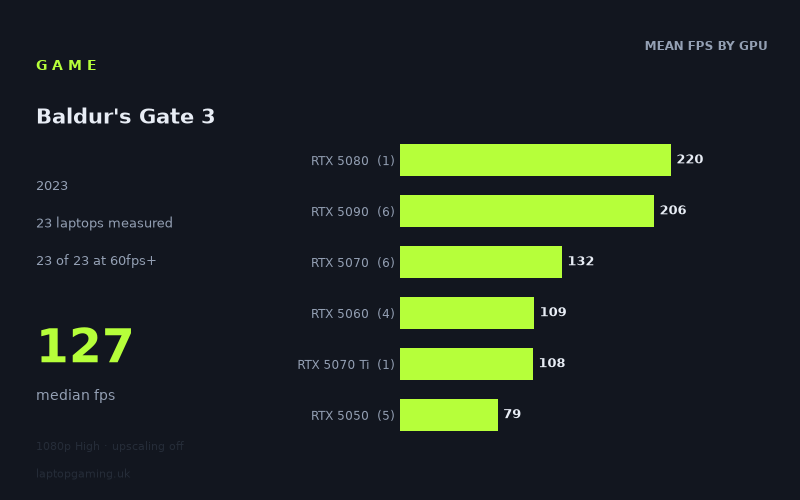
Every laptop we have figures for
Frame rates measured by Notebookcheck.
What it asks of a laptop
Baldur's Gate 3 is one of the more forgiving titles in our scoring suite, and the measured figures say so plainly: all 18 laptops cleared 60fps at 1080p on the High preset with upscaling switched off. Not most of them. All of them. The slowest machine in the set, an MSI Cyborg 15 with an RTX 5050, still returned 66fps. That is a rare result — plenty of 2023-era games will drop an entry-level laptop GPU into the forties at the same settings.
The spread runs from 66fps to 220fps, a ratio of about 3.3x between the cheapest and the fastest hardware on test. That sounds wide, but read where the range sits rather than how long it is. The floor is above the playable threshold and the ceiling is well past what most gaming laptop panels can display. In practical terms, the question this game asks is not "will it run?" but "how much headroom am I paying for?"
The difficulty scales cleanly with GPU tier, which tells you the load is falling on the graphics silicon in a predictable way. Mean figures by tier: RTX 5050 at 79fps, RTX 5060 at 110fps, RTX 5070 at 132fps, RTX 5090 at 202fps. Each step up buys a real, measurable gain — right up until the top, where things flatten out. The single RTX 5080 result, 220fps from the Lenovo Legion Pro 7i 16 Gen 10, sits above the 202fps average of five RTX 5090 laptops and above the fastest 5090 in the set (212fps from the Asus ROG Strix Scar 18). When a lower tier beats a higher one, the GPU has stopped being the thing holding the frame rate back. At that end of the stack you are running into the limits of the engine and the CPU feeding it, not the graphics card.
What runs it
Every tier clears 60fps. The RTX 5050 group is the interesting one, because it is where the variation lives. Five 5050 laptops returned 87, 87, 82, 75 and 66fps — a 32 per cent gap between the best and worst example of nominally the same GPU. The Acer Nitro V 16 AI (5050 at 115W) and Medion Erazer Scout 17 E1 both hit 87fps; the Acer Nitro V14 AI managed 75fps and the MSI Cyborg 15 66fps. Same chip, very different thermal and power envelopes. If you are shopping at this tier, the chassis matters more than the sticker on it.
100fps needs an RTX 5060 or better. Thirteen of 18 laptops cleared triple digits, and the cut-off lands neatly between the tiers — the fastest 5050 result was 87fps, the slowest 5060 result 106fps. All three 5060 machines are comfortably over: Lenovo Legion 5 15AHP G10 at 113fps, HP Omen 16-ap0091ng at 110fps, Lenovo LOQ at 106fps. Note how tight that cluster is, three machines within 7fps of each other. The 5060 appears to be less sensitive to power configuration here than the 5050 is.
144fps requires an RTX 5080 or 5090. Seven of 18 laptops cleared it, and six of those seven are top-tier cards. The one 5070 machine that got there is the HP Omen 17z-db100 at 145fps, and it only just does — the rest of the 5070 group landed at 131fps (Razer Blade 14, 115W), 127fps (ASUS TUF Gaming A18, 115W) and 124fps (MSI Katana 17 HX). That is a 21fps gap within a single GPU tier, and the two 115W machines sit at the bottom of it. If you want to saturate a 144Hz panel reliably, the 5070 is a coin toss dependent on cooling; the 5080 and 5090 are not.
Above 144Hz, the returns collapse. The five 5090 laptops returned 212, 204, 202, 197 and 196fps — a 16fps spread across machines that vary enormously in price, from the Medion Erazer Beast 16 X1 Ultimate at £4,884 to the Razer Blade 16 Core Ultra 9 at £4,979. The £3,662 Legion Pro 7i with the 5080 beat all of them. For this specific title, the top of the market is not delivering value.
The cheapest laptop that handles it
If 60fps is your bar, it is the MSI Cyborg 15 at £984. That is the cheapest machine in the measured set and it is also the slowest, at 66fps — but it clears the threshold, and it does so on the High preset with upscaling off. Turn DLSS on or drop a preset and you have meaningful margin. For a game this heavy on menus, dialogue and turn-based combat, 66fps is not a compromised experience.
If you want a smoother floor, the ASUS TUF Gaming A18 at £1,489 is the value pick in the data. Its RTX 5070 at 115W returned 127fps — roughly double the Cyborg's figure for around 50 per cent more money, and enough to feed a 120Hz panel with room to spare. The MSI Katana 17 HX at £2,312 returned 124fps, three frames slower than the TUF for £823 more, which is a useful reminder that price and frame rate are only loosely correlated once you are inside a tier.
At the top, the Legion Pro 7i 16 Gen 10 at £3,662 is the fastest machine measured and the cheapest of the high-end options listed. The £4,884 Medion and £4,979 Razer both came in slower.
What this means if you're buying
Do not buy a laptop for this game. Every configuration on test runs it, so Baldur's Gate 3 should not be the title that pushes you up a GPU tier — buy for the more demanding things in your library and this will be handled as a side effect.
If it genuinely is your priority, the sensible stopping point is the RTX 5060. It clears 100fps consistently across three different chassis with only 7fps of variation, which is the most predictable result in the whole data set. Above that, the 5070 is worth it only if you can confirm a higher power ceiling — the 115W examples both landed in the 120s and 130s, well short of 144fps. Above the 5070, you are buying frames your panel probably cannot show you, and the 5080 result suggests you would be paying a premium for hardware the game cannot keep busy.
How these numbers were produced
Frame rates here are not measured by us, and we label how each one was arrived at. A figure marked measured comes from a published run on that exact machine. A figure marked representative is derived from the GPU and its power limit (TGP) and cross-referenced against published reviews - a sound estimate of what that configuration delivers, but not a measurement of that specific laptop. Unless stated otherwise, numbers are 1920x1080, High preset, upscaling off. Where a laptop ships in several power configurations we use the wattage of the exact SKU listed, because a 140W RTX 5070 and a 115W one are not the same product.