Details
Product prices and availability are accurate as of the date/time indicated and are subject to change. Any price and availability information displayed on Amazon.co.uk at the time of purchase will apply to the purchase of this product.Performance analysis
Cyberpunk 2077 1.6 (2022): what it takes to run it
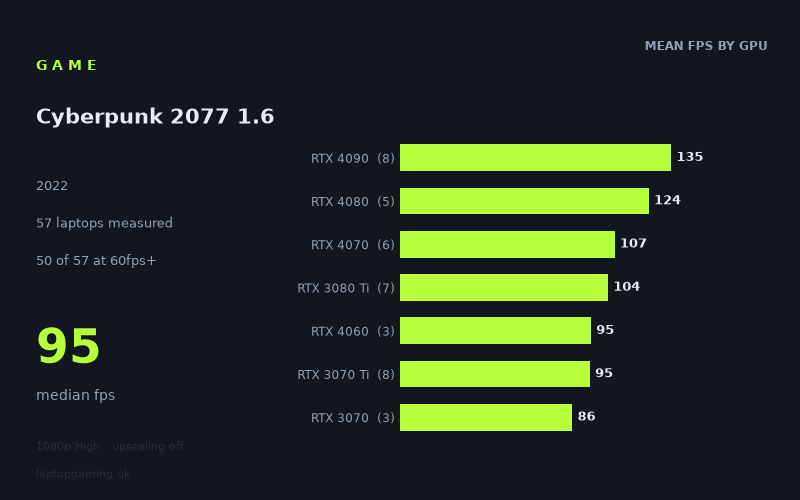
Measured on 57 gaming laptops at 1920×1080, High preset, upscaling off.
Every laptop we have figures for
Frame rates measured by Notebookcheck.
What it asks of a laptop
At 1,920 x 1,080 on the High preset with upscaling disabled, Cyberpunk 2077 1.6 is demanding, but not inaccessible to mid-range gaming laptops. Notebookcheck's figures cover a substantial 57-laptop sample, running from 40fps to 205fps, with a median result of 95fps. That is a wide 165fps gap between the slowest and fastest result, and it shows that laptop graphics configuration matters greatly here.
The reassuring headline is that 50 of the 57 measured laptops reached at least 60fps. A machine with a reasonable dedicated GPU can therefore deliver a smooth 1080p High experience without relying on upscaling. However, the game becomes much more selective once the target rises above 60fps: only 23 of 57 laptops reached 100fps, while just three managed 144fps or more.
The numbers separate noticeably by GPU tier, but there is also meaningful variation within the same GPU name. This is especially visible in the RTX 4090 results, which range from 98fps in the Razer Blade 16 Early 2023 RTX to 205fps in the Asus ROG Strix Scar 17. RTX 3080 Ti laptops similarly range from 72fps to 146fps. The measured figures therefore suggest that the GPU badge alone is not enough to predict performance precisely: the particular laptop implementation, including stated GPU power limits where provided, can make a substantial difference.
The tier averages still provide a useful broad picture. RTX 4090 laptops averaged 135fps across eight measured systems, RTX 4080 models averaged 124fps across five, and RTX 4070 machines averaged 107fps across six. Older RTX 3080 Ti laptops averaged 104fps, close to the RTX 4070 average in this sample. Below that, RTX 4060 and RTX 3070 Ti machines both averaged 95fps, while RTX 3060 systems averaged 71fps. The lower end is where compromise becomes more likely: RTX 4050 laptops averaged 62fps, and RTX 3050 and RTX 3050 Ti systems averaged 45fps and 44fps respectively.
What runs it
For 60fps, the measured results favour RTX 3060-class hardware and above, although this is not an absolute dividing line. All seven tested RTX 3060 laptops cleared 60fps, ranging from 60fps in the Dell XPS 17 9720 RTX with its 70W RTX 3060 to 88fps in the Lenovo Legion 5 15IAH7H with a 140W RTX 3060. The RTX 3070 sample ran from 83fps to 91fps, while RTX 3070 Ti systems returned 84fps to 106fps.
RTX 4060 machines were also comfortably above 60fps in this dataset: the Dell G15 and Lenovo Legion Slim 5 achieved 86fps and 85fps respectively, while the Acer Predator Helios 16 reached 115fps with its 140W RTX 4060. That 30fps difference between the lowest and highest RTX 4060 result is a useful warning against treating every RTX 4060 laptop as equivalent.
RTX 4050 results are less consistent. The Lenovo LOQ 15IRH8 Core i7 and Schenker XMG Apex 15 both reached 73fps, but the MSI Stealth 14 Studio achieved 61fps, and the Lenovo Yoga Pro 7 14IRH G8 and Acer Swift X recorded 53fps and 52fps. The measured figures indicate that some RTX 4050 laptops are solid 60fps machines at these settings, but some are not.
For 100fps, the picture changes. The tier averages point towards RTX 4070, RTX 4080 and RTX 4090 laptops, but specific machines from other tiers also cross the line. All of the measured RTX 4070 examples sit between 95fps and 121fps: the Lenovo Legion Pro 5 with a 140W RTX 4070 reached 121fps, while the Schenker XMG Pro 16 Studio recorded 95fps. RTX 4080 systems achieved 105fps to 141fps, and the RTX 4090 group includes results from 98fps to 205fps.
There are also capable older machines. The MSI Raider GE66 with RTX 3080 Ti reached 146fps, while the MSI GE67 HX with a 150W RTX 3070 Ti and the Razer Blade 17 RTX 3080 Ti both recorded 106fps. These are individual measured results, not guarantees for every laptop using those GPUs.
144fps is an elite target in this test. Only three of the 57 laptops reached it: the Asus ROG Strix Scar 17 with RTX 4090 at 205fps, the Alienware m18 R1 with RTX 4090 at 148fps, and the MSI Raider GE66 with RTX 3080 Ti at 146fps. Even many RTX 4080 and RTX 4090 laptops remained below 144fps, so buyers targeting a 144Hz panel should not assume that a high-end GPU will automatically keep this game at that refresh rate under the measured settings.
The cheapest laptop that handles it
Among the entries with GBP prices in the fact sheet, the lowest-priced machines that comfortably handle the game are two Razer Blade 14 configurations listed at £1,057. The Razer Blade 14 Ryzen 9 with an RTX 3070 Ti at 100W recorded 86fps, while the Razer Blade 14 Ryzen 9 RTX with an RTX 3070 at 100W recorded 84fps. Both are well above 60fps at 1080p High with upscaling off.
There are cheaper-performing classes in the full data, but no lower GBP price is supplied for them. For example, the Lenovo Legion 5 15IAH7H with RTX 3060 reached 88fps, the Dell G16 with RTX 3060 reached 80fps, and the Lenovo LOQ 15IRH8 Core i7 with RTX 4050 reached 73fps. Without prices for those specific laptops, the measured figures cannot establish which is the true cheapest purchase option.
If buying from the priced examples alone, the £1,057 Razer Blade 14 entries are the value floor for a clearly measured 60fps-plus result. The £1,706 Lenovo Legion 5 Pro 16ARH7H RTX 3070 Ti reached 102fps, while the £1,869 Acer Predator Helios 16 with RTX 4060 reached 115fps. Those are more suitable reference points for a buyer who wants greater headroom than a basic 60fps target.
What this means if you're buying
For a laptop intended to play Cyberpunk 2077 1.6 at the tested 1080p High settings, 60fps is achievable without top-end hardware. The seven measured RTX 3060 systems all reached that mark, as did the tested RTX 3070, RTX 3070 Ti and RTX 4060 machines. RTX 4050 can work, but the 52fps to 73fps spread means the specific model deserves closer scrutiny.
Around 90fps to 100fps is a more realistic buying target for an RTX 4060, RTX 3070 Ti or RTX 4070 laptop, based on these results. Buyers seeking consistently higher figures should look closely at the actual measured machine rather than simply moving up a GPU label. The 98fps RTX 4090 result and 146fps RTX 3080 Ti result demonstrate how much overlap there can be between configurations.
Finally, buy for the performance target rather than the panel refresh rate alone. This game can exceed 100fps on many well-equipped laptops, but 144fps was rare in Notebookcheck's sample. A laptop that delivers 80fps to 115fps is still performing strongly here; the measured figures show that a locked or sustained 144fps-class result demands one of a very small number of tested configurations.
How these numbers were produced
Frame rates here are not measured by us, and we label how each one was arrived at. A figure marked measured comes from a published run on that exact machine. A figure marked representative is derived from the GPU and its power limit (TGP) and cross-referenced against published reviews - a sound estimate of what that configuration delivers, but not a measurement of that specific laptop. Unless stated otherwise, numbers are 1920x1080, High preset, upscaling off. Where a laptop ships in several power configurations we use the wattage of the exact SKU listed, because a 140W RTX 5070 and a 115W one are not the same product.