Details
Product prices and availability are accurate as of the date/time indicated and are subject to change. Any price and availability information displayed on Amazon.co.uk at the time of purchase will apply to the purchase of this product.Performance analysis
F1 24 (2024): what it takes to run it
Measured on 55 gaming laptops at 1920×1080, High preset, upscaling off.

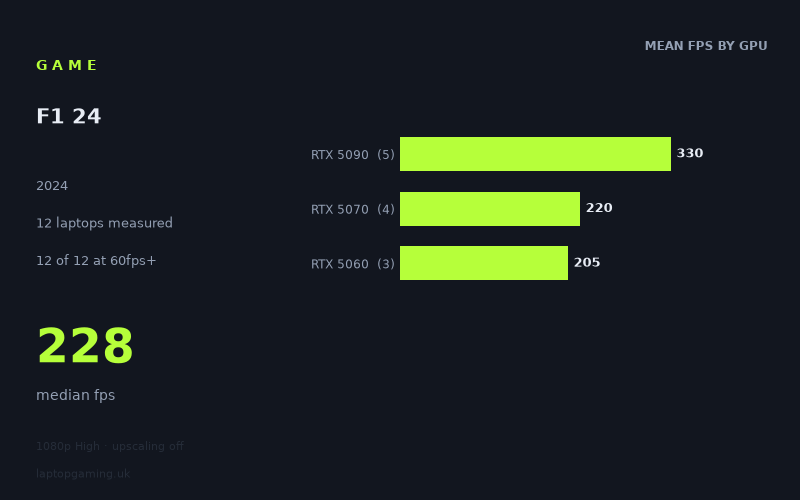
Every laptop we have figures for
Frame rates measured by Notebookcheck.
What it asks of a laptop
Very little. That is the short version, and the measured figures leave no room for hedging: all eight laptops in Notebookcheck's data set clear 144fps at 1920x1080 on the High preset with upscaling switched off. The slowest machine on the list, a Lenovo LOQ with a 115W RTX 5060, returns 195fps. The fastest, an Asus ROG Strix Scar 18 running a 175W RTX 5090, hits 372fps. The median across the eight is 243fps.
To put that in context, most modern releases we look at have a chunk of the sample sitting below 60fps at these settings and force a conversation about upscaling. Here, 8 of 8 clear 60fps, 8 of 8 clear 100fps, and 8 of 8 clear 144fps. There is no failure point in this data. The question with F1 24 is not whether a current gaming laptop runs it, but how much of your display's refresh ceiling you can actually saturate.
The more interesting story is in how the numbers separate. Averaged by GPU tier, the RTX 5090 machines return 324fps, the RTX 5070 machines 228fps, and the RTX 5060 machines 204fps. That gives a 1.59x gap between the top and bottom tier — real, but notably compressed given how far apart those chips are on paper. The tightest squeeze is between the 5070 and the 5060: a Razer Blade 14 with a 115W RTX 5070 manages 229fps, and a Lenovo Legion 5 with a 115W RTX 5060 manages 214fps. That is a 7% gap between two tiers of silicon, which is not what GPU-limited scaling looks like. At these frame rates the bottleneck has moved off the graphics card and onto the CPU and the game's own engine overhead.
You can see the same effect at the top. Four RTX 5090 laptops span 258fps to 372fps — a 44% spread within a single GPU tier. Power and cooling explain part of it: the 175W Strix Scar 18 and the 175W XMG Neo 16 lead at 372fps and 341fps respectively. But the Razer Blade 16 with a Core Ultra 9 sits at 258fps, a long way behind the other three 5090 machines, and that is a thin-chassis and CPU-pairing outcome rather than a graphics deficit. When a game runs this fast, the platform around the GPU determines the result.
What runs it
Working through the tiers as measured:
- RTX 5060 (115W): 195fps and 214fps. Comfortably past 144fps, so a 165Hz or 180Hz panel is close to being fed at native 1080p High. Even the weaker of the two results is over three times a 60fps target.
- RTX 5070: 228fps and 229fps, from a Razer Blade 14 at 115W and an HP Omen 17z respectively. Note how consistent those two are despite very different chassis sizes — further evidence the GPU is not the limiting factor here. A 240Hz panel is nearly saturated.
- RTX 5090: 258fps to 372fps. The 175W configurations at 341-372fps are the only machines in the sample that would meaningfully stretch a 360Hz or higher display at native resolution.
Every one of those numbers is with upscaling off. That matters: the headroom on show is native-resolution headroom, so anything you gain from DLSS is additive on top of already-excessive frame rates. On a 5060 or 5070 machine, that headroom is better spent on raising settings, pushing to a higher internal resolution, or driving an external 1440p or 4K panel than on chasing numbers your screen cannot display.
The cheapest laptop that handles it
The fact sheet only carries one price, and it is the wrong end of the market: the Razer Blade 16 with Core Ultra 9 and RTX 5090 at £4,979, which returns 258fps. That is the slowest RTX 5090 result in the sample and it costs roughly what four entry-level gaming laptops cost. As a way to run F1 24, it makes no sense whatsoever — a 115W RTX 5060 already clears 144fps.
The machines that actually answer the question are the two RTX 5060 laptops. The Lenovo LOQ (RTX 5060, 115W) at 195fps and the Lenovo Legion 5 15AHP G10 (RTX 5060, 115W) at 214fps both sit far above any sensible performance target at 1080p High. These are the cheapest configurations in Notebookcheck's data set, and both of them are overqualified. The 19fps gap between two nominally identical 115W 5060 laptops is worth noting as a general lesson — chassis, cooling and CPU pairing move results even within one GPU and one power limit — but at 195fps versus 214fps it is academic.
If your budget stretches to an RTX 5070, you are buying about 7-17% more frames than a 5060 in this specific title. That is a poor return if F1 24 is the deciding purchase, and a reasonable one if you have other, heavier games in mind.
What this means if you're buying
Do not let F1 24 shape your buying decision. There is no configuration in the measured sample that struggles, no tier that needs upscaling to reach a playable figure, and no meaningful gap between the cheapest and second-cheapest options. If you already own any current-generation gaming laptop, you are done — run it at native 1080p, High, upscaling off, and spend your attention on whether your panel's refresh rate is the actual constraint.
If you are buying new and this game matters to you, two things follow from the data. First, your display is the component that determines your experience, not your GPU: a 5060 laptop with a 165Hz screen and a 5090 laptop with a 165Hz screen will look identical here. If you want to exploit the 300fps-plus figures the 175W 5090 machines produce, you need a panel and a cable that can carry it. Second, because the game is CPU- and platform-limited at these frame rates, power limits and cooling matter more than the badge on the box. The 175W RTX 5090 laptops sit 32-44% ahead of the thin-chassis 5090 at £4,979. That pattern shows up in genuinely demanding games too, and it is a far better guide to what you should be looking for than anything F1 24's frame rates can tell you.
How these numbers were produced
Frame rates here are not measured by us, and we label how each one was arrived at. A figure marked measured comes from a published run on that exact machine. A figure marked representative is derived from the GPU and its power limit (TGP) and cross-referenced against published reviews - a sound estimate of what that configuration delivers, but not a measurement of that specific laptop. Unless stated otherwise, numbers are 1920x1080, High preset, upscaling off. Where a laptop ships in several power configurations we use the wattage of the exact SKU listed, because a 140W RTX 5070 and a 115W one are not the same product.