Performance analysis
F1 2021 (2021): what it takes to run it
Measured on 44 gaming laptops at 1920×1080, High preset, upscaling off.

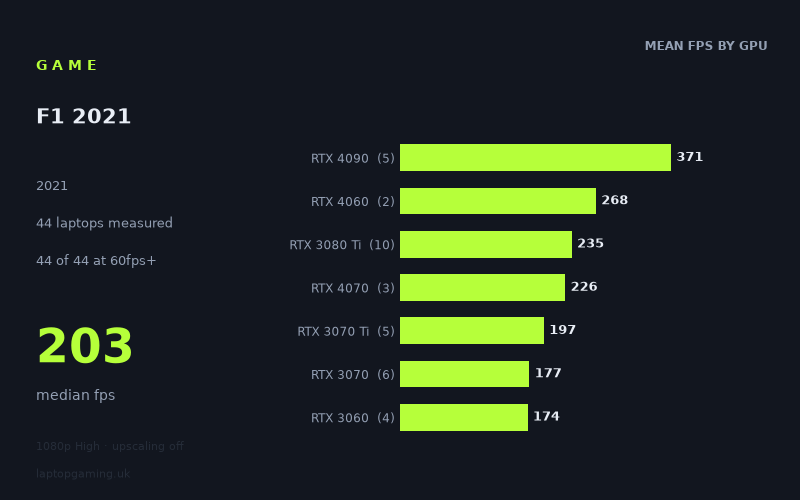
Every laptop we have figures for
Frame rates measured by Notebookcheck.
What it asks of a laptop
At 1,920 × 1,080 on the High preset with upscaling off, F1 2021 is a notably forgiving game for a gaming laptop. Notebookcheck's measured figures span 44 laptops, from 66fps at the bottom to 470fps at the top, with a median of 203fps. Every machine in the set reached 60fps, 42 of 44 exceeded 100fps, and 38 reached 144fps.
That is a wide range of laptops, not merely a collection of expensive flagship machines. The result is clear: a laptop does not need current high-end graphics hardware to run F1 2021 smoothly at these settings. Even the slowest measured result, the HP Envy 17-cr0079ng with an RTX 2050, managed 66fps. That is the only result close to the 60fps line.
The main point of separation is not whether a laptop can play the game, but how much headroom it has for high-refresh-rate displays. Once the measured laptops move beyond the entry-level GPUs, figures climb rapidly. RTX 3060 machines delivered 157fps to 198fps, while RTX 3070 laptops ranged from 149fps to 218fps. Those results put 144Hz play within reach even on several older mid-range gaming laptops.
There is also substantial variation between individual laptops carrying ostensibly similar GPUs. The RTX 3050 Ti results range from 97fps to 125fps, while the RTX 4050 results range from 112fps to 194fps. Power limits, cooling and the laptop’s wider configuration clearly matter in these measured results. Therefore, the GPU name alone is not enough to predict a precise frame rate, particularly in the lower and thinner laptop classes.
At the upper end, performance becomes excessive for a conventional 60Hz or 144Hz screen. The five RTX 4090 laptops averaged 371fps, with the Asus ROG Strix Scar 17 reaching 470fps. These numbers show huge headroom, but they should not be read as a reason to buy an RTX 4090 specifically for F1 2021 at 1080p High. The game runs very well on far less costly hardware in the measured data.
What runs it
For a 60fps target, all 44 measured laptops qualify. The least powerful result was the HP Envy 17-cr0079ng with RTX 2050 graphics at 66fps. This is enough for a basic 60Hz experience, though it leaves little margin compared with the rest of the sample.
For 100fps, the picture remains very positive. Only two laptops fell short: the Schenker Vision 14 with an RTX 3050 Ti at 50W produced 97fps, and the RTX 2050 HP Envy managed 66fps. The other 42 systems reached at least 100fps.
- RTX 3050 Ti: three measured laptops averaged 114fps. Results were 97fps, 121fps and 125fps. Two of the three passed 100fps, but none reached 144fps.
- RTX 4050: three laptops averaged 155fps, ranging from 112fps in the Acer Swift X to 194fps in the MSI Stealth 14 Studio. All three cleared 100fps, while two passed 144fps.
- RTX 3060: four laptops averaged 174fps, with results from 157fps to 198fps. Every measured RTX 3060 machine exceeded 144fps.
- RTX 3070: six laptops averaged 177fps. The lowest result was 149fps and the highest 218fps, so all six cleared 144fps.
- RTX 3070 Ti: five laptops averaged 197fps. Four exceeded 144fps, but the HP Omen 17-ck1075ng recorded 139fps.
- RTX 3080 and RTX 3080 Ti: the two RTX 3080 systems measured 165fps and 172fps, while ten RTX 3080 Ti laptops averaged 235fps and ranged from 196fps to 292fps. All of these results were above 144fps.
- RTX 4060 and RTX 4070: the two RTX 4060 laptops recorded 244fps and 292fps. The three RTX 4070 models delivered 220fps, 220fps and 238fps. All five were well beyond 144fps.
- RTX 4090: five laptops averaged 371fps, ranging from 299fps to 470fps. This is performance aimed at very high-refresh-rate panels rather than simply meeting a playable threshold.
The 144fps threshold is therefore realistic on most dedicated gaming laptops in the data. The exceptions are the RTX 2050 machine, all three RTX 3050 Ti systems, the 112fps RTX 4050 Acer Swift X, and the 139fps RTX 3070 Ti HP Omen 17-ck1075ng. In total, 38 of 44 laptops reached 144fps.
The cheapest laptop that handles it
Among the machines with a GBP price listed in the fact sheet, the lowest-priced option is the Asus ROG Zephyrus G14 2024 with RTX 4070 graphics at £1,038. Notebookcheck's measured figure for this laptop is 220fps, making it comfortably capable of 60fps, 100fps and 144fps at 1080p High with upscaling disabled.
That £1,038 figure is lower than the other priced entries supplied here, including the Asus ROG Strix G17 with RTX 3050 Ti at £1,167, which measured 125fps, and the MSI Stealth 14 Studio with RTX 4050 at £1,899, which reached 194fps. It is also far below the listed £2,466 Acer Predator Triton 500 SE with RTX 3080 Ti and the £4,500 Razer Blade 17 Early with RTX 3080 Ti.
These are the prices included in the fact sheet, rather than a current market-wide price comparison. They do, however, make the Zephyrus G14 result particularly notable: it is both the least expensive listed laptop and one of the stronger measured performers.
What this means if you’re buying
Buy for the display target, not just for F1 2021’s minimum playable performance. The measured figures indicate that 60fps is achievable even on an RTX 2050 laptop, while 100fps is available on nearly every system tested. A laptop around RTX 3060 or RTX 3070 level delivered 144fps or more in every measured example, making those GPUs more than adequate for a 144Hz display at these test settings.
If you are considering an RTX 3050 Ti or a lower-power RTX 4050 laptop, inspect the specific model’s performance rather than assuming the GPU tier guarantees 144fps. The measured results show that these machines can range from under 100fps to well above 144fps. For F1 2021 alone, RTX 4060, RTX 4070, RTX 3080 Ti and RTX 4090 laptops offer far more performance than required for a standard 144Hz panel.
The sensible buying conclusion is simple: this is not a game that demands a flagship gaming laptop at 1080p High. Prioritise a machine with the screen refresh rate, price and general laptop design you want, then use the measured figures for that specific model to judge how much frame-rate headroom it offers.
How these numbers were produced
Frame rates here are not measured by us, and we label how each one was arrived at. A figure marked measured comes from a published run on that exact machine. A figure marked representative is derived from the GPU and its power limit (TGP) and cross-referenced against published reviews - a sound estimate of what that configuration delivers, but not a measurement of that specific laptop. Unless stated otherwise, numbers are 1920x1080, High preset, upscaling off. Where a laptop ships in several power configurations we use the wattage of the exact SKU listed, because a 140W RTX 5070 and a 115W one are not the same product.