Details
Product prices and availability are accurate as of the date/time indicated and are subject to change. Any price and availability information displayed on Amazon.co.uk at the time of purchase will apply to the purchase of this product.Performance analysis
The Outer Worlds 2 (2025): what it takes to run it
Measured on 8 gaming laptops at 1920×1080, High preset, upscaling off.

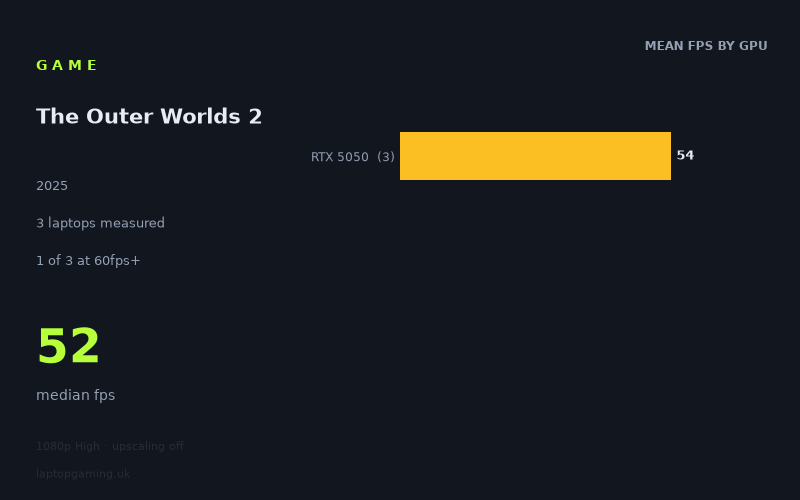
Every laptop we have figures for
Frame rates measured by Notebookcheck.
What it asks of a laptop
Start with the caveat, because it shapes everything below: Notebookcheck's figures for The Outer Worlds 2 currently cover three laptops, and all three use the same GPU — the RTX 5050. That is not enough to build a tier-by-tier buying guide from, and we are not going to pretend otherwise. What we have is a narrow, useful slice: three entry-level 2025 gaming laptops at 1920x1080, High preset, upscaling switched off. Everything that follows is an extrapolation from that slice, and we will flag where the extrapolation gets thin.
The three results, in full:
- 60fps — Acer Nitro V 16 AI (RTX 5050 at 115W)
- 52fps — Acer Nitro V14 AI (RTX 5050)
- 51fps — MSI Cyborg 15 (RTX 5050, £984)
Mean across the three: 54fps. Fastest 60, slowest 51, median 52.
The first thing worth saying is that this is a demanding game at native resolution. An RTX 5050 is not a powerful GPU, but 1080p High with no upscaling is the sort of workload plenty of 2025 releases will hand back at 80 or 90fps on that class of hardware. The Outer Worlds 2 hands back 51 to 60. Only one of the three machines reaches 60fps at all, and it does so exactly — 60.0, no headroom. None of the three gets within touching distance of 100fps, let alone the 144fps a decent gaming laptop panel can display.
The second thing is more interesting, and it is the one genuinely solid inference the data supports. All three laptops share a GPU, and yet the spread between fastest and slowest is 18 per cent. That is a wide gap for identical silicon. The fact sheet gives us the likely reason: the winning machine is explicitly listed at 115W, and it is the larger 16-inch chassis. The two slower results come from a 14-inch and a 15-inch laptop. This is a power-limit and thermal story, not a silicon story. The RTX 5050 in a well-cooled 16-inch shell running at its upper power ceiling is a meaningfully different product from the same chip squeezed into a thinner or cheaper body.
We cannot say where the load is falling — GPU-bound, CPU-bound, memory-bandwidth-bound — because we only have one GPU tier and no CPU-scaling data. But the fact that performance tracks so cleanly with chassis size and stated wattage points at a GPU-limited workload that rewards every watt you can feed it.
What runs it
Honestly: we can only speak to one tier.
RTX 5050 (3 laptops, mean 54fps): playable at 1080p High native, but marginal. One of three clears 60fps, and only just. The other two sit in the low 50s. That is fine for a single-player game on a 60Hz panel if you are tolerant of dips below the refresh rate, and it is exactly the scenario where switching upscaling on — which these figures deliberately do not do — buys back real headroom. Turn DLSS on at Quality and the low-50s machines should comfortably clear 60. We have no measured figure for that, so treat it as reasoning rather than a number.
RTX 5060 and above: no measured figures. We are not going to guess. What the 5050 numbers do tell you is the shape of the problem — if the entry tier lands at 51 to 60fps native, a mid-tier card is going to be the point at which 1080p High native becomes genuinely comfortable, and 1440p starts to be a conversation. But that is inference from one data point, not measurement, and anyone quoting you a specific frame rate for a 5070 in this game is making it up.
High-refresh gaming: nothing in this dataset comes close to 100fps, never mind 144. If you have bought a 165Hz panel and you want to feed it in this game, the three laptops we have figures for will not do it at native 1080p High. You would be looking at a lower preset, aggressive upscaling, frame generation, or considerably more GPU than an RTX 5050.
The cheapest laptop that handles it
Only one of the three has a price attached in the source data: the MSI Cyborg 15 at £984, which returned 51fps — the slowest of the three, and the floor of what we have measured. That is a sub-£1,000 machine that will run The Outer Worlds 2 at 1080p High in the low 50s natively, and comfortably above 60 with upscaling engaged. For a story-driven single-player game, that is a legitimate purchase.
The Acer Nitro V 16 AI is the machine to want out of these three — the 115W GPU and the larger chassis buy you the only 60fps result in the set — but the fact sheet gives us no price for it, so we cannot tell you what that extra 18 per cent costs. The Acer Nitro V14 AI at 52fps is functionally tied with the MSI.
What this means if you're buying
Three points, all proportionate to three data points.
Wattage matters more than the GPU name here. The single most useful thing in this dataset is that three RTX 5050 laptops span 51 to 60fps. If you are shopping at the entry tier, the number on the spec sheet is not the whole story — find the graphics power figure, and favour the larger chassis. A 115W 16-inch machine and a thin 14-inch machine with the same GPU are not the same purchase.
Budget for upscaling. These are native figures with upscaling off, which is the right way to benchmark and the wrong way to play. If you are buying at the RTX 5050 level, assume you will be running DLSS and plan your expectations around 60fps, not 144.
If you are shopping above the 5050, we cannot help you yet. There are no measured figures for mid-range or high-end GPUs in this dataset. We would rather say that than invent a number. Come back when the sample fills out.
How these numbers were produced
Frame rates here are not measured by us, and we label how each one was arrived at. A figure marked measured comes from a published run on that exact machine. A figure marked representative is derived from the GPU and its power limit (TGP) and cross-referenced against published reviews - a sound estimate of what that configuration delivers, but not a measurement of that specific laptop. Unless stated otherwise, numbers are 1920x1080, High preset, upscaling off. Where a laptop ships in several power configurations we use the wattage of the exact SKU listed, because a 140W RTX 5070 and a 115W one are not the same product.