Details
Product prices and availability are accurate as of the date/time indicated and are subject to change. Any price and availability information displayed on Amazon.co.uk at the time of purchase will apply to the purchase of this product.Performance analysis
Indiana Jones and the Great Circle (2024): what it takes to run it
Measured on 22 gaming laptops at 1920×1080, High preset, upscaling off.

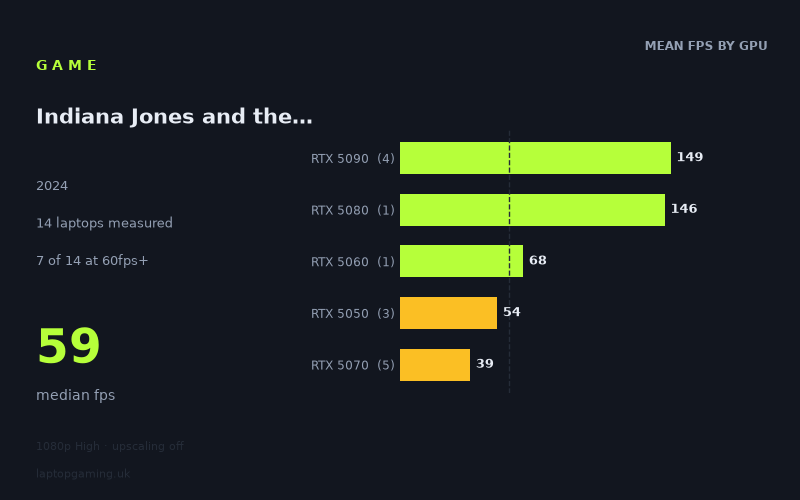
Every laptop we have figures for
Frame rates measured by Notebookcheck.
What it asks of a laptop
The headline spread on Indiana Jones and the Great Circle is enormous: 164fps at the top, 0fps at the bottom, with a median of 59fps across the twelve laptops Notebookcheck measured at 1080p on the High preset with upscaling switched off. Only half the sample manages 60fps. That puts this firmly in the demanding category — but the more interesting story is how the figures separate, because it isn't a clean ladder.
At the top end, the game scales exactly as you'd expect. The RTX 5090 machines average 148fps, the single RTX 5080 result lands at 146fps, and the gap between the best 5090 (164fps on the Asus ROG Strix Scar 18) and the Legion Pro 7i's 5080 is small enough that you'd struggle to feel it. Above that tier, nothing else in the sample comes close — there is no middle. The fourth-fastest laptop scores 138fps; the fifth scores 68fps. That is a 70fps cliff with nothing in between, and it tells you this game punishes anything below the flagship tier hard at native resolution.
Below the cliff, the ordering breaks down completely. The RTX 5060 in the Lenovo LOQ, running at 115W, posts 68fps. The RTX 5050 laptops average 54fps across three machines. And the RTX 5070 group averages 34fps across four laptops — the slowest tier in the entire dataset, sitting below a GPU two rungs beneath it. That is not how power limits work. The Acer Nitro V 16 AI runs a 5050 at 115W and manages 59fps; the ASUS TUF Gaming A18 runs a 5070 at the same 115W and manages 39fps. Wattage doesn't explain a 20fps deficit from a materially larger GPU.
What the numbers imply is that the 5070 results in this sample are not measuring the card's capability — something at the configuration or driver level is holding those four machines back, and the Razer Blade 14's 0fps (a 5070 at 115W that didn't produce a playable result at all) sits in the same group. Treat the 5070 figures here as a flag, not a verdict. The one 5070 that behaves normally, in the MSI Katana 17 HX, hits 60fps, which is roughly where you'd expect a mid-tier card to land given the 5060 and 5050 results around it.
What runs it
Working through the tiers on the measured data:
- 144fps and above: two laptops out of twelve. The ROG Strix Scar 18 at 164fps and the Legion Pro 7i 16 Gen 10 at 146fps. That's a 5090 at 175W and a 5080 at 175W. High-refresh gaming at native 1080p in this title is a flagship-only proposition.
- 100fps and above: four laptops. Add the Schenker XMG Neo 16 E25 (5090, 143fps) and the ROG Strix Scar 16 (5090, 138fps). Note that all three 5090 results differ by 26fps despite identical silicon, so cooling and sustained power delivery matter here — the Scar 18 pulls meaningfully ahead of the other two.
- 60fps and above: six laptops. The four above, plus the Lenovo LOQ's 5060 at 68fps and the MSI Katana 17 HX's 5070 at exactly 60fps. Both are at the threshold rather than comfortably clear of it, and 60fps average on the LOQ implies dips well below that in heavier scenes.
- Below 60fps: the other half. The RTX 5050 machines land at 59fps (Acer Nitro V 16 AI), 52fps (Medion Erazer Scout 17 E1) and 50fps (MSI Cyborg 15). Playable, not smooth. Then the anomalous 5070s at 39fps, and the Blade 14 at zero.
The important caveat on all of this: these are native-resolution figures with upscaling off. That's the correct way to measure a GPU, but it's not how most people will play. Every machine in the 50–68fps band has obvious headroom available from upscaling, and the 5050 laptops in particular look far more viable once you stop insisting on native rendering.
The cheapest laptop that handles it
Awkwardly, the cheapest machine in the sample with a price attached is also one of the weakest performers: the MSI Cyborg 15 at £984, with an RTX 5050 delivering 50fps. That's below the 60fps line but within striking distance of it with upscaling engaged, and at under a grand it's the value entry point.
The ASUS TUF Gaming A18 at £1,489 is the trap in this dataset. On paper it's a 5070 machine, a full tier above the Cyborg, and it scores 39fps — 11fps slower for £505 more. Whatever is causing the 5070 results here, that combination is not one to buy on the strength of this benchmark.
The MSI Katana 17 HX at £2,312 is the cheapest priced laptop in the sample to actually clear 60fps, at exactly 60fps. That is a lot of money for a bare pass at 1080p. The Lenovo LOQ's 5060 is the best-value performer in the whole set at 68fps, but no price is given for it in the measured data, so we can't call it on cost.
At the top, the Lenovo Legion Pro 7i 16 Gen 10 at £3,662 gets you 146fps from a 175W 5080 — within 18fps of the fastest 5090 in the sample, which makes it the sensible flagship buy rather than the fastest one.
What this means if you're buying
Three things follow from these numbers. First, native 1080p at High is genuinely heavy in this game: half the sample fails to hit 60fps, and you need a 5080 or 5090 to reach high-refresh territory. Second, GPU tier alone is not a reliable predictor here — the 5070 group underperforms 5050 laptops badly enough that you should check figures for the specific machine rather than trusting the badge. Third, if you're shopping at the £1,000–1,500 mark, the 5050 and 5060 machines land in the 50–68fps range and will need upscaling to feel comfortable, which is a reasonable trade rather than a dealbreaker. Just don't pay a 5070 premium expecting a 5070 result until the figures for your specific model say otherwise.
How these numbers were produced
Frame rates here are not measured by us, and we label how each one was arrived at. A figure marked measured comes from a published run on that exact machine. A figure marked representative is derived from the GPU and its power limit (TGP) and cross-referenced against published reviews - a sound estimate of what that configuration delivers, but not a measurement of that specific laptop. Unless stated otherwise, numbers are 1920x1080, High preset, upscaling off. Where a laptop ships in several power configurations we use the wattage of the exact SKU listed, because a 140W RTX 5070 and a 115W one are not the same product.