Details
Product prices and availability are accurate as of the date/time indicated and are subject to change. Any price and availability information displayed on Amazon.co.uk at the time of purchase will apply to the purchase of this product.Performance analysis
The Elder Scrolls IV Oblivion Remastered (2025): what it takes to run it
Measured on 14 gaming laptops at 1920×1080, High preset, upscaling off.
Every laptop we have figures for
Frame rates measured by Notebookcheck.
What it asks of a laptop
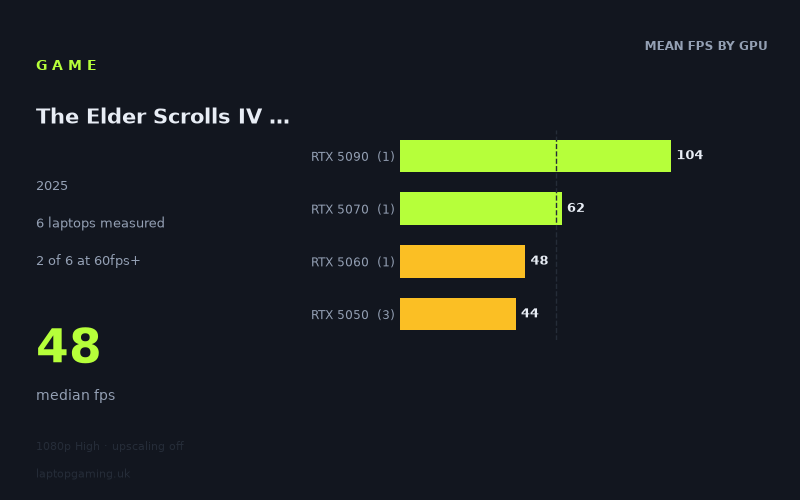
The spread here tells you most of what you need to know before you read a single line about GPU tiers. At 1920x1080 on the High preset with upscaling switched off, Notebookcheck's numbers run from 104fps at the top to 40fps at the bottom, with a median of 48fps. Two of the six laptops tested clear 60fps. One clears 100fps. None of them reach 144fps.
That last figure is the one worth sitting with. A £4,884 machine with a mobile RTX 5090 in it — the fastest laptop silicon currently available — cannot feed a 144Hz panel at native 1080p on High. When the flagship tops out at 104fps, you are looking at a game where the GPU is the hard constraint across the entire market, not just at the bottom of it. There is no CPU-bound plateau visible in these figures, no point where extra graphics power stops paying off. Every step up the GPU ladder produces a clean, roughly proportional gain.
Look at how the tiers separate. The RTX 5050 average sits at 44fps, the RTX 5060 at 115W manages 48fps, the RTX 5070 hits 62fps, and the RTX 5090 delivers 104fps. That is a 2.4x range from bottom to top of the sample, which is close to what you'd expect from raw shader and bandwidth differences alone. Nothing here suggests the game is bottlenecked by anything other than the graphics chip: no clustering, no diminishing returns, no sign that a faster CPU would rescue a weaker GPU. It's a pure rendering load, and it scales like one.
The other detail worth flagging is the RTX 5050 group. Three laptops, one GPU, and results of 48fps, 45fps and 40fps — an 8fps spread, or 20% between best and worst. That is a large gap for identical silicon, and it points squarely at power limits and cooling headroom. The Medion Erazer Scout 17 E1 at 48fps and the Acer Nitro V14 AI at 40fps are running the same chip to very different effect, and the 17-inch chassis versus the 14-inch chassis is the obvious explanation. If you're shopping at this tier, the badge on the box tells you less than the size of the heatsink behind it.
What runs it
RTX 5090 — 104fps. The only configuration in the sample that comfortably clears 100fps at native 1080p High. This is the one machine where you can leave upscaling off, ignore the settings menu entirely and get a genuinely fluid result. It still doesn't saturate a 144Hz display, which is a useful reminder that top-tier mobile hardware and top-tier refresh rates don't automatically pair up in this title.
RTX 5070 — 62fps. Clears the 60fps line, but only just. Two frames of margin is not margin at all; it means the average sits above 60 while dips will spend meaningful time below it. This is a playable, respectable result rather than a comfortable one, and it's the tier where enabling upscaling starts to look less like a compromise and more like the sensible default.
RTX 5060 at 115W — 48fps. Below 60fps at native settings, and note that this is the 115W configuration, i.e. the 5060 with a reasonable power budget rather than a squeezed one. Interestingly it lands level with the best-performing RTX 5050 in the sample at 48fps, which says something about how much a well-cooled lower tier can claw back — and how little separates these two tiers in practice once chassis constraints are in play.
RTX 5050 — 40 to 48fps, mean 44fps. The entry tier delivers something in the low-to-mid 40s depending entirely on the laptop. Playable in the loosest sense, not what most people would describe as smooth. This tier needs either upscaling, a step down from High, or both.
144fps and above — nothing. No configuration in the sample gets there. If you own a 165Hz or 240Hz panel, this game will not use it at native resolution on High, regardless of what you spend.
The cheapest laptop that handles it
If "handles it" means clearing 60fps at native 1080p High, the answer in this sample is the MSI Katana 17 HX (RTX 5070) at £2,312, which returns 62fps. That is the cheapest machine in the measured set to get over the line, and it does so by the narrowest possible margin.
The Medion Erazer Beast 16 X1 Ultimate (RTX 5090) at £4,884 is the only laptop here that clears 100fps, at 104fps. That's roughly double the price of the Katana for a 68% frame rate increase — the usual flagship maths, and the usual conclusion that it only makes sense if you were buying at that level anyway.
Below the Katana, the picture is about which entry machine you pick rather than whether you clear 60. The Medion Erazer Scout 17 E1 (RTX 5050) at 48fps matches the Lenovo LOQ (RTX 5060 at 115W) exactly, and beats the HP Victus 15-fa2160ng (RTX 5050) at 45fps and the Acer Nitro V14 AI (RTX 5050) at 40fps. If you're spending at the RTX 5050 level, the larger 17-inch Medion returns 20% more performance than the 14-inch Acer from the same GPU. That gap is free performance available for choosing the right chassis.
What this means if you're buying
Three practical conclusions come out of these figures.
- Treat upscaling as standard, not optional. The measured numbers were taken with it off, which is the right way to compare hardware but not necessarily the right way to play. Every tier below the RTX 5090 has a clear reason to switch it on, and the RTX 5070's two-frame margin over 60fps makes it worth doing even there.
- Don't buy a high-refresh panel for this game specifically. Nothing in the sample reaches 144fps at native 1080p High. If your reason for spending extra on a 240Hz screen is games like this, the money is better spent on the GPU.
- At the entry tier, cooling matters more than the GPU name. An RTX 5050 in a well-ventilated 17-inch shell matched an RTX 5060 running at 115W. An RTX 5050 in a 14-inch shell was 17% slower than one in a 17-inch shell. Check the chassis, not just the spec list.
Overall: this is a demanding game that scales cleanly with GPU power and offers no shortcuts. Below the RTX 5070 you should plan on upscaling or reduced settings as a matter of course. Above it, you're buying frames at flagship prices.
How these numbers were produced
Frame rates here are not measured by us, and we label how each one was arrived at. A figure marked measured comes from a published run on that exact machine. A figure marked representative is derived from the GPU and its power limit (TGP) and cross-referenced against published reviews - a sound estimate of what that configuration delivers, but not a measurement of that specific laptop. Unless stated otherwise, numbers are 1920x1080, High preset, upscaling off. Where a laptop ships in several power configurations we use the wattage of the exact SKU listed, because a 140W RTX 5070 and a 115W one are not the same product.