Details
Product prices and availability are accurate as of the date/time indicated and are subject to change. Any price and availability information displayed on Amazon.co.uk at the time of purchase will apply to the purchase of this product.Performance analysis
Anno 117: Pax Romana (2025): what it takes to run it
Measured on 10 gaming laptops at 1920×1080, High preset, upscaling off.

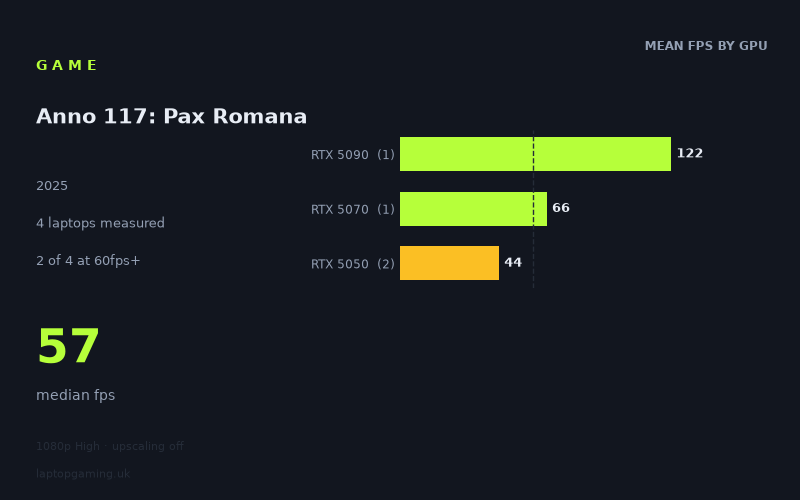
Every laptop we have figures for
Frame rates measured by Notebookcheck.
What it asks of a laptop
The measured spread here is wide but orderly. At 1920x1080 on the High preset with upscaling switched off, Notebookcheck's numbers run from 122fps on an RTX 5090 laptop down to 41fps on an RTX 5050 machine — a factor of three between the top and bottom of the sample. The median across the four laptops tested is 57fps, which tells you most of what you need to know: this is a game that sits right on the 60fps line for mainstream hardware rather than comfortably above or below it.
The more useful signal is how the figures separate. Sorted by GPU tier, the mean results are 44fps for the RTX 5050, 66fps for the RTX 5070 and 122fps for the RTX 5090. That is close to clean linear scaling with silicon: the 5070 is roughly 50% faster than the 5050 average, and the 5090 is roughly 85% faster again than the 5070. Nothing flattens out at the top. When a game is limited by the processor rather than the graphics chip, you typically see the fastest GPUs bunch together as they all hit the same ceiling — a 5090 landing at, say, 80fps when a 5070 manages 70fps. That does not happen here. The 5090 keeps pulling away, and it does so at 1080p, the resolution where CPU limits are most likely to show themselves.
The conclusion is that at High settings this is a GPU-bound workload across the entire range tested, and that the graphics card in your laptop is the single variable that matters most. It is also, in absolute terms, a demanding game: only one of four machines cleared 100fps, and none of the four reached 144fps. If you own a 144Hz or 165Hz panel — which is to say, if you own more or less any gaming laptop sold in the last few years — nothing in this sample fills it at native 1080p on High.
One caveat worth stating plainly, because the fact sheet does not cover it: these are benchmark figures from a fixed test run, not a measurement of a heavily built-out late-game save. Builder-style games generally get heavier as the simulation grows, and no measured data here speaks to that. Treat the numbers below as a ceiling for how the game behaves, not a floor.
What runs it
Working through the tiers with the measured figures:
- RTX 5050 — 41 to 48fps. Both 5050 laptops in the sample fall short of 60fps at 1080p High. The Acer Nitro V14 AI managed 48fps, the MSI Cyborg 15 41fps. Playable in the sense that a management game is playable in the forties, but you are not getting a smooth 60, and you have no headroom at all.
- RTX 5070 — 66fps. The ASUS TUF Gaming A18, with its 5070 running at 115W, clears 60fps but only just. That is a 10% margin. Any additional load — a busier scene, a warmer chassis, a lower-power model of the same GPU — could put it back under the line.
- RTX 5090 — 122fps. The ROG Strix Scar 18, with the 5090 at 175W, is the only machine in the sample that comfortably exceeds 100fps. Even so, it does not reach 144fps at these settings.
Two of four laptops reached 60fps; one of four reached 100fps; none reached 144fps. That is a fairly blunt summary of where the bar sits.
The gap between the two RTX 5050 machines deserves attention on its own. Same GPU tier, 41fps versus 48fps — a 17% difference that comes down entirely to how much power and cooling the chassis gives the chip. The 14-inch Acer beating the 15-inch MSI is a reminder that GPU model names are not performance specifications on laptops. The same applies further up: the 5070 figure was measured at 115W and the 5090 figure at 175W. Lower-wattage implementations of the same GPUs exist and will land lower.
The cheapest laptop that handles it
Of the machines with prices attached, the ASUS TUF Gaming A18 at £1,489 is the cheapest in this sample to clear 60fps, at 66fps with its RTX 5070 configured for 115W. That is the entry point for a genuinely comfortable native-1080p experience on High from the measured data.
Below that, the MSI Cyborg 15 at £984 is the budget option and it returns 41fps — the slowest result in the sample. It runs the game, but it runs it in the low forties, and it is the machine most likely to feel the strain as scenes get busier. The Acer Nitro V14 AI does better on the same GPU tier at 48fps, though no price is given for it in the measured data, so we cannot say what that extra 17% costs.
The gap between the £984 machine and the £1,489 machine is around £500 for a 61% jump in frame rate. In pure fps-per-pound terms that is a reasonable trade, and it is the difference between sitting under 60fps and sitting over it.
What this means if you're buying
If your priority is native 1080p at High with no upscaling, an RTX 5070 at a decent power budget is the sensible floor. The 5070 result is not generous — 66fps is a slim margin — but it is on the right side of 60. Anything at the 5050 tier will land in the forties and stay there.
If you want three figures at these settings, the measured data offers exactly one route: an RTX 5090 at high wattage, in a large chassis, at flagship money. Nothing between the 5070 and the 5090 was tested, so we cannot say where the 100fps line actually falls — it is somewhere in the untested middle of the stack.
Two practical points. First, check the wattage, not just the GPU name. The two 5050 laptops differ by 7fps on identical silicon, and the headline 5070 and 5090 figures both come from generously fed configurations. Second, all of these numbers are with upscaling off. That was a deliberate testing choice to isolate raw GPU performance, and it means the 5050 results in particular represent a worst case rather than the only way to play. But since the fact sheet contains no measured upscaled figures, we cannot tell you how much you would get back — only that the native-resolution ranking above is the one to buy against.
How these numbers were produced
Frame rates here are not measured by us, and we label how each one was arrived at. A figure marked measured comes from a published run on that exact machine. A figure marked representative is derived from the GPU and its power limit (TGP) and cross-referenced against published reviews - a sound estimate of what that configuration delivers, but not a measurement of that specific laptop. Unless stated otherwise, numbers are 1920x1080, High preset, upscaling off. Where a laptop ships in several power configurations we use the wattage of the exact SKU listed, because a 140W RTX 5070 and a 115W one are not the same product.