Details
Product prices and availability are accurate as of the date/time indicated and are subject to change. Any price and availability information displayed on Amazon.co.uk at the time of purchase will apply to the purchase of this product.Performance analysis
Kingdom Come Deliverance 2 (2025): what it takes to run it
Measured on 15 gaming laptops at 1920×1080, High preset, upscaling off.

Every laptop we have figures for
Frame rates measured by Notebookcheck.
What it asks of a laptop
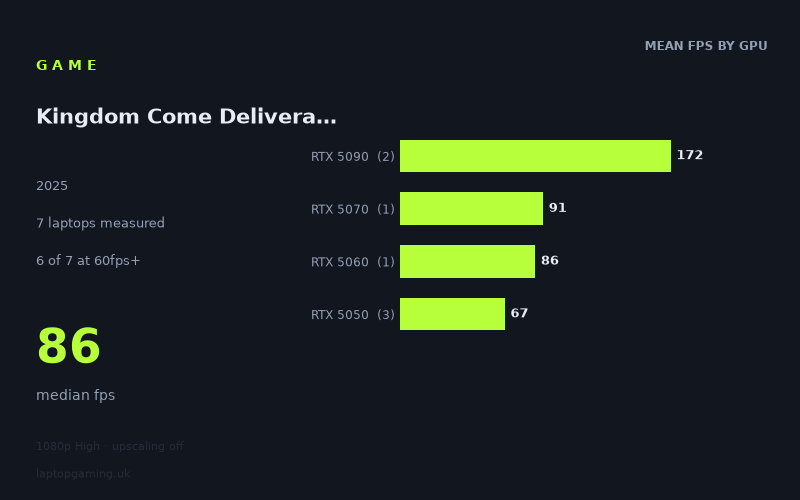
The spread here is the story: 178fps at the top, 58fps at the bottom, with a median of 86fps across seven laptops all running the same 1920x1080 High preset with upscaling switched off. That's a roughly threefold gap between the fastest and slowest machine in the sample, which is a wider fan-out than you'd see in a game that hits a CPU wall or chokes on VRAM. When a title is bottlenecked by something other than raw GPU throughput, the top-end results compress and everything converges toward a ceiling. Nothing like that happens in Notebookcheck's numbers — the RTX 5090 laptops keep scaling all the way to 178fps, which tells you the game is happy to consume whatever graphics silicon you feed it.
So this is a GPU-limited game that separates cleanly by tier, and that's actually good news for buyers. It means the figures are predictable: you can look at the class of GPU in a laptop, and the measured mean for that class, and get a usable estimate. The tier means bear this out — 172fps for the RTX 5090, 91fps for the 5070, 86fps for the 5060, 67fps for the 5050. Those are neat, evenly-spaced steps with no anomalies, no tier punching above the one above it, no sign of a hidden system requirement tripping up the cheaper machines.
Where it isn't forgiving is at the bottom. The three RTX 5050 laptops in the sample land at 74fps, 68fps and 58fps — a 16fps range, or roughly 28% variation, between three machines carrying nominally the same GPU. That's the widest intra-tier spread in the data and it's the single most important thing on this page if you're shopping under about £1,500. At the entry level, the badge on the box tells you less than the chassis it's fitted to. Power limits and cooling headroom decide whether you sit comfortably above 60fps or slip below it.
What runs it
Six of the seven laptops measured clear 60fps at 1080p High. That's a healthy pass rate and it means the game is broadly playable across the current mobile GeForce stack without touching settings. But only two of seven clear 100fps, and the same two clear 144fps — both of them RTX 5090 machines. There is no middle ground here: the game either runs at console-ish or better frame rates on mainstream hardware, or it runs at high-refresh rates on flagship hardware, with nothing in the sample landing between 91fps and 166fps.
RTX 5090 — the only tier that feeds a high-refresh panel
The Asus ROG Strix Scar 18 with its 5090 running at 175W returns 178fps, and the Medion Erazer Beast 16 X1 Ultimate manages 166fps. Both comfortably saturate a 144Hz panel at native 1080p on High and leave room to spare — enough that you'd sensibly be running these at higher resolutions or with settings pushed further, because 1080p High simply isn't asking enough of them. Note also the 12fps gap between two 5090 laptops: even at the top, power delivery matters.
RTX 5070 and RTX 5060 — solid 1080p, not high-refresh
The MSI Katana 17 HX with an RTX 5070 hits 91fps, and the Lenovo LOQ with a 115W RTX 5060 manages 86fps. The 5fps between them is small enough that, on this evidence, the 5060 in a well-fed configuration is doing most of what the 5070 does. Both sit in the 80-90fps band: no compromises needed, a genuinely smooth experience, but neither is going to make full use of a 144Hz or 165Hz screen at these settings without either dropping the preset or leaning on upscaling, which was disabled for these measurements.
RTX 5050 — playable, but depends entirely on the laptop
The Medion Erazer Scout 17 E1 leads the tier at 74fps, the HP Victus 15-fa2160ng follows at 68fps, and the Acer Nitro V14 AI trails at 58fps — the only machine in the sample that falls short of 60. The 14-inch chassis in that last case is the obvious suspect: less room for heatsinks, less sustained power budget. All three are technically playable, but only the top two have any margin. If your target is a locked 60fps, the Nitro V14 AI's 58fps average implies frequent dips below that line.
The cheapest laptop that handles it
Of the machines with prices in the measured set, the MSI Katana 17 HX at £2,312 is the cheapest that delivers a clean, no-thinking-required result at 91fps. It's also the better value of the two priced laptops by a wide margin — the Medion Erazer Beast 16 X1 Ultimate at £4,884 costs more than twice as much for 166fps, which is 82% more frames for 111% more money. That's the usual flagship maths, and it only makes sense if you're buying for a high-refresh panel or a resolution above 1080p.
Below the Katana, the Lenovo LOQ's 86fps from a 115W RTX 5060 is the result to chase, and it's the one that most buyers should be looking at: it's within 5fps of the 5070 machine, so unless a 5070 laptop is genuinely close in price, the 5060 tier is where the sensible money sits for this game.
What this means if you're buying
- If you already own an RTX 5060 or better, you're fine at 1080p High. No settings archaeology required.
- If you're buying at the RTX 5050 level, the GPU name isn't enough. The 16fps spread across three 5050 laptops means you should be checking the specific model and, where possible, its power limit. Larger chassis fared better in this sample; the 14-inch machine came last.
- Don't buy a 144Hz+ panel expecting to fill it unless you're going 5090. Only two of seven laptops cleared 144fps, and both were flagships. On a 5060 or 5070, a 120Hz screen is the honest match at these settings.
- The figures are native. Upscaling was off for every measurement, so these are the floor for any machine that can make use of it — the 60fps borderline cases have somewhere to go.
- Spending above roughly £2,300 buys frame rate, not playability. The £2,312 Katana already clears every meaningful threshold except high-refresh.
How these numbers were produced
Frame rates here are not measured by us, and we label how each one was arrived at. A figure marked measured comes from a published run on that exact machine. A figure marked representative is derived from the GPU and its power limit (TGP) and cross-referenced against published reviews - a sound estimate of what that configuration delivers, but not a measurement of that specific laptop. Unless stated otherwise, numbers are 1920x1080, High preset, upscaling off. Where a laptop ships in several power configurations we use the wattage of the exact SKU listed, because a 140W RTX 5070 and a 115W one are not the same product.