Details
Product prices and availability are accurate as of the date/time indicated and are subject to change. Any price and availability information displayed on Amazon.co.uk at the time of purchase will apply to the purchase of this product.Performance analysis
Avatar Frontiers of Pandora (2023): what it takes to run it
Measured on 5 gaming laptops at 1920×1080, High preset, upscaling off.

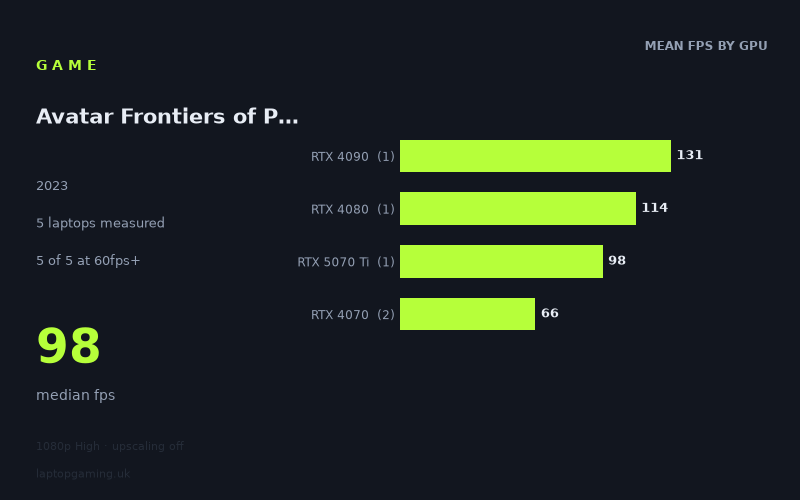
Every laptop we have figures for
Frame rates measured by Notebookcheck.
What it asks of a laptop
At 1,920 × 1,080 on the High preset with upscaling disabled, Avatar Frontiers of Pandora is demanding enough to separate high-end gaming laptops clearly, but the five measured machines all remained above 60fps. Notebookcheck’s figures span from 65fps to 131fps: a substantial 66fps gap between the slowest and fastest result. The median is 98fps.
That is a useful result, but the sample is still limited to five laptops. It shows what these specific machines achieved rather than establishing a rule for every laptop carrying the same GPU name. This matters especially with laptop graphics chips, where cooling and power limits can differ between models.
The numbers suggest that High-quality native 1080p play is not an automatic 100fps experience outside the upper GPU tiers. Both RTX 4070 laptops landed in the mid-60s, while the RTX 5070 Ti machine reached 98fps. The RTX 4080 and RTX 4090 systems were the only measured laptops above 100fps, at 114fps and 131fps respectively.
The game therefore looks comfortable for a 60Hz display on the measured machines, but it is less forgiving if the aim is to make full use of a 120Hz, 144Hz or faster panel without enabling upscaling. No laptop in this set reached 144fps at these settings. Even the Alienware m18 R2 with its 175W RTX 4090 recorded 131fps rather than crossing that threshold.
The separation between tiers is fairly pronounced. Notebookcheck measured 66fps as the mean for the two RTX 4070 laptops, 98fps for the single RTX 5070 Ti result, 114fps for the single RTX 4080 result and 131fps for the single RTX 4090 result. Those single-machine tier figures should not be read as GPU-wide averages, but they do show a clear performance ladder in this particular group.
What runs it
Every measured laptop cleared 60fps. That is five out of five machines at 1,920 × 1,080, High, with upscaling off. The lowest result was still 65fps, so the available evidence says that each of these configurations can deliver a conventional 60fps target at the tested settings.
- RTX 4070: The Asus ROG Zephyrus G16 2024 managed 66fps, while the Asus ROG Zephyrus G14 2024 with its 75W RTX 4070 managed 65fps. These are the two results closest to the 60fps line. They are sufficient for that target in the measured run, but neither approached 100fps.
- RTX 5070 Ti: The Chuwi Gamebook, R9, fitted with a 140W RTX 5070 Ti, recorded 98fps. That is a sizeable 32fps ahead of the RTX 4070 mean in this small sample, although it remains just below the 100fps threshold.
- RTX 4080: The Lenovo Legion Pro 7 reached 114fps. It is one of only two measured systems to exceed 100fps, giving it a clearer margin for high-refresh play than the RTX 5070 Ti result.
- RTX 4090: The Alienware m18 R2, with a 175W RTX 4090, was fastest at 131fps. It is 17fps ahead of the measured RTX 4080 machine and 33fps ahead of the RTX 5070 Ti system. It still did not hit 144fps.
For the stated thresholds, the picture is straightforward: five of five laptops achieved at least 60fps, two of five reached at least 100fps, and none reached 144fps. The two 100fps-capable machines were the RTX 4080 Lenovo Legion Pro 7 and RTX 4090 Alienware m18 R2. The figures do not support saying that an RTX 4070 laptop will deliver 100fps at these settings; the two measured examples returned 65fps and 66fps.
The cheapest laptop that handles it
The only price supplied in the measured set is for the Asus ROG Zephyrus G14 2024, listed at £1,088. It recorded 65fps with its 75W RTX 4070 at the tested 1080p High settings, with upscaling disabled.
That makes it the lowest-priced named option in the supplied information, rather than proof that it is the cheapest laptop available for this game. No prices were provided for the Alienware m18 R2, Lenovo Legion Pro 7, Chuwi Gamebook, R9, or Asus ROG Zephyrus G16 2024, so a full price-to-performance ranking cannot be made from these figures.
Still, the G14 result is important for buyers working to a tighter budget: it shows that a £1,088 machine in this particular configuration cleared 60fps. Its 65fps result is effectively level with the 66fps recorded by the RTX 4070-equipped Zephyrus G16 2024, though only the G14’s GPU power rating and price are provided here.
What this means if you’re buying
If your requirement is simply a stable-looking route towards 60fps at native 1080p High, the measured RTX 4070 laptops are the entry point in this set. Both Zephyrus machines passed 60fps, albeit narrowly, so buyers should treat them as 60fps-oriented rather than high-refresh options for these exact settings.
If you want performance close to 100fps without upscaling, the Chuwi Gamebook, R9’s 140W RTX 5070 Ti result is the nearest measured example at 98fps. It is notably quicker than either RTX 4070 machine, but it did not technically clear the 100fps mark.
For a confirmed 100fps-plus result from the supplied data, look to the Lenovo Legion Pro 7 with RTX 4080 or Alienware m18 R2 with 175W RTX 4090. Their 114fps and 131fps results offer the strongest measured performance, though neither is enough to guarantee full 144Hz utilisation at High preset, native 1080p and upscaling off.
In short, buy around the RTX 4070 level for the measured 60fps target, and step up to the tested RTX 4080 or RTX 4090 machines if 100fps is the priority. For 144fps at these settings, Notebookcheck’s five available laptop results do not provide a confirmed option.
How these numbers were produced
Frame rates here are not measured by us, and we label how each one was arrived at. A figure marked measured comes from a published run on that exact machine. A figure marked representative is derived from the GPU and its power limit (TGP) and cross-referenced against published reviews - a sound estimate of what that configuration delivers, but not a measurement of that specific laptop. Unless stated otherwise, numbers are 1920x1080, High preset, upscaling off. Where a laptop ships in several power configurations we use the wattage of the exact SKU listed, because a 140W RTX 5070 and a 115W one are not the same product.