Details
Product prices and availability are accurate as of the date/time indicated and are subject to change. Any price and availability information displayed on Amazon.co.uk at the time of purchase will apply to the purchase of this product.Performance analysis
Borderlands 4 (2025): what it takes to run it
Measured on 9 gaming laptops at 1920×1080, High preset, upscaling off.

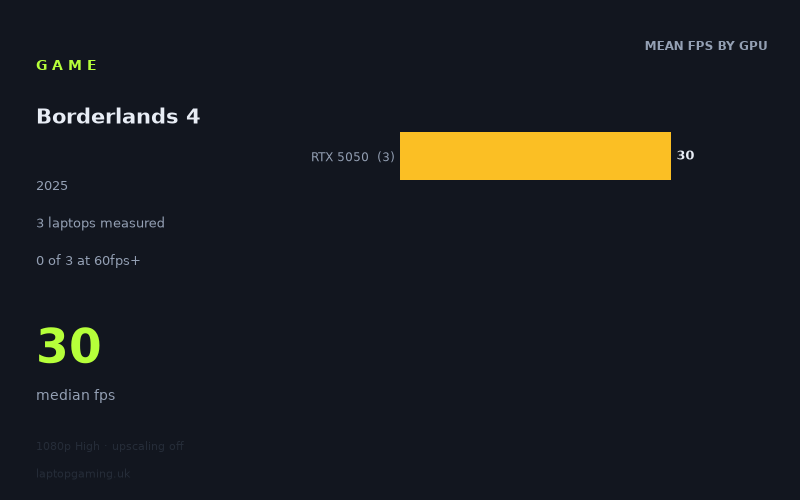
Every laptop we have figures for
Frame rates measured by Notebookcheck.
What it asks of a laptop
Start with the caveat, because it matters more than anything else here: the measured figures cover three laptops, and all three use the same GPU. Notebookcheck has numbers for an HP Victus 15-fa2160ng, an Acer Nitro V 16 AI and an Acer Nitro V14 AI, every one of them an RTX 5050. That is not a spread. It's a single data point sampled three times, and it means this piece can tell you what happens at the bottom of the current laptop stack and essentially nothing about what happens above it.
What it does tell you is bleak. At 1920x1080, High preset, upscaling switched off, the three machines returned 30fps, 30fps and 29fps. Fastest to slowest, that is a one-frame spread. Nothing in the sample reached 60fps, let alone 100 or 144.
The one-frame gap is the interesting part. One of those machines — the Nitro V 16 AI — is a 115W configuration, and it landed on exactly the same number as the Victus. Normally you expect a chassis with more power headroom to pull clear of a thinner one by a meaningful margin, because that's what GPU power budget buys you. Here it bought nothing measurable. Three different chassis, three different cooling designs, three different CPU pairings, and the results collapse into a single figure.
That pattern says the bottleneck isn't thermal or power delivery. Something about this workload is putting a hard ceiling on the RTX 5050 that extra watts don't lift. Whether that's raw shader throughput, memory capacity or memory bandwidth, the three-laptop sample can't distinguish — you'd need figures from the same GPU with different memory configurations, or from the tier above, to separate those causes. What you can say with confidence is that on this class of hardware, the game is not thermally limited, it's simply out of the machine's reach at these settings, and buying the better-cooled version of the same GPU won't rescue it.
What runs it
Honestly? On the evidence available, nothing in this sample runs it acceptably at 1080p High native. Zero of three laptops cleared 60fps. Zero cleared 100. Zero cleared 144.
I can't tell you which GPUs do clear those bars, because there are no measured figures for any tier above the RTX 5050, and inventing them would be worse than useless. What I can do is show you the size of the gap you'd need to close, using the numbers that exist:
- To reach 60fps from a 30fps baseline you need roughly double the performance of an RTX 5050 in this workload.
- To reach 100fps you need something in the region of 3.3x.
- To reach 144fps, for anyone with a high-refresh panel they'd like to actually use, you're looking at close to 4.8x.
Doubling performance is a big jump but not an absurd one across a full GPU stack. Tripling or quintupling it at native resolution is a different proposition entirely, and I'd treat 144fps at 1080p High native as an open question rather than something you should assume the flagships deliver. Until there are measured figures for the mid and upper tiers, that's the most useful thing anyone can honestly tell you.
There's a second lever the measurements don't cover. Every one of these runs was taken with upscaling switched off. Rendering at a lower internal resolution and upscaling is the standard route out of exactly this kind of hole, and it would almost certainly lift these numbers — but by how much is not something the fact sheet answers, and the honest position is that we don't know. Anyone treating "just turn on upscaling" as a guaranteed fix from 30fps to 60fps is guessing. Dropping the preset below High is the other obvious lever, and again there are no measured figures for it.
The cheapest laptop that handles it
None of them, at these settings, and no prices were supplied with the measured data, so I'm not going to quote you figures I can't stand behind.
What the three machines establish is the shape of the problem rather than a shopping recommendation:
- HP Victus 15-fa2160ng (RTX 5050) — 30fps
- Acer Nitro V 16 AI (RTX 5050, 115W) — 30fps
- Acer Nitro V14 AI (RTX 5050) — 29fps
These are all budget-to-lower-midrange machines, and they behave identically. The practical takeaway for a buyer is narrow but genuinely useful: if you are choosing between RTX 5050 laptops specifically for this game, the choice doesn't matter. The 115W model isn't worth a premium here. The 16-inch chassis isn't worth a premium over the 15-inch here. Whatever differentiates these three laptops — build, screen, keyboard, battery, the CPU inside — it isn't this game's frame rate.
What this means if you're buying
Three things, weighted by how much the data supports them.
Confident: an RTX 5050 laptop will not give you 60fps at 1080p High with upscaling off. Three separate machines from two manufacturers agree to within a single frame. If that's the configuration you were planning to buy and this is a game you care about, budget for compromise — lower preset, upscaling on, or both — and understand that you'll be tuning rather than picking a preset and forgetting about it.
Reasonably supported: spending more within the RTX 5050 tier is wasted money for this title. The 115W part gained nothing. Power and cooling aren't the limiting factor, so paying for better power and cooling doesn't buy frames.
Not supported, and I want to be clear about it: anything at all about how the RTX 5060, 5070, 5080 or 5090 behave in this game. There are no measured figures for them. The 30fps floor tells you this workload is heavy on entry-level silicon; it does not tell you where the curve flattens out higher up. If you're spending £1,500 or more specifically to run this well, wait for numbers from that tier rather than extrapolating from three identical results at the bottom of the stack. Extrapolating from a one-frame spread on a single GPU is exactly the kind of guess that ends with a refund request.
How these numbers were produced
Frame rates here are not measured by us, and we label how each one was arrived at. A figure marked measured comes from a published run on that exact machine. A figure marked representative is derived from the GPU and its power limit (TGP) and cross-referenced against published reviews - a sound estimate of what that configuration delivers, but not a measurement of that specific laptop. Unless stated otherwise, numbers are 1920x1080, High preset, upscaling off. Where a laptop ships in several power configurations we use the wattage of the exact SKU listed, because a 140W RTX 5070 and a 115W one are not the same product.