Details
Product prices and availability are accurate as of the date/time indicated and are subject to change. Any price and availability information displayed on Amazon.co.uk at the time of purchase will apply to the purchase of this product.Performance analysis
Star Wars Outlaws (2024): what it takes to run it
Measured on 16 gaming laptops at 1920×1080, High preset, upscaling off.

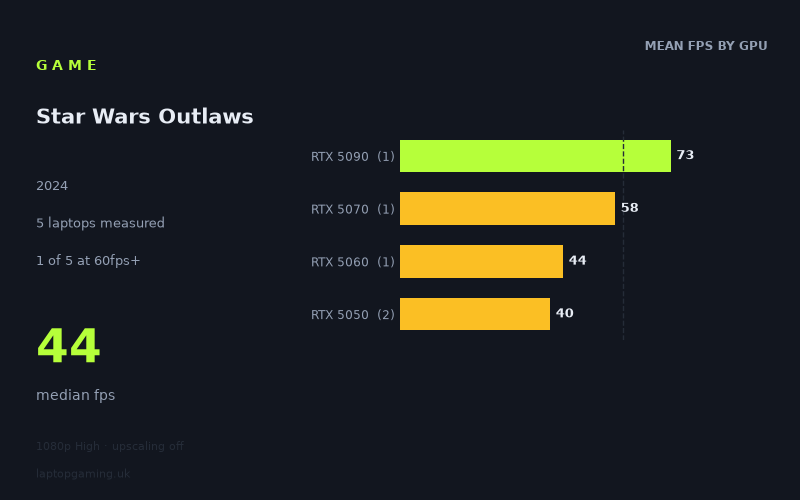
Every laptop we have figures for
Frame rates measured by Notebookcheck.
What it asks of a laptop
Star Wars Outlaws is one of the heaviest titles in Notebookcheck's laptop test set, and the shape of the numbers matters as much as their size. At 1920x1080 on the High preset with upscaling switched off, the fastest machine on the list — a laptop with an RTX 5090 in it — managed 73fps. The slowest returned 40fps. Nothing in the sample cleared 100fps, let alone 144fps. One laptop out of five got past 60fps.
That is unusual. Plenty of demanding games separate a flagship from an entry-level GPU by a factor of three or more at 1080p. Here the total spread is 1.8x, and the median sits at 44fps. Two conclusions follow. First, this is a genuinely GPU-hungry game at native resolution — even the top of the mobile stack is working at a level most people would associate with a mid-range card in a lighter title. Second, the bottom of the range is compressed in a way that suggests something other than raw shader throughput is holding the cheaper machines back.
Look at the tier means. The RTX 5050 laptops averaged 40fps (41fps and 40fps individually), and the RTX 5060 managed 44fps. That is a gap of roughly 10 per cent between two distinct GPU tiers — far narrower than the hardware difference implies. Note also that one of the 5050 machines was configured at 115W and still landed at 40fps, one frame behind the other 5050 laptop. Extra power budget bought nothing measurable. When more wattage and a nominally faster GPU both fail to move the needle, the limit is usually elsewhere: memory capacity, memory bandwidth, or CPU-side overhead in a large streaming open world. Whatever the cause, the practical effect is that the entry-level tier collapses into a single performance band around 40-44fps.
Above that band, scaling returns to something recognisable. The RTX 5070 laptop hit 58fps, a 32 per cent gain over the 5060. The RTX 5090 laptop reached 73fps, a further 26 per cent. So the game does reward serious silicon — it just refuses to reward the cheap end of the ladder for anything.
What runs it
Working through the measured tiers at 1080p High, native:
- RTX 5090 — 73fps. The only figure that reads as comfortable. A locked 60 with headroom for the busy market districts and firefights where averages sag.
- RTX 5070 — 58fps. The only other laptop above the median by a meaningful margin, and the only one within touching distance of 60. Two frames short of the mark on average means dips below 50 in heavier scenes are all but guaranteed.
- RTX 5060 (115W) — 44fps. Playable, not smooth. This is 40-45fps territory where a controller helps and mouse aiming feels sluggish.
- RTX 5050 — 40-41fps. Effectively the same experience as the 5060. Both configurations, including the 115W one, sit in the same band.
Laptops clearing 60fps: one of five. Clearing 100fps: none. Clearing 144fps: none. If you own a 165Hz or 240Hz panel, no laptop in this sample feeds it at native 1080p High. The high-refresh screen is not the constraint here; the GPU is.
One important caveat about how these figures were produced: upscaling was off. That is the correct way to measure a GPU, because it isolates the hardware rather than the reconstruction algorithm. It is not how most people will actually play this game. The measured numbers should be read as the floor — the worst case, native rendering. How much upscaling recovers on any given machine is not quantified in these figures, so treat any personal estimate of that gain with caution, but the direction is obvious: every laptop here has more headroom available than the native numbers show.
The cheapest laptop that handles it
Of the machines with prices attached, the MSI Katana 17 HX (RTX 5070) at £2,312 is the cheapest that gets close to 60fps, at 58fps. It is also the value pick by a wide margin. The Medion Erazer Beast 16 X1 Ultimate (RTX 5090) at £4,884 delivers 73fps — 26 per cent more performance for 111 per cent more money. That is a poor exchange rate in this game specifically, and worth spelling out: you are paying an extra £2,572 for 15 frames per second.
Below the Katana, the Lenovo LOQ (RTX 5060 at 115W) at 44fps, the Medion Erazer Scout 17 E1 (RTX 5050) at 41fps and the Acer Nitro V 16 AI (RTX 5050 at 115W) at 40fps all land in the same 40-44fps band. No prices are given for these three in the measured data, but they occupy the budget and lower-mid tiers, and the important point is that they perform almost identically. If Outlaws is your reason for buying, there is no case for spending up from a 5050 to a 5060 — the measured difference is four frames per second, which you will not perceive.
What this means if you're buying
Three things fall out of these numbers.
The entry tier is a single band, so buy on price within it. If your budget puts you at RTX 5050 or 5060 level, expect 40-44fps native at 1080p High and choose on chassis, cooling noise, screen and warranty rather than on the GPU badge. The 115W configurations gained nothing measurable in this title, so don't pay a premium for wattage on this game's account.
Sixty frames per second is a £2,300 target here, and it isn't a guarantee. The 5070 at 58fps is the entry point to smoothness, and it is still an average rather than a floor. If a hard 60 matters to you, plan on either dropping settings or leaning on upscaling.
High-refresh panels are irrelevant to this title. Nothing tested reached 100fps. If your buying logic includes "I want to use my 240Hz screen", Outlaws is not the game that will justify it at native resolution — and the flagship RTX 5090 doesn't change that answer.
The broader read: this is a title where the sensible purchase sits in the middle. The cheap end delivers a uniform, mediocre 40fps regardless of what you pick, and the expensive end charges flagship money for a result that is merely adequate. The RTX 5070 tier is where the curve is steepest in your favour.
How these numbers were produced
Frame rates here are not measured by us, and we label how each one was arrived at. A figure marked measured comes from a published run on that exact machine. A figure marked representative is derived from the GPU and its power limit (TGP) and cross-referenced against published reviews - a sound estimate of what that configuration delivers, but not a measurement of that specific laptop. Unless stated otherwise, numbers are 1920x1080, High preset, upscaling off. Where a laptop ships in several power configurations we use the wattage of the exact SKU listed, because a 140W RTX 5070 and a 115W one are not the same product.