Details
Product prices and availability are accurate as of the date/time indicated and are subject to change. Any price and availability information displayed on Amazon.co.uk at the time of purchase will apply to the purchase of this product.Performance analysis
Assassin's Creed Shadows (2025): what it takes to run it
Measured on 35 gaming laptops at 1920×1080, High preset, upscaling off.

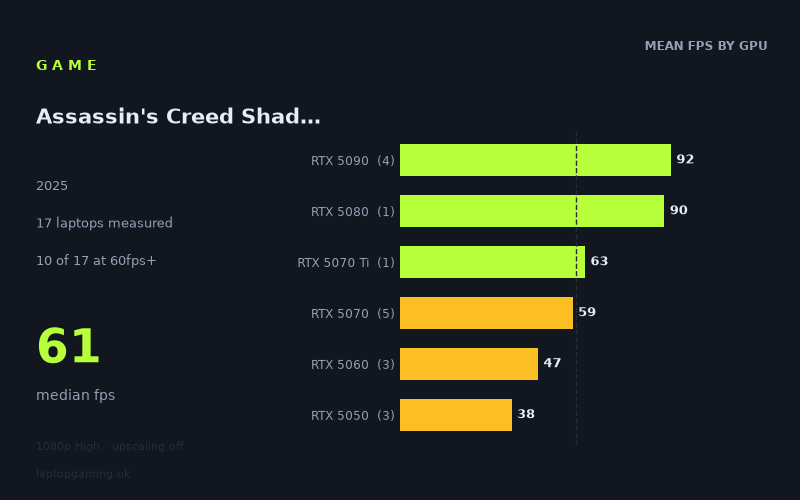
Every laptop we have figures for
Frame rates measured by Notebookcheck.
What it asks of a laptop
The single most telling number in Notebookcheck's data set isn't the slowest result, it's the fastest. Not one of the twelve laptops measured cleared 100fps at 1920x1080 on the High preset with upscaling disabled. The quickest machine in the field, an Asus ROG Strix Scar 18 running an RTX 5090 at its full 175W, managed 96fps. That is a mobile flagship, in an 18-inch chassis, at 1080p — and it still lands short of triple figures.
That tells you what kind of workload this is. Assassin's Creed Shadows is not a game where a fast GPU runs out of things to do and the CPU becomes the limit; it is a game that scales cleanly with graphics power right to the top of the current mobile stack and then simply runs out of stack. The full spread runs from 96fps down to 28fps, with a median of 56fps. Only six of the twelve laptops tested reached 60fps, which means the coin-flip machine in this sample is a 56fps machine — playable, but below the threshold most people would accept as a floor.
The difficulty is clearly GPU-shaped. Group the results by tier and they separate almost perfectly: RTX 5090 averages 91fps, RTX 5080 90fps, RTX 5070 57fps, RTX 5060 48fps, RTX 5050 38fps. There is no muddle in the middle, no tier where results overlap because a processor is holding things back. Each step down the product ladder costs you a visible chunk of performance, and the drop from 5080 to 5070 — 90fps to 57fps on average — is the steepest single fall in the data.
The other thing worth reading is the variance within tiers, because it's unusually wide. Three RTX 5070 laptops returned 77fps, 63fps and 32fps. Three RTX 5050 machines returned 43fps, 43fps and 28fps. A game this GPU-bound punishes anything that constrains the GPU — power limit, cooling headroom, chassis volume — and the measured figures show that punishment plainly. Buying by GPU name alone is a worse strategy here than in most games.
What runs it
144fps: nothing. No laptop in the measured field came close at these settings. If you own a 240Hz panel and intend to feed it at native 1080p on High with upscaling off, the current mobile hardware does not exist to do it.
100fps: nothing. The RTX 5090 machines came in at 96fps, 90fps and 86fps — a Strix Scar 18, a Schenker XMG Neo 16 E25 and a Razer Blade 16 respectively. Even the top of the range is a high-60s-to-mid-90s proposition, not a high-refresh one.
60fps: RTX 5090, RTX 5080, and RTX 5070 if the cooling is good enough. The Lenovo Legion Pro 7i 16 Gen 10 with an RTX 5080 at 175W hit 90fps, statistically inseparable from the 5090 average of 91fps. Below that, the RTX 5070 is the boundary tier: the ASUS TUF Gaming A18 managed 77fps, the Razer Blade 14 63fps, but the HP Omen 17z-db100 fell to 32fps. Two of three 5070 laptops cleared 60fps comfortably; the third didn't come near it.
Below 60fps: RTX 5060 and RTX 5050. The Lenovo Legion 5 15AHP G10 returned 49fps and the Lenovo LOQ 46fps, both on 5060s at 115W. The 5050 machines — an Acer Nitro V14 AI and a Medion Erazer Scout 17 E1 at 43fps each, an Acer Nitro V 16 AI at 28fps — are firmly in 30fps territory at these settings. These are not unplayable numbers, but they are numbers that will want either lower settings or the upscaling that these measurements deliberately switched off.
The cheapest laptop that handles it
The answer is unusually clear-cut. The ASUS TUF Gaming A18 at £1,489 is the cheapest machine in the measured field, and at 77fps it is the fifth-fastest of the twelve. It beats a Razer Blade 14 carrying the same RTX 5070 at the same 115W by 14fps, and it beats the HP Omen 17z-db100 — also a 5070 — by 45fps. An 18-inch chassis extracting more from an identical GPU allocation is exactly what you'd expect from a title this GPU-limited, and here it turns a mid-tier part into a comfortable 60fps-plus result.
Above that, the pricing gets steep fast for what the numbers give back. The Lenovo Legion Pro 7i 16 Gen 10 at £3,662 delivers 90fps — 17 per cent more frames for roughly 2.5 times the money. The Razer Blade 16 at £4,979 carries an RTX 5090 and returns 86fps, less than the £3,662 Legion's RTX 5080. That is a thin-chassis penalty showing up in the data, and at nearly £5,000 it's an expensive one.
What this means if you're buying
Three things follow from the measured figures.
- There is no high-refresh answer at native 1080p High. Zero of twelve laptops passed 100fps. If your target is a fast panel running at its rated refresh, the frames have to come from upscaling or reduced settings, not from spending more on the GPU.
- The 5080 and 5090 are effectively the same GPU here. 90fps average versus 91fps average. Whatever justifies the price gap between those tiers, this game is not it.
- Chassis and power delivery matter more than usual. A 5070 in this sample can be a 77fps laptop or a 32fps laptop. A 5050 can be 43fps or 28fps. Check the specific machine's measured result, not the sticker on the lid.
For most buyers the practical target is an RTX 5070 in a chassis large enough to feed it, and the £1,489 TUF A18 is the clearest example of that in the data. Anything at 5060 or below is a sub-60fps machine at these settings, and should be bought with the expectation of dialling something back.
How these numbers were produced
Frame rates here are not measured by us, and we label how each one was arrived at. A figure marked measured comes from a published run on that exact machine. A figure marked representative is derived from the GPU and its power limit (TGP) and cross-referenced against published reviews - a sound estimate of what that configuration delivers, but not a measurement of that specific laptop. Unless stated otherwise, numbers are 1920x1080, High preset, upscaling off. Where a laptop ships in several power configurations we use the wattage of the exact SKU listed, because a 140W RTX 5070 and a 115W one are not the same product.