Performance analysis
Far Cry 6 (2021): what it takes to run it
Measured on 17 gaming laptops at 1920×1080, High preset, upscaling off.

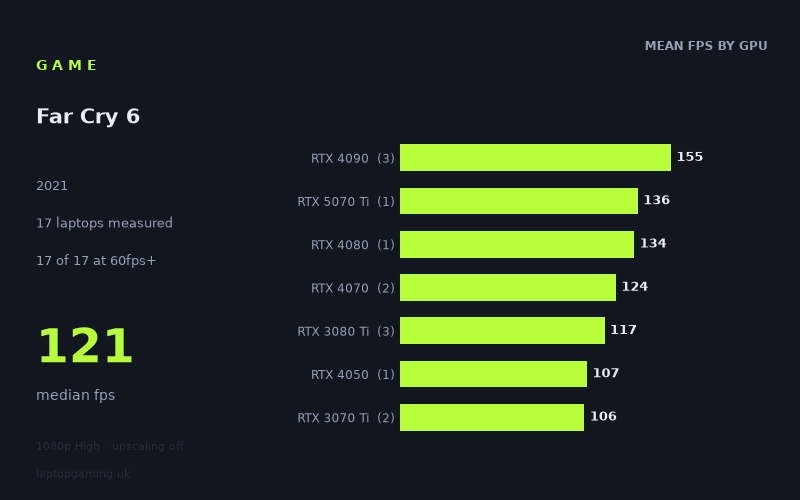
Every laptop we have figures for
Frame rates measured by Notebookcheck.
What it asks of a laptop
At 1,920 × 1,080 on the High preset with upscaling off, Far Cry 6 is forgiving by current gaming-laptop standards. Notebookcheck’s measured figures span from 81fps on the Lenovo Legion 5 with an RTX 3060 to 182fps on the Asus ROG Strix Scar 17 with an RTX 4090. Every one of the 17 measured laptops cleared 60fps, while the median result was a healthy 121fps.
That is a useful result for buyers with an older or lower-tier gaming GPU. The slowest measured machine was still comfortably beyond the usual 60fps target, rather than merely scraping it. There is also a sizeable 101fps gap between the fastest and slowest results, so more powerful laptops can make effective use of high-refresh displays. But the figures suggest that Far Cry 6 does not require flagship hardware for consistently smooth 1080p High play.
The separation between GPU tiers is reasonably clear, though laptop power limits and the rest of each system matter. The three RTX 4090 laptops averaged 155fps, while the single RTX 4080 result was 134fps and the single RTX 5070 Ti result was 136fps. Mid-range results remain strong: the two RTX 4070 machines averaged 124fps, and the three RTX 3080 Ti machines averaged 117fps.
Older and lower-end GPUs do not collapse under the High preset either. The RTX 4050 result was 107fps, the two RTX 3070 Ti laptops averaged 106fps, the RTX 3070 pair averaged 91fps, and the two RTX 3060 systems averaged 89fps. In short, extra GPU performance primarily buys headroom for high-refresh 1080p gaming here, rather than changing the game from unplayable to playable.
What runs it
For 60fps: all 17 measured laptops managed it. The lowest result, 81fps from the Lenovo Legion 5 with RTX 3060 graphics, is still 21fps above that threshold. The other RTX 3060, the Lenovo Legion S7 15ACH6 at 100W, reached 97fps. The two RTX 3070 machines each recorded 91fps: the Gigabyte A5 X1 with a 140W RTX 3070 and the Schenker XMG Apex 17 M21.
This means that the measured RTX 3060 and RTX 3070 laptops are viable choices for 1080p High if your target is a stable-feeling 60fps experience. The available figures are not minimum-frame-rate data, so they cannot prove that performance never falls below 60fps in every scene. They do, however, show substantial average-frame-rate headroom on these specific laptops.
For 100fps: 12 of the 17 measured machines reached or exceeded the mark. The entry point in this set is the Aorus 17 XE4 with a 130W RTX 3070 Ti, at 103fps. The MSI Stealth GS66 with RTX 3070 Ti reached 108fps, while the Medion Erazer Scout E20 with a 100W RTX 4050 managed 107fps.
The RTX 4070 results were stronger again: 121fps for the MSI Sword 16 HX and 126fps for the MSI Stealth 16 Studio with a 105W RTX 4070. RTX 3080 Ti performance varied considerably across the three measured laptops, from 95fps in the Schenker XMG Neo 17 M22 to 126fps in the MSI Raider GE66 and 130fps in the 175W MSI GE76 Raider. That spread is a reminder not to treat the GPU name alone as a guarantee of a particular result.
For 144fps: only two of the 17 laptops met the threshold: the Asus ROG Strix Scar 17 with RTX 4090 at 182fps and the MSI Titan GT77 HX with a 150W RTX 4090 at 147fps. The Aorus 17X AZF with a 175W RTX 4090 reached 136fps, as did the Chuwi Gamebook, R9 with a 140W RTX 5070 Ti. The Razer Blade 16 Early with RTX 4080 was close behind at 134fps.
So a 144Hz screen is not wasted on the faster machines, but Notebookcheck’s numbers do not support assuming that every RTX 4090, RTX 4080 or RTX 5070 Ti laptop will sustain 144fps at these settings. The measured RTX 4090 sample alone ranges from 136fps to 182fps.
The cheapest laptop that handles it
The fact sheet provides a price for only one measured laptop: the MSI Stealth GS66 with RTX 3070 Ti, listed at £2,688. It delivered 108fps at 1,920 × 1,080 High with upscaling off, making it more than capable of the 60fps target and one of the 12 machines above 100fps.
However, it would be misleading to call it the cheapest laptop for Far Cry 6. Prices are not supplied for the other 16 machines, including the Lenovo Legion 5 with RTX 3060 at 81fps and the Lenovo Legion S7 15ACH6 with 100W RTX 3060 at 97fps. Those systems may have cost less, but the supplied figures do not establish that. What can be said is that the £2,688 MSI is not necessary purely to achieve 60fps in this game: several lower-tier GPU machines in the measured list also did so.
What this means if you’re buying
If Far Cry 6 at 1080p High is your concern, prioritise value rather than chasing a flagship GPU. The measured RTX 3060 laptops delivered 81fps and 97fps, while the RTX 3070 pair both reached 91fps. Those results indicate that even these older GPU tiers can provide a convincing experience at the tested settings.
If you want more headroom for a 100Hz or 120Hz display, the measured RTX 4050, RTX 3070 Ti and RTX 4070 machines are more persuasive. Their listed results run from 103fps to 126fps. An RTX 4070 laptop is particularly appealing in this data set, but there are only two such results, so treat 121fps to 126fps as evidence for those two machines rather than a universal RTX 4070 promise.
Buy at the RTX 4080, RTX 5070 Ti or RTX 4090 level only if you specifically want the best chance of exploiting a 144Hz panel at these settings, or if you are also buying for more demanding games. For Far Cry 6 alone, the measured figures show diminishing practical returns once you are already above 100fps. The game runs well across the entire tested range; the main buying decision is whether you value basic 60fps comfort, roughly 100fps high-refresh play, or the limited set of laptops that reached 144fps.
How these numbers were produced
Frame rates here are not measured by us, and we label how each one was arrived at. A figure marked measured comes from a published run on that exact machine. A figure marked representative is derived from the GPU and its power limit (TGP) and cross-referenced against published reviews - a sound estimate of what that configuration delivers, but not a measurement of that specific laptop. Unless stated otherwise, numbers are 1920x1080, High preset, upscaling off. Where a laptop ships in several power configurations we use the wattage of the exact SKU listed, because a 140W RTX 5070 and a 115W one are not the same product.