Performance analysis
Battlefield 6 (2025): what it takes to run it
Measured on 6 gaming laptops at 1920×1080, High preset, upscaling off.
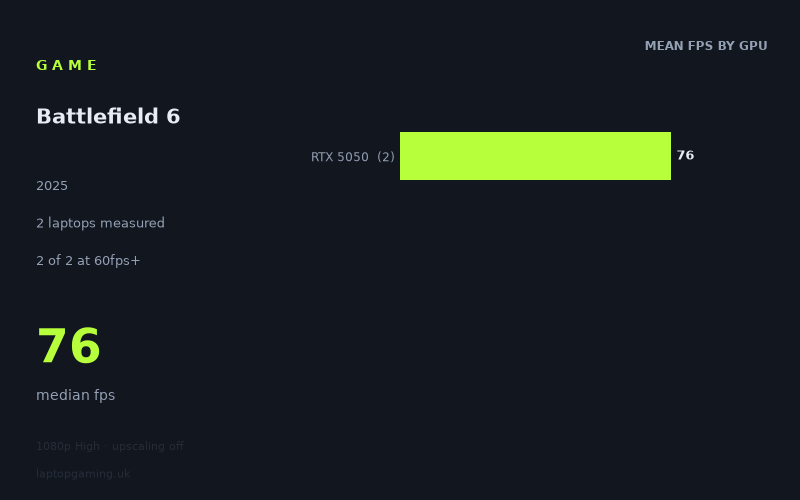
Every laptop we have figures for
Frame rates measured by Notebookcheck.
A very small sample — read this first
Before anything else: the measured figures for Battlefield 6 cover exactly two laptops, and both of them use the same GPU. That is not a dataset you can build a tier chart from. It is two data points from the bottom rung of the current mobile GeForce stack, and everything below is written with that limit in mind.
Both machines were run at 1920x1080 on the High preset with upscaling switched off, and both cleared 60fps:
- Acer Nitro V 16 AI (RTX 5050, 115W) — 78fps
- HP Victus 15-fa2160ng (RTX 5050) — 74fps
Median 76fps, spread of four frames. Two of two above 60fps, none above 100fps, none above 144fps. That is the whole picture. There are no RTX 5060, 5070, 4070 or 5090 numbers here, so anything said about those parts would be guesswork dressed up as analysis, and this site does not do that.
What it asks of a laptop
What the two results do tell you is genuinely useful, because they establish a floor. An RTX 5050 — the entry point of the mobile 50-series — produced a playable, comfortably-above-60 result at native 1080p on High with no upscaling crutch. That is not the behaviour of a laptop-hostile game. Plenty of modern shooters put a 50-class mobile GPU into the 40s at those settings and force you into quality-mode DLSS just to hit 60. Battlefield 6 did not do that on either machine.
The four-frame gap between the two laptops is the other interesting detail. The Nitro V 16 AI is specified at 115W and finished 5.4% ahead of the Victus 15. That is a small margin for what is likely a meaningful difference in sustained power budget, and it hints that at this settings level the bottleneck is not purely how much wattage you can feed the GPU. Whether that is a CPU limit, a memory limit, or simply the game's own frame pacing behaviour, the numbers cannot say — but it does mean that if you are cross-shopping two RTX 5050 laptops and one advertises a higher graphics power figure, the measured evidence here suggests you should not expect that alone to transform your frame rate. Five per cent is inside the range where chassis, cooling state and test conditions matter as much as the spec sheet.
The more important limitation is the ceiling. Neither laptop reached 100fps, let alone 144fps. For a single-player game that would be irrelevant; for a competitive multiplayer shooter, where most gaming laptops now ship with 144Hz or 165Hz panels as standard, it matters a great deal. On this hardware, at these settings, you are leaving most of your display's refresh rate unused.
What runs it
Working through the tiers with what has actually been measured:
- 60fps at 1080p High, native: cleared by both RTX 5050 laptops, at 74fps and 78fps. This is the only tier the data supports a statement about, and it supports it clearly — the entry-level 50-series handled it without needing upscaling.
- 100fps at 1080p High, native: neither machine got there. The faster of the two fell 22fps short, which is a 28% gap. That is not a margin you close with a fan profile or a driver update.
- 144fps at 1080p High, native: nowhere near. You would need roughly double the measured throughput.
- Everything above the 5050: no figures. An RTX 5060, 5070 or 5080 laptop will obviously be faster, but by how much, and whether any of them cross 144fps at these settings, is not something these two results can answer.
One thing worth stating plainly: the 74-78fps figures were recorded with upscaling off. Anyone actually playing a competitive shooter on an RTX 5050 would almost certainly turn DLSS on, and the headroom that unlocks is not captured here. The measured numbers are therefore a conservative baseline rather than a description of how you would realistically configure the game — but they are the honest baseline, and that is more useful for comparison than a number inflated by a reconstruction setting.
The cheapest laptop that handles it
The fact sheet does not include pricing for either machine, so no cost-per-frame comparison is possible. What can be said is that the two laptops measured — the Acer Nitro V 16 AI and the HP Victus 15-fa2160ng — are both mainstream, high-volume machines rather than premium hardware, and both delivered above 70fps. If your budget puts you in that bracket, the evidence is that Battlefield 6 is within reach at 1080p High without compromise. The 16in Nitro V with its 115W configuration was the faster of the two, but by a margin small enough that other factors — panel, chassis, thermals, warranty, actual shop price on the day — should decide it rather than four frames.
What this means if you're buying
The practical takeaway is a floor rather than a recommendation. If an RTX 5050 manages 74-78fps at native 1080p High, then a 5050 is the entry ticket, and anything above it in the stack has room to spare at that resolution. Nobody shopping for a gaming laptop today needs to worry about whether Battlefield 6 will run.
What you should think about is the refresh rate question. If you are buying specifically to play this game competitively on a 144Hz or 165Hz panel, the two measured results say an RTX 5050 will not feed that display at native High — you would be looking at upscaling, lowered settings, or a step up the GPU stack. How far up is a question the data cannot answer yet, and we would rather tell you that than invent a tier chart. If more figures land across 5060 and 5070 machines, we will revisit this with something more substantial than two laptops sharing one GPU.
How these numbers were produced
Frame rates here are not measured by us, and we label how each one was arrived at. A figure marked measured comes from a published run on that exact machine. A figure marked representative is derived from the GPU and its power limit (TGP) and cross-referenced against published reviews - a sound estimate of what that configuration delivers, but not a measurement of that specific laptop. Unless stated otherwise, numbers are 1920x1080, High preset, upscaling off. Where a laptop ships in several power configurations we use the wattage of the exact SKU listed, because a 140W RTX 5070 and a 115W one are not the same product.