Details
Product prices and availability are accurate as of the date/time indicated and are subject to change. Any price and availability information displayed on Amazon.co.uk at the time of purchase will apply to the purchase of this product.Performance analysis
Alan Wake 2 (2023): what it takes to run it
Measured on 37 gaming laptops at 1920×1080, High preset, upscaling off.
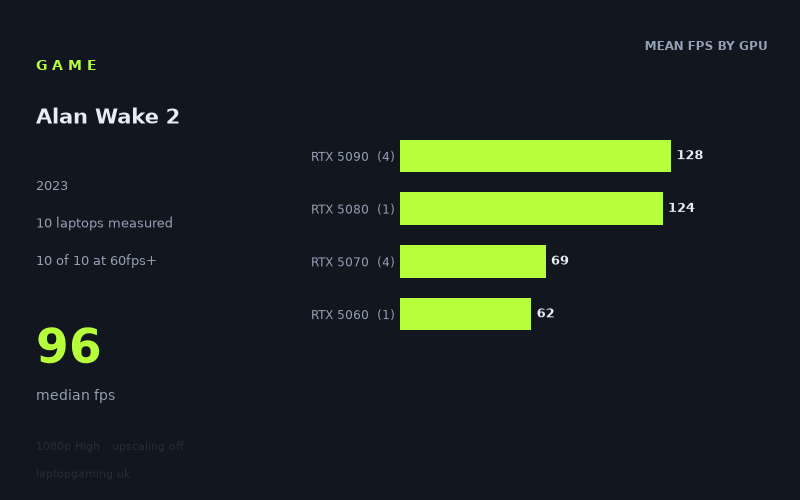
Every laptop we have figures for
Frame rates measured by Notebookcheck.
What it asks of a laptop
Alan Wake 2 is one of the clearest GPU-bound titles in the current benchmark set, and the measured figures make that obvious the moment you line them up. At 1920x1080 on the High preset with upscaling switched off, Notebookcheck's numbers run from 133fps on an RTX 5090 laptop down to 62fps on an RTX 5060 machine. That's a spread of better than two to one across a single generation of mobile silicon, on the same preset, at the same resolution. Very few games separate hardware that cleanly.
The good news first: all seven laptops in the sample clear 60fps. Nothing in this pool falls into stutter territory or forces you into the settings menu before you can play. The bad news is that nothing clears 144fps either - the fastest configuration measured, an Asus ROG Strix Scar 18 running a 175W RTX 5090, tops out at 133fps. If you bought a laptop for its 240Hz panel and you expect native-resolution rendering to feed it, this is a game that will not oblige, regardless of how much you spent.
Where the difficulty comes from is visible in the tier averages. The RTX 5090 laptops average 128fps and the single RTX 5080 sits at 124fps - a gap of roughly 3%, which is nothing. Step down one more rung and the floor drops out: the RTX 5070 machines average 70fps, and the RTX 5060 manages 62fps. That is a 77% deficit between the 5080 and the 5070, against a 3% deficit between the 5080 and the 5090. The scaling is not linear; it is a cliff.
Two things follow from that shape. First, at the top of the stack something other than raw GPU throughput is capping the result - a 5090 at 175W should not be finishing within a handful of frames of a 5080. At 120-130fps on a 1080p workload, the likely constraint is the CPU and the engine's own ceiling rather than the graphics chip. Second, at the bottom of the stack the GPU is unambiguously the limiter, and buying more of it buys you frames directly. That means money spent on a 5070 rather than a 5060 does very little here (70fps versus 62fps, an 8fps gain), while money spent stepping from a 5070 to a 5080 nearly doubles your frame rate.
What runs it
60fps: everything measured. Seven out of seven laptops clear it, including the cheapest configuration in the pool. The RTX 5060 at 115W returns 62fps - a pass, but a narrow one. That is a native-resolution, upscaling-off figure at High, so there is headroom available by enabling upscaling or trimming the preset, but at stock settings a 5060 laptop is running with almost no margin. Dips below 60 in heavier scenes are the reasonable expectation, not a surprise.
100fps: four out of seven. The threshold sits exactly at the 5080/5090 boundary. The Lenovo Legion Pro 7i 16 Gen 10 (RTX 5080, 175W) hits 124fps; the Asus ROG Strix Scar 16 with a 5090 manages 121fps; the Schenker XMG Neo 16 E25 with a 175W 5090 reaches 130fps; and the Strix Scar 18, same GPU and power budget, takes the top spot at 133fps. Nothing below an RTX 5080 gets near triple digits - the fastest 5070 result is 72fps, a long way short.
144fps: nothing. Zero of seven. The ceiling in this data set is 133fps, and given how tightly the 5090 and 5080 results cluster, throwing more GPU at the problem is not going to move it much. High-refresh play at native 1080p is not on the table with this hardware at these settings.
Worth noting on power: the two 175W RTX 5090 machines (133fps and 130fps) both beat the third 5090 laptop at 121fps. That is a 10% gap between configurations of the same GPU, which is the usual reminder that the wattage on the spec sheet matters as much as the model number. The Razer Blade 14's 5070 at 115W returning 72fps against the HP Omen 17z's 69fps points the same way in a thinner chassis.
The cheapest laptop that handles it
Only one price appears in the measured set: the Lenovo Legion Pro 7i 16 Gen 10 at £3,662, with a 175W RTX 5080, delivering 124fps. That is comfortably the best-value entry into triple-digit frame rates here, because it matches the 5090 laptops to within a few percent for what will almost certainly be less money.
If your target is simply playable rather than fast, the Lenovo Legion 5 15AHP G10 with a 115W RTX 5060 does the job at 62fps, and it is the cheapest class of machine represented. The Razer Blade 14 (RTX 5070, 115W, 72fps) and HP Omen 17z-db100 (RTX 5070, 69fps) sit in between, but the extra 7-10fps over the 5060 is not the kind of gain that changes how the game feels. Prices for these four machines aren't in the measured data, so treat the ranking as performance-per-tier rather than performance-per-pound.
What this means if you're buying
The purchasing logic here is unusually blunt. There are effectively two outcomes: around 60-72fps, or around 121-133fps. Nothing lands in between, because no measured configuration does.
- Already own a 5060 or 5070 laptop? You can play it. Expect a locked-60 experience with settings adjustments in the heavier moments. Upgrading within that band is pointless - the 5070 buys you 8-10fps over the 5060.
- Buying for high frame rates? The RTX 5080 at full 175W is the entry point, and it is the sensible stopping point too. The 5090 adds 4-9fps over the 5080 in this test, which is not a meaningful return on the price gap.
- Buying for a 165Hz or 240Hz panel? No measured laptop feeds it natively. That is a job for upscaling, not for hardware.
- Check the TGP before you check the GPU name. A 10% swing between identical 5090s tells you what a thin chassis costs.
How these numbers were produced
Frame rates here are not measured by us, and we label how each one was arrived at. A figure marked measured comes from a published run on that exact machine. A figure marked representative is derived from the GPU and its power limit (TGP) and cross-referenced against published reviews - a sound estimate of what that configuration delivers, but not a measurement of that specific laptop. Unless stated otherwise, numbers are 1920x1080, High preset, upscaling off. Where a laptop ships in several power configurations we use the wattage of the exact SKU listed, because a 140W RTX 5070 and a 115W one are not the same product.