Performance analysis
Tiny Tina's Wonderlands (2022): what it takes to run it
Measured on 31 gaming laptops at 1920×1080, High preset, upscaling off.

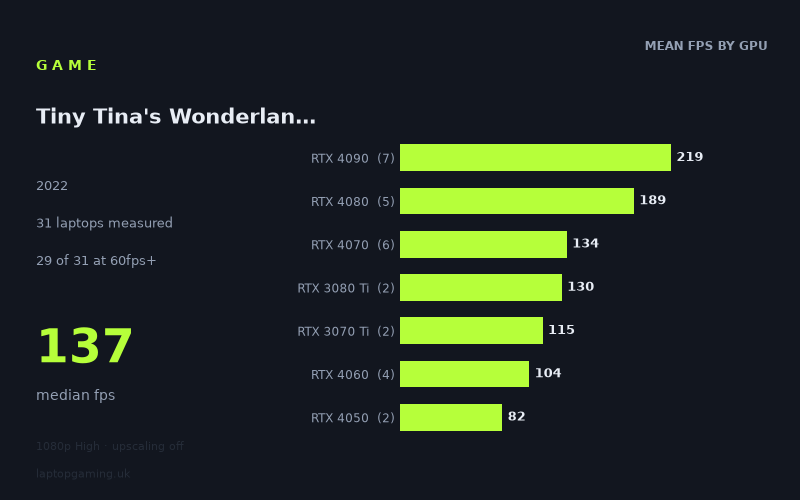
Every laptop we have figures for
Frame rates measured by Notebookcheck.
What it asks of a laptop
Tiny Tina's Wonderlands is relatively forgiving by current gaming-laptop standards at 1920x1080 on the High preset with upscaling off. Notebookcheck's measured figures cover 31 laptops, ranging from 56fps to 232fps, with a median of 137fps. Most of the sample is comfortably beyond a basic 60fps target: 29 of the 31 machines reached that mark. A substantial 25 of 31 also exceeded 100fps, while 14 reached 144fps or more.
That does not mean graphics hardware is irrelevant. The gap between the top and bottom of the results is large: the fastest Alienware m18 R1 with an RTX 4090 managed 232fps, while the Asus V16 with an RTX 3050 recorded 56fps. The measured GPU-tier averages also separate clearly, from 219fps for the RTX 4090 group down to 58fps for the RTX 3050 group.
The practical reading is that the game scales well with available GPU performance rather than imposing a high entry requirement. Older and lower-end dedicated GPUs can still approach or clear 60fps, whereas upper-mid-range hardware has enough performance for high-refresh-rate laptop displays. Configuration still matters within a GPU class, however. The four RTX 4060 laptops span 87fps to 115fps, for example, and the six RTX 4070 laptops range from 119fps to 144fps. Treat the named-machine results as more useful than assuming every laptop with the same GPU will deliver identical performance.
What runs it
60fps: nearly the whole measured field
A 60fps result was achieved by 29 of the 31 measured laptops. The RTX 4050 machines both cleared it, with the Lenovo Yoga Pro 9 16IMH9 RTX at 93fps and the MSI Thin GF63 at 72fps. The single RTX 3050 Ti result, the HP Victus 16-e0145ng, also reached 69fps.
The only two laptops below 60fps were RTX 3050 models: the Lenovo Slim Pro 7 recorded 59fps and the Asus V16 reached 56fps. These are close to the threshold rather than far behind it, but neither can be described as delivering a measured 60fps result under these conditions.
RTX 4060 is more than sufficient in the measured sample. Results were 115fps from the Acer Predator Helios 16, 110fps from the MSI Katana 17, 105fps from the Lenovo Legion Slim 5, and 87fps from the HP Omen Transcend 14-fb0014. Even the slowest of those four is well over 60fps.
100fps: RTX 4060 and above, with one exception
For a 100fps target, the evidence points towards RTX 4060, although the small four-laptop sample shows that this is not automatic. Three RTX 4060 machines were above 100fps: the Acer Predator Helios 16 at 115fps, MSI Katana 17 at 110fps and Lenovo Legion Slim 5 at 105fps. The HP Omen Transcend 14-fb0014 was lower at 87fps.
Every measured RTX 4070 laptop cleared 100fps, ranging from 119fps on the Maingear ML-16 MK2 to 144fps on both the Lenovo Legion Pro 5 and Lenovo Legion Slim 7i 16 Gen 8. The RTX 3080 Ti results sat at 137fps and 124fps, while both RTX 3070 Ti laptops recorded 115fps.
The RTX 4080 and RTX 4090 results are far beyond this target. Notebookcheck's RTX 4080 group averaged 189fps across five laptops, while the RTX 4090 group averaged 219fps across seven. These are strong results, but they should be read in context: this game does not require this level of hardware merely to achieve a smooth 1080p High experience.
144fps: RTX 4080, RTX 4090, or the fastest measured RTX 4070 systems
Fourteen of the 31 laptops reached 144fps or higher. All seven RTX 4090 machines did so, from 194fps on the Aorus 17X AZF to 232fps on the Alienware m18 R1. All five RTX 4080 machines also cleared 144fps, with results from 167fps on the Alienware x16 R2 to 213fps on the MSI Vector 16 HX.
At RTX 4070 level, only two of the six measured systems reached 144fps: the Lenovo Legion Pro 5 and Lenovo Legion Slim 7i 16 Gen 8, both at exactly 144fps. The other RTX 4070 figures were 138fps, 132fps, 130fps and 119fps. That makes RTX 4070 capable of getting close, but the available numbers do not support treating 144fps as assured across the tier.
The cheapest laptop that handles it
The lowest price in the supplied figures is the Asus V16 at £900, but its RTX 3050 produced 56fps. It is therefore the cheapest priced machine listed, not the cheapest one with a measured 60fps result.
The least expensive laptop in the fact sheet that clearly clears 60fps is the Acer Predator Helios 16 at £1,873. Its RTX 4060 at 140W recorded 115fps, giving it considerable headroom over 60fps and enough measured performance for 100fps-plus play at the tested resolution and preset.
The other priced examples are much more expensive and serve different targets. The Alienware m16 R2 with RTX 4070 at 140W reached 138fps at £2,375. The Alienware x16 R1 with RTX 4080 at 175W delivered 183fps at £3,130, while the similarly priced Alienware x16 R2 recorded 167fps. The MSI Raider 18 HX, also using an RTX 4080 at 175W, reached 203fps at £4,679.
What this means if you're buying
For this exact 1920x1080 High, no-upscaling test, buying specifically for Tiny Tina's Wonderlands does not require flagship hardware. The measured results suggest that an RTX 4060 laptop is the more convincing starting point if you want well over 60fps, though the 87fps to 115fps spread among four RTX 4060 systems means checking reviews of the particular model remains worthwhile.
An RTX 4070 laptop looks like the stronger choice for consistently high frame rates: all six measured examples exceeded 100fps, although only two hit 144fps. RTX 4080 and RTX 4090 laptops are the appropriate measured options for readers prioritising 144fps and above, but their performance is substantially beyond what the game needs for a standard 60fps target.
Lower-cost RTX 4050 and RTX 3050 Ti machines can still run the tested setting above 60fps in these results. The two RTX 3050 laptops are the point at which the margin disappears, recording 59fps and 56fps. If 60fps is non-negotiable, those specific results make RTX 3050 a less secure bet than the higher tiers.
How these numbers were produced
Frame rates here are not measured by us, and we label how each one was arrived at. A figure marked measured comes from a published run on that exact machine. A figure marked representative is derived from the GPU and its power limit (TGP) and cross-referenced against published reviews - a sound estimate of what that configuration delivers, but not a measurement of that specific laptop. Unless stated otherwise, numbers are 1920x1080, High preset, upscaling off. Where a laptop ships in several power configurations we use the wattage of the exact SKU listed, because a 140W RTX 5070 and a 115W one are not the same product.