Performance analysis
Shadow of the Tomb Raider (2018): what it takes to run it
Measured on 35 gaming laptops at 1920×1080, High preset, upscaling off.

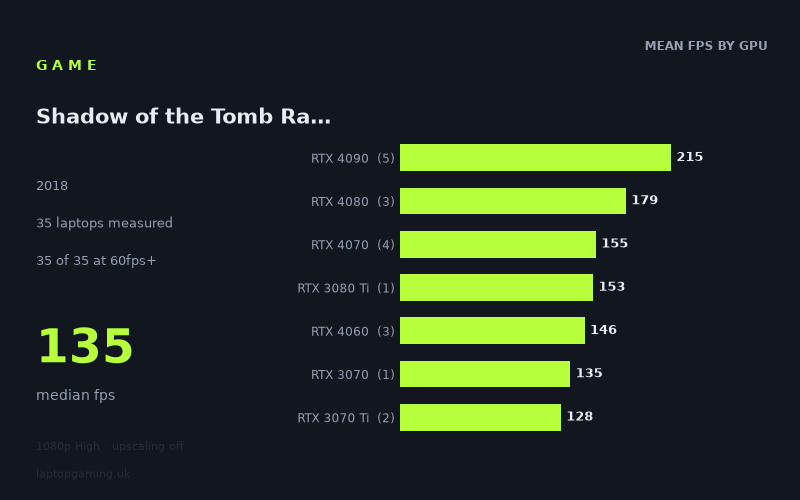
Every laptop we have figures for
Frame rates measured by Notebookcheck.
What it asks of a laptop
At 1,920 x 1,080 on the High preset with upscaling off, Shadow of the Tomb Raider is forgiving by modern gaming-laptop standards. Notebookcheck's measured figures span 35 laptops, from 83fps at the bottom to 293fps at the top, with a median result of 135fps. Every machine in the sample exceeded 60fps, 32 of 35 exceeded 100fps, and 13 reached 144fps or more.
That is an unusually broad set of comfortable results. Even the two slowest machines measured, the HP Omen 15-en0375ng with RTX 2060 and Asus ROG Strix G17 with RTX 3050 Ti at 95W, returned 83fps. The RTX 4050-equipped MSI Stealth 14 Studio reached 95fps. For a laptop with a 60Hz display, the measured data therefore suggests plenty of headroom across this sample at the tested settings.
The figures do still separate meaningfully as GPU performance rises. Notebookcheck's RTX 4090 group averaged 215fps across five laptops, while the RTX 4080 group averaged 179fps across three. The four RTX 4070 laptops averaged 155fps, and the three RTX 4060 systems averaged 146fps. This is not a title in which expensive hardware is necessary for playable performance, but stronger GPUs can be put to use by high-refresh-rate displays.
Power limits and laptop design also matter. The Asus ROG Strix Scar 17 with RTX 4090 reached 293fps, while the other measured RTX 4090 systems ranged from 144fps to 219fps. Similarly, the RTX 4070 results range from 137fps in the Razer Blade 14 RTX to 168fps in the Lenovo Legion Pro 5 with RTX 4070 at 140W. GPU labels are useful shorthand, but these measured results do not support treating every laptop with the same GPU as identical.
What runs it
For 60fps: all 35 measured laptops clear the target. The lowest recorded results were 83fps from the RTX 2060 HP Omen 15-en0375ng and the RTX 3050 Ti Asus ROG Strix G17. The single RTX 4050 result, the 90W MSI Stealth 14 Studio, was also comfortably above 60fps at 95fps. That makes 60fps a modest target at the tested 1080p High settings, based on this sample.
For 100fps: 32 of the 35 measured systems qualify. The RTX 3060 Schenker XMG Core 17 managed 102fps, while the measured RTX 2070 laptops ranged from 102fps to 118fps. RTX 2080 machines recorded 105fps, 105fps and 127fps. The sole RTX 3070 result was 135fps, and the two RTX 3070 Ti systems delivered 124fps and 131fps.
The three exceptions to 100fps were the MSI Stealth 14 Studio with RTX 4050 at 95fps, plus the two 83fps RTX 2060 and RTX 3050 Ti entries. As these lower-tier GPU groups each have only one measured laptop, apart from neither being broad groups in their own right, this should be read as evidence of what these specific machines achieved rather than a firm rule for every laptop using those GPUs.
For 144fps: 13 of 35 laptops reached or exceeded the target. All five measured RTX 4090 machines did so, although their results varied substantially: 144fps from the Asus ROG Strix Scar 18 2023 with RTX 4090 at 150W, 208fps from the Asus Zephyrus Duo 16 with RTX 4090 at 175W, 210fps from the Aorus 17X AZF with RTX 4090 at 175W, 219fps from the MSI Titan GT77 HX with RTX 4090 at 150W, and 293fps from the Asus ROG Strix Scar 17.
All three RTX 4080 laptops also passed 144fps, recording 165fps, 176fps and 196fps. Among RTX 4070 laptops, the Lenovo Legion Pro 5 reached 168fps, while the MSI Stealth 16 Studio and Gigabyte AERO 16 OLED BSF both recorded 158fps; the Razer Blade 14 RTX reached 137fps. Of the three RTX 4060 machines, only the MSI Katana 17 cleared 144fps, at 156fps. The Schenker XMG Neo 17 M22 with RTX 3080 Ti also did so at 153fps.
Older or lower-ranked entries can still provide excellent results, but the measured data does not show a dependable 144fps result below those specific machines. The RTX 3080 laptops ranged from 111fps to 138fps, the RTX 3070 result was 135fps, and the RTX 3070 Ti machines reached 124fps and 131fps.
The cheapest laptop that handles it
Only a small number of the listed laptops have GBP prices in the fact sheet, so it would not be sound to claim a definitive cheapest model across all 35 systems. Among the machines with a stated price, the lowest-priced option is the Asus ROG Strix G17 at £1,248. Its RTX 3050 Ti at 95W produced 83fps, which is comfortably above 60fps but below the sample's 100fps and 144fps thresholds.
If 100fps is the goal, the lowest-priced stated model cannot be identified from the available pricing data. The MSI Stealth 14 Studio costs £1,896 and recorded 95fps, while the Acer Predator Helios 16 costs £1,873 and reached 141fps with its RTX 4060 at 140W. On the measured figures, the Helios is the more suitable priced example for a fast 120Hz or 144Hz panel, although 141fps falls just short of a measured 144fps average.
The more expensive priced examples demonstrate diminishing necessity rather than a requirement to spend heavily. The Razer Blade 16 Early with RTX 4080 at 175W reached 196fps at £3,131, while the Asus ROG Strix Scar 18 2023 with RTX 4090 at 150W reached 144fps at £4,000. The £4,883 Asus ROG Strix Scar 17 posted the sample-leading 293fps.
What this means if you're buying
For a buyer targeting 1080p High without upscaling, there is no need to select a top-end GPU solely to make Shadow of the Tomb Raider run acceptably. The measured data shows that even the lowest-performing laptops in this 35-machine sample remained above 60fps.
A laptop aimed at a 100Hz-class display has a wide pool of measured options. The RTX 3060 result reached 102fps, RTX 2070 machines reached 102fps to 118fps, and the tested RTX 2080, RTX 3070, RTX 3070 Ti, RTX 3080, RTX 4060 and RTX 4070 systems all exceeded 100fps. However, several of those tier averages come from only one to four laptops, so individual chassis and power configurations remain important.
For a 144Hz display, the safer measured choices are the RTX 4080 and RTX 4090 laptops in this data set, all of which reached at least 144fps. Several RTX 4070 machines also did so, as did one RTX 4060 and the measured RTX 3080 Ti system, but results are not uniform within those groups. Buy the laptop rather than merely the GPU name: the difference between 137fps and 168fps among the RTX 4070 entries is large enough to matter for a high-refresh target.
How these numbers were produced
Frame rates here are not measured by us, and we label how each one was arrived at. A figure marked measured comes from a published run on that exact machine. A figure marked representative is derived from the GPU and its power limit (TGP) and cross-referenced against published reviews - a sound estimate of what that configuration delivers, but not a measurement of that specific laptop. Unless stated otherwise, numbers are 1920x1080, High preset, upscaling off. Where a laptop ships in several power configurations we use the wattage of the exact SKU listed, because a 140W RTX 5070 and a 115W one are not the same product.