Performance analysis
GRID Legends (2022): what it takes to run it
Measured on 11 gaming laptops at 1920×1080, High preset, upscaling off.

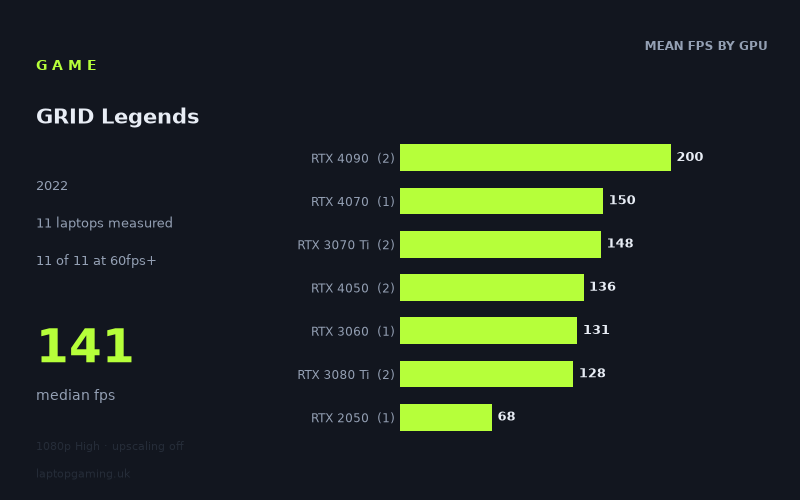
Every laptop we have figures for
Frame rates measured by Notebookcheck.
What it asks of a laptop
At the measured 1,920 × 1,080 High preset with upscaling off, GRID Legends is relatively forgiving for a modern gaming laptop. Notebookcheck’s figures cover 11 laptops, and every one of them cleared 60fps. The full spread runs from 68fps on the HP Envy 17-cr0079ng with an RTX 2050 to 210fps on the MSI Titan GT77 HX with an RTX 4090 at 150W.
The 141fps median is particularly telling. This is not a game that appears to require flagship hardware merely to feel smooth at the tested settings: 10 of the 11 measured laptops exceeded 100fps, while five reached at least 144fps. Even the slowest result, 68fps, is above the usual 60fps target.
That said, the results do not sort into a perfectly neat GPU hierarchy. The two RTX 4090 machines are predictably fastest, at 190fps and 210fps, but the middle of the table is tightly packed. An RTX 4070 laptop recorded 150fps, the two RTX 3070 Ti machines managed 148fps and 149fps, and the RTX 4050 systems returned 130fps and 141fps. There is also a substantial difference between the two RTX 3080 Ti laptops: 139fps from the Gigabyte Aero 16 YE5 with a 105W RTX 3080 Ti, but 117fps from the Medion Erazer Beast X30 with a 175W RTX 3080 Ti.
Those overlaps mean that GPU name alone is not enough to predict a precise result here. Laptop design, power limits and the wider system clearly matter, and several GPU tiers are represented by only one or two machines. The measured figures support broad performance brackets, rather than promises that every laptop carrying a particular GPU will deliver the same frame rate.
What runs it
For 60fps: all 11 measured laptops cleared this target at 1080p High without upscaling. The entry point in these numbers is the HP Envy 17-cr0079ng with an RTX 2050, which achieved 68fps. That makes 60fps look readily attainable on the tested hardware, although the RTX 2050 result leaves far less margin than the rest of the field.
For 100fps: 10 of 11 laptops reached it. The RTX 3060-powered Alienware x14 i7 RTX managed 131fps, while the two RTX 4050 machines recorded 130fps in the Schenker XMG Apex 15 (Late 23) and 141fps in the Medion Erazer Scout E20. The pair of RTX 3070 Ti laptops sat almost level at 148fps and 149fps. These are strong results for a 120Hz or 144Hz laptop display, though only some individual systems actually crossed the 144fps line.
For 144fps: five measured machines met or exceeded it. The MSI Stealth 16 Studio with an RTX 4070 at 105W reached 150fps; the Aorus 17 XE4 and Lenovo Legion 5 Pro 16 G7 i7 RTX 3070Ti, both using RTX 3070 Ti graphics, delivered 149fps and 148fps respectively; and both RTX 4090 laptops cleared the mark comfortably, at 190fps and 210fps.
The RTX 4050 results are worth reading carefully. Their 130fps and 141fps averages to 136fps across two laptops, close to a 144fps target but not consistently above it in this small sample. Similarly, the RTX 3080 Ti mean is 128fps across two machines, despite the GPU’s high-end name: the two measured systems produced 117fps and 139fps. Neither result reached 144fps.
- RTX 4090: 200fps mean across two laptops; 190fps to 210fps.
- RTX 4070: 150fps in one laptop.
- RTX 3070 Ti: 148fps mean across two laptops; both effectively at 144fps.
- RTX 4050: 136fps mean across two laptops; 130fps to 141fps.
- RTX 3060: 131fps in one laptop.
- RTX 3080 Ti: 128fps mean across two laptops; 117fps to 139fps.
- RTX 2050: 68fps in one laptop.
The cheapest laptop that handles it
No laptop prices are included in the fact sheet, so it is not possible to identify the cheapest measured machine in GBP without inventing information. The lowest-performing laptop that still handled the tested 1080p High workload above 60fps was the HP Envy 17-cr0079ng with RTX 2050, at 68fps. That is a performance observation, not a value judgement: its purchase price is not provided.
For a larger buffer above 60fps, the measured RTX 3060, RTX 4050, RTX 3070 Ti, RTX 4070, RTX 3080 Ti and RTX 4090 laptops all produced at least 117fps. However, there are no prices here with which to decide which provides the best value or lowest-cost route to that level of performance.
What this means if you’re buying
If your aim is simply a stable-looking 60fps experience at the tested 1080p High preset with upscaling off, the available figures suggest GRID Legends does not demand an expensive flagship gaming laptop. The RTX 2050-equipped HP Envy managed 68fps, and every stronger measured configuration was substantially faster.
For a high-refresh display, the safer area in this dataset begins around the RTX 3060 and RTX 4050 results, which were all above 100fps. But buying specifically for 144fps needs more care. The RTX 3070 Ti pair both achieved roughly 148fps, the single RTX 4070 result was 150fps, and RTX 4090 machines were far beyond that target. In contrast, the two RTX 4050 and two RTX 3080 Ti results remained below 144fps despite being close in some cases.
The practical conclusion is straightforward: buy the laptop rather than the badge. GRID Legends appears easy enough at the tested settings that an RTX 2050 can clear 60fps, while the mid-range and high-end machines measured here are mostly better suited to high-refresh play. For a 144Hz target, the specific RTX 3070 Ti, RTX 4070 and RTX 4090 laptops in Notebookcheck’s numbers are the clearest evidence; for anything beyond that, the RTX 4090 systems provide the largest measured headroom.
How these numbers were produced
Frame rates here are not measured by us, and we label how each one was arrived at. A figure marked measured comes from a published run on that exact machine. A figure marked representative is derived from the GPU and its power limit (TGP) and cross-referenced against published reviews - a sound estimate of what that configuration delivers, but not a measurement of that specific laptop. Unless stated otherwise, numbers are 1920x1080, High preset, upscaling off. Where a laptop ships in several power configurations we use the wattage of the exact SKU listed, because a 140W RTX 5070 and a 115W one are not the same product.