Performance analysis
Spider-Man Miles Morales (2022): what it takes to run it
Measured on 6 gaming laptops at 1920×1080, High preset, upscaling off.

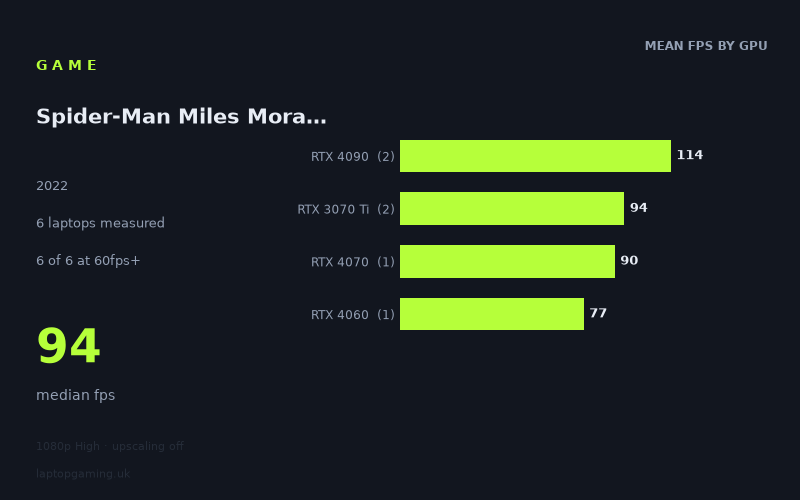
Every laptop we have figures for
Frame rates measured by Notebookcheck.
What it asks of a laptop
At 1,920 x 1,080 on the High preset with upscaling off, Spider-Man Miles Morales is comfortably playable on every one of the six laptops in Notebookcheck's figures. The slowest result is 77fps, while the fastest is 118fps, giving a 41fps spread between the measured machines. The median is 94fps.
That makes it a relatively forgiving game for a gaming laptop at these test conditions if the target is 60fps. All six machines clear that threshold, including the MSI Katana 17 with an RTX 4060, which records 77fps. There is therefore no measured result suggesting that 1080p High without upscaling requires flagship hardware merely to achieve a smooth 60fps experience.
It is more demanding if the aim is a consistently high-refresh-rate result. Only two of the six measured laptops reach 100fps: the two RTX 4090 systems. None reaches 144fps. The figures consequently draw a useful line between “comfortably above 60fps” and “well into three-figure frame rates”: mainstream and older high-end GPUs handle the former, but the latter favours the fastest machines in this small sample.
The GPU tiers separate in a broadly understandable way, although the sample needs to be kept in mind. The two RTX 4090 laptops average 114fps, ahead of the two RTX 3070 Ti machines at 94fps. The single RTX 4070 result is 90fps and the single RTX 4060 result is 77fps. That is a meaningful performance range, but it is not evidence that every laptop carrying one of these GPU names will deliver the same result. The RTX 4070 and RTX 4060 entries each represent only one laptop, while power figures are supplied for some, but not all, of the systems.
In practical terms, the measured numbers suggest that this game does not place extreme demands on a suitably equipped gaming laptop at 1080p High, but it does reward more powerful hardware if a buyer specifically wants 100fps or more without upscaling.
What runs it
60fps: all six measured laptops clear 60fps. The lowest figure belongs to the MSI Katana 17 with an RTX 4060 at 77fps. Above it are the Gigabyte AERO 16 OLED BSF with an RTX 4070 at 90fps, the Aorus 15 XE5 with an RTX 3070 Ti at 93fps, the Razer Blade 15 OLED (Early 2022) with an RTX 3070 Ti at 95fps, and both RTX 4090 systems.
- MSI Katana 17, RTX 4060: 77fps
- Gigabyte AERO 16 OLED BSF, RTX 4070: 90fps
- Aorus 15 XE5, RTX 3070 Ti at 130W: 93fps
- Razer Blade 15 OLED (Early 2022), RTX 3070 Ti at 110W: 95fps
- Asus ROG Strix Scar 18 2023, RTX 4090 at 150W: 109fps
- MSI Titan GT77 HX, RTX 4090 at 150W: 118fps
100fps: only the RTX 4090 laptops do so in the measured set. The MSI Titan GT77 HX reaches 118fps and the Asus ROG Strix Scar 18 2023 reaches 109fps. Their 114fps tier average is 20fps ahead of the 94fps average recorded by the two RTX 3070 Ti laptops.
144fps: none of the six measured laptops reaches 144fps under these conditions. Even the fastest result, the Titan GT77 HX's 118fps, is 26fps short of that mark. Buyers choosing a 144Hz-class laptop display should therefore not assume that this particular 1080p High, no-upscaling configuration will fill its refresh range based on these figures.
The RTX 3070 Ti results are especially close despite the stated difference in GPU power: the 110W Razer Blade 15 OLED records 95fps and the 130W Aorus 15 XE5 records 93fps. That is a reminder not to treat a GPU label or a listed power value as a guaranteed frame-rate result in isolation. These are results from two specific laptops, not a broad ranking of all RTX 3070 Ti designs.
The cheapest laptop that handles it
The fact sheet does not provide prices for the MSI Katana 17, Gigabyte AERO 16 OLED BSF, Aorus 15 XE5, Razer Blade 15 OLED, or MSI Titan GT77 HX. It is therefore not possible to identify the cheapest measured laptop from the supplied information.
What can be said is that the MSI Katana 17 with RTX 4060 is the lowest-performing measured machine and still records 77fps, comfortably above 60fps. That makes it the lowest measured performance entry that handles the game at the stated 1080p High settings, but not necessarily the cheapest laptop available.
The only supplied price is for the Asus ROG Strix Scar 18 2023: £4,000. It delivers 109fps with its 150W RTX 4090, but the figures do not support presenting it as a value choice against the unpriced laptops.
What this means if you're buying
If 60fps at 1,920 x 1,080, High preset and no upscaling is the goal, the six measured results are reassuring: every tested laptop meets it, from the RTX 4060 Katana 17 at 77fps to the RTX 4090 Titan GT77 HX at 118fps.
If the priority is 100fps or more at those same settings, the available evidence points to the measured RTX 4090 laptops. Both clear the target, whereas the RTX 3070 Ti, RTX 4070 and RTX 4060 entries do not. However, that conclusion should be read alongside the sample sizes: there are two RTX 4090 results, two RTX 3070 Ti results, and only one result each for RTX 4070 and RTX 4060.
For a buyer comparing laptops, the key distinction is not whether the game runs at all, but how much frame-rate headroom is wanted. The measured RTX 4060, RTX 4070 and RTX 3070 Ti systems all sit between 77fps and 95fps, while the RTX 4090 machines move to 109fps and 118fps. None of the measured laptops reaches 144fps, so the data does not support buying on the assumption of a 144fps result at these settings.
How these numbers were produced
Frame rates here are not measured by us, and we label how each one was arrived at. A figure marked measured comes from a published run on that exact machine. A figure marked representative is derived from the GPU and its power limit (TGP) and cross-referenced against published reviews - a sound estimate of what that configuration delivers, but not a measurement of that specific laptop. Unless stated otherwise, numbers are 1920x1080, High preset, upscaling off. Where a laptop ships in several power configurations we use the wattage of the exact SKU listed, because a 140W RTX 5070 and a 115W one are not the same product.