Details
Product prices and availability are accurate as of the date/time indicated and are subject to change. Any price and availability information displayed on Amazon.co.uk at the time of purchase will apply to the purchase of this product.Performance analysis
Control (2019): what it takes to run it
Measured on 13 gaming laptops at 1920×1080, High preset, upscaling off.

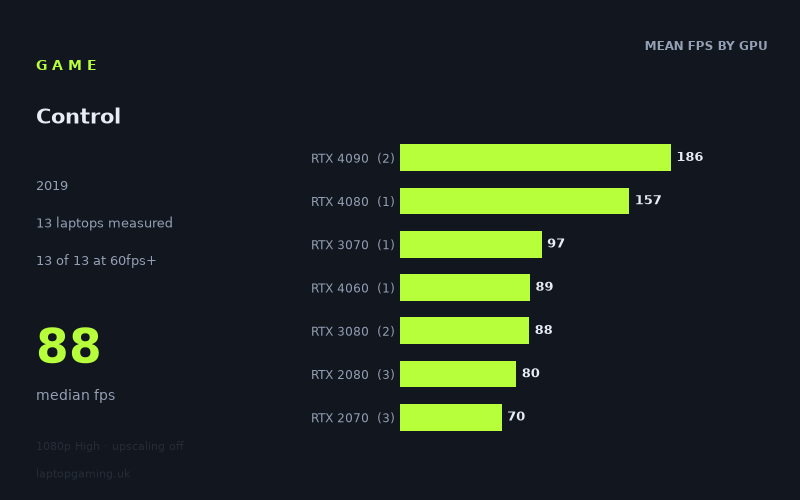
Every laptop we have figures for
Frame rates measured by Notebookcheck.
What it asks of a laptop
At 1,920 × 1,080 on the High preset with upscaling off, Control is relatively forgiving for the laptops represented in Notebookcheck’s figures. All 13 measured machines reached at least 60fps, with results ranging from 60fps to 187fps. The median result is 88fps, so the middle of this particular sample sits comfortably above a basic 60fps target.
That does not mean laptop specification is irrelevant. The 127fps gap between the slowest and fastest results is substantial, and the figures separate clearly at the top end. The two RTX 4090 laptops recorded 184fps and 187fps, while the RTX 4080-equipped Razer Blade 16 Early reached 157fps. These are the only three machines in the sample above both 100fps and 144fps.
Below that level, the results are much more compressed. The RTX 3070 Schenker XMG Neo 17 reached 97fps, the RTX 4060 MSI Katana 17 managed 89fps, and the measured RTX 3080 laptops produced 95fps and 82fps. Older RTX 2080 and RTX 2070 machines still returned usable figures, from 60fps to 88fps. This suggests that High settings at 1080p do not require the newest high-end hardware for 60fps, but sustained very high refresh-rate performance does demand one of the fastest laptops in this sample.
There is also visible variation between machines carrying similar GPU names. The two RTX 3080 results differ by 13fps, at 95fps for the Gigabyte Aero 17 HDR YC and 82fps for the Asus ROG Zephyrus G15. The RTX 2080 group runs from 71fps to 88fps, while the RTX 2070 group spans 60fps to 81fps. These are measured laptop results rather than a clean GPU-only comparison, so the sensible conclusion is to check figures for the specific laptop configuration rather than assume every system with the same graphics label will perform identically.
What runs it
For a 60fps target, every laptop in Notebookcheck’s 13-machine sample clears the line at these settings. The narrowest pass is the Gigabyte Aero 15 OLED with an RTX 2070 at exactly 60fps. Other RTX 2070 machines fare better: the Gigabyte Aero 17 HDR XB reached 68fps and the MSI GE66 Raider reached 81fps.
The measured RTX 2080 systems also provide a clear 60fps result, although their numbers vary: 71fps on the MSI Creator 17, 80fps on the Acer Predator Triton 500 and 88fps on the Asus Strix Scar 17. The RTX 3080 pair recorded 82fps on the Asus ROG Zephyrus G15 and 95fps on the Gigabyte Aero 17 HDR YC. The single measured RTX 4060 laptop, the MSI Katana 17, reached 89fps, while the Schenker XMG Neo 17 with RTX 3070 posted 97fps.
For 100fps, the picture changes sharply. Only three of the 13 measured laptops reached that threshold: the Razer Blade 16 Early with RTX 4080 at 157fps, plus the RTX 4090 versions of the Asus ROG Strix Scar 18 2023 at 184fps and MSI Titan GT77 HX at 187fps. The nearest machine below 100fps is the RTX 3070 XMG Neo 17 at 97fps. It is close, but it is not a measured 100fps result.
The same three systems are the only measured laptops to clear 144fps. The RTX 4080 Blade 16’s 157fps result provides 13fps above that mark, while the RTX 4090 machines are much further ahead at 184fps and 187fps. No RTX 3070, RTX 4060, RTX 3080, RTX 2080 or RTX 2070 machine in this set reached 100fps, let alone 144fps.
The cheapest laptop that handles it
The fact sheet does not provide prices for most of the 13 laptops, so it cannot identify the genuinely cheapest machine that handles Control at these settings. It would be misleading to name one based only on its frame rate or GPU tier.
Of the two machines with listed UK prices, the Asus ROG Zephyrus G15 with RTX 3080 costs £2,196 and recorded 82fps. That is enough for a measured 60fps-class experience at 1080p High without upscaling, but it is not one of the systems that reached 100fps.
The other priced model is the Asus ROG Strix Scar 18 2023 with RTX 4090 at £4,000, which achieved 184fps. It is vastly faster in the supplied results, but it is plainly not the lower-priced option among the two models with known prices. Several unpriced machines also clear 60fps, including the Gigabyte Aero 15 OLED at 60fps, Gigabyte Aero 17 HDR XB at 68fps and MSI Creator 17 at 71fps; their value cannot be judged from this fact sheet because no GBP prices are supplied.
What this means if you’re buying
If your priority is simply playing Control at 1,920 × 1,080, High settings and no upscaling, the measured evidence is reassuring: all 13 laptops in this sample reached 60fps or better. A laptop represented by the RTX 2070, RTX 2080, RTX 3070, RTX 4060 or RTX 3080 results can be sufficient for that target, though the data also shows that exact machine choice affects the outcome.
If you are buying for a 100Hz or faster display, be more selective. Only the RTX 4080 and RTX 4090 machines measured here broke 100fps, and only those same three systems cleared 144fps. The RTX 3070 result of 97fps is close to 100fps, but the sample contains only one RTX 3070 laptop, so it should not be treated as a guarantee for all RTX 3070 machines.
For most buyers focused on a steady 60fps-class result, the supplied figures suggest there is little need to pay £4,000 solely for Control performance. For buyers specifically targeting 144Hz operation at these exact settings, the measured numbers point towards the Razer Blade 16 Early with RTX 4080, or the two RTX 4090 laptops, rather than the lower-tier systems in this sample.
How these numbers were produced
Frame rates here are not measured by us, and we label how each one was arrived at. A figure marked measured comes from a published run on that exact machine. A figure marked representative is derived from the GPU and its power limit (TGP) and cross-referenced against published reviews - a sound estimate of what that configuration delivers, but not a measurement of that specific laptop. Unless stated otherwise, numbers are 1920x1080, High preset, upscaling off. Where a laptop ships in several power configurations we use the wattage of the exact SKU listed, because a 140W RTX 5070 and a 115W one are not the same product.