Performance analysis
Metro Exodus (2019): what it takes to run it
Measured on 19 gaming laptops at 1920×1080, High preset, upscaling off.

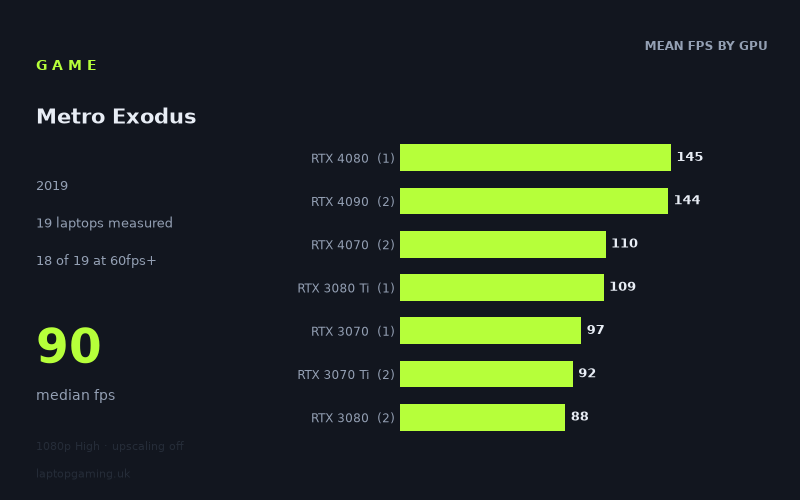
Every laptop we have figures for
Frame rates measured by Notebookcheck.
What it asks of a laptop
At 1,920 × 1,080 on the High preset with upscaling disabled, Metro Exodus is relatively forgiving for a modern gaming laptop, at least in this set of Notebookcheck figures. The measured range runs from 55fps to 153fps, with a median of 90fps. Crucially, 18 of the 19 measured laptops reached 60fps or better, while six exceeded 100fps.
That does not mean the game places no demands on the GPU. There is a substantial 98fps gap between the slowest and fastest recorded machines, and the figures separate clearly at the top end. The fastest systems pair high-end RTX 4080 and RTX 4090 laptop GPUs with high power limits: the MSI Titan GT77 HX, using a 150W RTX 4090, reached 153fps, while the 175W RTX 4080 Razer Blade 16 Early managed 145fps. A 175W RTX 4090 in the Aorus 17X AZF recorded 134fps.
The more useful conclusion for most buyers is that 60fps is not reserved for flagship hardware. Several older GPU generations and mid-range chips were comfortably above that line in the measured figures. The RTX 3060-equipped Lenovo Legion 5 reached 80fps, for example, while RTX 2070 machines ranged from 72fps to 83fps. Even the measured RTX 2080 laptops sat between 75fps and 90fps.
Power configuration and the particular laptop clearly matter, so GPU names alone are not a complete performance guarantee. The RTX 4070 results were both 110fps, despite one being listed at 105W in the MSI Stealth 16 Studio and the other at 140W in the Razer Blade 18 RTX. Meanwhile, the two RTX 4090 results were 153fps at 150W and 134fps at 175W. These are useful measured outcomes for specific machines, not a rule that one wattage or chassis layout will always beat another.
There are also small samples in several GPU tiers. Notebookcheck has figures for only one RTX 4080 laptop, one RTX 3080 Ti laptop, one RTX 3070 laptop, one RTX 3060 laptop and one RTX 3050 Ti laptop. Treat those tier averages as context rather than broad predictions for every laptop carrying those graphics chips.
What runs it
For a 60fps target at these measured settings, the evidence is very positive. Eighteen of the 19 laptops cleared 60fps. The measured RTX 2070 systems delivered 72fps, 75fps and 83fps, while the three RTX 2080 laptops achieved 75fps, 78fps and 90fps. The RTX 3060 Lenovo Legion 5 recorded 80fps. Those results suggest that a laptop does not need a current flagship GPU to run Metro Exodus well at 1080p High without upscaling.
The one measured exception was the Asus ROG Strix G17 with a 95W RTX 3050 Ti, which produced 55fps. That is close to 60fps, but it is below the target in this data set. It is therefore the clearest indication that entry-level discrete graphics are where the margin begins to disappear under these conditions.
For 100fps, the field narrows considerably. Only six laptops reached that threshold:
- MSI Titan GT77 HX, RTX 4090 at 150W: 153fps.
- Razer Blade 16 Early, RTX 4080 at 175W: 145fps.
- Aorus 17X AZF, RTX 4090 at 175W: 134fps.
- MSI Stealth 16 Studio, RTX 4070 at 105W: 110fps.
- Razer Blade 18 RTX, RTX 4070 at 140W: 110fps.
- Schenker XMG Neo 17 M22, RTX 3080 Ti: 109fps.
This is an interesting result because it shows that 100fps was not limited to the newest RTX 4080 and RTX 4090 machines in these measurements. Both measured RTX 4070 laptops reached 110fps, and the single RTX 3080 Ti system reached 109fps. However, there is only one RTX 3080 Ti result and two RTX 4070 results, so this should not be treated as a guarantee for every configuration using those GPUs.
For 144fps, there are only two qualifying machines. The MSI Titan GT77 HX reached 153fps and the Razer Blade 16 Early reached 145fps. The Aorus 17X AZF’s 134fps is fast, but remains short of 144fps. If the aim is to make full use of a 144Hz panel at this exact resolution and preset, Notebookcheck’s figures only confirm that outcome for those two specific laptops.
The averages reinforce the broad pattern, but also show why individual results matter. The RTX 4080 average is 145fps from one laptop, while the two RTX 4090 systems average 144fps. RTX 4070 averages 110fps across two systems, RTX 3080 Ti records 109fps from one system, and RTX 3070 averages 97fps from one machine. Older RTX 2070 and RTX 2080 laptops still average 77fps and 81fps respectively across three machines each.
The cheapest laptop that handles it
The fact sheet provides a price for only one laptop: the Asus ROG Strix G17 with a 95W RTX 3050 Ti, listed at £1,166. It recorded 55fps, so it does not meet a strict 60fps definition of “handles it” at 1,920 × 1,080 High with upscaling off.
As a result, the measured data cannot identify the cheapest laptop that reaches 60fps. Several machines did so, including the Lenovo Legion 5 with RTX 3060 at 80fps and multiple RTX 2070 laptops at 72fps to 83fps, but no prices are supplied for them. It would be misleading to declare one of those models the budget recommendation without comparable UK pricing.
What this means if you’re buying
If Metro Exodus is one game among many and 60fps at 1080p High is the goal, the measured figures indicate that an RTX 3060, RTX 2070 or RTX 2080-class laptop can be sufficient, provided the specific model performs similarly to the machines listed here. The measured RTX 3050 Ti result is below 60fps, so it offers less headroom at these settings.
For a higher-refresh target around 100fps, the strongest measured evidence is with the two RTX 4070 laptops, the RTX 3080 Ti Schenker XMG Neo 17 M22, and the RTX 4080/RTX 4090 systems. For 144fps, the data supports only the MSI Titan GT77 HX and Razer Blade 16 Early.
Buy on the performance target rather than assuming that every newer GPU tier automatically changes the experience. At this 1080p High preset, Metro Exodus runs above 60fps on almost every measured laptop, but consistent triple-digit performance and 144fps-class results still require a much narrower set of specific high-performance machines.
How these numbers were produced
Frame rates here are not measured by us, and we label how each one was arrived at. A figure marked measured comes from a published run on that exact machine. A figure marked representative is derived from the GPU and its power limit (TGP) and cross-referenced against published reviews - a sound estimate of what that configuration delivers, but not a measurement of that specific laptop. Unless stated otherwise, numbers are 1920x1080, High preset, upscaling off. Where a laptop ships in several power configurations we use the wattage of the exact SKU listed, because a 140W RTX 5070 and a 115W one are not the same product.