Performance analysis
Rainbow Six Extraction (2022): what it takes to run it
Measured on 8 gaming laptops at 1920×1080, High preset, upscaling off.

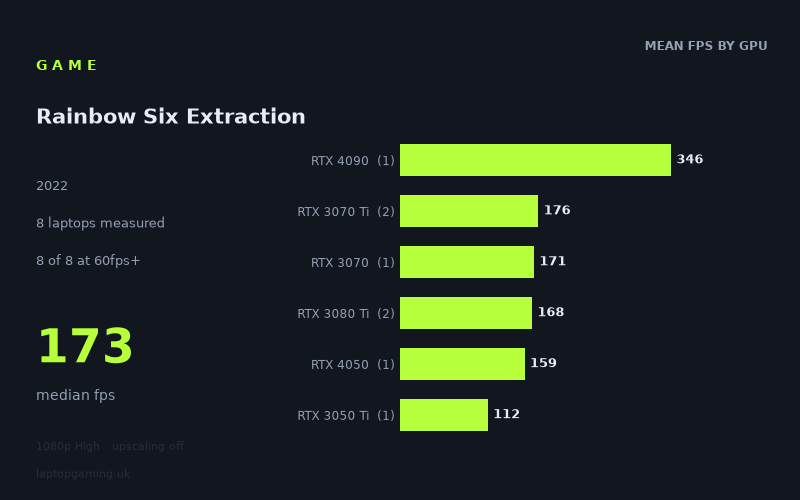
Every laptop we have figures for
Frame rates measured by Notebookcheck.
What it asks of a laptop
Rainbow Six Extraction looks forgiving for a gaming laptop at the measured 1920x1080 High preset with upscaling off. Across the eight Notebookcheck results, every machine exceeded 100fps, including the slowest tested system: the HP Victus 16-e0145ng with an RTX 3050 Ti running at 75W, which produced 112fps. The median result was 173fps, while the full spread ran from 112fps to 346fps.
That is an unusually high baseline from this particular sample. The game is not asking tested laptops merely to reach a playable 60fps; all eight machines were comfortably beyond that point, and all eight also cleared 100fps. Seven of the eight reached at least 144fps. For a 1080p gaming laptop, then, the measured figures suggest that High settings without upscaling are viable even on older or lower-tier dedicated graphics hardware represented here.
There is still a substantial gap between machines. The MSI Titan GT77 HX, fitted with a 150W RTX 4090, reached 346fps: more than three times the HP Victus result. However, the figures below the RTX 4090 are tightly grouped considering the different GPU names and power limits involved. The RTX 4050 at 100W managed 159fps, while the two RTX 3080 Ti laptops averaged 168fps despite having notably different results: 180fps for the 175W Medion Erazer Beast X30 and 157fps for the 105W Gigabyte Aero 16 YE5.
That variation is important when reading the GPU labels. These are measured results from eight individual laptops, not a guarantee that every laptop with the same GPU will perform identically. In particular, most GPU tiers here are represented by only one machine, while the RTX 3070 Ti and RTX 3080 Ti results each cover two. The power figures also differ substantially, from 75W for the tested RTX 3050 Ti to 175W for one RTX 3080 Ti. The data supports clear conclusions about these specific machines, but it does not support treating a GPU name alone as a precise performance prediction.
What runs it
Every laptop in the supplied set clears 60fps at 1920x1080 High with upscaling disabled. More usefully, every one also clears 100fps. That means the measured baseline starts at 112fps on the RTX 3050 Ti-equipped HP Victus 16-e0145ng.
- RTX 3050 Ti: The HP Victus 16-e0145ng, using a 75W RTX 3050 Ti, recorded 112fps. It is the only result below 144fps, but it remains well above both 60fps and 100fps.
- RTX 4050: The 100W RTX 4050 in the Medion Erazer Scout E20 achieved 159fps. That clears 144fps by 15fps in this one measured laptop.
- RTX 3070: The MSI Crosshair 15 R6E, with an RTX 3070 at 105W, reached 171fps. It is above 144fps and close to the 173fps median across all eight results.
- RTX 3070 Ti: The two measured RTX 3070 Ti laptops were particularly consistent: 177fps from the 130W Aorus 17 XE4 and 176fps from the MSI Stealth GS66. Their mean was 176fps, and both comfortably exceeded 144fps.
- RTX 3080 Ti: Results varied by 23fps between the two laptops. The 175W Medion Erazer Beast X30 reached 180fps, while the 105W Gigabyte Aero 16 YE5 managed 157fps. Both cleared 144fps, but the difference illustrates why laptop configuration matters alongside the GPU badge.
- RTX 4090: The 150W RTX 4090 in the MSI Titan GT77 HX was far ahead at 346fps. This is the highest measured result, although it comes from one laptop only.
For a 144Hz laptop display, the figures are encouraging. Seven of the eight tested machines delivered at least 144fps at the stated settings. The exception was the RTX 3050 Ti HP Victus at 112fps, which is still a strong result for a 120Hz-class experience but does not reach the measured 144fps threshold. Buyers specifically targeting 144fps should note that the RTX 4050 result is based on one 100W laptop, while the RTX 3070, RTX 3080 Ti and RTX 4090 categories also have limited samples.
The cheapest laptop that handles it
The fact sheet provides a price for only one machine: the MSI Stealth GS66 at £2,688. Its RTX 3070 Ti recorded 176fps, placing it well above 60fps, 100fps and 144fps in Notebookcheck’s figures.
That does not make the MSI Stealth GS66 the cheapest laptop that can handle Rainbow Six Extraction. Prices are not supplied for the other seven machines, including the HP Victus 16-e0145ng, which delivered the lowest measured result at 112fps but still exceeded 100fps. On the available information, the most accurate conclusion is that the Stealth GS66 is the only priced example, not the value or entry-price recommendation.
If the objective is simply smooth High-preset 1080p play in the tested conditions, the HP Victus 16-e0145ng is the least powerful measured machine that still handles the game comfortably at 112fps. If the target is 144fps, the Medion Erazer Scout E20 with its 100W RTX 4050 is the lowest-scoring machine in this sample to exceed that mark, at 159fps. Neither can be called the cheapest option because no prices are provided for them.
What this means if you’re buying
For Rainbow Six Extraction alone, the measured data does not point to a need for a flagship gaming laptop. The RTX 4090-equipped MSI Titan GT77 HX delivers an enormous 346fps, but the game was already running at 157fps to 180fps on the tested RTX 4050, RTX 3070, RTX 3070 Ti and RTX 3080 Ti machines. That makes the 4090 result useful for very high-refresh displays, but not necessary for a strong 1080p High-preset result in this game.
A laptop capable of delivering roughly 144fps is the more practical dividing line in these numbers. The tested 100W RTX 4050, 105W RTX 3070, both RTX 3070 Ti systems and both RTX 3080 Ti systems all cleared it. The 75W RTX 3050 Ti did not, though its 112fps result still makes it suitable for a laptop with a 120Hz display or for players content below 144fps.
Pay attention to the exact laptop rather than assuming a higher-numbered GPU always guarantees a higher result. The 100W RTX 4050 scored 159fps, ahead of the 105W RTX 3080 Ti result at 157fps, while the 175W RTX 3080 Ti reached 180fps. Within this small sample, graphics power limits and the individual laptop configuration clearly matter. For buyers comparing machines, these measurements support looking for independent results for the exact model and GPU power rating, especially when choosing between similarly priced laptops.
How these numbers were produced
Frame rates here are not measured by us, and we label how each one was arrived at. A figure marked measured comes from a published run on that exact machine. A figure marked representative is derived from the GPU and its power limit (TGP) and cross-referenced against published reviews - a sound estimate of what that configuration delivers, but not a measurement of that specific laptop. Unless stated otherwise, numbers are 1920x1080, High preset, upscaling off. Where a laptop ships in several power configurations we use the wattage of the exact SKU listed, because a 140W RTX 5070 and a 115W one are not the same product.