Performance analysis
Ghostwire Tokyo (2022): what it takes to run it
Measured on 9 gaming laptops at 1920×1080, High preset, upscaling off.

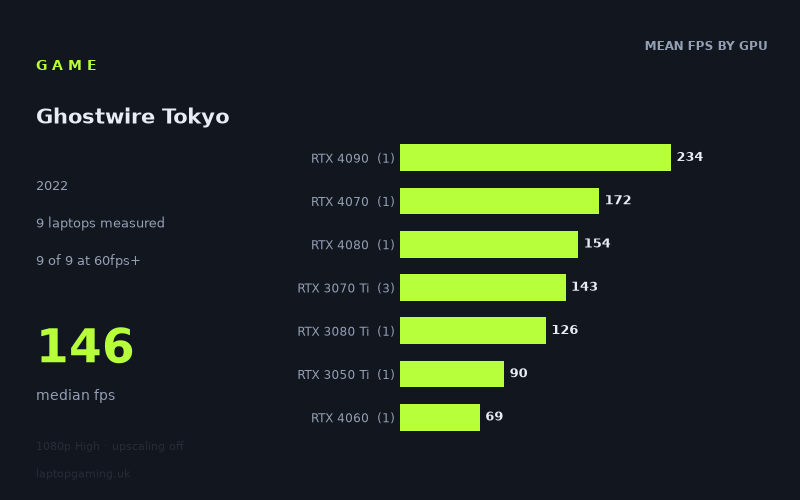
Every laptop we have figures for
Frame rates measured by Notebookcheck.
What it asks of a laptop
At 1,920 x 1,080 on the High preset with upscaling off, Ghostwire Tokyo ran at 60fps or better on all nine measured laptops. The measured range is wide, from 69fps on the MSI Katana 17 with an RTX 4060 to 234fps on the MSI Titan GT77 HX with an RTX 4090 running at 150W, but the floor is still comfortably above 60fps.
That makes this look reasonably forgiving at this particular resolution and preset, at least among the machines in Notebookcheck's data. The median result is 146fps, while seven of the nine laptops exceeded 100fps and five reached 144fps or more. A laptop does not need a top-tier GPU merely to make the game playable at these settings.
There are important limits to that conclusion. The figures cover only nine laptops, and several GPU tiers are represented by only one machine. This is particularly relevant because the results do not form a neat GPU-name hierarchy. The RTX 4070-equipped Asus ROG Strix G18 reached 172fps, ahead of the measured RTX 4080 and RTX 3080 Ti systems, while the RTX 4060 MSI Katana 17 recorded the lowest result at 69fps. These are results from specific laptops, not proof that every laptop carrying a particular GPU will perform in the same order.
The RTX 3070 Ti results show why that caution matters. Three laptops with that GPU produced 152fps, 146fps and 131fps, a 21fps spread. The listed power figures also differ where they are supplied: the Asus ROG Flow X16's RTX 3070 Ti is specified at 125W, while the RTX 4090, RTX 4070 and RTX 4080 examples are listed at 150W, 165W and 175W respectively. GPU tier remains useful as a broad guide, but the measured laptop configuration clearly matters.
What runs it
For a 60fps target at 1,920 x 1,080 High without upscaling, every measured machine cleared the line. The lowest result was still 69fps from the MSI Katana 17 with RTX 4060 graphics. The HP Victus 16-e0145ng with an RTX 3050 Ti at 75W managed 90fps. Based on these two specific results, even the slowest laptops in this small sample delivered a conventional 60fps experience at the tested settings.
- RTX 3050 Ti: the HP Victus 16-e0145ng achieved 90fps. It cleared 60fps, but not 100fps or 144fps.
- RTX 4060: the MSI Katana 17 achieved 69fps. It cleared 60fps, but not 100fps or 144fps.
- RTX 3070 Ti: the three measured laptops averaged 143fps. Individually, the HP Omen 17-ck1075ng reached 152fps, the HP Omen 16-b1090ng reached 146fps and the Asus ROG Flow X16 reached 131fps. All three cleared 100fps; the two HP systems also cleared 144fps, while the Flow X16 did not.
- RTX 3080 Ti: the Medion Erazer Beast X30, with its RTX 3080 Ti at 175W, recorded 126fps. That is above 100fps but below 144fps.
- RTX 4070: the Asus ROG Strix G18, using an RTX 4070 at 165W, achieved 172fps. It cleared 60fps, 100fps and 144fps.
- RTX 4080: the Razer Blade 16 Early, with an RTX 4080 at 175W, recorded 154fps. It also cleared all three thresholds.
- RTX 4090: the MSI Titan GT77 HX, with an RTX 4090 at 150W, reached 234fps, the fastest measured result by a substantial margin.
For a 100fps target, the measured dividing line falls between the two lower-scoring systems and the rest of the sample. The RTX 3050 Ti Victus at 90fps and RTX 4060 Katana at 69fps fell short; the RTX 3080 Ti result of 126fps and every RTX 3070 Ti result exceeded it. For 144fps, five laptops made the grade: the Titan GT77 HX, ROG Strix G18, Razer Blade 16 Early, HP Omen 17-ck1075ng and HP Omen 16-b1090ng.
The cheapest laptop that handles it
The fact sheet does not provide UK prices for any of the nine laptops, so it is not possible to identify the cheapest measured option in GBP without inventing information. The lowest-performing measured machine was the MSI Katana 17 with RTX 4060 graphics at 69fps, but a lower frame rate does not establish that it was the cheapest laptop.
What the numbers do establish is that the HP Victus 16-e0145ng with RTX 3050 Ti and the MSI Katana 17 with RTX 4060 both cleared 60fps at the tested settings, recording 90fps and 69fps respectively. They are the two measured examples below 100fps, rather than verified budget recommendations.
What this means if you're buying
If your aim is simply to play Ghostwire Tokyo at 1,920 x 1,080 High with upscaling off, the data suggests that a 60fps target is not especially difficult among these nine machines. Every listed laptop passed it. However, do not read the RTX 4060 Katana's 69fps as a universal RTX 4060 result, or the Victus's 90fps as a universal RTX 3050 Ti result: each tier has only one such sample here.
For higher-refresh-rate use, the measured figures favour the specific RTX 3070 Ti, RTX 4070, RTX 4080 and RTX 4090 laptops that reached 144fps or more. The RTX 3070 Ti is the most useful tier in this data set because it has three examples, but even there the results range from 131fps to 152fps. A buyer targeting 144fps should therefore look at measured results for the exact laptop rather than rely on the GPU label alone.
The practical reading is straightforward: 60fps is supported by all nine measured laptops, 100fps by seven, and 144fps by five. The game can scale from a 69fps result to 234fps at the same stated resolution and preset, so laptop implementation has a major effect on the outcome. Check figures for the exact model you are considering, especially where its GPU power limit differs from the examples listed here.
How these numbers were produced
Frame rates here are not measured by us, and we label how each one was arrived at. A figure marked measured comes from a published run on that exact machine. A figure marked representative is derived from the GPU and its power limit (TGP) and cross-referenced against published reviews - a sound estimate of what that configuration delivers, but not a measurement of that specific laptop. Unless stated otherwise, numbers are 1920x1080, High preset, upscaling off. Where a laptop ships in several power configurations we use the wattage of the exact SKU listed, because a 140W RTX 5070 and a 115W one are not the same product.