Performance analysis
The Witcher 3 v4 (2023): what it takes to run it
Measured on 6 gaming laptops at 1920×1080, High preset, upscaling off.
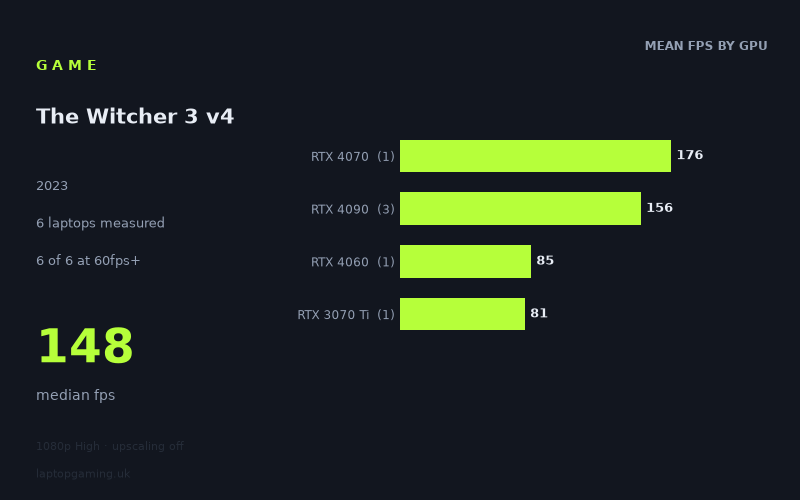
Every laptop we have figures for
Frame rates measured by Notebookcheck.
What it asks of a laptop
At the measured 1,920 x 1,080 High preset with upscaling off, The Witcher 3 v4 runs comfortably above 60fps on all six laptops in Notebookcheck’s figures. The recorded range is 81fps to 176fps, with a median of 148fps. That makes it relatively forgiving if the target is simply a stable-looking 60fps experience at these settings, but considerably more selective if you are buying for a 120Hz or 144Hz display.
The important limitation is the sample size. These results cover only six laptops, and several GPU categories are represented by just one machine. They show what these specific systems achieved, rather than establishing a guaranteed result for every laptop carrying the same graphics chip. Laptop GPU performance depends on the complete machine, including its configured graphics power limit, cooling and processor, and the measured numbers demonstrate that badge alone is not enough to rank every system neatly.
The spread between the RTX 4060 and RTX 3070 Ti machines is small: the Medion Erazer Defender P40 with its 140W RTX 4060 reached 85fps, while the Razer Blade 15 OLED with a 110W RTX 3070 Ti recorded 81fps. Both are clearly beyond 60fps, but neither reaches 100fps in this data set. The higher-end entries are much faster, ranging from 138fps to 176fps, which is where high-refresh play becomes realistic.
There is also a useful warning against treating the nominal GPU tier as the whole story. The Schenker XMG Fusion 15, using a 140W RTX 4070, produced the highest measured result at 176fps. That is ahead of all three RTX 4090 laptops in the list, despite those machines carrying the higher-tier GPU: the MSI Titan GT77 HX managed 173fps at 150W, the Asus Zephyrus Duo 16 reached 158fps at 175W, and the Razer Blade 16 Early 2023 RTX recorded 138fps at 175W. The figures do not tell us why those systems differ, but they do show why shoppers should look for results from the exact laptop model rather than assuming a GPU name guarantees a particular frame rate.
What runs it
For the tested 1080p High configuration with upscaling disabled, every measured laptop clears 60fps:
- RTX 3070 Ti: the 110W RTX 3070 Ti in the Razer Blade 15 OLED (Early 2022) achieved 81fps.
- RTX 4060: the 140W RTX 4060 in the Medion Erazer Defender P40 achieved 85fps.
- RTX 4090: the three measured laptops delivered 138fps, 158fps and 173fps, for a 156fps mean across those three systems.
- RTX 4070: the one measured example, the 140W Schenker XMG Fusion 15 (Early 24), reached 176fps.
For a 100fps target, the results split more sharply. Four of the six laptops reached at least 100fps. Those were the Schenker RTX 4070 at 176fps and the three RTX 4090 systems at 173fps, 158fps and 138fps. The RTX 4060 and RTX 3070 Ti examples did not: their 85fps and 81fps results are respectable for 60Hz gaming, but are not evidence that those specific laptops can sustain 100fps at the measured settings.
A 144fps target is more demanding still. Three of the six machines reached 144fps or higher: the Schenker XMG Fusion 15 at 176fps, MSI Titan GT77 HX at 173fps and Asus Zephyrus Duo 16 at 158fps. The Razer Blade 16 Early 2023 RTX, despite its 175W RTX 4090, fell short at 138fps. It is close to 144fps, but it is not appropriate to describe that measured result as clearing a 144fps target.
Put simply, Notebookcheck’s numbers suggest that the tested RTX 4060 and RTX 3070 Ti laptops are sufficient for 60fps-plus play at 1080p High without upscaling. The measured high-end machines are the options for buyers who specifically want three-digit frame rates, while only three of the six tested systems actually crossed 144fps.
The cheapest laptop that handles it
The fact sheet does not include UK prices for any of the six laptops, so it is not possible to identify the cheapest option in GBP without inventing information. The lowest-performing measured machine is not necessarily the least expensive, and the highest frame rate does not establish the best value.
What the available figures can say is that the two lowest measured results still handled the tested setting well above 60fps: the Medion Erazer Defender P40 with RTX 4060 recorded 85fps, and the Razer Blade 15 OLED (Early 2022) with RTX 3070 Ti recorded 81fps. If these are being considered against current retail options, price and exact configuration need to be checked separately; the benchmark data alone cannot rank them by affordability.
What this means if you’re buying
If your goal is 1080p High with upscaling off and a 60fps target, the measured evidence is encouraging across the whole six-laptop group. Even the slowest result, 81fps, leaves a 21fps margin above 60fps. That does not mean every gaming laptop will deliver the same result, but it does mean none of the tested machines struggled with this particular workload at the stated settings.
If you are choosing a laptop with a high-refresh screen in mind, set a more exact target. The RTX 4060 and RTX 3070 Ti entries in this sample are 81-85fps machines here, so they fit a 60Hz-focused purchase better than a purchase based on expecting 100fps or 144fps at these settings. The measured RTX 4090 and RTX 4070 systems are substantially quicker, but the results range from 138fps to 176fps. A 144Hz panel is therefore not automatically matched by every high-end configuration.
The strongest buying lesson from this small sample is to compare the exact laptop, not just the GPU tier. The fastest measured result belongs to the RTX 4070 Schenker, while one RTX 4090 laptop sits below 144fps. For The Witcher 3 v4 at 1080p High without upscaling, buy around the frame-rate target you actually want: 60fps is covered by all six measured machines, 100fps is supported by four, and 144fps is supported by three.
How these numbers were produced
Frame rates here are not measured by us, and we label how each one was arrived at. A figure marked measured comes from a published run on that exact machine. A figure marked representative is derived from the GPU and its power limit (TGP) and cross-referenced against published reviews - a sound estimate of what that configuration delivers, but not a measurement of that specific laptop. Unless stated otherwise, numbers are 1920x1080, High preset, upscaling off. Where a laptop ships in several power configurations we use the wattage of the exact SKU listed, because a 140W RTX 5070 and a 115W one are not the same product.