Details
Product prices and availability are accurate as of the date/time indicated and are subject to change. Any price and availability information displayed on Amazon.co.uk at the time of purchase will apply to the purchase of this product.Performance analysis
Borderlands 3 (2019): what it takes to run it
Measured on 22 gaming laptops at 1920×1080, High preset, upscaling off.

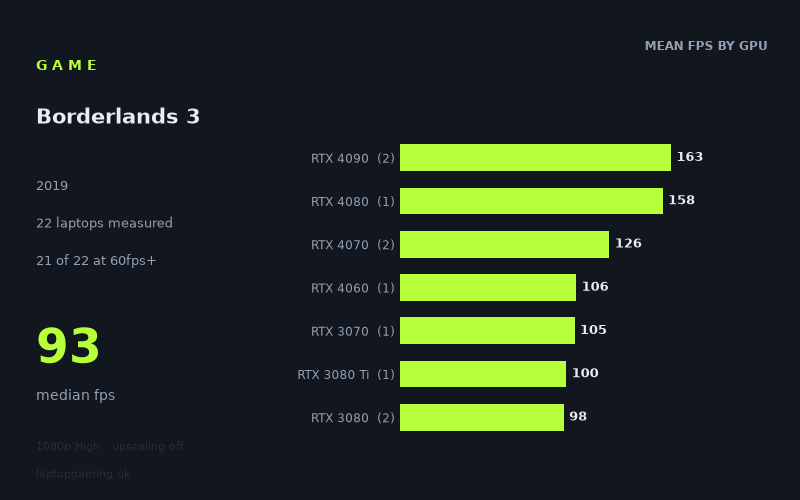
Every laptop we have figures for
Frame rates measured by Notebookcheck.
What it asks of a laptop
At 1920x1080 on the High preset with upscaling off, Borderlands 3 is broadly manageable for gaming laptops, but it still separates lower-end and higher-end graphics hardware clearly. Notebookcheck’s measured figures span from 57fps to 164fps across 22 laptops, with a median of 93fps. Crucially, 21 of the 22 machines reached 60fps or better, while nine reached 100fps and only three exceeded 144fps.
That makes it a relatively forgiving game if the target is a conventional 60fps experience at these settings, including on several older laptop GPUs. It is more demanding if the aim is to make full use of a high-refresh display. The gap between the 57fps RTX 3050 Ti result and the 164fps RTX 4090 result is substantial, and even laptops that are comfortably above 60fps do not automatically reach 100fps or 144fps.
The measured results also show why GPU labels should not be treated as a complete performance specification. The two RTX 4070 laptops recorded 132fps and 120fps, for a 126fps mean, but they were specified at 140W and 105W respectively. Likewise, the results come from different laptop designs and generations. The figures are useful evidence of what these particular machines achieved, rather than a guarantee for every laptop using the same GPU name.
For a 60fps target, Borderlands 3 does not appear to require current flagship hardware at 1080p High. For sustained triple-digit performance, however, the measured numbers favour RTX 4060-class hardware and above, though the sample sizes in several tiers are only one machine. A 144Hz-screen target is more demanding still: only the RTX 4080 and RTX 4090 laptops in this set crossed 144fps.
What runs it
60fps: almost the whole sample
Twenty-one of the 22 measured laptops met or exceeded 60fps. The lowest result above that threshold was the HP Omen 15-en0375ng with an RTX 2060, at 62fps. This is the clearest evidence that a 60fps result at 1920x1080 High is viable on older mid-range gaming hardware, although 62fps leaves little headroom compared with the faster machines.
- RTX 2060: HP Omen 15-en0375ng, 62fps.
- RTX 2070: five laptops averaged 82fps, ranging from 76fps in the MSI GS66 Stealth to 92fps in the MSI GE66 Raider.
- RTX 2080: three laptops averaged 87fps, with results of 80fps, 84fps and 98fps.
- RTX 3060: Lenovo Legion 5, 90fps.
- RTX 3070 Ti: Asus ROG Flow X16, 92fps.
- RTX 3080: two laptops averaged 98fps, from 94fps to 103fps.
The exception was the Asus ROG Strix G17 with an RTX 3050 Ti at 95W, which returned 57fps. That is close to 60fps rather than dramatically below it, but it is the only measured laptop that missed the threshold. On these figures, an RTX 3050 Ti laptop should not be assumed to deliver a locked 60fps at the stated settings.
100fps: a more selective target
Nine of the 22 laptops reached at least 100fps. The entry point in this specific data set was the Schenker XMG Neo 17 M22 with an RTX 3080 Ti at exactly 100fps, followed by the Gigabyte Aero 17 HDR YC with an RTX 3080 at 103fps, the Schenker XMG Neo 17 with an RTX 3070 at 105fps, and the MSI Katana 17 with an RTX 4060 at 106fps.
Those are individual laptop results, and the RTX 4060, RTX 3070 and RTX 3080 Ti entries each represent only one machine. They do show that 100fps is achievable below the newest high-end tier, but the wider data does not support treating every laptop with those GPUs as a guaranteed 100fps machine.
- RTX 4060: MSI Katana 17, 106fps.
- RTX 4070: 120fps in the MSI Stealth 16 Studio and 132fps in the Razer Blade 18 RTX.
- RTX 4080: Razer Blade 16 Early, 158fps.
- RTX 4090: 162fps in the MSI Titan GT77 HX and 164fps in the Aorus 17X AZF.
144fps: flagship territory in these measurements
Only three machines passed 144fps: the Razer Blade 16 Early with an RTX 4080 at 158fps, plus the MSI Titan GT77 HX and Aorus 17X AZF with RTX 4090 GPUs at 162fps and 164fps. The RTX 4070 results of 120fps and 132fps are strong, but neither reaches 144fps in the measured configuration.
For buyers focused on a 144Hz panel, the available evidence therefore points to RTX 4080 and RTX 4090 laptops. There is only one RTX 4080 result and two RTX 4090 results, so this is a description of the measured machines rather than a blanket recommendation for every laptop in those categories.
The cheapest laptop that handles it
Only two prices are supplied in the fact sheet, so it is not possible to identify the cheapest laptop across all 22 measured systems. Among the priced machines, the Asus ROG Strix G17 is the lower-cost option at £1,167, but its RTX 3050 Ti at 95W produced 57fps. It is close to 60fps, yet it does not meet that target in Notebookcheck’s figures.
The other priced system is the Asus ROG Zephyrus G15, listed at £2,196. Its RTX 3080 recorded 94fps, giving it a far larger performance margin at the same 1080p High, no-upscaling test. It also falls short of 100fps, albeit narrowly.
If “handles it” means reaching 60fps in the measured test, the fact sheet does not include a price for the least expensive qualifying machine. The HP Omen 15-en0375ng is the lowest-scoring laptop that still clears 60fps, at 62fps, but no GBP price is provided.
What this means if you’re buying
A buyer targeting 1920x1080 High at around 60fps does not need to shop exclusively for premium hardware on this evidence. RTX 2060, RTX 2070, RTX 2080 and RTX 3060 laptops all produced qualifying results in the sample, although the RTX 2060’s 62fps result offers limited margin. The RTX 3050 Ti result of 57fps is the warning sign for buyers considering lower-end or older machines.
For a more consistently high-refresh experience, the practical measured range starts around the RTX 4060, RTX 3070 and RTX 3080 Ti results at 100fps to 106fps, but each of those GPU tiers has just one sample here. The two RTX 4070 machines provide stronger evidence for triple-digit performance, at 120fps and 132fps.
If the priority is getting beyond 144fps without changing the tested resolution, preset or upscaling setting, the measured data narrows the field to the RTX 4080 and RTX 4090 laptops. For everyone else, the results suggest Borderlands 3 is much easier to accommodate at a 60fps or roughly 90fps target than at a 144fps one.
How these numbers were produced
Frame rates here are not measured by us, and we label how each one was arrived at. A figure marked measured comes from a published run on that exact machine. A figure marked representative is derived from the GPU and its power limit (TGP) and cross-referenced against published reviews - a sound estimate of what that configuration delivers, but not a measurement of that specific laptop. Unless stated otherwise, numbers are 1920x1080, High preset, upscaling off. Where a laptop ships in several power configurations we use the wattage of the exact SKU listed, because a 140W RTX 5070 and a 115W one are not the same product.