Performance analysis
Dying Light 2 (2022): what it takes to run it
Measured on 14 gaming laptops at 1920×1080, High preset, upscaling off.

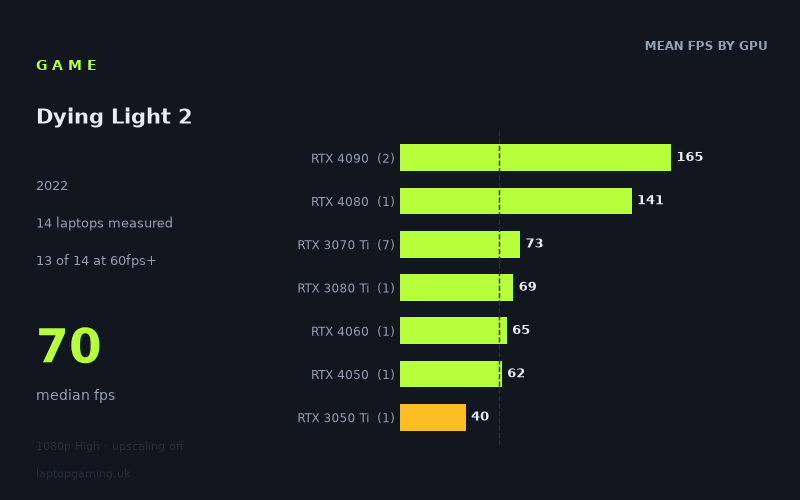
Every laptop we have figures for
Frame rates measured by Notebookcheck.
What it asks of a laptop
Dying Light 2 is relatively accommodating at 1920x1080 on the High preset with upscaling disabled, at least on the 14 laptops represented in Notebookcheck’s measured figures. Thirteen of the 14 machines reached 60fps or more, while the median result was 70fps. That makes a 60fps target realistic across a broad range of dedicated gaming GPUs in this particular dataset.
There is still a substantial performance range, however. Results run from 40fps on the HP Victus 16-e0145ng with an RTX 3050 Ti at 75W to 174fps on the MSI Titan GT77 HX with an RTX 4090 at 150W. The 134fps gap shows that Dying Light 2 can make good use of considerably faster laptop graphics hardware if the aim is a high-refresh-rate experience rather than simply staying above 60fps.
The separation between the top-end GPUs is clear. The two RTX 4090 laptops recorded 174fps and 156fps, averaging 165fps, while the single RTX 4080 result was 141fps. Those are the only measured machines above 100fps apart from the RTX 4080 system, and only the two RTX 4090 laptops exceeded 144fps.
Below that level, the figures cluster much more tightly. Seven RTX 3070 Ti laptops returned between 66fps and 86fps, with a 73fps mean. That is a useful indication that the game is quite playable on this older performance tier at the tested settings, but it also shows that laptop configuration matters: the RTX 3070 Ti results span 20fps. The RTX 3080 Ti result, from the 105W Gigabyte Aero 16 YE5, was 69fps, placing it among the RTX 3070 Ti machines rather than near the RTX 4080 and RTX 4090 results.
It is important not to overstate the GPU-tier comparisons. While there are seven RTX 3070 Ti systems in the figures, the RTX 4080, RTX 3080 Ti, RTX 4060, RTX 4050 and RTX 3050 Ti groups each contain only one laptop. Those results describe those specific machines at the stated settings, not every laptop carrying those GPUs.
What runs it
60fps: most of the measured gaming laptops
For a 60fps target at 1080p High without upscaling, 13 of the 14 measured laptops cleared the line. The lowest result still above it was the MSI Katana 15 with an RTX 4050 at 105W, at 62fps. The MSI Katana 17 with an RTX 4060 recorded 65fps, while the Gigabyte Aero 16 YE5 with a 105W RTX 3080 Ti reached 69fps.
The RTX 3070 Ti group was consistently above 60fps in these measurements:
- Acer Predator Helios 300, RTX 3070 Ti at 150W: 86fps.
- Schenker XMG Neo 15, RTX 3070 Ti at 150W: 82fps.
- Asus ROG Flow X16, RTX 3070 Ti at 125W: 71fps.
- HP Omen 16-b1090ng, RTX 3070 Ti: 70fps.
- MSI Stealth GS66, RTX 3070 Ti: 70fps.
- MSI Creator Z17, RTX 3070 Ti at 105W: 67fps.
- Asus ROG Zephyrus M16, RTX 3070 Ti at 120W: 66fps.
The exception is the HP Victus 16-e0145ng, whose RTX 3050 Ti at 75W managed 40fps. Based on this result, that particular laptop does not meet a 60fps expectation at the tested 1080p High settings with upscaling off.
100fps: confined to the fastest measured hardware
Only three of the 14 laptops reached 100fps. The Razer Blade 16 Early with an RTX 4080 at 175W recorded 141fps. Above it were the Razer Blade 16 2024 with an RTX 4090 at 156fps and the MSI Titan GT77 HX with an RTX 4090 at 150W at 174fps.
Every other measured laptop was at 86fps or below. In practical buying terms, the figures do not support treating 100fps as a likely outcome for the RTX 3070 Ti, RTX 3080 Ti, RTX 4060 or RTX 4050 machines listed here at these settings. They may offer smooth 60fps-plus performance, but the measured results are well short of triple-digit frame rates.
144fps: only the RTX 4090 examples
Two of 14 laptops reached 144fps: the MSI Titan GT77 HX at 174fps and Razer Blade 16 2024 at 156fps, both RTX 4090 systems. The RTX 4080 Razer Blade 16 Early came close at 141fps, but did not clear 144fps in Notebookcheck’s figure. For a laptop with a 144Hz display, the measurements therefore show that the two tested RTX 4090 systems can exceed that refresh rate at 1080p High without upscaling, while the tested RTX 4080 system narrowly misses it.
The cheapest laptop that handles it
The fact sheet provides a GBP price for only one machine: the MSI Stealth GS66, listed at £2,688. Its RTX 3070 Ti produced 70fps, so it handles Dying Light 2 comfortably above 60fps in the tested configuration.
That does not make the Stealth GS66 the cheapest laptop capable of running the game. Several other machines also achieved 60fps or more, including the RTX 4050-equipped MSI Katana 15 at 62fps and RTX 4060-equipped MSI Katana 17 at 65fps, but no prices are supplied for them. There is not enough pricing information here to identify the lowest-cost purchase option honestly.
What this means if you’re buying
If your priority is a straightforward 60fps experience at 1920x1080 High with upscaling off, the measured numbers suggest that a laptop comparable to the tested RTX 4050, RTX 4060 or RTX 3070 Ti examples can be sufficient. The evidence is strongest for the RTX 3070 Ti class because it has seven measured laptops, all between 66fps and 86fps. The RTX 4050 and RTX 4060 results are encouraging, but each is based on one machine only.
If you want sustained headroom above 100fps in this test, the measured options narrow sharply to the RTX 4080 and RTX 4090 laptops. For 144fps, the two RTX 4090 machines are the proven choices in this dataset. Conversely, the RTX 3050 Ti result of 40fps shows that lower-power entry-level graphics hardware can fall well below the 60fps mark at these settings.
In short: Dying Light 2 does not require a flagship laptop for acceptable 1080p High performance, but high-refresh play does. A 60fps-focused buyer has many more viable measured options than a buyer targeting 100fps or 144fps.
How these numbers were produced
Frame rates here are not measured by us, and we label how each one was arrived at. A figure marked measured comes from a published run on that exact machine. A figure marked representative is derived from the GPU and its power limit (TGP) and cross-referenced against published reviews - a sound estimate of what that configuration delivers, but not a measurement of that specific laptop. Unless stated otherwise, numbers are 1920x1080, High preset, upscaling off. Where a laptop ships in several power configurations we use the wattage of the exact SKU listed, because a 140W RTX 5070 and a 115W one are not the same product.