Performance analysis
Assassin´s Creed Valhalla (2020): what it takes to run it
Measured on 16 gaming laptops at 1920×1080, High preset, upscaling off.
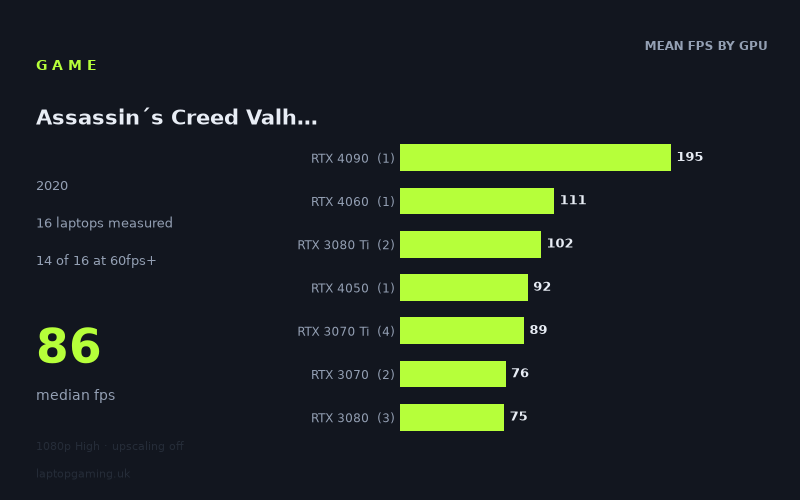
Every laptop we have figures for
Frame rates measured by Notebookcheck.
What it asks of a laptop
At 1,920 x 1,080 on the High preset with upscaling off, Assassin’s Creed Valhalla is broadly manageable for gaming laptops, but it still separates lower-end GPUs from mid-range and high-end hardware clearly. Notebookcheck’s measured figures span from 34fps to 195fps across 16 laptops, with a median of 86fps. Fourteen of those 16 machines reached at least 60fps, while only four reached 100fps and just one exceeded 144fps.
That makes this a game where a properly specified mid-range laptop can provide a comfortable 60fps-plus experience at these settings, but where chasing very high refresh-rate performance demands considerably more GPU power. The lower end is the main dividing line: the RTX 2060 laptop managed 53fps and the RTX 3050 Ti model reached 34fps, while every measured RTX 3070, RTX 3070 Ti, RTX 3080, RTX 3080 Ti, RTX 4050, RTX 4060 and RTX 4090 laptop was above 60fps.
The figures also show why laptop GPU names should not be read as a simple performance hierarchy. The three measured RTX 3080 laptops averaged 75fps, below the RTX 3070 Ti group’s 89fps average and only marginally ahead of the two RTX 3070 systems, which averaged 76fps. These are results from specific laptops, rather than proof that one GPU name will always outperform another. The measured RTX 3080 results range from 72fps to 79fps, whereas the four RTX 3070 Ti machines range from 85fps to 94fps.
For a 60Hz laptop display, the results suggest that this benchmark is not especially punishing once you move beyond the entry-level RTX 3050 Ti and older RTX 2060 examples in this sample. For 120Hz, 144Hz and faster screens, however, the performance requirement rises sharply. The 86fps median is well short of 120fps, and the only machine to clear 144fps was the RTX 4090-equipped Asus ROG Strix Scar 17.
What runs it
60fps: most of the measured RTX 30- and RTX 40-series laptops
Fourteen of the 16 measured laptops achieved 60fps or more. The lowest result above that threshold was 72fps from the Gigabyte Aero 17 HDR YC with RTX 3080 graphics. The Asus ROG Zephyrus G15, also listed with an RTX 3080, produced 74fps, while the Razer Blade 15 Advanced with an RTX 3080 at 105W reached 79fps.
The RTX 3070 entries were similarly capable: the Schenker XMG Neo 17 achieved 77fps and the Razer Blade 14 Ryzen 9 RTX, with an RTX 3070 at 100W, managed 75fps. RTX 3070 Ti laptops were stronger in this set, ranging from 85fps in the MSI Stealth GS66 to 94fps in the Asus ROG Strix Scar 15 with a 150W RTX 3070 Ti. The Aorus 17 XE4 reached 90fps and the Asus ROG Flow X16 recorded 88fps.
Among newer lower-numbered RTX 40-series parts, the Medion Erazer Scout E20 with an RTX 4050 at 100W delivered 92fps. That is a useful result for this particular machine, though it is one result from one laptop rather than a guarantee for every RTX 4050 system.
The two systems below 60fps were the HP Omen 15-en0375ng with RTX 2060 graphics at 53fps and the Asus ROG Strix G17 with a 95W RTX 3050 Ti at 34fps. On the measured High preset, these are the laptops most likely to need reduced settings if a stable 60fps target matters.
100fps: a short list
Only four of the 16 measured laptops reached 100fps. Two were RTX 3080 Ti models: the MSI GE76 Raider with a 175W RTX 3080 Ti recorded 103fps, while the MSI Raider GE66 reached exactly 100fps. The MSI Katana 17 with RTX 4060 graphics was faster still at 111fps.
Above them all was the Asus ROG Strix Scar 17 with RTX 4090 graphics, at 195fps. It was the only measured laptop to exceed 144fps, and it did so by a substantial margin. There is only one RTX 4090 result and one RTX 4060 result in the supplied figures, so these should be treated as results for those individual laptops rather than broad tier-wide promises.
The cheapest laptop that handles it
Of the laptops with GBP prices supplied, the Razer Blade 14 Ryzen 9 RTX is the least expensive option that clears 60fps in Notebookcheck’s figures. Listed at GBP1,057, it achieved 75fps with its RTX 3070 at 100W.
The next priced machine in the list is the Asus ROG Strix G17 at GBP1,167, but its RTX 3050 Ti at 95W managed only 34fps. It is therefore cheaper than several faster options but does not meet a 60fps target in these measured conditions.
Other priced examples are the Asus ROG Strix Scar 15 with RTX 3070 Ti at 150W, which cost GBP1,968 and achieved 94fps; the Asus ROG Zephyrus G15 with RTX 3080 at GBP2,196 and 74fps; and the MSI Stealth GS66 with RTX 3070 Ti at GBP2,688 and 85fps. Based solely on the prices provided, the Razer Blade 14 is the strongest value reference point for a measured 60fps-plus result. This is not a complete market-price comparison, as prices are not supplied for every laptop in the data.
What this means if you’re buying
For this specific 1080p High benchmark without upscaling, a laptop capable of around 75fps to 95fps is well represented by the measured RTX 3070, RTX 3070 Ti and RTX 4050 systems. That range should suit a 60Hz display comfortably and makes reasonable use of a 90Hz screen, based on the recorded results.
If 100fps is the target, the data points to the specific RTX 3080 Ti and RTX 4060 laptops listed above: 100fps from the MSI Raider GE66, 103fps from the MSI GE76 Raider, and 111fps from the MSI Katana 17. Buyers should not assume that every laptop carrying those GPU labels will reproduce those figures, particularly as the supplied sample includes only one RTX 4060 machine and two RTX 3080 Ti machines.
For a 144Hz panel, the evidence is much narrower. Only the Asus ROG Strix Scar 17 with RTX 4090 graphics cleared 144fps, reaching 195fps. If consistently exploiting a high-refresh display is the priority, this set of numbers supports buying at that level only if the budget allows. Otherwise, the measured 72fps-to-94fps results from several RTX 3070 Ti, RTX 3070 and RTX 3080 laptops indicate that a 60fps-focused purchase is the more realistic target for this game at the stated settings.
How these numbers were produced
Frame rates here are not measured by us, and we label how each one was arrived at. A figure marked measured comes from a published run on that exact machine. A figure marked representative is derived from the GPU and its power limit (TGP) and cross-referenced against published reviews - a sound estimate of what that configuration delivers, but not a measurement of that specific laptop. Unless stated otherwise, numbers are 1920x1080, High preset, upscaling off. Where a laptop ships in several power configurations we use the wattage of the exact SKU listed, because a 140W RTX 5070 and a 115W one are not the same product.