Performance analysis
Guardians of the Galaxy (2021): what it takes to run it
Measured on 10 gaming laptops at 1920×1080, High preset, upscaling off.

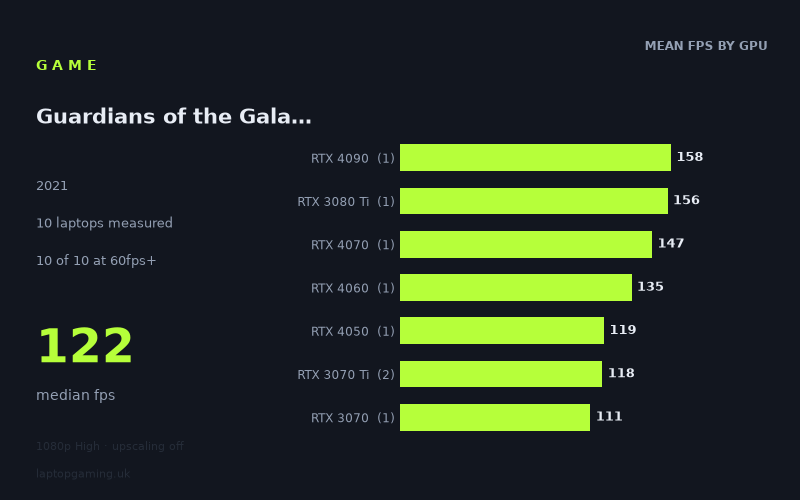
Every laptop we have figures for
Frame rates measured by Notebookcheck.
What it asks of a laptop
At 1,920 × 1,080 using the High preset with upscaling off, Guardians of the Galaxy is accommodating for a gaming laptop in this set of measured figures. Notebookcheck’s numbers range from 82fps on the slowest sampled machine to 158fps on the fastest, while the median is 122fps. Every one of the ten measured laptops cleared 60fps, and nine reached at least 100fps.
That does not mean every gaming laptop will deliver the same result. The 76fps gap between the 158fps Medion Erazer Beast X40 and the 82fps HP Victus 16-e0145ng is substantial, particularly for buyers targeting high-refresh-rate displays. Still, the important result is that even the lowest-scoring machine in this sample remained well above 60fps at these settings. For a conventional 60Hz or 120Hz laptop screen, the measured performance is generally strong.
The figures do separate by GPU class, but not with perfectly neat generational scaling. That is expected from a small set made up of different laptop designs and, in some cases, explicitly different GPU power limits. The RTX 3080 Ti sample, for example, is an MSI GE76 Raider running its GPU at 175W and records 156fps, only 2fps behind the RTX 4090-equipped Medion. Meanwhile, the RTX 4070 Asus ROG Strix G18 reaches 147fps and the RTX 4060 MSI Katana 17 records 135fps.
Those results show that the game benefits from more graphics performance, but they should not be read as a universal ranking of every laptop GPU. Most GPU tiers here are represented by only one laptop. The exception is RTX 3070 Ti, where two machines average 118fps but range from 111fps to 125fps. Treat these as results for the specific laptops listed, rather than a guarantee that any laptop carrying the same GPU name will match them.
What runs it
For 60fps gameplay, all ten measured laptops are sufficient at 1080p High with upscaling disabled. The entry point in this particular group is the HP Victus 16-e0145ng with an RTX 3050 Ti at 75W, which produced 82fps. It is the clear outlier at the lower end, sitting 25fps behind the Lenovo Legion S7 15ACH6 with an RTX 3060 at 100W, but it still has a 22fps margin over 60fps in the measured result.
- RTX 3050 Ti at 75W: HP Victus 16-e0145ng, 82fps. This is enough for a 60fps target in the measured High-preset run, but it is not a 100fps result.
- RTX 3060 at 100W: Lenovo Legion S7 15ACH6, 107fps. This is the lowest-scoring machine in the sample to exceed 100fps.
- RTX 3070: Schenker XMG Apex 17 M21, 111fps.
- RTX 3070 Ti: Aorus 17 XE4 at 130W, 111fps; MSI Stealth GS66, 125fps. The two measured RTX 3070 Ti laptops average 118fps.
- RTX 4050 at 100W: Medion Erazer Scout E20, 119fps.
- RTX 4060: MSI Katana 17, 135fps.
- RTX 4070 at 165W: Asus ROG Strix G18, 147fps.
- RTX 3080 Ti at 175W: MSI GE76 Raider, 156fps.
- RTX 4090: Medion Erazer Beast X40, 158fps.
For a 100fps target, nine of the ten measured laptops qualify. The only exception is the RTX 3050 Ti HP Victus at 82fps. The RTX 3060 Legion reached 107fps, so the measured figures suggest that laptops around this level can be suitable for a 100Hz display in this game, provided their configuration performs comparably. However, the sample does not establish a broad rule for all RTX 3060 systems.
A 144fps target is more selective. Only three of the ten laptops achieved it: the Medion Erazer Beast X40 with RTX 4090 at 158fps, the MSI GE76 Raider with RTX 3080 Ti at 175W at 156fps, and the Asus ROG Strix G18 with RTX 4070 at 165W at 147fps. The RTX 4060 Katana 17 came reasonably close at 135fps, but it did not clear 144fps in the measured run. For a 144Hz panel, that distinction matters if the aim is to keep frame rate at or above the panel’s refresh rate without lowering settings or enabling upscaling.
The cheapest laptop that handles it
The fact sheet does not include prices for most of the measured laptops, so it is not possible to identify the cheapest laptop in this group without inventing price information. The only listed price is for the MSI Stealth GS66 with RTX 3070 Ti, at £2,688. It recorded 125fps, comfortably above both 60fps and 100fps, but its listed price alone does not show whether it was cheaper or more expensive than the other nine machines.
If “handles it” means maintaining at least 60fps at the measured settings, the HP Victus 16-e0145ng is the lowest-performing successful machine at 82fps. If it means exceeding 100fps, the Lenovo Legion S7 15ACH6 with RTX 3060 at 100W is the lowest-scoring qualifying system at 107fps. Neither should be called the cheapest, however, because no prices are supplied for them.
What this means if you’re buying
For Guardians of the Galaxy specifically, a laptop does not need flagship-class measured performance to run 1080p High acceptably without upscaling. The weakest sampled configuration, the RTX 3050 Ti HP Victus, still delivered 82fps. A buyer focused on a 60Hz display therefore does not need to choose between the RTX 4070, RTX 3080 Ti or RTX 4090 results shown here.
Higher tiers make more sense for display-refresh targets rather than basic playability. The RTX 3060, RTX 3070, RTX 3070 Ti and RTX 4050 machines in this sample all sit in the 107fps-to-125fps range, which is well suited to 100Hz-class performance. The RTX 4060 result of 135fps improves on that, but remains below the 144fps line. Among these measured laptops, the RTX 4070 at 165W is the lowest tier to clear 144fps.
Finally, pay attention to the exact laptop, not just the GPU label. The supplied figures include 75W, 100W, 130W, 165W and 175W GPU variants, and nearly every tier has only one measured example. The safest buying conclusion is therefore straightforward: use the named laptops and their measured frame rates as reference points, and do not assume another machine with the same GPU will necessarily produce the same result.
How these numbers were produced
Frame rates here are not measured by us, and we label how each one was arrived at. A figure marked measured comes from a published run on that exact machine. A figure marked representative is derived from the GPU and its power limit (TGP) and cross-referenced against published reviews - a sound estimate of what that configuration delivers, but not a measurement of that specific laptop. Unless stated otherwise, numbers are 1920x1080, High preset, upscaling off. Where a laptop ships in several power configurations we use the wattage of the exact SKU listed, because a 140W RTX 5070 and a 115W one are not the same product.