Performance analysis
Death Stranding (2020): what it takes to run it
Measured on 12 gaming laptops at 1920×1080, High preset, upscaling off.

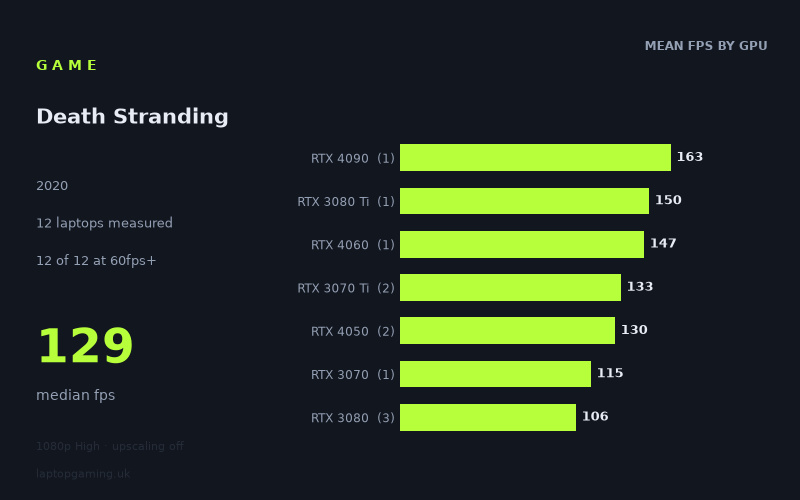
Every laptop we have figures for
Frame rates measured by Notebookcheck.
What it asks of a laptop
At the measured 1,920 × 1,080 High preset with upscaling off, Death Stranding is relatively forgiving for a gaming laptop. All 12 laptops in Notebookcheck’s figures exceeded 60fps, the slowest result was still 82fps, and the median was 129fps. That is a healthy result for a game running at a demanding-looking High setting without upscaling.
The overall spread is 82fps to 163fps, a difference of 81fps. That sounds wide, but the important point is that the lower end remains comfortably playable. The numbers suggest that the game scales well enough to reward faster hardware and higher-refresh displays, rather than requiring premium hardware merely to avoid poor performance.
GPU names alone do not explain every result. The clearest example is the RTX 3080 group: the Medion Erazer Beast X25, with its RTX 3080 at 130W, reached 134fps, while the MSI GS76 Stealth with an RTX 3080 at 95W managed 102fps. The Asus ROG Zephyrus G15’s RTX 3080 returned 82fps. Across those three laptops, the RTX 3080 mean was 106fps, but the individual results range from 82fps to 134fps.
That separation matters more than the badge on the laptop lid. Power limits and the particular laptop design can substantially affect the measured outcome. The RTX 4050 results are also closely grouped despite different stated power figures: 130fps for the 140W Schenker XMG Apex 15 (Late 23) and 129fps for the 100W Medion Erazer Scout E20. However, those are only two machines, so they are useful reference points rather than a guarantee for every RTX 4050 laptop.
With 12 laptops measured, this is a more useful sample than a one-machine result, but several GPU tiers are represented by just one laptop. Treat the single-machine figures as exactly that: evidence of what that named laptop achieved, not a universal result for every system using the same GPU.
What runs it
Every measured laptop clears 60fps. The entry point in these figures is the Schenker XMG Focus 15 with an RTX 3050 Ti at 75W, which achieved 86fps. The Asus ROG Zephyrus G15, using an RTX 3080, recorded 82fps. Those two results are the only ones below 100fps, and both remain above 60fps by a useful margin.
For a 100fps target, 10 of the 12 measured laptops reached it. The Acer Predator Helios 300 with an RTX 3070 at 100W managed 115fps. The three RTX 3080 laptops produced 134fps, 102fps and 82fps respectively, illustrating why it is safer to assess a specific laptop than to assume that an RTX 3080 automatically means a certain frame rate.
- RTX 3050 Ti: 86fps on the Schenker XMG Focus 15. This clears 60fps but not 100fps in the measured result.
- RTX 3070: 115fps on the Acer Predator Helios 300. This clears both 60fps and 100fps.
- RTX 4050: 130fps on the 140W Schenker XMG Apex 15 (Late 23), and 129fps on the 100W Medion Erazer Scout E20. Both measured machines clear 100fps.
- RTX 3070 Ti: 137fps on the 130W Aorus 17 XE4 and 129fps on the MSI Stealth GS66. Both clear 100fps, but neither reaches 144fps in these figures.
- RTX 4060: 147fps on the MSI Katana 17. This is one of the three measured systems above 144fps.
- RTX 3080 Ti: 150fps on the MSI GE76 Raider at 175W. This clears 144fps.
- RTX 4090: 163fps on the Medion Erazer Beast X40. This is the fastest measured result.
A 144Hz screen is not fully utilised by most of the sample at these settings, although three laptops did exceed 144fps: the Medion Erazer Beast X40 with RTX 4090 at 163fps, the MSI GE76 Raider with RTX 3080 Ti at 150fps, and the MSI Katana 17 with RTX 4060 at 147fps. The RTX 4060 result is particularly notable, but it comes from one laptop, so it should not be read as a blanket prediction for all RTX 4060 machines.
The cheapest laptop that handles it
The fact sheet provides prices for only two of the 12 laptops, so it does not support a definitive claim about the cheapest laptop overall. Of the machines with listed prices, the Asus ROG Zephyrus G15 is the lower-priced option at £2,196, compared with £2,688 for the MSI Stealth GS66.
The Zephyrus G15 recorded 82fps with its RTX 3080, while the MSI Stealth GS66 recorded 129fps with an RTX 3070 Ti. Both handle the game above 60fps, but the MSI’s measured result is 47fps higher despite its higher listed price. Since no prices are supplied for the RTX 3050 Ti, RTX 4050, RTX 4060, RTX 3070, RTX 3080 Ti or RTX 4090 machines, there is no evidence here to identify the true budget choice.
What this means if you’re buying
If your aim is simply smooth 1080p High performance without upscaling, the measured figures indicate that you do not need the fastest class of gaming laptop. Even the RTX 3050 Ti result was 86fps, and every listed system was above 60fps.
For a laptop intended to make better use of a 120Hz or similar high-refresh display, the measured RTX 3070, RTX 4050 and RTX 3070 Ti machines are more convincing: they returned from 115fps to 137fps. The two measured RTX 4050 laptops are especially close at 129fps and 130fps, though the sample remains too small to turn that into a general rule for every RTX 4050 model.
If a sustained 144fps-class result is the priority at these exact settings, Notebookcheck’s numbers identify only three successful machines: the RTX 4060 MSI Katana 17, RTX 3080 Ti MSI GE76 Raider, and RTX 4090 Medion Erazer Beast X40. For all other buying decisions, check the specific laptop’s GPU power configuration and measured results where possible. Death Stranding appears accommodating at 1080p High, but the RTX 3080 results show that the same GPU label can still lead to very different performance.
How these numbers were produced
Frame rates here are not measured by us, and we label how each one was arrived at. A figure marked measured comes from a published run on that exact machine. A figure marked representative is derived from the GPU and its power limit (TGP) and cross-referenced against published reviews - a sound estimate of what that configuration delivers, but not a measurement of that specific laptop. Unless stated otherwise, numbers are 1920x1080, High preset, upscaling off. Where a laptop ships in several power configurations we use the wattage of the exact SKU listed, because a 140W RTX 5070 and a 115W one are not the same product.