Performance analysis
Dirt 5 (2020): what it takes to run it
Measured on 13 gaming laptops at 1920×1080, High preset, upscaling off.

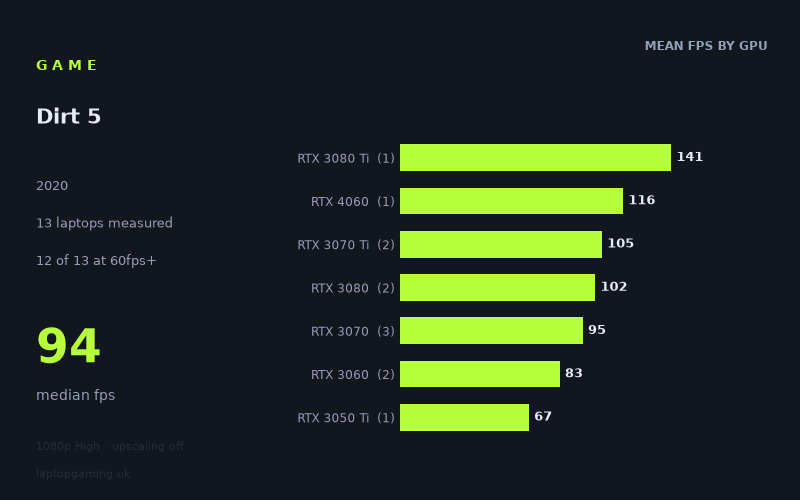
Every laptop we have figures for
Frame rates measured by Notebookcheck.
What it asks of a laptop
At 1,920 x 1,080 on the High preset with upscaling off, Dirt 5 looks relatively forgiving for a gaming laptop, at least among the 13 machines in Notebookcheck’s measured figures. The spread runs from 59fps to 141fps, with a median of 94fps. Crucially, 12 of the 13 laptops reached 60fps or better, while five exceeded 100fps.
That makes 60fps a realistic target across a broad range of dedicated-GPU laptops in this set. The one machine below that line was the HP Omen 15-en0375ng with an RTX 2060, at 59fps, which is only just short of the mark. The measured results therefore suggest that Dirt 5 does not require flagship hardware simply to produce a console-like 60fps experience at these settings.
The separation between the machines becomes more meaningful when targeting higher-refresh screens. The fastest result, 141fps from the MSI GE76 Raider with its 175W RTX 3080 Ti, is still below 144fps. Five of the 13 laptops managed at least 100fps, but eight did not. Dirt 5 is therefore much easier to run at 60fps than at the 100fps-plus level needed to make the most of a fast 120Hz or 144Hz laptop display.
GPU name alone is not the whole story in these figures. The RTX 3070 results range from 86fps in the Acer Nitro 5 with an 85W GPU to 105fps in the Medion Erazer Beast X20 with a 140W RTX 3070. Similarly, the two RTX 3080 laptops recorded 86fps and 117fps. The figures show that laptop implementation, including the stated GPU power limits where available, can matter substantially alongside the GPU tier.
What runs it
60fps-class laptops
For a 60fps target at 1080p High without upscaling, nearly every measured laptop cleared the line. The Asus ROG Strix G17 with an RTX 3050 Ti at 95W reached 67fps, while the MSI Katana GF76 with an RTX 3060 at 85W managed 77fps. The two RTX 3060 machines averaged 83fps, with the Schenker XMG Core 17 at 89fps and the Katana at 77fps.
The HP Omen 15-en0375ng and its RTX 2060 produced 59fps. That is close enough to 60fps to show the game is not far beyond this older GPU in the measured configuration, but it did not actually reach the target in Notebookcheck’s number. If 60fps is a firm requirement at this preset and resolution, the measured RTX 3050 Ti result is the lowest tier here that demonstrably clears it.
High-refresh performance
The RTX 3070 family provides stronger results, though not a uniform one. The three measured RTX 3070 laptops averaged 95fps: 86fps for the 85W Acer Nitro 5, 94fps for the 100W Acer Predator Helios 300, and 105fps for the 140W Medion Erazer Beast X20. In practical buying terms, that is a useful warning not to assume that every RTX 3070 laptop will deliver the same frame rate.
The two RTX 3070 Ti laptops averaged 105fps. The MSI Stealth GS66 recorded 98fps, while the 130W Aorus 17 XE4 reached 112fps. Both are clearly above 60fps, but only the Aorus result crossed 100fps.
There is also one RTX 4060 result: the MSI Katana 17 achieved 116fps. That is the third-fastest result in the table, behind the RTX 3080 Ti GE76 Raider at 141fps and the RTX 3080 Lenovo Legion 7 at 117fps. However, it is one measurement from one laptop, so it should be read as what that Katana 17 did rather than a blanket expectation for all RTX 4060 systems.
At the top end, the MSI GE76 Raider’s 175W RTX 3080 Ti delivered 141fps. This was the fastest measured result, but it remained 3fps below 144fps. No laptop in the supplied figures reached 144fps, so there is no measured basis for promising a locked 144fps at 1080p High with upscaling disabled.
The cheapest laptop that handles it
The lowest-priced machine in the fact sheet that has both a stated price and a measured result above 60fps is the Asus ROG Strix G17. Its RTX 3050 Ti at 95W recorded 67fps, and its listed price is £1,167. Based on this single measured configuration, it handles Dirt 5 at 1080p High without upscaling at above 60fps.
It is important not to treat that as proof that every similarly priced RTX 3050 Ti laptop will do the same. This is one laptop, with one stated power limit and one recorded result. It is, however, the least expensive priced example provided that clears 60fps.
The other priced machines in the list are much more expensive and are aimed at higher frame rates rather than basic playability. The Asus ROG Zephyrus G15 with an RTX 3080 is listed at £2,196 and recorded 86fps. The MSI Stealth GS66 with an RTX 3070 Ti is listed at £2,688 and recorded 98fps. Their results also reinforce the point that a higher GPU label and higher price do not automatically translate into the highest figure in a laptop game benchmark.
What this means if you’re buying
For Dirt 5 specifically, a laptop capable of roughly 60fps at 1080p High does not need to sit at the top of the gaming-laptop market. In these measured figures, the RTX 3050 Ti ROG Strix G17 reached 67fps, and both RTX 3060 systems were comfortably above that threshold at 77fps and 89fps.
If the aim is to use a 120Hz or 144Hz display more effectively, look beyond the minimum 60fps result. The measured RTX 3070, RTX 3070 Ti, RTX 3080 and RTX 4060 machines occupy the roughly 86fps-to-117fps range, with the RTX 3080 Ti GE76 Raider reaching 141fps. Even then, 144fps was not achieved by any of the 13 laptops.
The sensible reading of the data is to buy for the frame-rate target, not just the GPU badge. An RTX 3050 Ti result is enough for 60fps here; RTX 3060 and RTX 3070-class systems provide more headroom; and the quickest measured machines are better suited to very high refresh rates. Check the exact laptop model and GPU power configuration where possible, because the measured differences within ostensibly similar GPU tiers are large enough to affect what sort of screen the machine can properly serve.
How these numbers were produced
Frame rates here are not measured by us, and we label how each one was arrived at. A figure marked measured comes from a published run on that exact machine. A figure marked representative is derived from the GPU and its power limit (TGP) and cross-referenced against published reviews - a sound estimate of what that configuration delivers, but not a measurement of that specific laptop. Unless stated otherwise, numbers are 1920x1080, High preset, upscaling off. Where a laptop ships in several power configurations we use the wattage of the exact SKU listed, because a 140W RTX 5070 and a 115W one are not the same product.