Performance analysis
Doom Eternal (2020): what it takes to run it
Measured on 13 gaming laptops at 1920×1080, High preset, upscaling off.

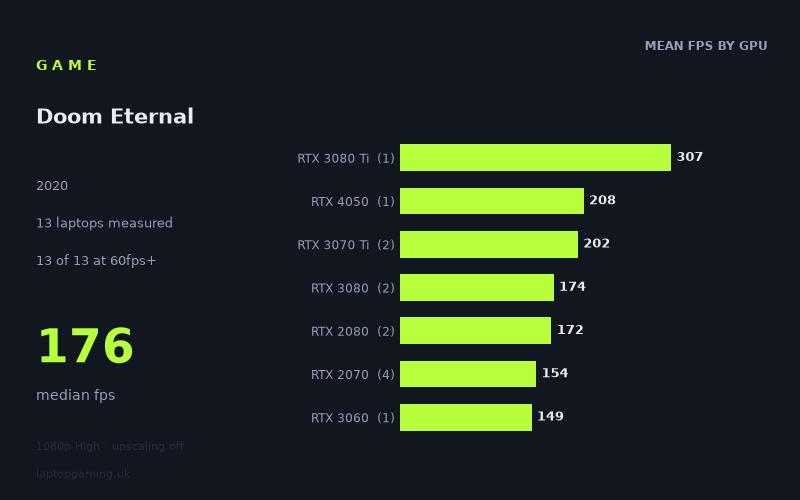
Every laptop we have figures for
Frame rates measured by Notebookcheck.
What it asks of a laptop
Doom Eternal is exceptionally forgiving by the standards of the measured laptop results, at least at 1,920 x 1,080 on the High preset with upscaling disabled. Notebookcheck’s 13 results range from 139fps to 307fps, with a median of 176fps. Every measured laptop clears 60fps and 100fps, while 11 of the 13 also reach 144fps.
That is a notably high floor. Even the slowest recorded machine, the Gigabyte Aero 17 HDR XB with an RTX 2070, averages 139fps. The other sub-144fps result is the MSI GS66 Stealth, also with an RTX 2070, at 141fps. Neither is far from the 144fps mark, and both remain well beyond the level required for a conventional 60Hz display.
The spread at the top end is much wider. The MSI GE76 Raider with its 175W RTX 3080 Ti reaches 307fps, more than twice the result of the slowest RTX 2070 laptop. However, the figures do not show a simple, clean GPU-generation hierarchy. The RTX 4050-equipped Schenker XMG Apex 15 (Late 23) records 208fps, ahead of both measured RTX 3070 Ti machines and the RTX 3080 examples. Likewise, the two RTX 3080 laptops span 165fps to 183fps.
That matters when reading the data. These are results from specific laptops, not proof that every laptop carrying the same GPU will perform identically. Power limits are listed for some machines, including the 175W RTX 3080 Ti, 140W RTX 4050, 130W RTX 3070 Ti, 130W RTX 3080 and 95W RTX 3060, while other entries do not include a stated power figure. The measured numbers suggest that laptop implementation can matter as much as the graphics chip’s name in this game.
Still, the overall picture is clear: at the tested settings, Doom Eternal does not need a particularly recent or high-end gaming laptop to deliver very high frame rates. The challenge for buyers is less about reaching playability and more about matching the laptop to a high-refresh-rate display.
What runs it
All seven GPU tiers represented in the figures clear 60fps and 100fps. There is no measured result below 139fps, so the data supports a confident conclusion that each of these specific laptops runs the game comfortably at 1080p High without upscaling.
- RTX 3080 Ti: The single measured RTX 3080 Ti laptop, the MSI GE76 Raider at 175W, achieves 307fps. This is the highest result in the set by a considerable margin, but it is also based on one machine.
- RTX 4050: The single RTX 4050 result is 208fps from the 140W Schenker XMG Apex 15 (Late 23). That is comfortably above 144fps and is the second-fastest individual result.
- RTX 3070 Ti: The two laptops average 202fps. The Aorus 17 XE4 produces 207fps at 130W, while the MSI Stealth GS66 records 196fps. Both are well above 144fps.
- RTX 3080: The two RTX 3080 laptops average 174fps. The Asus ROG Zephyrus Duo 15 SE records 183fps at 130W, and the Asus ROG Zephyrus G15 records 165fps. Both clear 144fps.
- RTX 2080: The Asus Strix Scar 17 reaches 193fps and the Acer Predator Triton 500 reaches 150fps, for a 172fps mean. Both are above 144fps, although the latter has less headroom for a sustained 144fps target.
- RTX 2070: This is the largest sample, with four laptops averaging 154fps. Results range from 139fps to 176fps. The MSI GE66 Raider reaches 176fps and the Schenker XMG Apex 15 reaches 161fps, both above 144fps. The MSI GS66 Stealth at 141fps and Gigabyte Aero 17 HDR XB at 139fps fall just short of that threshold.
- RTX 3060: The sole RTX 3060 result, the 95W HP Victus 16-e0179ng, records 149fps. That clears 144fps, but only narrowly. As it is one laptop result, it should not be treated as a blanket expectation for all RTX 3060 models.
For a 60Hz or 100Hz screen, every measured machine is more than sufficient at these settings. For a 144Hz panel, the evidence is almost as positive: 11 of 13 laptops reach 144fps, including the measured RTX 3060 result and several RTX 2070 models. The two exceptions miss by only 3fps and 5fps.
The cheapest laptop that handles it
Only two prices are included in the fact sheet, so there is not enough pricing information to identify the cheapest of all 13 laptops. Of the specifically priced machines, the lower listed price belongs to the Asus ROG Zephyrus G15, at £2,196. Its RTX 3080 produces 165fps, placing it securely above both 100fps and 144fps in Notebookcheck’s measured result.
The other priced entry is the MSI Stealth GS66, listed at £2,688. Its RTX 3070 Ti records 196fps. That is 31fps faster than the priced Zephyrus G15 result, but the fact sheet does not provide enough comparable prices to make a wider value judgement.
If the aim is simply to run Doom Eternal well at the tested settings, the figures show that considerably lower-performing configurations would still be adequate: the 95W RTX 3060 HP Victus 16-e0179ng manages 149fps, while the slowest RTX 2070 result remains at 139fps. No price is supplied for those machines, however.
What this means if you’re buying
Buy for the screen you intend to use, not because Doom Eternal requires an extreme GPU. A laptop with a 60Hz or 100Hz display has ample measured performance across every machine here. A 144Hz display is also a realistic target for most of the sample, including the measured RTX 3060 laptop and most RTX 2070 systems.
For the largest possible frame-rate headroom, the MSI GE76 Raider’s 307fps result is in a different class, but it should be read as the result of one RTX 3080 Ti laptop at 175W rather than a universal RTX 3080 Ti expectation. Equally, the 208fps RTX 4050 result is impressive, but it comes from one 140W machine.
The practical takeaway is that Doom Eternal’s 1080p High preset is well suited to a broad range of gaming laptops in this sample. Avoid assuming that a GPU label alone determines the outcome: the measured RTX 2070, RTX 2080, RTX 3080 and RTX 3070 Ti results overlap substantially. For this game, a laptop’s individual implementation and display refresh rate are more useful buying considerations than chasing the highest possible graphics tier.
How these numbers were produced
Frame rates here are not measured by us, and we label how each one was arrived at. A figure marked measured comes from a published run on that exact machine. A figure marked representative is derived from the GPU and its power limit (TGP) and cross-referenced against published reviews - a sound estimate of what that configuration delivers, but not a measurement of that specific laptop. Unless stated otherwise, numbers are 1920x1080, High preset, upscaling off. Where a laptop ships in several power configurations we use the wattage of the exact SKU listed, because a 140W RTX 5070 and a 115W one are not the same product.