Performance analysis
Elex 2 (2022): what it takes to run it
Measured on 10 gaming laptops at 1920×1080, High preset, upscaling off.
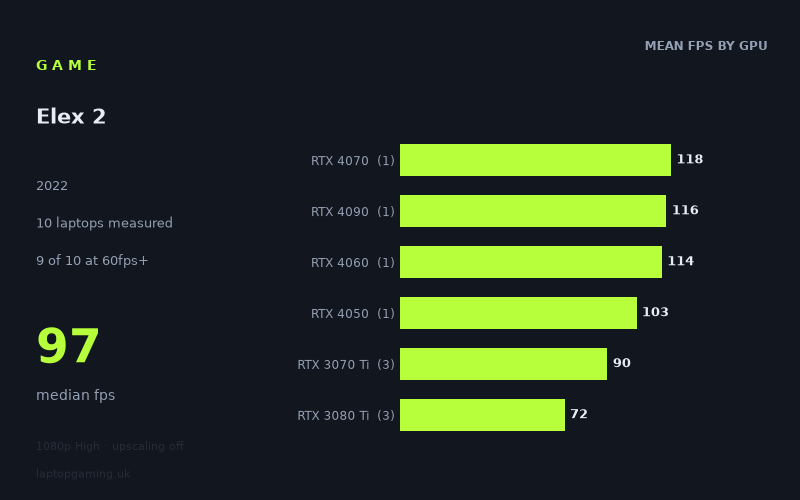
Every laptop we have figures for
Frame rates measured by Notebookcheck.
What it asks of a laptop
At 1,920 × 1,080 on the High preset with upscaling off, Elex 2 is broadly manageable on the measured gaming laptops, but its results are not neat enough to judge purely by the GPU name on the specification sheet.
Notebookcheck's measured figures span from 43fps to 118fps, a sizeable 75fps gap. The median is 97fps, while nine of the ten laptops recorded at least 60fps. That makes 60fps a realistic target for most of the machines in this sample, rather than an exceptional result reserved for the fastest hardware. However, only four of ten reached 100fps or more, and none hit 144fps. Buyers targeting a 144Hz display should therefore not assume that Elex 2 will fully exploit that refresh rate at these tested settings.
The main lesson from the spread is that laptop implementation matters greatly. The three RTX 3080 Ti laptops, for example, range from 43fps in the MSI Creator Z16P to 96fps in the Schenker XMG Pro 17 E22. The Gigabyte Aero 16 YE5, whose RTX 3080 Ti is listed at 105W, returned 76fps. That is a 53fps difference within one GPU tier. By contrast, the measured RTX 3070 Ti laptops sit in a tighter 83fps-to-99fps range.
This means Elex 2 does not appear especially punishing in the sense that it excludes mid-range gaming laptops at 1080p High, but it is demanding enough for power limits and the wider laptop design to be visible in the results. A newer or higher-numbered GPU is not, by itself, a guarantee of a better result in this sample. The RTX 4060, RTX 4070, RTX 4090 and RTX 4050 entries all perform strongly, but each of those results comes from only one laptop.
What runs it
For 60fps: nine of the ten measured laptops cleared the target. The fastest measured RTX 3080 Ti result, the Schenker XMG Pro 17 E22, managed 96fps, while the Gigabyte Aero 16 YE5 reached 76fps. The three RTX 3070 Ti machines recorded 99fps, 89fps and 83fps. The measured RTX 4050 laptop, Medion Erazer Scout E20 at 100W, reached 103fps.
The outlier is the MSI Creator Z16P with RTX 3080 Ti, at 43fps. It is important not to turn that single result into a blanket statement about RTX 3080 Ti laptops: the other two RTX 3080 Ti systems measured 76fps and 96fps. Equally, the numbers show that an RTX 3080 Ti badge alone does not ensure 60fps in this game under the stated test conditions.
For 100fps: four of the ten laptops made it. The Asus ROG Strix G18 with RTX 4070 at 165W was the fastest measured system at 118fps. The Medion Erazer Beast X40 with RTX 4090 reached 116fps, the MSI Katana 17 with RTX 4060 delivered 114fps, and the Medion Erazer Scout E20 with RTX 4050 at 100W recorded 103fps.
Those are notable results, particularly because the sample's RTX 4050, RTX 4060, RTX 4070 and RTX 4090 systems are all above 100fps. Nevertheless, each tier is represented by one laptop only. The measured figures support saying that these four specific laptops cleared 100fps; they do not support a wider promise that every laptop using those GPUs will do so.
For 144fps: none of the measured laptops reached the target. The closest was the RTX 4070-equipped Asus ROG Strix G18 at 118fps, followed by the RTX 4090 Medion Erazer Beast X40 at 116fps and the RTX 4060 MSI Katana 17 at 114fps. At 1080p High without upscaling, 144fps is not demonstrated by this data.
The cheapest laptop that handles it
No laptop prices are included in the supplied fact sheet, so it is not possible to identify the cheapest option in GBP without inventing information. The measured figures can instead identify the lowest-performing named machine that still cleared 60fps: the Gigabyte Aero 16 YE5 with RTX 3080 Ti at 105W recorded 76fps.
Other named systems that cleared 60fps include the Aorus 17X XES with RTX 3070 Ti at 83fps, Aorus 17 XE4 with RTX 3070 Ti at 130W at 89fps, Schenker XMG Pro 17 E22 with RTX 3080 Ti at 96fps, MSI Vector GP76 with RTX 3070 Ti at 150W at 99fps, Medion Erazer Scout E20 with RTX 4050 at 100W at 103fps, MSI Katana 17 with RTX 4060 at 114fps, Medion Erazer Beast X40 with RTX 4090 at 116fps, and Asus ROG Strix G18 with RTX 4070 at 165W at 118fps.
Without pricing, the sensible buying approach is to compare current UK prices for the specific laptop configurations rather than choosing only by GPU tier. The results show why: the slower RTX 3080 Ti result was below 60fps, while the tested RTX 4050 laptop exceeded 100fps.
What this means if you’re buying
If your aim is a solid 60fps experience at the measured 1080p High settings, the data is encouraging: nine of ten laptops achieved it. But the one 43fps result means buyers should look for measured reviews of the exact chassis where possible, especially when comparing machines with the same GPU.
For roughly 100fps, the four successful systems were the Asus ROG Strix G18 RTX 4070 at 165W, Medion Erazer Beast X40 RTX 4090, MSI Katana 17 RTX 4060 and Medion Erazer Scout E20 RTX 4050 at 100W. That is a useful shortlist of proven results, but it remains a small one-machine-per-tier sample rather than a universal ranking of laptop GPUs.
For high-refresh gaming, temper expectations. The 97fps median suggests that a 120Hz or 144Hz panel may not be consistently driven to its maximum refresh rate at these settings, and the measured peak of 118fps is well short of 144fps. Elex 2 is best treated as a game where a capable gaming laptop can deliver good 1080p High performance, but where the individual laptop’s power configuration has a meaningful effect on the outcome.
How these numbers were produced
Frame rates here are not measured by us, and we label how each one was arrived at. A figure marked measured comes from a published run on that exact machine. A figure marked representative is derived from the GPU and its power limit (TGP) and cross-referenced against published reviews - a sound estimate of what that configuration delivers, but not a measurement of that specific laptop. Unless stated otherwise, numbers are 1920x1080, High preset, upscaling off. Where a laptop ships in several power configurations we use the wattage of the exact SKU listed, because a 140W RTX 5070 and a 115W one are not the same product.