Performance analysis
Immortals of Aveum (2023): what it takes to run it
Measured on 5 gaming laptops at 1920×1080, High preset, upscaling off.

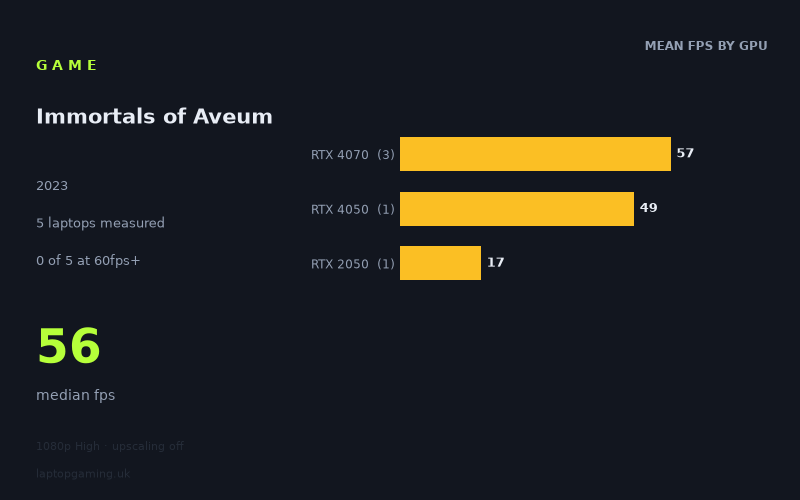
Every laptop we have figures for
Frame rates measured by Notebookcheck.
What it asks of a laptop
Immortals of Aveum looks demanding at the measured setting: 1920x1080, High preset, with upscaling switched off. The available Notebookcheck figures cover only five laptops, so this is a small sample and should be read as evidence of what these specific machines achieved rather than a guarantee for every laptop carrying the same GPU name.
Even so, the pattern is clear. The fastest result in the group is 57fps, while the slowest is 17fps. The median is 56fps. No tested laptop reached 60fps, let alone 100fps or 144fps, at this 1080p High configuration without upscaling.
The three RTX 4070 laptops are tightly grouped: the Acer Nitro 17 and HP Omen 16-xf0376ng both managed 57fps, while the HP Victus 16-r0077ng reached 56fps. All three use an RTX 4070 rated at 140 W. That close grouping suggests that, within this small set of high-power RTX 4070 machines, Immortals of Aveum sits just below a sustained 60fps result at the tested settings.
The separation becomes more pronounced below that tier. The 140 W RTX 4050 in the Schenker XMG Apex 15 (Late 23) produced 49fps, eight frames behind the leading RTX 4070 results. The Acer Aspire 5, equipped with a 35 W RTX 2050, fell to 17fps. That is 40fps behind the fastest machines in the sample and shows that the game is far less forgiving of lower-tier or lower-power graphics hardware at High settings.
Power limits matter in laptop gaming, and the measured machines underline why it is important not to judge performance from a GPU label alone. The RTX 4070 and RTX 4050 results here come from 140 W configurations, whereas the RTX 2050 result comes from a 35 W configuration. The figures do not isolate GPU generation, power limit or the rest of each laptop’s hardware, but they do show a substantial real-world gap between these tested systems.
For a laptop owner, the practical conclusion is straightforward: 1080p High without upscaling is a challenging target. It is not an automatic 60fps experience even on the three tested 140 W RTX 4070 laptops. The game may be playable on these systems, but the measured results do not support calling this configuration a locked-60fps option.
What runs it
At the tested 1920x1080 High preset with upscaling off, none of the five measured laptops cleared 60fps. That is the key result. There are no measured 60fps, 100fps or 144fps options in this dataset.
RTX 4070 at 140 W
Notebookcheck’s numbers include three RTX 4070 laptops, all rated at 140 W:
- Acer Nitro 17: 57fps
- HP Omen 16-xf0376ng: 57fps
- HP Victus 16-r0077ng: 56fps
The RTX 4070 mean is therefore 57fps across three laptops. These are the best results in the supplied figures, but they remain below 60fps. None reaches 100fps or 144fps. If you own one of these specific high-power RTX 4070 machines, the numbers suggest that the chosen High, no-upscaling setup is close to 60fps rather than comfortably beyond it.
RTX 4050 at 140 W
The Schenker XMG Apex 15 (Late 23), with a 140 W RTX 4050, achieved 49fps. This is a respectable result relative to the much lower-powered RTX 2050 machine, but it is still 11fps short of 60fps and eight frames behind the RTX 4070 average in this sample.
For this particular RTX 4050 laptop, 1080p High without upscaling should be viewed as a roughly 50fps proposition based on the measured figure, not as a 60fps setting. It also does not approach 100fps or high-refresh 144fps territory.
RTX 2050 at 35 W
The Acer Aspire 5 with a 35 W RTX 2050 recorded 17fps. This is the only RTX 2050 result supplied, so it cannot stand in for every RTX 2050 laptop. It does, however, show that this specific low-power system is not well suited to Immortals of Aveum at 1080p High with upscaling off.
At 17fps, it is 39fps below the sample median of 56fps and far below the 60fps threshold. There is no basis in these figures for expecting a satisfactory High-preset experience from this particular laptop under the tested conditions.
The cheapest laptop that handles it
No laptop prices are included in the fact sheet, so it is not possible to identify the cheapest option in GBP from the supplied information.
There is also an important qualification around the word “handles”. None of the five measured laptops reached 60fps at 1920x1080 High with upscaling off. The closest machines are the Acer Nitro 17 and HP Omen 16-xf0376ng, both at 57fps, followed closely by the HP Victus 16-r0077ng at 56fps. The Schenker XMG Apex 15 (Late 23) reached 49fps, while the Acer Aspire 5 reached 17fps.
If the requirement is specifically the best measured performance at the tested settings, the two 57fps RTX 4070 systems are the leading options in this dataset. If the requirement is a measured 60fps result, there is no qualifying laptop here.
What this means if you’re buying
Buy for the performance target rather than the GPU badge alone. The limited sample indicates that a 140 W RTX 4070 laptop can get close to 60fps at 1080p High without upscaling, but the measured figures do not show it exceeding that line. A 140 W RTX 4050 laptop is lower still at 49fps in the one measured example.
For someone shopping specifically for Immortals of Aveum at this exact configuration, the safest reading is that high-power RTX 4070 laptops are near-60fps machines, not proven 60fps-plus machines. The three results are consistent enough to make that useful, while still being too small a sample for a blanket claim about all RTX 4070 laptops.
A low-power RTX 2050 laptop should be treated with much more caution. The measured Acer Aspire 5 result of 17fps is not close to the performance shown by the 140 W RTX 4050 and RTX 4070 systems. If your laptop resembles that tested configuration, 1080p High with upscaling off is clearly an unsuitable target according to Notebookcheck’s number.
Finally, high-refresh displays bring no demonstrated advantage at these settings. Zero of five measured laptops reached 100fps, and zero reached 144fps. A 144 Hz panel may still have value in other games, but Immortals of Aveum at the tested 1080p High, no-upscaling configuration does not supply the frame rates needed to make full use of it on any laptop in this sample.
How these numbers were produced
Frame rates here are not measured by us, and we label how each one was arrived at. A figure marked measured comes from a published run on that exact machine. A figure marked representative is derived from the GPU and its power limit (TGP) and cross-referenced against published reviews - a sound estimate of what that configuration delivers, but not a measurement of that specific laptop. Unless stated otherwise, numbers are 1920x1080, High preset, upscaling off. Where a laptop ships in several power configurations we use the wattage of the exact SKU listed, because a 140W RTX 5070 and a 115W one are not the same product.